
013 Android ActionFloatingButton悬浮按钮组件与Snackbar组件使用
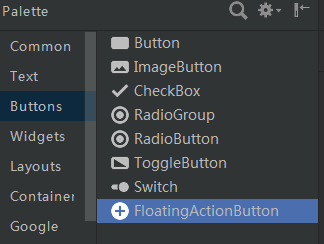
1.导入ActionFloatingButton组件(点击下载按钮,安装组件)
2,.ImageView图片XML设置
<ImageView

        android:id="@+id/imageView3"

        android:layout_width="match_parent"

        android:layout_height="match_parent"

        android:scaleType="fitXY"

        app:srcCompat="@mipmap/img1" />
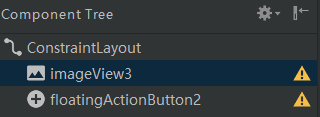
3.ActionFloatingButton组件是悬浮在ImageView之上的
4.java后台代码
(1)XML布局
重点:
设置组件在屏幕的右下角(距底端20dp、右端20dp)
<?xml version="1.0" encoding="utf-8"?>

<RelativeLayout xmlns:android="http://schemas.android.com/apk/res/android"

    xmlns:app="http://schemas.android.com/apk/res-auto"

    xmlns:tools="http://schemas.android.com/tools"

    android:layout_width="match_parent"

    android:layout_height="match_parent"

    tools:context=".MainActivity">

    <ImageView

        android:id="@+id/imageView3"

        android:layout_width="match_parent"

        android:layout_height="match_parent"

        android:scaleType="fitXY"

        app:srcCompat="@mipmap/img1" />

    <android.support.design.widget.FloatingActionButton

        android:id="@+id/floatingActionButton2"

        android:layout_width="wrap_content"

        android:layout_height="wrap_content"

        android:clickable="true"

        android:layout_marginRight="20dp"

        android:layout_marginBottom="20dp"

        android:layout_alignParentBottom="true"

        android:layout_alignParentRight="true"

        app:srcCompat="@mipmap/img" />

</RelativeLayout>
(2)java后台代码
package com.lucky.test14;

import android.app.Activity;

import android.graphics.Color;

import android.support.design.widget.FloatingActionButton;

import android.support.design.widget.Snackbar;

import android.support.v7.app.AppCompatActivity;

import android.os.Bundle;

import android.view.View;

import android.widget.Toast;

public class MainActivity extends AppCompatActivity {

    FloatingActionButton floatingActionButton;

    @Override

    protected void onCreate(Bundle savedInstanceState) {

        super.onCreate(savedInstanceState);

        setContentView(R.layout.activity_main);

        floatingActionButton=findViewById(R.id.floatingActionButton2);

        //给悬浮按钮设置点击事件

        floatingActionButton.setOnClickListener(new View.OnClickListener() {

            @Override

            public void onClick(View v) {

                Snackbar.make(v,"snackBar内容显示",Snackbar.LENGTH_SHORT)

                        .setAction("确定", new View.OnClickListener() {

                            @Override

                            public void onClick(View v) {

                                Toast.makeText(MainActivity.this,"您点击了确定",Toast.LENGTH_LONG).show();

                            }

                        })

                        .setActionTextColor(Color.BLUE)

                        .show();

            }

        });

    }

}
注意:
Toast语句一定不能忘记在最后调用show()方法
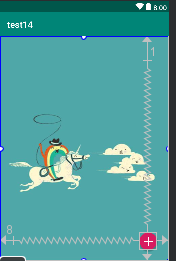
5.效果图
源码:test14

013 Android ActionFloatingButton悬浮按钮组件与Snackbar组件使用的更多相关文章
- Android用悬浮按钮实现翻页效果
今天给大家分享下自己用悬浮按钮点击实现翻页效果的例子. 首先,一个按钮要实现悬浮,就要用到系统顶级窗口相关的WindowManager,WindowManager.LayoutParams.那么在An ...
- android ——悬浮按钮及可交互提示
一.悬浮按钮 FloatingActionButton是Design Support中的一个控件,它会默认colorAccent作为按钮的颜色,还可以给按钮一个图标. 这是没有图标的,这是有图标的. ...
- FloatingActionButtonDemo【悬浮按钮的使用,顺带snackBar的使用】
版权声明:本文为HaiyuKing原创文章,转载请注明出处! 前言 FloatingActionButton简称FAB. 一. 对于App或某个页面中是否要使用FloatingActionButton ...
- Android 5.0新控件——FloatingActionButton(悬浮按钮)
Android 5.0新控件--FloatingActionButton(悬浮按钮) FloatingActionButton是5.0以后的新控件,一个悬浮按钮,之所以叫做悬浮按钮,主要是因为自带阴影 ...
- android悬浮按钮(Floating action button)的两种实现方法
原文: http://www.jcodecraeer.com/a/anzhuokaifa/androidkaifa/2014/1028/1857.html 最近android中有很多新的设计规范被引入 ...
- Android FloatingActionButton(FAB) 悬浮按钮
FloatingActionButton 悬浮按钮 ...
- Android 软件开发之 PreferenceActivity 中的组件
1.PreferenceActivity 介绍 PreferenceActivity 继承ListActivity 它是以一个列表的形式在展现内容,它最主要的特点是添加Preference可以让控件的 ...
- 转:Android软件开发之PreferenceActivity中的组件
本文转于 “雨松MOMO的程序世界” 博客,请务必保留此出处http://xys289187120.blog.51cto.com/3361352/656784 1.PreferenceActivity ...
- Android Cocos2d-x游戏集成友盟社会化组件分享功能
最近在帮助开发者集成友盟社会化组件的过程中,发现游戏的集成过程遇到一些困难,而Cocos2d-x具有较好的代表性,因此整理了一篇关于Android Cocos2d-x游戏集成友盟社会化组件指南,由于本 ...
随机推荐
- c++ (proxy)代理模式
假设我们有几个具有相似的窗体,都包含关闭窗体(closeButton)和按钮单击事件(ClickButton)我们在处理时,不想直接操作每个窗体,可以请求代理. #include<iostrea ...
- 数字图像处理实验(9):PROJECT 04-05,Correlation in the Frequency Domain 标签: 图像处理MATLAB 2017-05-25 10:14
实验要求: Objective: To know how to implement correlation of 2 functions in the frequency domain and, us ...
- Ajax步骤
var request = new XMLHttpRequest(); request.open("GET","get.php",ture); request. ...
- Laravel框架中的数据库CURD操作、连贯操作、链式操作的用法
Laravel是一套简洁.优雅的PHP Web开发框架(PHP Web Framework).它可以让你从面条一样杂乱的代码中解脱出来:它可以帮你构建一个完美的网络APP,而且每行代码都可以简洁.富于 ...
- DELPHI XE5 跨平台 Form ShowModal 官方示例
Calling ShowModal as an Anonymous Method on All Platforms procedure THeaderFooterForm.btnPickClick(S ...
- 【C#】CLR内存那点事(初级)
最近回头看了一下书,对内存的理解又有新的认识.我所关注的内存里面说没有寄存器的,所以我关注的只有 托管堆(heap),栈(stack), 字符串常量池(string是一个很特殊的对象) 首先我们看两个 ...
- 并发编程学习笔记之Java存储模型(十三)
概述 Java存储模型(JMM),安全发布.规约,同步策略等等的安全性得益于JMM,在你理解了为什么这些机制会如此工作后,可以更容易有效地使用它们. 1. 什么是存储模型,要它何用. 如果缺少同步,就 ...
- Mybatis-generator逆向工程
$.Mybatis-generator介绍 MyBatis Generator(MBG)是MyBatis MyBatis 和iBATIS的代码生成器.它将为所有版本的MyBatis以及版本2.2.0之 ...
- 获取oracle 库所有表名
(mybatis多参)
- IP地址和子网划分
前期知识准备 二进制 和十进制 二进制数据是用0和1表示的数,进位规则为缝二进1, 二进制和十进制的关系 二进 十进 0 1 10 2 100 4 1000 8 10000 16 10000 ...