
.NET 最好用的验证组件 FluentValidation
前言
一个 .NET 验证框架,支持链式操作,易于理解,功能完善,组件内提供十几种常用验证器,可扩展性好,支持自定义验证器,支持本地化多语言。
项目介绍
FluentValidation 是一个开源的 .NET 库,用于验证对象的属性。
它提供了一种简单而强大的方式来定义和执行验证规则,使验证逻辑的编写和维护更加直观和便捷。
相较于传统的数据注解,FluentValidation 提供了更灵活、可扩展的验证规则定义方式。
通过流畅且易于理解的语法,它显著提升了代码的可读性和可维护性。

项目使用
FluentValidation 11 支持以下平台:
.NET Core 3.1、.NET 5、.NET 6、.NET 7、.NET 8、.NET Standard 2.0
1、安装FluentValidation
通过 NuGet 包管理器或 dotnet CLI 进行安装。
dotnet add package FluentValidation
或NuGet 包管理器

2、Program.cs
using FluentValidation;

using FluentValidation.AspNetCore;

using MicroElements.Swashbuckle.FluentValidation.AspNetCore;

var builder = WebApplication.CreateBuilder(args);

var services = builder.Services;

// Asp.Net stuff

services.AddControllers();

services.AddEndpointsApiExplorer();

// Add Swagger

services.AddSwaggerGen();

// Add FV

services.AddFluentValidationAutoValidation();

services.AddFluentValidationClientsideAdapters();

// Add FV validators

services.AddValidatorsFromAssemblyContaining<Program>();

// Add FV Rules to swagger

services.AddFluentValidationRulesToSwagger();

var app = builder.Build();

// Use Swagger

app.UseSwagger();

app.UseSwaggerUI();

app.MapControllers();

app.Run();
3、Startup.cs
public void ConfigureServices(IServiceCollection services)

{

    // Asp.net stuff

    services.AddControllers();

    // HttpContextValidatorRegistry requires access to HttpContext

    services.AddHttpContextAccessor();

    // Register FV validators

    services.AddValidatorsFromAssemblyContaining<Startup>(lifetime: ServiceLifetime.Scoped);

    // Add FV to Asp.net

    services.AddFluentValidationAutoValidation();

    // Add swagger

    services.AddSwaggerGen(c =>

    {

        c.SwaggerDoc("v1", new OpenApiInfo { Title = "My API", Version = "v1" });

    });

    // [Optional] Add INameResolver (SystemTextJsonNameResolver will be registered by default)

    // services.AddSingleton<INameResolver, CustomNameResolver>();

    // Adds FluentValidationRules staff to Swagger. (Minimal configuration)

    services.AddFluentValidationRulesToSwagger();

    // [Optional] Configure generation options for your needs. Also can be done with services.Configure<SchemaGenerationOptions>

    // services.AddFluentValidationRulesToSwagger(options =>

    // {

    //     options.SetNotNullableIfMinLengthGreaterThenZero = true;

    //     options.UseAllOffForMultipleRules = true;

    // });

    // Adds logging

    services.AddLogging(builder => builder.AddConsole());

}

public void Configure(IApplicationBuilder app, IHostingEnvironment env)

{

    app.UseRouting();

    app.UseEndpoints(endpoints =>

    {

        endpoints.MapControllers();

    });

    // Adds swagger

    app.UseSwagger();

    // Adds swagger UI

    app.UseSwaggerUI(c =>

    {

        c.SwaggerEndpoint("/swagger/v1/swagger.json", "My API V1");

    });

}
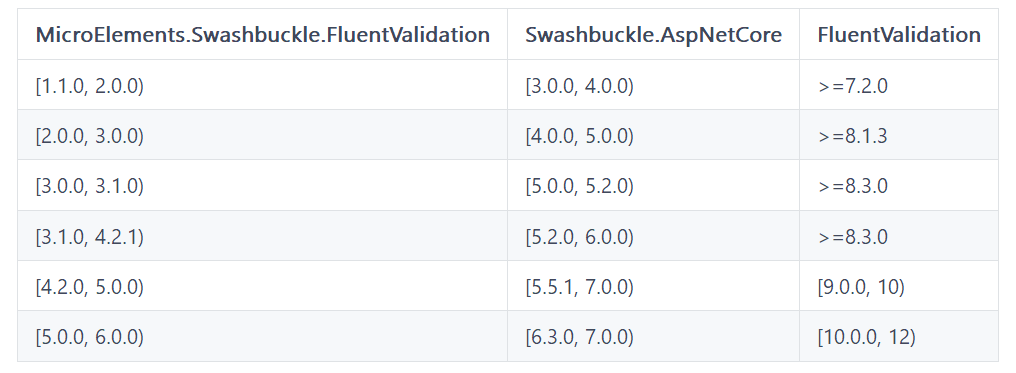
4、版本兼容
5、支持的验证器
- INotNullValidator(NotNull)
- INotEmptyValidator(NotEmpty)
- ILengthValidator(对于字符串:Length、MinimumLength、MaximumLength、ExactLength;对于数组:MinItems、MaxItems)
- IRegularExpressionValidator(Email、Matches)
- IComparisonValidator(GreaterThan、GreaterThanOrEqual、LessThan、LessThanOrEqual)
- IBetweenValidator(InclusiveBetween、ExclusiveBetween)
6、可扩展
可以将 FluentValidationRule 注册到 ServiceCollection 中。
自定义规则名称将替换具有相同名称的默认规则。
可以通过 FluentValidationRules.CreateDefaultRules() 获取默认规则的完整列表。
默认规则列表: Required(必填) NotEmpty(非空) Length(长度) Pattern(模式) Comparison(比较) Between(区间)
new FluentValidationRule("Pattern")

{

    Matches = propertyValidator => propertyValidator is IRegularExpressionValidator,

    Apply = context =>

    {

        var regularExpressionValidator = (IRegularExpressionValidator)context.PropertyValidator;

        context.Schema.Properties[context.PropertyKey].Pattern = regularExpressionValidator.Expression;

    }

}
7、Swagger 模型和验证器
public class Sample

{

    public string PropertyWithNoRules { get; set; }

    public string NotNull { get; set; }

    public string NotEmpty { get; set; }

    public string EmailAddress { get; set; }

    public string RegexField { get; set; }

    public int ValueInRange { get; set; }

    public int ValueInRangeExclusive { get; set; }

    public float ValueInRangeFloat { get; set; }

    public double ValueInRangeDouble { get; set; }

}

public class SampleValidator : AbstractValidator<Sample>

{

    public SampleValidator()

    {

        RuleFor(sample => sample.NotNull).NotNull();

        RuleFor(sample => sample.NotEmpty).NotEmpty();

        RuleFor(sample => sample.EmailAddress).EmailAddress();

        RuleFor(sample => sample.RegexField).Matches(@"(\d{4})-(\d{2})-(\d{2})");

        RuleFor(sample => sample.ValueInRange).GreaterThanOrEqualTo(5).LessThanOrEqualTo(10);

        RuleFor(sample => sample.ValueInRangeExclusive).GreaterThan(5).LessThan(10);

        // WARNING: Swashbuckle implements minimum and maximim as int so you will loss fraction part of float and double numbers

        RuleFor(sample => sample.ValueInRangeFloat).InclusiveBetween(1.1f, 5.3f);

        RuleFor(sample => sample.ValueInRangeDouble).ExclusiveBetween(2.2, 7.5f);

    }

}
8、包含验证器
public class CustomerValidator : AbstractValidator<Customer>

{

    public CustomerValidator()

    {

        RuleFor(customer => customer.Surname).NotEmpty();

        RuleFor(customer => customer.Forename).NotEmpty().WithMessage("Please specify a first name");

        Include(new CustomerAddressValidator());

    }

}

internal class CustomerAddressValidator : AbstractValidator<Customer>

{

    public CustomerAddressValidator()

    {

        RuleFor(customer => customer.Address).Length(20, 250);

    }

}
高级用法
1、异步验证
RuleForAsync(x => x.UserCode).MustAsync(async (usercode, cancellation) =>

{

    var code = await _userService.IsUserNameUniqueAsync(usercode);

    return code;

}).WithMessage("用户编码已存在");
2、条件验证
When(x => x.IsAdmin, () =>

{

    RuleFor(x => x.Super).NotEmpty().WithMessage("管理必须是超级管理员");

});
3、自定义验证规则
RuleFor(x => x.Number).Custom((value, context) =>

{

    if (value < 10 || value > 1000)

    {

        context.AddFailure("数字必须在10 到1000之间");

    }

});
4、自定义错误消息
RuleFor(x => x.UserName).NotEmpty().WithMessage("用户名称不能为空")

       .Matches(@"^\d{6}$").WithMessage("请输入有效的6位数字用户名称");
项目地址
GitHub:https://github.com/FluentValidation/FluentValidation
总结
FluentValidation 是一个优雅且功能强大的验证库,它在提升代码可读性和可维护性的同时,保持了高度的灵活性。
无论是简单的验证需求还是复杂的业务规则,FluentValidation 都能让我们轻松确保数据的有效性。
如果大家项目中有验证需求的,可以试一试,提高开发效率。
最后
如果你觉得这篇文章对你有帮助,不妨点个赞支持一下!你的支持是我继续分享知识的动力。如果有任何疑问或需要进一步的帮助,欢迎随时留言。
也可以加入微信公众号[DotNet技术匠] 社区,与其他热爱技术的同行一起交流心得,共同成长!优秀是一种习惯,欢迎大家留言学习!

.NET 最好用的验证组件 FluentValidation的更多相关文章
- .NET Core中的验证组件FluentValidation的实战分享
今天有人问我能不能出一篇FluentValidation的教程,刚好今天在实现我们的.NET Core实战项目之CMS的修改密码部分的功能中有用到FluentValidation,所以就以修改用户密码 ...
- asp.net mvc 模型验证组件——FluentValidation
asp.net mvc 模型验证组件——FluentValidation 示例 using FluentValidation; public class CustomerValidator: Abst ...
- 模型验证组件——FluentValidation
之前在博客园有幸从网友那里得知一个C#的模型验证组件(哈 不知道这样表述正确不),组件的功能比较简单,主要是实现了对Model的验证,例如验证用户名是否为空,密码长度是不是多余6个字符,当然还有其他更 ...
- 模型验证组件 FluentValidation
FluentValidation 是 .NET 下的模型验证组件,和 ASP.NET MVC 基于Attribute 声明式验证的不同处,其利用表达式语法链式编程,使得验证组件与实体分开.正如 Flu ...
- 验证组件——FluentValidation
FluentValidation FluentValidation是与ASP.NET DataAnnotataion Attribute验证实体不同的数据验证组件,提供了将实体与验证分离开 ...
- 验证组件FluentValidation的使用示例
官方文档:https://fluentvalidation.net/start#complex-properties 示例Demo:https://github.com/DavideYang125/F ...
- .NET平台开源项目速览(10)FluentValidation验证组件深入使用(二)
在上一篇文章:.NET平台开源项目速览(6)FluentValidation验证组件介绍与入门(一) 中,给大家初步介绍了一下FluentValidation验证组件的使用情况.文章从构建间的验证器开 ...
- .NET平台开源项目速览(6)FluentValidation验证组件介绍与入门(一)
在文章:这些.NET开源项目你知道吗?让.NET开源来得更加猛烈些吧!(第二辑)中,给大家初步介绍了一下FluentValidation验证组件.那里只是概述了一下,并没有对其使用和强大功能做深入研究 ...
- NET平台开源项目速览(6)FluentValidation验证组件介绍与入门(转载)
原文地址:http://www.cnblogs.com/asxinyu/p/dotnet_Opensource_project_FluentValidation_1.html 阅读目录 1.基本介绍 ...
- kpvalidate开辟验证组件,通用Java Web请求服务器端数据验证组件
小菜利用工作之余编写了一款Java小插件,主要是用来验证Web请求的数据,是在服务器端进行验证,不是简单的浏览器端验证. 小菜编写的仅仅是一款非常初级的组件而已,但小菜为它写了详细的说明文档. 简单介 ...
随机推荐
- QT 使用相对路径读取.txt文件
QT可以使用QFile来读取.txt文件,具体代码实现如下: 1 #include <QCoreApplication> 2 #include <QString> 3 #inc ...
- 使用VS Code 学习算法(第四版)
最近在学习算法(第四版),书中一直在使用命令行来执行Java程序,而使用Eclipse时,很难使用命令行,或者说我根本就不会用,于是就想研究一下使用VS Code来编写代码,使用命令行来执行程序.看了 ...
- Linux常用指令及shell脚本记录
记录一些常用指令在博客上,以防哪天因太久不敲而忘却,还可以直接翻看博客记录,不用再一条条百度搜...... 一.Linux常用指令 一.设置文件权限为aapp用户及用户组-- chown -R app ...
- 有数大数据基础平台之智能运维平台EasyEagle介绍:集群队列篇
他来啦,他来啦!大数据基础平台发布会中提到的智能运维平台,他来啦! 作为数据平台的用户们,下述问题一直困扰着我们: 集群资源水位如何,利用率如何,是否需要扩容? 队列为什么最近大量任务出现pendin ...
- Linux-makefile命令后面的-j4 -j8是什么意思?
其实是指在编译指定的文件时用多少个线程进行编程的意思~ 相关命令示例如下: make zImage -j8 make modules -j8 --------------------------- m ...
- npm ERR! `perfix` is not a valid npm option
全局路径cmd命令:npm config set perfix "D:\Program Files\nodejs\node_global" 缓存路径cmd命令:npm config ...
- 使用 Doxygen 来生成 Box2d 的 API 文档
对于 Doxygen 以前只听别人说过,而现在使用它也是一个偶然,缘分吧.前两天看 box2d 的官方 sdk 中,发现他有用户手册却没有说明,只是留下了一个 Doxygen 的文件.事情告一段落,然 ...
- iOS开发基础144-逐字打印效果
在AIGC类的APP中,实现那种一个字一个字.一行一行地打印出文字的效果,可以通过多种方法来实现.下面是一些实现方法,使用Swift和OC来举例说明. OC版 1. 基于定时器的逐字打印效果 可以使用 ...
- 【MySQL】 批量更改库,表,字段的字符集
库一级的更改: -- 单个库字符集更改 ALTER DATABASE `ymcd_aisw` CHARACTER SET 'utf8' COLLATE 'utf8_general_ci'; ALTER ...
- 【Dos-BatchPrograming】01
--0. 1.文件后缀的延申 官方教程更推荐使用.cmd作为后缀 .cmd和.bat的区别: http://www.360doc.com/content/12/0810/09/3688062_2293 ...