
ASP.NET Core – TagHelper
前言
以前写的 Asp.net core 学习笔记之 Tag Helper, 这篇是整理版.
参考
Docs – Author Tag Helpers in ASP.NET Core
Creating a Custom Tag Helper in ASP.NET Core: Gathering Data
介绍
TagHelper 有点像 Angular 的指令 directive, 绝大部分情况下都是用来装修 element 的. 比如 add class.
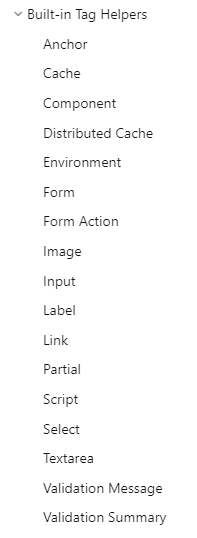
下面是 ASP.NET Core build-in 的 tag, 应该可以感觉出来它都用在什么地方了. 我用它来实现 router link active 的功能.
Create Tag Helper
[HtmlTargetElement(Attributes = "[routerLinkActive]")]

public class RouterLinkActiveTagHelper : TagHelper

{

    public override void Process(TagHelperContext context, TagHelperOutput output)

    {

        base.Process(context, output);

    }

}
创建一个 RouterLinkActiveTagHelper class 继承 TagHelper
HtmlTargetElement 负责定义 selector, 和 Angular 一样它需要一个 selector 做匹配
Process 负责对 element 做任何修改, 比如 add class, innerHtml, appendHtml 等等.
还有一种 selector 是 for tag 的. 比较少用到, 也是和 Angular 一样的概念, directive 通常是匹配 attribute 但其实是可以匹配 element tag 的 (有些 Angular 玩家都不知道呢).
[HtmlTargetElement("my-email", TagStructure = TagStructure.NormalOrSelfClosing)]
要使用前需要添加 view import
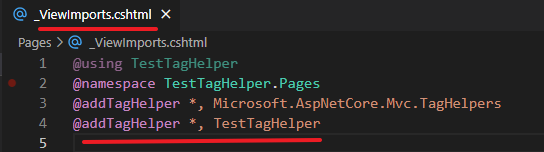
第一个参数是具体的 namespace + class name, * 代表匹配全部
第二个参数是 Assembly 的名字
@addTagHelper TestWeb.TagHelpers.*, TestWeb
表示, TestWeb Assembly 里面, TestWeb.TagHelpers namespace 下的所有 class
然后就可以使用了
<body>

  <a routerLinkActive href="/contact">Contact</a>

</body>
data-* 和 asp-* 是不合格的 selector
asp- 是 ASP.NET Core 保留和专用的 selector, 所以我们用不到.
data- 不能用是因为

所以切记, 不要用 asp- 和 data- 作为 selector
@Input()
@input 原至 Angular, 就是在使用指令的时候, 传入一些变量作为操控.
<a routerLinkActive company-name="Abc" company-age="15" href="/contact">Contact</a>
传入 company name 和 age
通过 property 接收
[HtmlAttributeName("company-name")]

public string CompanyName { get; set; } = "";

public int? CompanyAge { get; set; }
它默认是 kebab-case map to PascalCase, 如果想取别名就使用 HtmlAttributeName 声明就可以了.
有自动做类型转换. empty string != null 哦, null 指的是完全没有放 attribute.
Process
public override void Process(TagHelperContext context, TagHelperOutput output)

{

    if (output.Attributes.TryGetAttribute("class", out var attribute))

    {

        var value = attribute.Value; // readonly

    }

    output.AddClass("active", HtmlEncoder.Default);

    output.Attributes.Add("data-attribute", "value");

    output.Content.SetHtmlContent("<h1>Email1</h1>"); // 注: self closing tag, 这句会无效, 因为不会有 content

    output.Content.AppendHtml("<h1>Email2</h1>"); // 注: self closing tag, 这句会无效, 因为不会有 content

    output.TagName = "div"; // 换 tag

    output.TagMode = TagMode.SelfClosing; // 换 closing mode

    base.Process(context, output);

}
常见的操作有, add class, append html, inner html, get attribute 等等.
Read ViewContext
ViewContext 包含了常用到的 ViewBag, ViewData, RouteData, HttpContext 等等.
[ViewContext]

[HtmlAttributeNotBound]

public ViewContext ViewContext { get; set; } = null!;
通过 ViewContent Attribute 声明就可以了.
Parent Child 沟通
参考: The Very Basics of Nesting for Tag Helpers
这个会比较复杂一些.
[HtmlTargetElement("email", TagStructure = TagStructure.NormalOrSelfClosing)]

public class EmailTagHelper : TagHelper

{

    public override async Task ProcessAsync(TagHelperContext context, TagHelperOutput output)

    {

        context.Items.Add(typeof(EmailContext), new EmailContext());

        var childContent = await output.GetChildContentAsync();

        var emailChildren = ((EmailContext)context.Items[typeof(EmailContext)]).EmailChildren;

        var contentString = childContent.GetContent(); // get content string

    }

}

[HtmlTargetElement("email-child", TagStructure = TagStructure.NormalOrSelfClosing)]

public class EmailChildTagHelper : TagHelper

{

    public override void Process(TagHelperContext context, TagHelperOutput output)

    {

        var emailContext = (EmailContext)context.Items[typeof(EmailContext)];

        emailContext.EmailChildren.Add(this);

    }

}
parent 通过 Context.Items 传入一个容器 (也可以传入子层需要的资料), child 把资料放入容器中.
parent await GetChildContentAsync, 等待子层完成后, 再打开容器, 把子层放进去的资料拿出来.
这样就可以 parent child 沟通了, 看上去容器是多余的, 子层为什么不能也使用 context.Items.Add 的方式回传给 parent 呢?
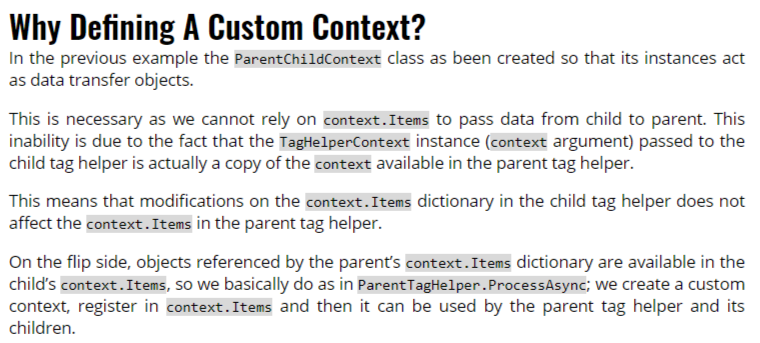
因为它是一个 copy... 我也不知道为什么它要这样设计.
RouterLinkActive
用法
<div routerLinkActive class="container">

  <a routerLinkActive href="/services/aircon-general-servicing">Aicon General Servicing</a>

  <a routerLinkActive href="/services/aircon-repair?page=1">Aicon Repair Page 1</a>

  <a routerLinkActive href="/services/aircon-repair?page=2">Aicon Repair Page 2</a>

</div>
当前 URL 和当前 element 的 href 或者子孙 element 的 href 吻合的话, routerLinkActive 就要 add class "active".
[HtmlTargetElement(Attributes = "[routerLinkActive]")]

public class RouterLinkActiveTagHelper : TagHelper

{

    [ViewContext]

    [HtmlAttributeNotBound]

    public ViewContext ViewContext { get; set; } = null!;

    public override async Task ProcessAsync(TagHelperContext context, TagHelperOutput output)

    {

        var selfAndDescendantLinks = new List<string>();

        var selfLink = GetSelfLinkFromHref();

        if (selfLink != null)

        {

            selfAndDescendantLinks.Add(selfLink);

        }

        var descendantLinks = await GetDescendantLinksAsync();

        selfAndDescendantLinks.AddRange(descendantLinks);

        // note 解忧:

        // link 是 encode 的, 而 Request.Path 是 decode 的, 所以需要加 .ToString 让它 encode, 这样才能 match with link

        var requestPathWithQuery = ViewContext.HttpContext.Request.Path.ToString() + ViewContext.HttpContext.Request.QueryString.ToString();

        if (selfAndDescendantLinks.Contains(requestPathWithQuery))

        {

            output.AddClass("active", HtmlEncoder.Default);

        }

        await base.ProcessAsync(context, output);

        string? GetSelfLinkFromHref()

        {

            output.Attributes.TryGetAttribute("href", out var hrefAttribute);

            return hrefAttribute?.Value.ToString();

        }

        async Task<List<string>> GetDescendantLinksAsync()

        {

            var childHtml = output.Content.IsModified ? output.Content.GetContent() : (await output.GetChildContentAsync()).GetContent();

            var regex = new Regex(@"<a .*href=""(\S*)""");

            var matchedHrefs = regex.Matches(childHtml);

            return matchedHrefs.ToArray().Select(matchedHref => matchedHref.Groups[1].Value).ToList();

        }

    }

}
找出 href 的 link, 然后和当前 URL 做匹配, 匹配到的话就添加 class active.
Disable Tag Helper
有一个 MyTagHelper, target element anchor attrubute href

只要在 element tag 或者 attribute 前加上感叹号 (!), 就可以了.
下面 3 个写法都可以.
<!a href="/contact" @(true ? "skip-test" : "")>Contact</a>

<!a href="/contact" @(true ? "skip-test" : "")>Contact</!a>

<a !href="/contact" @(true ? "skip-test" : "")>Contact</a>
The tag helper must not have C# in the element's attribute declaration area
参考:
stackoverflow – The tag helper 'input' must not have C# in the element's attribute declaration area
stackoverflow – Razor is not writing my "selected" value into the page
这个 tag helper 的一个 limitation, 不允许 dynamic 指令
它的情况是这样的, 比如有一个 MyTagHelper, target element anchor attrubute href
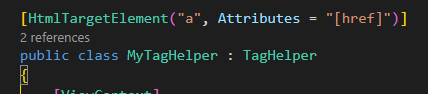
我想动态添加 attribute 像下面这样, 是不可以的.

动态添加 value 就可以

而且我发现如果 tag helper 是在另一个 dll 里面, 它不会提示错误, 反而会有意想不到的 bug. 注意咯
ASP.NET Core – TagHelper的更多相关文章
- ASP.NET Core MVC TagHelper实践HighchartsNET快速图表控件-开源
ASP.NET Core MVC TagHelper最佳实践HighchartsNET快速图表控件支持ASP.NET Core. 曾经在WebForms上写过 HighchartsNET快速图表控件- ...
- 【无私分享:ASP.NET CORE 项目实战(第九章)】创建区域Areas,添加TagHelper
目录索引 [无私分享:ASP.NET CORE 项目实战]目录索引 简介 在Asp.net Core VS2015中,我们发现还有很多不太简便的地方,比如右击添加视图,转到试图页等功能图不见了,虽然我 ...
- asp.net core的TagHelper简单使用
TagHelper(标签助手)是ASP.NET Core非常好的一种新特性.可以扩展视图,让其看起来像一个原生HTML标签. 应该使用TagHelper替换HtmlHelper,因其更简洁更易用,且支 ...
- [转]【无私分享:ASP.NET CORE 项目实战(第九章)】创建区域Areas,添加TagHelper
本文转自:http://www.cnblogs.com/zhangxiaolei521/p/5808417.html 目录索引 [无私分享:ASP.NET CORE 项目实战]目录索引 简介 在Asp ...
- asp.net core高级应用:TagHelper+Form
上一篇博客我讲解了TagHelper的基本用法和自定义标签的生成,那么我就趁热打铁,和大家分享一下TagHelper的高级用法~~,大家也可以在我的博客下随意留言. 对于初步接触asp.net cor ...
- asp.net core新特性(1):TagHelper
进步,才是人应该有的现象.-- 雨果 今天开始,我就来说说asp.net core的新特性,今天就说说TagHelper标签助手.虽然学习.net,最有帮助的就是microsoft的官方说明文档了,里 ...
- Asp.Net Core 入门(八)—— Taghelper
Taghelper是一个服务端的组件,可以在Razor文件中创建和渲染HTML元素,类似于我们在Asp.Net MVC中使用的Html Taghelper.Asp.Net Core MVC内置的Tag ...
- ASP.NET Core 3.0 : 二十五. TagHelper
什么是TagHelper?这是ASP.NET Core 中新出现的一个名词,它的作用是使服务器端代码可以在Razor 文件中参与创建和呈现HTML 元素.(ASP.NET Core 系列目录) 一.概 ...
- ASP.NET Core 中文文档 第四章 MVC(4.2)控制器操作的路由
原文:Routing to Controller Actions 作者:Ryan Nowak.Rick Anderson 翻译:娄宇(Lyrics) 校对:何镇汐.姚阿勇(Dr.Yao) ASP.NE ...
- ASP.NET Core 中文文档 第四章 MVC(4.6)Areas(区域)
原文:Areas 作者:Dhananjay Kumar 和 Rick Anderson 翻译:耿晓亮(Blue) 校对:许登洋(Seay) Areas 是 ASP.NET MVC 用来将相关功能组织成 ...
随机推荐
- 解决方案 | Claunch 如何更新配置文件
1.问题 比如我的电脑上有Claunch 3.26版本(绿色版本),但是更新的时候如何保证我的新版本的图标.链接也更新是个问题. 官网说得比较模糊: 2.解决方法 打开复制data数据覆盖到新版本同样 ...
- 关于Windows 10 LTSC 2019无法安装Edge的解决方案
最近新换了Windows 10 LTSC 2019系统,使用体验干净且流畅,但是在更新Edge时遇到了问题:系统内装的是9x版本的Edge浏览器,并且提示更新错误,有system level方面的问题 ...
- Session的默认保存路径
在php.ini里的配置session.save_path是注释掉的,那么Seesion保存的路径在不同类型操作系统保存在什么位置? Linux:/tmp 或 /var/lib/php/session ...
- 阅读翻译Mathematics for Machine Learning之2.5 Linear Independence
阅读翻译Mathematics for Machine Learning之2.5 Linear Independence 关于: 首次发表日期:2024-07-18 Mathematics for M ...
- C# WinForm自制项目模板入坑记
1. 创建模板配置 1.1 在项目目录中创建.template.config文件夹 1.2 创建一个名为"template.json" 的新文件 { "author&qu ...
- 开源新纪元:Llama 3.1超大杯405B跑分惊艳,首次超越GPT-4o,下载链接曝光!
开源巨擘Llama 3.1崭露头角,性能卓越引发热议 在科技界的瞩目下,Llama 3.1系列模型以其卓越的性能脱颖而出,尤其是其405B超大杯版本,在微软Azure-ML GitHub平台的多项评测 ...
- 【MySQL】编写随机密码生成脚本
数据需求: 密码规则是 12位 数字 + 字母 混合后MD5加密 然后导出一个表格或者记录文件,文件没明确要求 实现过程: 1.MD5加密函数使用 SET @txt = '123456'; SELEC ...
- 【Mybatis】Bonus02 补充
关于主键生成问题 Mybatis的主键生成是基于JDBC的使用主键[getGeneratedKeys()]方法 也就是说,必须要JDBC驱动的支持才行 @Test public void junitT ...
- 斯坦福AI团队被质疑抄袭国产大模型
原文地址: https://mbd.baidu.com/newspage/data/landingsuper?context={"nid"%3A"news_8882699 ...
- Jax框架的Traced object特性与TensorFlow的placeholder的一致性
前文: Jax框架的static与Traced Operations -- Static vs Traced Operations 前文讨论分析了Jax的static特性和Traced特性,这些谈下个 ...