
使用C#如何监控选定文件夹中文件的变动情况?
目录
1、前言
2、效果
3、具体实现
页面设计
全部代码
FileSystemWatcher的介绍
FileSystemWatcher的构造函数
FileSystemWatcher的属性
FileSystemWatcher的事件
4、总结
前言
有时候我们会有监控电脑上某一个文件夹中文件变动情况的需求,在本文中,我也会以一个具体的例子,说明在C#中如何使用FileSystemWatcher类来实现上述需求。
效果
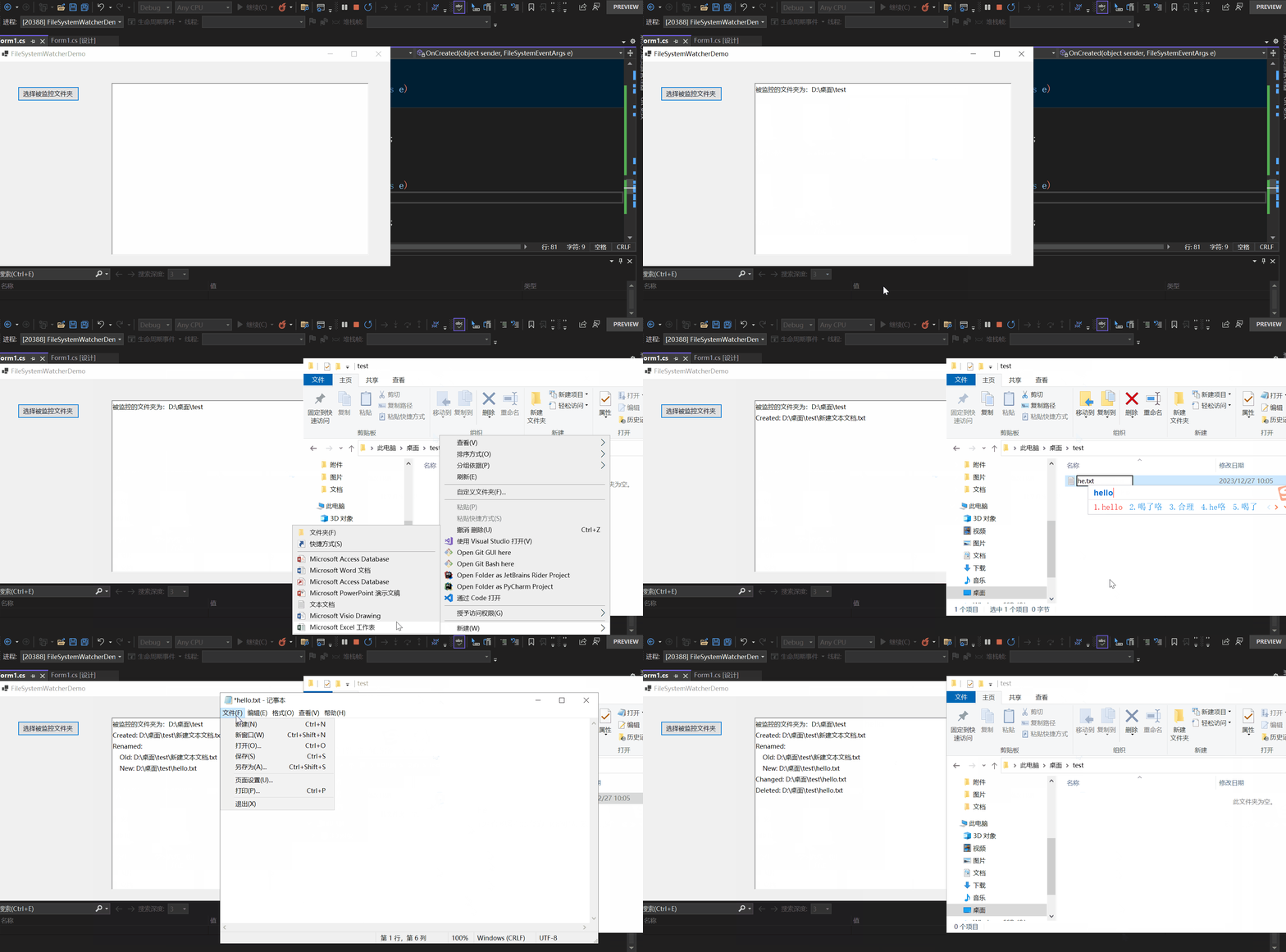
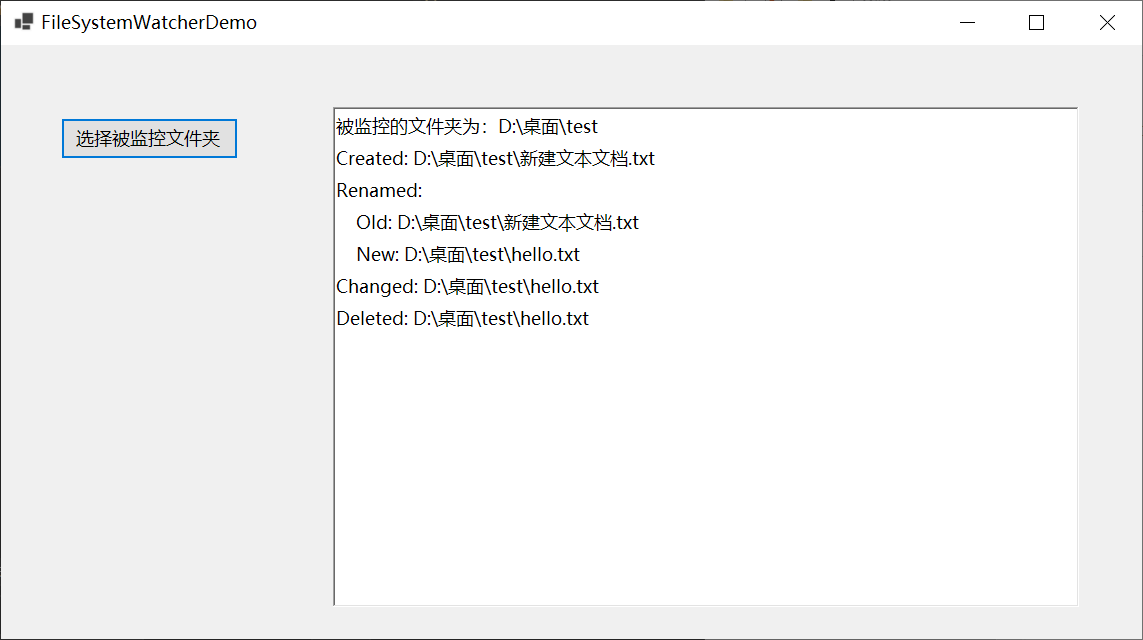
具体实现
如果你对C#如何监控选定文件夹中文件的变动情况感兴趣,可以继续往下阅读。
界面设计
为了更好的演示效果,我这里winform的界面设计如下:
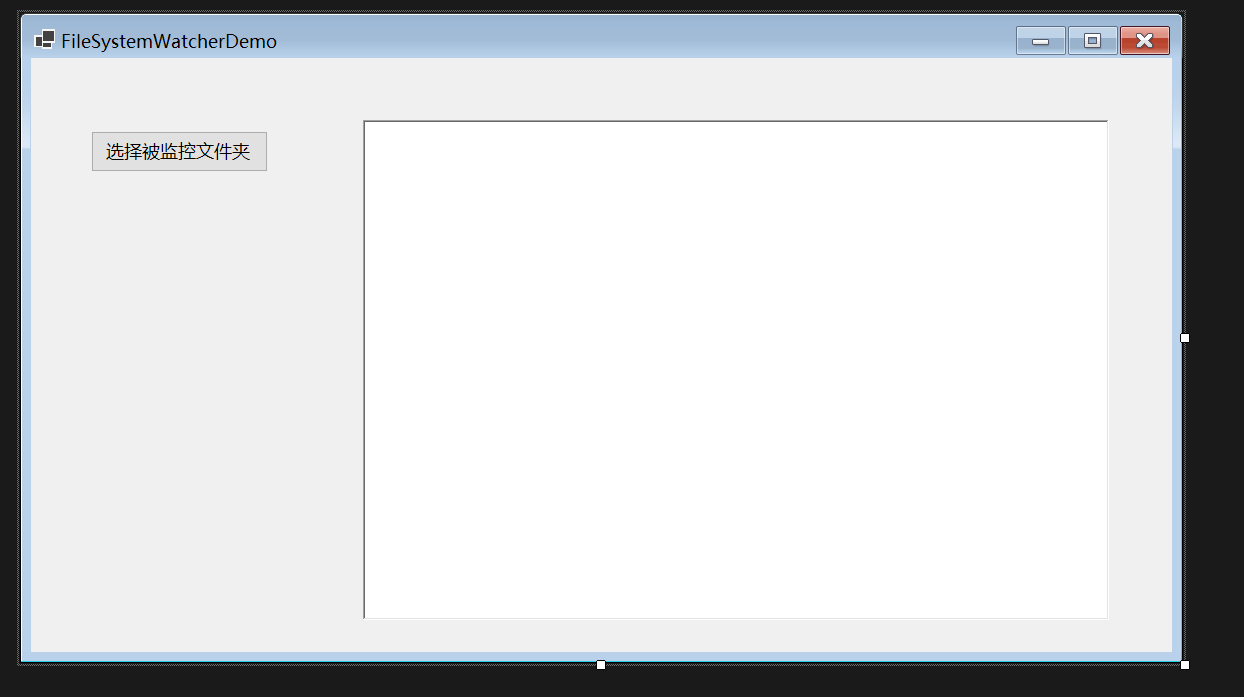
很简单,只有一个button与一个richtextbox,button用来指定被监控的文件,richtextbox用来输出一些信息。
全部代码
namespace FileSystemWatcherDemo

{

    public partial class Form1 : Form

    {

        public Form1()

        {

            InitializeComponent();

        }

        private void button1_Click(object sender, EventArgs e)

        {

            // 创建一个 FolderBrowserDialog 实例

            FolderBrowserDialog folderBrowserDialog = new FolderBrowserDialog();

            // 设置对话框的标题

            folderBrowserDialog.Description = "选择文件夹";

            // 如果用户点击了“确定”按钮

            if (folderBrowserDialog.ShowDialog() == DialogResult.OK)

            {

                richTextBox1.Text = "";

                // 获取用户选择的文件夹路径

                string selectedFolder = folderBrowserDialog.SelectedPath;

                // 提示被监控文件夹路径

                richTextBox1.Text += $"被监控的文件夹为:{selectedFolder}\r\n";

                var watcher = new FileSystemWatcher($"{selectedFolder}");

                watcher.NotifyFilter = NotifyFilters.Attributes

                                | NotifyFilters.CreationTime

                                | NotifyFilters.DirectoryName

                                | NotifyFilters.FileName

                                | NotifyFilters.LastAccess

                                | NotifyFilters.LastWrite

                                | NotifyFilters.Security

                                | NotifyFilters.Size;

                watcher.Changed += OnChanged;

                watcher.Created += OnCreated;

                watcher.Deleted += OnDeleted;

                watcher.Renamed += OnRenamed;

                watcher.Filter = "*.txt";

                watcher.IncludeSubdirectories = true;

                watcher.EnableRaisingEvents = true;

            }

            else

            {

                MessageBox.Show("您本次没有选择文件夹!!!");

            }

        }

        private void AppendMessageToRichTextBox(string message)

        {

            // 在RichTextBox中添加提示信息

            richTextBox1.Invoke(new Action(() =>

            {

                richTextBox1.AppendText(message + Environment.NewLine);

            }));

        }

        private void OnChanged(object sender, FileSystemEventArgs e)

        {

            if (e.ChangeType != WatcherChangeTypes.Changed)

            {

                return;

            }

            AppendMessageToRichTextBox($"Changed: {e.FullPath}");

        }

        private void OnCreated(object sender, FileSystemEventArgs e)

        {

            string value = $"Created: {e.FullPath}";

            AppendMessageToRichTextBox($"Created: {e.FullPath}");

        }

        private  void OnDeleted(object sender, FileSystemEventArgs e)

        {

            AppendMessageToRichTextBox($"Deleted: {e.FullPath}");

        }

        private  void OnRenamed(object sender, RenamedEventArgs e)

        {

            AppendMessageToRichTextBox($"Renamed:");

            AppendMessageToRichTextBox($"    Old: {e.OldFullPath}");

            AppendMessageToRichTextBox($"    New: {e.FullPath} ");

        }

    }

}
FileSystemWatcher的介绍
看过以上代码,会发现核心就是FileSystemWatcher的使用。接下来我将介绍一下C#中的FileSystemWatcher类。
FileSystemWatcher是C#中的一个类,该类可以侦听文件系统更改通知,并在目录或目录中的文件发生更改时引发事件。
FileSystemWatcher的构造函数
该类有三种构造函数,如下所示:
| 形式 | 含义 |
|---|---|
| FileSystemWatcher() | 初始化 FileSystemWatcher 类的新实例。 |
| FileSystemWatcher(String) | 初始化 FileSystemWatcher 类的新实例,给定要监视的目录。 |
| FileSystemWatcher(String, String) | 初始化 FileSystemWatcher类的新实例,给定要监视的目录和文件类型。 |
var watcher = new FileSystemWatcher($"{selectedFolder}");
本文中我选择的就是第二种构造函数,指定要监视的目录。
FileSystemWatcher的属性
现在介绍一下在本示例中用到的FileSystemWatcher的属性,如下所示:
| 名称 | 类型 | 含义 |
|---|---|---|
| EnableRaisingEvents | bool | 设置FileSystemWatcher是否有效 |
| Filter | string | 设置一个要监控的文件的格式 |
| Filters | Collection | 设置多个要监控的文件的格式 |
| IncludeSubdirectories | bool | 获取或设置一个值,该值指示是否应监视指定路径中的子目录 |
| NotifyFilter | NotifyFilters | 获取或设置要监视的更改的类型 |
| Path | string | 获取或设置要监视的目录的路径 |
现在来解释下所用到的代码的含义:
watcher.Filter = "*.txt";
表示要监控的文件为.txt格式。
watcher.IncludeSubdirectories = true;
表示指定路径中的子目录也要监视。
watcher.EnableRaisingEvents = true;
表示该对象可以触发事件,也就是还有效。
 watcher.NotifyFilter = NotifyFilters.Attributes

                                | NotifyFilters.CreationTime

                                | NotifyFilters.DirectoryName

                                | NotifyFilters.FileName

                                | NotifyFilters.LastAccess

                                | NotifyFilters.LastWrite

                                | NotifyFilters.Security

                                | NotifyFilters.Size;
设置要监视的更改的类型。NotifyFilter属性的类型为NotifyFilters枚举类型。
NotifyFilters枚举类型:
[System.Flags]

public enum NotifyFilters
指定要在文件或文件夹中监视的更改。
此枚举支持其成员值的按位组合。
该枚举类型包含的值与含义如下所示:
| 名称 | 含义 |
|---|---|
| Attributes | 文件或文件夹的属性 |
| CreationTime | 文件或文件夹的创建时间 |
| DirectoryName | 目录名 |
| FileName | 文件的名称 |
| LastAccess | 文件或文件夹上一次打开的日期 |
| LastWrite | 上一次向文件或文件夹写入内容的日期 |
| Security | 文件或文件夹的安全设置 |
| Size | 文件或文件夹的大小 |
在这里使用了该枚举类型的按位组合表示这几种更改的类型要受到监视。
FileSystemWatcher的事件
FileSystemWatcher中的事件如下:
| 名称 | 含义 |
|---|---|
| Changed | 当更改指定 Path 中的文件和目录时发生 |
| Created | 当在指定Path 中创建文件和目录时发生 |
| Deleted | 删除指定Path中的文件或目录时发生 |
| Renamed | 重命名指定 Path中的文件或目录时发生 |
| Error | 当 FileSystemWatcher 的实例无法继续监视更改或内部缓冲区溢出时发生 |
                watcher.Changed += OnChanged;

                watcher.Created += OnCreated;

                watcher.Deleted += OnDeleted;

                watcher.Renamed += OnRenamed;
在这里我使用到了Changed、Created、Deleted和Renamed事件。
我将以Changed 事件为例,详细解释一下:
watcher.Changed += OnChanged;
这行代码的含义。
我们查看FileSystemWatcher的源代码,Changed事件的代码如下所示:
/// <devdoc>

///    Occurs when a file or directory in the specified <see cref='System.IO.FileSystemWatcher.Path'/> is changed.

/// </devdoc>

public event FileSystemEventHandler? Changed

{

    add

    {

        _onChangedHandler += value;

    }

    remove

    {

        _onChangedHandler -= value;

    }

}
可知将值赋给了_onChangedHandler,我们再来查看_onChangedHandler的定义:
 // Event handlers

 private FileSystemEventHandler? _onChangedHandler;
类型为FileSystemEventHandler?与Changed事件一致,再来看看FileSystemEventHandler?的定义:
public delegate void FileSystemEventHandler(object sender, FileSystemEventArgs e);
发现是一个参数类型分别为object、FileSystemEventArgs返回值类型为空的委托类型。
object我们知道,那么FileSystemEventArgs又是什么呢?
查看它的源码,截取一部分,如下所示:
public class FileSystemEventArgs : EventArgs

{

     private readonly WatcherChangeTypes _changeType;

     private readonly string? _name;

     private readonly string _fullPath;

     /// <devdoc>

///    Gets one of the <see cref='System.IO.WatcherChangeTypes'/> values.

/// </devdoc>

public WatcherChangeTypes ChangeType

{

    get

    {

        return _changeType;

    }

}

/// <devdoc>

///    Gets the fully qualified path of the affected file or directory.

/// </devdoc>

public string FullPath

{

    get

    {

        return _fullPath;

    }

}

/// <devdoc>

///       Gets the name of the affected file or directory.

/// </devdoc>

public string? Name

{

    get

    {

        return _name;

    }

}

 }
发现FileSystemEventArgs继承自EventArgs,而EventArgs表示包含事件数据的类的基类,因此可以明白FileSystemEventArgs表示为目录事件:Changed, Created, Deleted提供数据的类。
FileSystemEventArgs提供三个数据分别为ChangeType、FullPath、Name。
那ChangeType是什么呢?
查看ChangeType的定义:
 //

 // 摘要:

 //     Changes that might occur to a file or directory.

 [Flags]

 public enum WatcherChangeTypes

 {

     //

     // 摘要:

     //     The creation of a file or folder.

     Created = 1,

     //

     // 摘要:

     //     The deletion of a file or folder.

     Deleted = 2,

     //

     // 摘要:

     //     The change of a file or folder. The types of changes include: changes to size,

     //     attributes, security settings, last write, and last access time.

     Changed = 4,

     //

     // 摘要:

     //     The renaming of a file or folder.

     Renamed = 8,

     //

     // 摘要:

     //     The creation, deletion, change, or renaming of a file or folder.

     All = 15

 }
是一个枚举类型,表示更改的类型。
现在回过头来看:
watcher.Changed += OnChanged;
OnChanged方法如下:
  private void OnChanged(object sender, FileSystemEventArgs e)

  {

      if (e.ChangeType != WatcherChangeTypes.Changed)

      {

          return;

      }

      AppendMessageToRichTextBox($"Changed: {e.FullPath}");

  }
为什么可以将OnChanged方法订阅到watcher.Changed事件上呢?
因为OnChanged方法与watcher.Changed事件中的委托类型FileSystemEventHandler的返回类型和签名是相同的。
OnChanged方法的返回类型与签名如下:
private void OnChanged(object sender, FileSystemEventArgs e)
FileSystemEventHandler委托类型的定义如下:
public delegate void FileSystemEventHandler(object sender, FileSystemEventArgs e);
现在已经理解了订阅事件,那么什么时候触发事件呢?
查看FileSystemWatcher的部分源码:
 /// <devdoc>

 ///    Raises the <see cref='System.IO.FileSystemWatcher.Changed'/> event.

 /// </devdoc>

 protected void OnChanged(FileSystemEventArgs e)

 {

     InvokeOn(e, _onChangedHandler);

 }

 private void InvokeOn(FileSystemEventArgs e, FileSystemEventHandler? handler)

 {

     if (handler != null)

     {

         ISynchronizeInvoke? syncObj = SynchronizingObject;

         if (syncObj != null && syncObj.InvokeRequired)

             syncObj.BeginInvoke(handler, new object[] { this, e });

         else

             handler(this, e);

     }

 }
当发生相应的改变时,就会调用FileSystemWatcher类的OnChanged方法,从而触发事件。
总结
本文通过一个实例,介绍了如何通过C#中的FileSystemWatcher类实现监控选定的文件夹,希望对你有所帮助。
使用C#如何监控选定文件夹中文件的变动情况?的更多相关文章
- C# 将文件夹中文件复制到另一个文件夹
p{ text-align:center; } blockquote > p > span{ text-align:center; font-size: 18px; color: #ff0 ...
- python批量处理文件夹中文件的问题
用os模块读取文件夹中文件 原来的代码: import osfrom scipy.misc import imread filenames=os.listdir(r'./unprocess')for ...
- php获取指定文件夹中文件名称
/** * php获取指定文件夹中文件名称 * @author jackie <2018.10.10> */ public static function getFileName($fil ...
- Python按顺序读取文件夹中文件
参考资料: https://blog.csdn.net/qq_22227123/article/details/79903116 https://blog.csdn.net/merdy_xi/arti ...
- C#实现对指定文件夹中文件按修改时间排序
string path = "~/Document/Introduction/团队管理制度/"; DirectoryInfo dirinfo = new Di ...
- 【linux】复制文件夹中文件,排除部分文件
如下 cp `ls|grep -v -E '*json|out'|xargs` /home/data/ 用grep -v 表示排除, -E 表示正则 ls|grep -v -E '*json|out ...
- Java访问文件夹中文件的递归遍历代码Demo
上代码: import java.io.File; /* * 需求:对指定目录进行所有内容的列出(包含子目录中的内容) * 也可以理解为 深度遍历. */ public class FindAllFi ...
- Python之获取文件夹中文件列表以及glob与fnmatch模块的使用
获取文件夹中的文件列表 print(os.listdir("../secondPackage")) # ['__init__.py', 'secondCookBook.py', ' ...
- 使用java读取文件夹中文件的行数
使用java统计某文件夹下所有文件的行数 经理突然交代一个任务:要求统计某个文件夹下所有文件的行数.在网上查了一个多小时没有解决.后来心里不爽就决定自己写一个java类用来统计文件的行数,于是花了两个 ...
- 使用.NET统计文件夹中文件总数
软件下载: http://hovertree.com/h/bjaf/hwqtjwjs.htm 截图: 使用方法:点击按钮,选择文件夹,就可以显示文件夹中包含的文件总数. 这个项目包含在HoverTre ...
随机推荐
- Ubuntu 18.04安装RabbitMQ
1.安装erlang语言环境 sudo apt install erlang-nox 2.更新Ubuntu 源 sudo apt update 3.安装RabbitMQ服务 sudo apt inst ...
- 从内核世界透视 mmap 内存映射的本质(原理篇)
本文基于内核 5.4 版本源码讨论 之前有不少读者给笔者留言,希望笔者写一篇文章介绍下 mmap 内存映射相关的知识体系,之所以迟迟没有动笔,是因为 mmap 这个系统调用看上去简单,实际上并不简单, ...
- WebAssembly实践指南——C++和Rust通过wasmtime实现相互调用实例
C++和Rust通过wasmtime实现相互调用实例 1 wasmtime介绍 wasmtime是一个可以运行WebAssembly代码的运行时环境. WebAssembly是一种可移植的二进制指令集 ...
- Solution -「ARC 103B」Robot Arms
Description Link. 给定 \(n\) 组坐标.构造长度为 \(m\) 的序列 \(\{c_n\}\) 和 \(n\) 组包含 LRUD 的路径,满足对于每一组坐标: \(c_i\) 表 ...
- vue2实现饼图Pie组件封装
实现如下效果: 效果展示:https://code.juejin.cn/pen/7226656439941955644 如果不会请移步到官网的栗子,请点击查看 直接给大家上代码: 整体代码片段 1 & ...
- Centos7中防火墙打开3306端口(亲测)
开放3306端口 firewall-cmd --zone=public --add-port=3306/tcp --permanent 开启防火墙 systemctl start firewa ...
- oracle:修改表空间
近来新建了一张表,发现放错表空间,且表中已有数据,故想到修改已有表的表空间 1.查看表所在的表空间select table_name,tablespace_name from dba_tables w ...
- ASP.NET 6启动时自动创建MongoDB索引
大家好,我是Edison. 最近,在使用MongoDB时,碰到这样的一个需求:针对某个Collection手动在开发环境创建了索引,但在测试环境和生产环境不想再手动操作了,于是就想着通过代码的方式在A ...
- MySQL低配数据库被大量数据导入时KO
在一个低配MySQL数据库(笔记本电脑虚机环境,虚机配置2CPU/3G内存),在3000万级别的大量数据LOAD DATA方式导入时,坚持一小时后,终于被KO了,甚至没写下任何有用的日志,只是在操作界 ...
- 自编码器AE全方位探析:构建、训练、推理与多平台部署
本文深入探讨了自编码器(AE)的核心概念.类型.应用场景及实战演示.通过理论分析和实践结合,我们详细解释了自动编码器的工作原理和数学基础,并通过具体代码示例展示了从模型构建.训练到多平台推理部署的全过 ...