
flutter填坑之旅(有状态组件StatefulWidget)
今天我们来看看flutter的StatefulWidget(有状态组件),最常用就是app 主页的底部导航栏的应用
效果图
 首页 首页 |
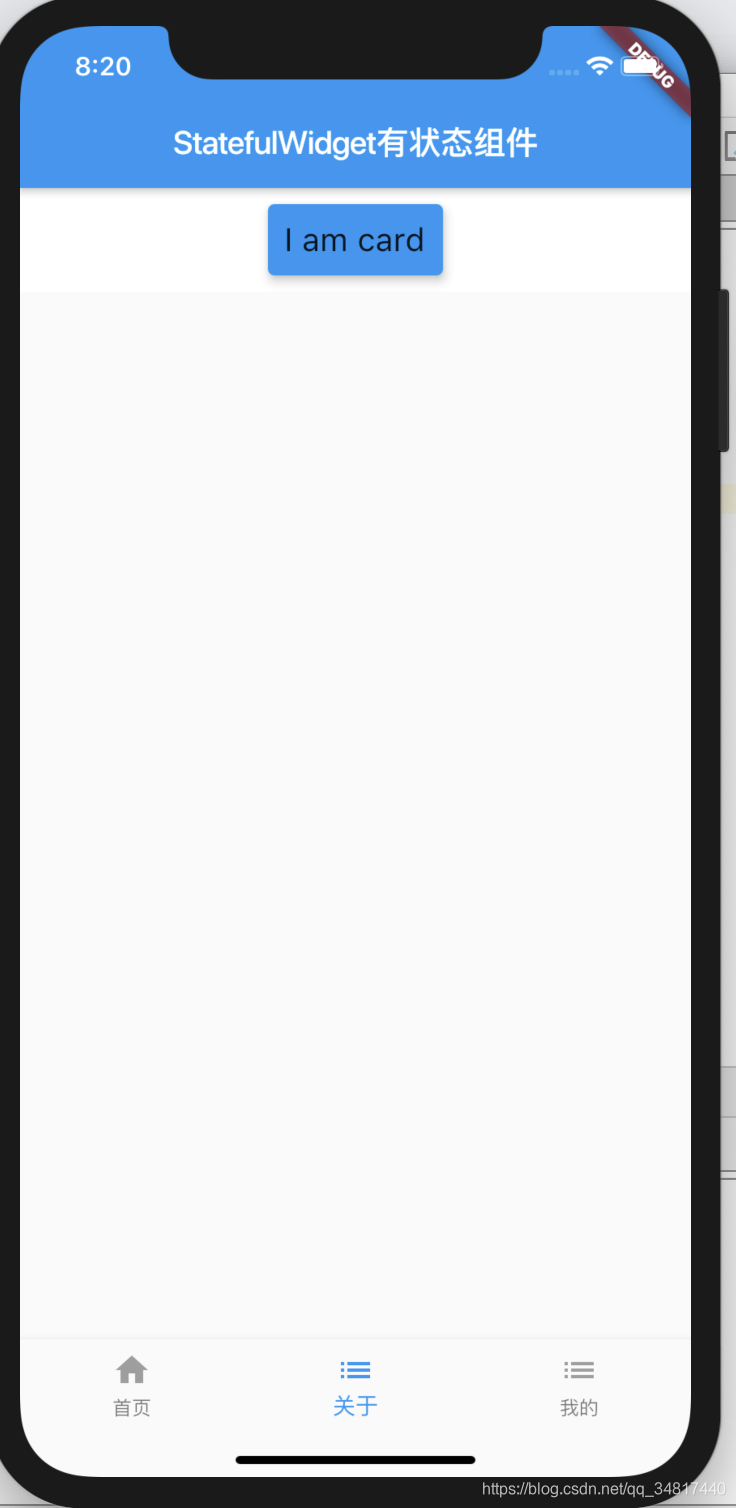 关于 关于 |
 我的 我的 |
statefull-widget-learn .dart
import 'package:flutter/material.dart';

import 'package:flutter/services.dart';

import 'package:my_first_app/child/widget/about.dart';

import 'package:my_first_app/child/widget/first.dart';

import 'package:my_first_app/child/widget/mine.dart';

///程序入口main

void main() => runApp(StatefullWidgetLearn());

class StatefullWidgetLearn extends StatefulWidget {

  @override

  _StatefullWidgetLearnState createState() => _StatefullWidgetLearnState();

}

class _StatefullWidgetLearnState extends State<StatefullWidgetLearn> {

  // 定义一个变量监听当前激活的ID

  int _currentIndex = 0;

  // This widget is the root of your application.

  @override

  Widget build(BuildContext context) {

    TextStyle textStyle = TextStyle(fontSize: 20);

    return MaterialApp(

      title: 'StatefulWidget有状态组件',

      theme: ThemeData(

        primarySwatch: Colors.blue,

      ),

      home: Scaffold(

        appBar: AppBar(

          title: Text('StatefulWidget有状态组件'),

        ),

        bottomNavigationBar: BottomNavigationBar(

          currentIndex: _currentIndex, // 设置当前激活id等于_currentIndex

          onTap: (index) {

            // 点击后将当前选中id 赋值给 _currentIndex变量

            setState(() {

              _currentIndex = index;

            });

          },

          items: [

            BottomNavigationBarItem(

                icon: Icon(

                  Icons.home,

                  color: Colors.grey,

                ),

                activeIcon: Icon(

                  Icons.home,

                  color: Colors.blue,

                ),

                title: Text('首页')),

            BottomNavigationBarItem(

                icon: Icon(

                  Icons.list,

                  color: Colors.grey,

                ),

                activeIcon: Icon(

                  Icons.list,

                  color: Colors.blue,

                ),

                title: Text('关于')),

            BottomNavigationBarItem(

                icon: Icon(

                  Icons.list,

                  color: Colors.grey,

                ),

                activeIcon: Icon(

                  Icons.list,

                  color: Colors.blue,

                ),

                title: Text('我的'))

          ],

        ),

        body: _currentIndex == 0

            ? RefreshIndicator(

                //RefreshIndicator下拉刷新组件

                child: ListView(

                  ///ListView是一个列表组件,然它的子组件

                  ///也是一个Widget

                  ///在dart中万物皆对象

                  ///然而在flutter中处处是组件

                  ///然后再调用first组件,玩过vue的同学应该很了解这个

                  children: <Widget>[First()],

                ),

                onRefresh: handleRefesh,

              )

            : _currentIndex == 1

                ? RefreshIndicator(

                    child: ListView(

                      children: <Widget>[About()],

                    ),

                    onRefresh: handleRefesh,

                  )

                : RefreshIndicator(

                    child: ListView(

                      children: <Widget>[Mine()],

                    ),

                    onRefresh: handleRefesh,

                  ),

      ),

    );

  }

  Future<Null> handleRefesh() async {

    await Future.delayed((Duration(milliseconds: 200)));

  }

}
about.dart
import 'package:flutter/material.dart';

import 'package:flutter/cupertino.dart';

class About extends StatefulWidget {

  @override

  _AboutState createState() => _AboutState();

}

class _AboutState extends State<About> {

  @override

  Widget build(BuildContext context) {

    TextStyle textStyle = TextStyle(fontSize: 20);

    return Container(

      decoration: BoxDecoration(color: Colors.white),

      alignment: Alignment.center,

      child: Column(

        children: <Widget>[

          Card(

            color: Colors.blue,

            elevation: 5,

            margin: EdgeInsets.all(10),

            child: Container(

              padding: EdgeInsets.all(10),

              child: Text(

                'I am card',

                style: textStyle,

              ),

            ),

          ),

        ],

      ),

    );

  }

}
mine.dart
import 'package:flutter/material.dart';

import 'package:flutter/cupertino.dart';

class Mine extends StatefulWidget {

  @override

  _MineState createState() => _MineState();

}

class _MineState extends State<Mine> {

  @override

  Widget build(BuildContext context) {

    TextStyle textStyle = TextStyle(fontSize: 20);

    return Container(

      decoration: BoxDecoration(color: Colors.white),

      alignment: Alignment.center,

      child: Column(

        children: <Widget>[

          Text('I like the app', style: textStyle),

          Icon(Icons.android, size: 50, color: Colors.red),

        ],

      ),

    );

  }

}
first.dart
import 'package:flutter/material.dart';

import 'package:flutter/cupertino.dart';

class First extends StatefulWidget {

  @override

  _FirstState createState() => _FirstState();

}

class _FirstState extends State<First> {

  @override

  Widget build(BuildContext context) {

    return Container(

      decoration: BoxDecoration(color: Colors.white),

      alignment: Alignment.center,

      child: Column(

        children: <Widget>[

          Container(

            height: 100,

            margin: EdgeInsets.only(top: 10),

            decoration: BoxDecoration(color: Colors.lightBlueAccent),

            child: PageView(

              children: <Widget>[

                _item('page1', Colors.deepPurple),

                _item('page2', Colors.green),

                _item('page3', Colors.red)

              ],

            ),

          )

        ],

      ),

    );

  }

  _item(String title, Color color) {

    return Container(

      alignment: Alignment.center,

      decoration: BoxDecoration(color: color),

      child: Text(

        title,

        style: TextStyle(fontSize: 22, color: Colors.white),

      ),

    );

  }

}
flutter填坑之旅(有状态组件StatefulWidget)的更多相关文章
- React Native填坑之旅--与Native通信之iOS篇
终于开始新一篇的填坑之旅了.RN厉害的一个地方就是RN可以和Native组件通信.这个Native组件包括native的库和自定义视图,我们今天主要设计的内容是native库方面的只是.自定义视图的使 ...
- React Native填坑之旅--布局篇
代码在这里: https://github.com/future-challenger/petshop/tree/master/client/petshop/src/controller 回头看看RN ...
- 使用vue开发微信公众号下SPA站点的填坑之旅
原文发表于本人博客,点击进入使用vue开发微信公众号下SPA站点的填坑之旅 本文为我创业过程中,开发项目的填坑之旅.作为一个技术宅男,我的项目是做一个微信公众号,前后端全部自己搞定,不浪费国家一分钱^ ...
- stm32填坑之旅 - stm32f103c8t6点亮板载贴片蓝色LED
转载请注明:https://www.cnblogs.com/rockyf/p/11691622.html 开篇 开篇一定要精彩,不然路人不理睬!下述是笔者作为arm小白的填坑之旅 没错,这个之前一直从 ...
- bootstrap-table填坑之旅<一>认识bootstrap-table
应公司需求,改版公司ERP的数据显示样式.由于前期开发的样式是bootstrap,所以选bootstrap-table理所当然(也是因为看了bootstrap-table官网的example功能强大, ...
- React Native填坑之旅--Flow篇(番外)
flow不是React Native必会的技能,但是作为正式的产品开发优势很有必要掌握的技能之一.所以,算是RN填坑之旅系列的番外篇. Flow是一个静态的检查类型检查工具,设计之初的目的就是为了可以 ...
- https填坑之旅
Boss说,我们买了个权威证书,不如做全站式的https吧,让用户打开主页就能看到受信任的绿标.于是我们就开始了填坑之旅. [只上主域好不好?] 不好...console会报出一大堆warning因为 ...
- React Native填坑之旅--Stateless组件
Stateless component也叫无状态组件.有三种方法可以创建无状态组件. 坑 一般一个组件是怎么定义的: 很久以前的方法: const Heading = createClass({ re ...
- React Native填坑之旅--Button篇
从React过来,发现React Native(以下简称RN)居然没有Button.隔壁的iOS是有UIButton的,隔壁的隔壁的Android里也是有的.没有Button,就没有点击效果啊.这还真 ...
- React Native填坑之旅--重新认识RN
如同黑夜里的一道光一样,就这么知道了F8. F8是每年一次Facebook每年一次的开发者大会.每次大会都会release相应的APP,iOS.Android都有.之前都是用Native开发的,但是2 ...
随机推荐
- 对使用网站模板编写自己的jsp页面的收获
收获与问题 先感叹一句模板的强大,模板只要按照我的上一篇博客的步骤进行修改,我们就能拥有一个自己写好看许多的界面了. 我目前套用模板还不是很熟练,套用的速度还需要加快,不过目前的我,已经掌握了基本要领 ...
- Racket while循环
Problem: 1805. 字符串中不同整数的数目 目录 lc题解地址 思路 Code lc题解地址 https://leetcode.cn/problems/number-of-different ...
- 解决vue中滚轮事件报错 Added non-passive event listener to a scroll-blocking 'mousewheel' event.告警
参考:https://www.jianshu.com/p/23850d4cade8 参考:让页面滑动流畅得飞起的新特性:Passive Event Listeners
- 自己动手从零写桌面操作系统GrapeOS系列教程——1.2 GrapeOS真机演示
学习操作系统原理最好的方法是自己写一个简单的操作系统. GrapeOS操作系统之前一直运行在模拟器和虚拟机中,今天我们来演示一下GrapeOS在真机上运行的情况. 一.物理机真机 今天演示用的真机是一 ...
- LeeCode 319周赛复盘
T1: 温度转换 思路:模拟 public double[] convertTemperature(double celsius) { return new double[]{celsius + 27 ...
- Linux Socket网络编程: TCP/UDP与本地套接字
网络交互和数据传输好比打电话,socket就像电话机,是在网络编程世界中与外界进行网络通信的途径 TCP网络编程 基于服务器-客户端模型,使用套接字完成连接的建立 服务端准备连接 使用socket创建 ...
- 微服务为什么要用到 API 网关?
本文介绍了 API 网关日志的价值,并以知名网关 Apache APISIX 为例,展示如何集成 API 网关日志. 作者程小兰,API7.ai 技术工程师,Apache APISIX Contrib ...
- Linux云计算运维工程师day29软件安装
1. diff(文本比较) [root@guosaike ~]# cp /etc/passwd{,.ori}备份 [root@guosaike ~]# diff /etc/passwd{,.ori} ...
- javasec(五)URLDNS反序列化分析
这篇文章介绍 URLDNS 就是ysoserial中⼀个利⽤链的名字,但准确来说,这个其实不能称作"利⽤链".因为其参数不是⼀个可以"利⽤"的命令,⽽仅为⼀个U ...
- AndroidApp加密数据明文抓取测试方法——hook方式
0x00 前言 在做移动安全的app渗透或者说移动app的漏洞挖掘时,往往会碰到一种情况:好不容易绕过了app的反抓包机制,通过burp抓到了app传输的数据包,这时想对这部分数据做一些爆破.篡改之类 ...