
[转帖]grafana配置邮件发送
- grafana的邮件配置文件是/etc/grafana/grafana.ini,新建grafana.ini文件,内容如下。
chown 472:472 grafana.ini
#################################### SMTP / Emailing ##########################

[smtp]

enabled = true

#是否允许开启

host = smtp.ym.163.com:465

#发送服务器地址,可以再邮箱的配置教程中找到:

user = 你的邮箱

password = 你的密码


;cert_file =


;key_file =


;skip_verify = false


from_address = 你的邮箱


from_name = Grafana


# EHLO identity in SMTP dialog (defaults to instance_name)


ehlo_identity = http://192.168.10.225:3000


[emails]


;welcome_email_on_sign_up = true


#################################### Logging ##########################
- 修改docker-compose.yml文件,将刚才的文件挂载进去并重启grafana。
###############grafana###############

  grafana:

    image: "grafana/grafana"

    hostname: grafana

    container_name: grafana

    ports:

      - '3000:3000'

    volumes:

      - /wdata/server/grafana/db/:/var/lib/grafana/

      - /wdata/server/grafana/etc/grafana.ini:/etc/grafana/grafana.ini

    #environment:

    #  - TZ=Asia/Shanghai

    restart: always

    #tty: true

    network_mode: host
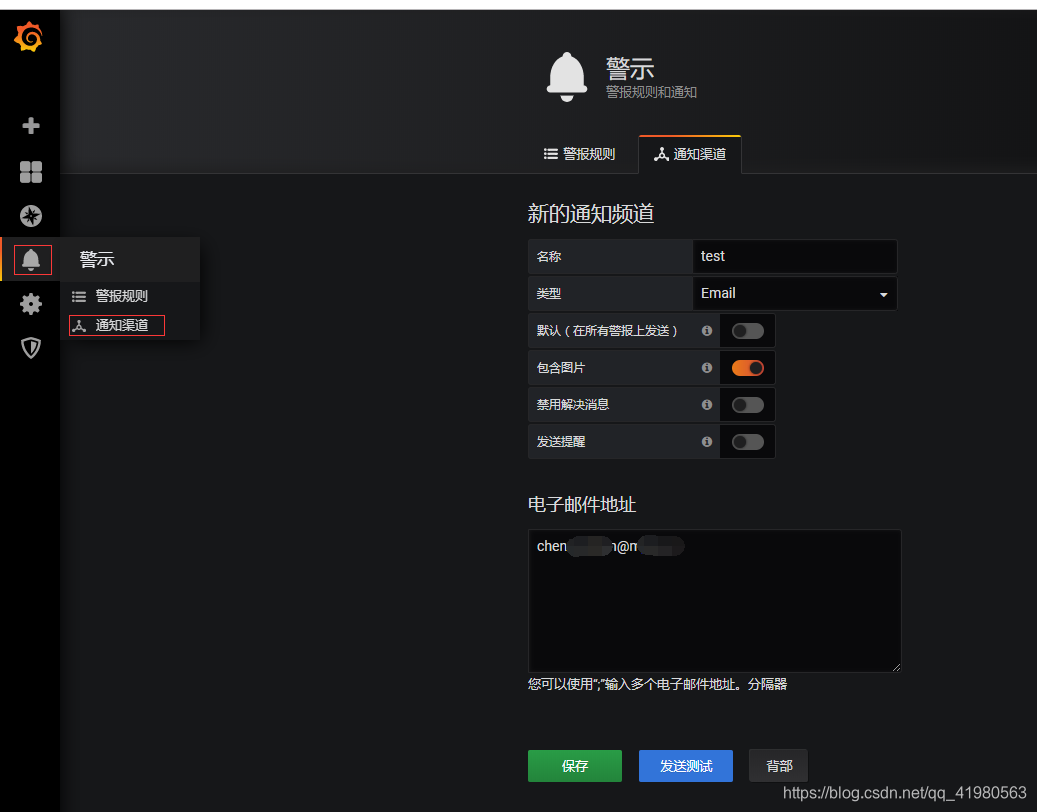
在消息通知那里测试邮件。
进入邮箱查看邮件已成功发送。
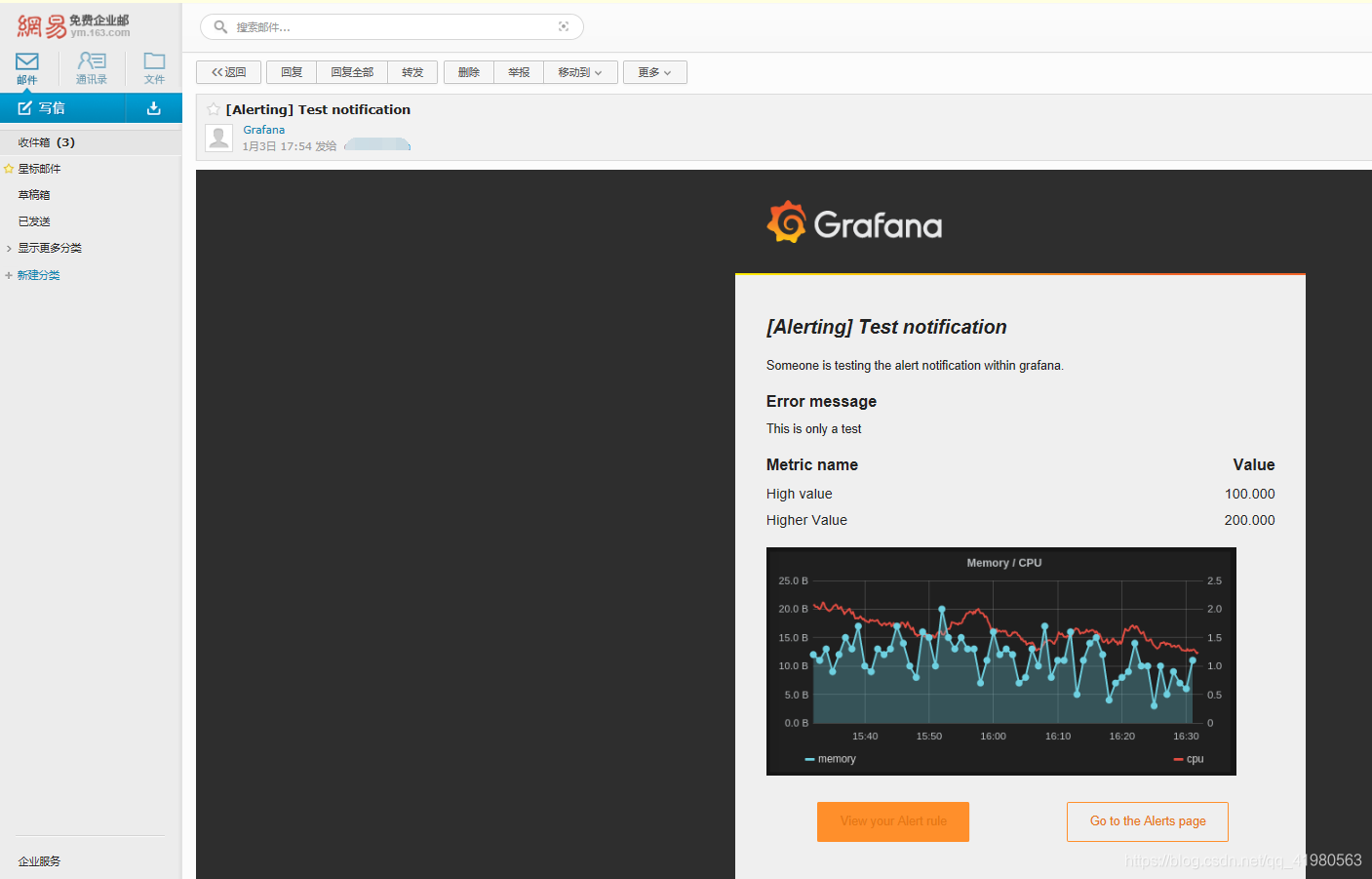
点击邮件内容跳转到grafana,发现跳转到的是localhost,无法跳转到grafana地址。

仔细检查发现grafana还有个默认配置/usr/share/grafana/conf/defaults.ini,将/usr/share/grafana/conf/defaults.ini内容复制出来并修改domain = localhost为domain = 你grafana访问URL
##################### Grafana Configuration Defaults #####################

#

# Do not modify this file in grafana installs

#

# possible values : production, development


app_mode = production

# instance name, defaults to HOSTNAME environment variable value or hostname if HOSTNAME var is empty


instance_name = ${HOSTNAME}

#################################### Paths ###############################


[paths]


# Path to where grafana can store temp files, sessions, and the sqlite3 db (if that is used)


data = data

# Temporary files in data directory older than given duration will be removed


temp_data_lifetime = 24h

# Directory where grafana can store logs


logs = data/log

# Directory where grafana will automatically scan and look for plugins


plugins = data/plugins

# folder that contains provisioning config files that grafana will apply on startup and while running.


provisioning = conf/provisioning

#################################### Server ##############################


[server]


# Protocol (http, https, h2, socket)


protocol = http

# The ip address to bind to, empty will bind to all interfaces


http_addr =

# The http port to use


http_port = 3000

# The public facing domain name used to access grafana from a browser


domain = 192.168.10.225

# Redirect to correct domain if host header does not match domain


# Prevents DNS rebinding attacks


enforce_domain = false

# The full public facing url


root_url = %(protocol)s://%(domain)s:%(http_port)s/

# Serve Grafana from subpath specified in root_url setting. By default it is set to false for compatibility reasons.


serve_from_sub_path = false

# Log web requests


router_logging = false

# the path relative working path


static_root_path = public

# enable gzip


enable_gzip = false

# https certs & key file


cert_file =


cert_key =

# Unix socket path


socket = /tmp/grafana.sock

#################################### Database ############################


[database]


# You can configure the database connection by specifying type, host, name, user and password


# as separate properties or as on string using the url property.

# Either "mysql", "postgres" or "sqlite3", it's your choice


type = sqlite3


host = 127.0.0.1:3306


name = grafana


user = root


# If the password contains # or ; you have to wrap it with triple quotes. Ex """#password;"""


password =


# Use either URL or the previous fields to configure the database


# Example: mysql://user:secret@host:port/database


url =

# Max idle conn setting default is 2


max_idle_conn = 2

# Max conn setting default is 0 (mean not set)


max_open_conn =

# Connection Max Lifetime default is 14400 (means 14400 seconds or 4 hours)


conn_max_lifetime = 14400

# Set to true to log the sql calls and execution times.


log_queries =

# For "postgres", use either "disable", "require" or "verify-full"


# For "mysql", use either "true", "false", or "skip-verify".


ssl_mode = disable

ca_cert_path =


client_key_path =


client_cert_path =


server_cert_name =

# For "sqlite3" only, path relative to data_path setting


path = grafana.db

# For "sqlite3" only. cache mode setting used for connecting to the database


cache_mode = private

#################################### Cache server #############################


[remote_cache]


# Either "redis", "memcached" or "database" default is "database"


type = database

# cache connectionstring options


# database: will use Grafana primary database.


# redis: config like redis server e.g. addr=127.0.0.1:6379,pool_size=100,db=0,ssl=false. Only addr is required. ssl may be 'true', 'false', or 'insecure'.


# memcache: 127.0.0.1:11211


connstr =

#################################### Data proxy ###########################


[dataproxy]

# This enables data proxy logging, default is false


logging = false

# How long the data proxy should wait before timing out default is 30 (seconds)


timeout = 30

# If enabled and user is not anonymous, data proxy will add X-Grafana-User header with username into the request, default is false.


send_user_header = false

#################################### Analytics ###########################


[analytics]


# Server reporting, sends usage counters to stats.grafana.org every 24 hours.


# No ip addresses are being tracked, only simple counters to track


# running instances, dashboard and error counts. It is very helpful to us.


# Change this option to false to disable reporting.


reporting_enabled = true

# Set to false to disable all checks to https://grafana.com


# for new versions (grafana itself and plugins), check is used


# in some UI views to notify that grafana or plugin update exists


# This option does not cause any auto updates, nor send any information


# only a GET request to https://grafana.com to get latest versions


check_for_updates = true

# Google Analytics universal tracking code, only enabled if you specify an id here


google_analytics_ua_id =

# Google Tag Manager ID, only enabled if you specify an id here


google_tag_manager_id =

#################################### Security ############################


[security]


# disable creation of admin user on first start of grafana


disable_initial_admin_creation = false

# default admin user, created on startup


admin_user = admin

# default admin password, can be changed before first start of grafana, or in profile settings


admin_password = admin

# used for signing


secret_key = SW2YcwTIb9zpOOhoPsMm

# disable gravatar profile images


disable_gravatar = false

# data source proxy whitelist (ip_or_domain:port separated by spaces)


data_source_proxy_whitelist =

# disable protection against brute force login attempts


disable_brute_force_login_protection = false

# set to true if you host Grafana behind HTTPS. default is false.


cookie_secure = false

# set cookie SameSite attribute. defaults to lax. can be set to "lax", "strict" and "none"


cookie_samesite = lax

# set to true if you want to allow browsers to render Grafana in a <frame>, <iframe>, <embed> or <object>. default is false.


allow_embedding = false

# Set to true if you want to enable http strict transport security (HSTS) response header.


# This is only sent when HTTPS is enabled in this configuration.


# HSTS tells browsers that the site should only be accessed using HTTPS.


# The default will change to true in the next minor release, 6.3.


strict_transport_security = false

# Sets how long a browser should cache HSTS. Only applied if strict_transport_security is enabled.


strict_transport_security_max_age_seconds = 86400

# Set to true if to enable HSTS preloading option. Only applied if strict_transport_security is enabled.


strict_transport_security_preload = false

# Set to true if to enable the HSTS includeSubDomains option. Only applied if strict_transport_security is enabled.


strict_transport_security_subdomains = false

# Set to true to enable the X-Content-Type-Options response header.


# The X-Content-Type-Options response HTTP header is a marker used by the server to indicate that the MIME types advertised


# in the Content-Type headers should not be changed and be followed. The default will change to true in the next minor release, 6.3.


x_content_type_options = false

# Set to true to enable the X-XSS-Protection header, which tells browsers to stop pages from loading


# when they detect reflected cross-site scripting (XSS) attacks. The default will change to true in the next minor release, 6.3.


x_xss_protection = false

#################################### Snapshots ###########################


[snapshots]


# snapshot sharing options


external_enabled = true


external_snapshot_url = https://snapshots-origin.raintank.io


external_snapshot_name = Publish to snapshot.raintank.io

# Set to true to enable this Grafana instance act as an external snapshot server and allow unauthenticated requests for


# creating and deleting snapshots.


public_mode = false

# remove expired snapshot


snapshot_remove_expired = true

#################################### Dashboards ##################

[dashboards]


# Number dashboard versions to keep (per dashboard). Default: 20, Minimum: 1


versions_to_keep = 20

#################################### Users ###############################


[users]


# disable user signup / registration


allow_sign_up = false

# Allow non admin users to create organizations


allow_org_create = false

# Set to true to automatically assign new users to the default organization (id 1)


auto_assign_org = true

# Set this value to automatically add new users to the provided organization (if auto_assign_org above is set to true)


auto_assign_org_id = 1

# Default role new users will be automatically assigned (if auto_assign_org above is set to true)


auto_assign_org_role = Viewer

# Require email validation before sign up completes


verify_email_enabled = false

# Background text for the user field on the login page


login_hint = email or username


password_hint = password

# Default UI theme ("dark" or "light")


default_theme = dark

# External user management


external_manage_link_url =


external_manage_link_name =


external_manage_info =

# Viewers can edit/inspect dashboard settings in the browser. But not save the dashboard.


viewers_can_edit = false

# Editors can administrate dashboard, folders and teams they create


editors_can_admin = false

[auth]


# Login cookie name


login_cookie_name = grafana_session

# The lifetime (days) an authenticated user can be inactive before being required to login at next visit. Default is 7 days.


login_maximum_inactive_lifetime_days = 7

# The maximum lifetime (days) an authenticated user can be logged in since login time before being required to login. Default is 30 days.


login_maximum_lifetime_days = 30

# How often should auth tokens be rotated for authenticated users when being active. The default is each 10 minutes.


token_rotation_interval_minutes = 10

# Set to true to disable (hide) the login form, useful if you use OAuth


disable_login_form = false

# Set to true to disable the signout link in the side menu. useful if you use auth.proxy


disable_signout_menu = false

# URL to redirect the user to after sign out


signout_redirect_url =

# Set to true to attempt login with OAuth automatically, skipping the login screen.


# This setting is ignored if multiple OAuth providers are configured.


oauth_auto_login = false

# limit of api_key seconds to live before expiration


api_key_max_seconds_to_live = -1

#################################### Anonymous Auth ######################


[auth.anonymous]


# enable anonymous access


enabled = false

# specify organization name that should be used for unauthenticated users


org_name = Main Org.

# specify role for unauthenticated users


org_role = Viewer

#################################### Github Auth #########################


[auth.github]


enabled = false


allow_sign_up = true


client_id = some_id


client_secret = some_secret


scopes = user:email,read:org


auth_url = https://github.com/login/oauth/authorize


token_url = https://github.com/login/oauth/access_token


api_url = https://api.github.com/user


team_ids =


allowed_organizations =

#################################### GitLab Auth #########################


[auth.gitlab]


enabled = false


allow_sign_up = true


client_id = some_id


client_secret = some_secret


scopes = api


auth_url = https://gitlab.com/oauth/authorize


token_url = https://gitlab.com/oauth/token


api_url = https://gitlab.com/api/v4


allowed_groups =

#################################### Google Auth #########################


[auth.google]


enabled = false


allow_sign_up = true


client_id = some_client_id


client_secret = some_client_secret


scopes = https://www.googleapis.com/auth/userinfo.profile https://www.googleapis.com/auth/userinfo.email


auth_url = https://accounts.google.com/o/oauth2/auth


token_url = https://accounts.google.com/o/oauth2/token


api_url = https://www.googleapis.com/oauth2/v1/userinfo


allowed_domains =


hosted_domain =

#################################### Grafana.com Auth ####################


# legacy key names (so they work in env variables)


[auth.grafananet]


enabled = false


allow_sign_up = true


client_id = some_id


client_secret = some_secret


scopes = user:email


allowed_organizations =

[auth.grafana_com]


enabled = false


allow_sign_up = true


client_id = some_id


client_secret = some_secret


scopes = user:email


allowed_organizations =

#################################### Generic OAuth #######################


[auth.generic_oauth]


name = OAuth


enabled = false


allow_sign_up = true


client_id = some_id


client_secret = some_secret


scopes = user:email


email_attribute_name = email:primary


email_attribute_path =


role_attribute_path =


auth_url =


token_url =


api_url =


team_ids =


allowed_organizations =


tls_skip_verify_insecure = false


tls_client_cert =


tls_client_key =


tls_client_ca =


send_client_credentials_via_post = false

#################################### SAML Auth ###########################


[auth.saml] # Enterprise only


# Defaults to false. If true, the feature is enabled


enabled = false

# Base64-encoded public X.509 certificate. Used to sign requests to the IdP


certificate =

# Path to the public X.509 certificate. Used to sign requests to the IdP


certificate_path =

# Base64-encoded private key. Used to decrypt assertions from the IdP


private_key =

# Path to the private key. Used to decrypt assertions from the IdP


private_key_path =

# Base64-encoded IdP SAML metadata XML. Used to verify and obtain binding locations from the IdP


idp_metadata =

# Path to the SAML metadata XML. Used to verify and obtain binding locations from the IdP


idp_metadata_path =

# URL to fetch SAML IdP metadata. Used to verify and obtain binding locations from the IdP


idp_metadata_url =

# Duration, since the IdP issued a response and the SP is allowed to process it. Defaults to 90 seconds


max_issue_delay = 90s

# Duration, for how long the SP's metadata should be valid. Defaults to 48 hours


metadata_valid_duration = 48h

# Friendly name or name of the attribute within the SAML assertion to use as the user's name


assertion_attribute_name = displayName

# Friendly name or name of the attribute within the SAML assertion to use as the user's login handle


assertion_attribute_login = mail

# Friendly name or name of the attribute within the SAML assertion to use as the user's email


assertion_attribute_email = mail

#################################### Basic Auth ##########################


[auth.basic]


enabled = true

#################################### Auth Proxy ##########################


[auth.proxy]


enabled = false


header_name = X-WEBAUTH-USER


header_property = username


auto_sign_up = true


ldap_sync_ttl = 60


sync_ttl = 60


whitelist =


headers =


enable_login_token = false

#################################### Auth LDAP ###########################


[auth.ldap]


enabled = false


config_file = /etc/grafana/ldap.toml


allow_sign_up = true

# LDAP backround sync (Enterprise only)


# At 1 am every day


sync_cron = "0 0 1 * * *"


active_sync_enabled = true

#################################### SMTP / Emailing #####################


[smtp]


enabled = false


host = localhost:25


user =


# If the password contains # or ; you have to wrap it with triple quotes. Ex """#password;"""


password =


cert_file =


key_file =


skip_verify = false


from_address = admin@grafana.localhost


from_name = Grafana


ehlo_identity =

[emails]


welcome_email_on_sign_up = false


templates_pattern = emails/*.html

#################################### Logging ##########################


[log]


# Either "console", "file", "syslog". Default is console and file


# Use space to separate multiple modes, e.g. "console file"


mode = console file

# Either "debug", "info", "warn", "error", "critical", default is "info"


level = info

# optional settings to set different levels for specific loggers. Ex filters = sqlstore:debug


filters =

# For "console" mode only


[log.console]


level =

# log line format, valid options are text, console and json


format = console

# For "file" mode only


[log.file]


level =

# log line format, valid options are text, console and json


format = text

# This enables automated log rotate(switch of following options), default is true


log_rotate = true

# Max line number of single file, default is 1000000


max_lines = 1000000

# Max size shift of single file, default is 28 means 1 << 28, 256MB


max_size_shift = 28

# Segment log daily, default is true


daily_rotate = true

# Expired days of log file(delete after max days), default is 7


max_days = 7

[log.syslog]


level =

# log line format, valid options are text, console and json


format = text

# Syslog network type and address. This can be udp, tcp, or unix. If left blank, the default unix endpoints will be used.


network =


address =

# Syslog facility. user, daemon and local0 through local7 are valid.


facility =

# Syslog tag. By default, the process' argv[0] is used.


tag =

#################################### Usage Quotas ########################


[quota]


enabled = false

#### set quotas to -1 to make unlimited. ####


# limit number of users per Org.


org_user = 10

# limit number of dashboards per Org.


org_dashboard = 100

# limit number of data_sources per Org.


org_data_source = 10

# limit number of api_keys per Org.


org_api_key = 10

# limit number of orgs a user can create.


user_org = 10

# Global limit of users.


global_user = -1

# global limit of orgs.


global_org = -1

# global limit of dashboards


global_dashboard = -1

# global limit of api_keys


global_api_key = -1

# global limit on number of logged in users.


global_session = -1

#################################### Alerting ############################


[alerting]


# Disable alerting engine & UI features


enabled = true


# Makes it possible to turn off alert rule execution but alerting UI is visible


execute_alerts = true

# Default setting for new alert rules. Defaults to categorize error and timeouts as alerting. (alerting, keep_state)


error_or_timeout = alerting

# Default setting for how Grafana handles nodata or null values in alerting. (alerting, no_data, keep_state, ok)


nodata_or_nullvalues = no_data

# Alert notifications can include images, but rendering many images at the same time can overload the server


# This limit will protect the server from render overloading and make sure notifications are sent out quickly


concurrent_render_limit = 5

# Default setting for alert calculation timeout. Default value is 30


evaluation_timeout_seconds = 30

# Default setting for alert notification timeout. Default value is 30


notification_timeout_seconds = 30

# Default setting for max attempts to sending alert notifications. Default value is 3


max_attempts = 3

#################################### Explore #############################


[explore]


# Enable the Explore section


enabled = true

#################################### Internal Grafana Metrics ############


# Metrics available at HTTP API Url /metrics


[metrics]


enabled              = true


interval_seconds     = 10


# Disable total stats (stat_totals_*) metrics to be generated


disable_total_stats = false

#If both are set, basic auth will be required for the metrics endpoint.


basic_auth_username =


basic_auth_password =

# Send internal Grafana metrics to graphite


[metrics.graphite]


# Enable by setting the address setting (ex localhost:2003)


address =


prefix = prod.grafana.%(instance_name)s.

[grafana_net]


url = https://grafana.com

[grafana_com]


url = https://grafana.com

#################################### Distributed tracing ############


[tracing.jaeger]


# jaeger destination (ex localhost:6831)


address =


# tag that will always be included in when creating new spans. ex (tag1:value1,tag2:value2)


always_included_tag =


# Type specifies the type of the sampler: const, probabilistic, rateLimiting, or remote


sampler_type = const


# jaeger samplerconfig param


# for "const" sampler, 0 or 1 for always false/true respectively


# for "probabilistic" sampler, a probability between 0 and 1


# for "rateLimiting" sampler, the number of spans per second


# for "remote" sampler, param is the same as for "probabilistic"


# and indicates the initial sampling rate before the actual one


# is received from the mothership


sampler_param = 1


# Whether or not to use Zipkin span propagation (x-b3- HTTP headers).


zipkin_propagation = false


# Setting this to true disables shared RPC spans.


# Not disabling is the most common setting when using Zipkin elsewhere in your infrastructure.


disable_shared_zipkin_spans = false

#################################### External Image Storage ##############


[external_image_storage]


# You can choose between (s3, webdav, gcs, azure_blob, local)


provider =

[external_image_storage.s3]


bucket_url =


bucket =


region =


path =


access_key =


secret_key =

[external_image_storage.webdav]


url =


username =


password =


public_url =

[external_image_storage.gcs]


key_file =


bucket =


path =

[external_image_storage.azure_blob]


account_name =


account_key =


container_name =

[external_image_storage.local]


# does not require any configuration

[rendering]


# Options to configure a remote HTTP image rendering service, e.g. using https://github.com/grafana/grafana-image-renderer.


# URL to a remote HTTP image renderer service, e.g. http://localhost:8081/render, will enable Grafana to render panels and dashboards to PNG-images using HTTP requests to an external service.


server_url =


# If the remote HTTP image renderer service runs on a different server than the Grafana server you may have to configure this to a URL where Grafana is reachable, e.g. http://grafana.domain/.


callback_url =

[panels]


# here for to support old env variables, can remove after a few months


enable_alpha = false


disable_sanitize_html = false

[plugins]


enable_alpha = false


app_tls_skip_verify_insecure = false

[enterprise]


license_path =

[feature_toggles]


# enable features, separated by spaces


enable =
- 修改docker-compose.yml,将defaults.ini文件挂载进去
version: '2'

services:

  grafana:

    image: "grafana/grafana"

    hostname: grafana

    container_name: grafana

    ports:

      - '3000:3000'

    volumes:

      - /wdata/server/grafana/db/:/var/lib/grafana/

      - /wdata/server/grafana/etc/grafana.ini:/etc/grafana/grafana.ini

      - /wdata/server/grafana/etc/defaults.ini:/usr/share/grafana/conf/defaults.ini

    restart: always

    network_mode: host
- 执行docker-compose up -d重启grafana再发送测试邮件访问里面的URL就能正常跳转到grafana了
[转帖]grafana配置邮件发送的更多相关文章
- CentOS6配置邮件发送
CentOS6配置邮件发送 注意:要启用邮箱的服务端授权代理功能,并从中获取授权码 \cp /etc/mail.rc{,.bak} # 备份配置文件 cat >>/etc/mail.rc& ...
- django 配置邮件发送 send_email
导入 send_email 所用方法导入 from django.core.mail import send_mail 因为使用的需要指明 发送人 所以要把 setting.py 中的 EMAIL_F ...
- Jenkins配置邮件发送测试报告
前言 在之前的文章(Jenkins自动执行python脚本输出测试报告)中,我们已成功实现利用Jenkins自动执行python脚本,输出并可直接在界面上查看测试报告,这里我们还差最后一步,我们需要将 ...
- Linux配置邮件发送信息
背景 一般情况下,我们的IT系统都会有相关的告警的处理,有的是邮件,有的是短信,这些都能很方便的获得一些有用的信息 在某些时候我们没有这样的系统,而自己又需要定期的获取一些信息的时候,配置一个邮件发送 ...
- WordPress如何配置邮件发送?
WordPress配置了邮件发送最直接的用处就是可以通过邮件找回密码,当然还有其他的用处,比如Wordpress有新用户注册,订单状态.评论等发生变化时给管理员发送邮件提醒等. 经过大量用户实践反馈, ...
- Centos 7 配置邮件发送
一.环境 系统:centos 7 sendmail:sendmail.x86_64 0:8.14.7-5.el7 mailx版本:mailx-12.5-19.el7.x86_64 二.软件安装: 1. ...
- jenkiins 配置邮件发送(四)
一.默认邮件配置的方法 Jenkins默认的插件只能发送执行失败的job 系统管理-->系统设置-->邮件通知 需要注意的是系统管理员邮箱地址必须要邮箱通知的邮箱一致,否则不会发送成功 在 ...
- redmine 配置邮件发送为async后,不能发送邮件(转载)
通过参考:http://www.oschina.net/question/2005703_16688 之前configuration.yaml文件中email的相关配置如下: production: ...
- CentOS 7安装GitLab、汉化、配置邮件发送
1.更换国内yum源 1.1 备份 mv /etc/yum.repos.d/CentOS-Base.repo /etc/yum.repos.d/CentOS-Base.repo.backup 1.2 ...
- java spring 邮件发送
开发中经常会遇到发送邮件进行用户验证,或者其它推送信息的情况,本文基于spring,完成邮件的发送,主要支持普通文本邮件的发送,html文本邮件的发送,带附件的邮件发送,没有实现群发.多个附件发送等需 ...
随机推荐
- Spring Eureka 源码解析
本文将简要分析一下关于 Spring Eureka 相关的一些必要的源代码,对应的版本:Spring Cloud 2021.0.1 @EnableEurekaServer 注解 @EnableEure ...
- 前端系列:基于 Flex 弹性布局详解
目录 基本介绍 基本概念 父项常见属性 flex-direction justify-content flex-wrap align-items align-content flex-flow 子项常 ...
- 面试官:说一说你的第一个Java程序是怎么跑起来的
面试官:"说一说你第一个Java程序是怎么跑起来的?" 我:"啊,您是说Hello World吗?" 面试官:"嗯,没错,几十年过去了,还是hello ...
- Programming Abstractions in C阅读笔记:p235-p241
<Programming Abstractions in C>学习第66天,p235-p241总结. 一.技术总结 1.backtracking algorithm(回溯算法) (1)定义 ...
- kylin&CDH理论基础
Kylin&CDH理论基础 一.维度与度量 维度是观察数据的角度.比如电商的销售数据,可以从时间维度来观察,进一步细化时间和地区维度来观察. 度量是被聚合的统计值,也是聚合运算的结果.知道维度 ...
- Cesium案例解析(七)——Layers在线地图服务
目录 1. 概述 2. 案例 2.1. Blue Marble 2.2. ArcGIS地形 2.3. Cesium地形 2.4. Natural Earth II 2.5. Earth at Nigh ...
- Windows下编译并使用64位GMP
目录 1. 概述 2. 编译 2.1. GCC环境 2.2. 编译过程 3. 使用 3.1. 调用 3.2. 示例 4. 参考 1. 概述 GMP是一个开源的数学运算库,它可以用于任意精度的数学运算, ...
- FTP安全组设置
放行FTP服务器 TCP 21端口及FTP服务器被动1024/65535端口
- Nginx 四层代理配置
四层代理比较方便.简单,nginx.conf 如下 #user nobody; worker_processes 1; #error_log logs/error.log; #error_log lo ...
- RabbitMQ--工作模式
单一模式 即单机不做集群 普通模式 即默认模式,对于消息队列载体,消息实体只存在某个节点中,每个节点仅有 相同的元数据,即队列的结构 当消息进入A节点的消息队列载体后,消费 者从B节点消费时,rabb ...