
android7/8新特性 画中画、shortcut和分屏模式
多窗口
在android7.0中原生提供了多窗口模式和画中画模式,多窗口模式将屏幕分为上下或左右两块区域分别显示两个应用,画中画模式主要应用在android TV中,类似于windows中的多窗口。
分屏
实现分屏功能只需要在AndroidManifest.xml中为application或特定的activity添加以下属性即可
android:resizeableActivity="true"
画中画
和分屏实现方式相同,只是需要设备支持,目前只是在android TV中有此功能,手机并没有开启该功能,需要进行特殊设置。实现方法也是在AndroidManifest.xml中为application或特定的activity添加以下属性
android:supportsPictureInPicture="true"
demo:
<?xml version="1.0" encoding="utf-8"?>

<manifest xmlns:android="http://schemas.android.com/apk/res/android"

    package="com.example.myapplication">

    <application

        android:allowBackup="true"

        android:icon="@mipmap/ic_launcher"

        android:label="@string/app_name"

        android:roundIcon="@mipmap/ic_launcher_round"

        android:supportsRtl="true"

        android:theme="@style/AppTheme">

        <activity

            android:name=".TestPIPActivity"

            android:supportsPictureInPicture="true"

            ></activity>

        <activity android:name=".MainActivity"

            android:resizeableActivity="true"

            >

            <intent-filter>

                <action android:name="android.intent.action.MAIN" />

                <category android:name="android.intent.category.LAUNCHER" />

            </intent-filter>

        </activity>

    </application>

</manifest>
import android.annotation.TargetApi;

import android.app.PictureInPictureParams;

import android.content.res.Configuration;

import android.os.Build;

import android.support.annotation.Nullable;

import android.support.v7.app.AppCompatActivity;

import android.os.Bundle;

import android.util.Log;

import android.util.Rational;

import android.view.Gravity;

import android.view.View;

import android.view.ViewGroup;

import android.widget.FrameLayout;

import android.widget.TextView;

// 画中画 test

public class TestPIPActivity extends AppCompatActivity {

    private static final String TAG = "TestPIPActivity";

    private PictureInPictureParams.Builder mPictureInPictureParamsBuilder;

    @TargetApi(Build.VERSION_CODES.O)

    @Override

    protected void onCreate(@Nullable Bundle savedInstanceState) {

        super.onCreate(savedInstanceState);

        FrameLayout content = new FrameLayout(this);

        setContentView(content,new ViewGroup.LayoutParams(

                ViewGroup.LayoutParams.MATCH_PARENT, ViewGroup.LayoutParams.MATCH_PARENT));

        if(Build.VERSION.SDK_INT == Build.VERSION_CODES.O){

            mPictureInPictureParamsBuilder = new PictureInPictureParams.Builder();

            final TextView textView = new TextView(this);

            textView.setText("test PIP");

            textView.setTextSize(20);

            FrameLayout.LayoutParams fl = new FrameLayout.LayoutParams(

                    ViewGroup.LayoutParams.WRAP_CONTENT, ViewGroup.LayoutParams.WRAP_CONTENT);

            fl.gravity = Gravity.CENTER ;

            textView.setOnClickListener(new View.OnClickListener() {

                @Override

                public void onClick(View v) {//主要操作

                    Rational aspectRatio = new Rational(10,10);

                    mPictureInPictureParamsBuilder.setAspectRatio(aspectRatio).build();

                    enterPictureInPictureMode(mPictureInPictureParamsBuilder.build());

                }

            });

            content.addView(textView,fl);

        }else{

            TextView descTv = new TextView(this);

            descTv.setText("当前版本不支持...");

            descTv.setTextSize(20);

            FrameLayout.LayoutParams Tvfl = new FrameLayout.LayoutParams(

                    ViewGroup.LayoutParams.WRAP_CONTENT, ViewGroup.LayoutParams.WRAP_CONTENT);

            Tvfl.gravity = Gravity.CENTER ;

            content.addView(descTv,Tvfl);

        }

    }

    @Override

    public void onPictureInPictureModeChanged(boolean isInPictureInPictureMode, Configuration newConfig) {

        super.onPictureInPictureModeChanged(isInPictureInPictureMode, newConfig);

        Log.d(TAG,String.valueOf(isInPictureInPictureMode));

    }

}
shortcut
android7.1中加入的shortcut类似于iOS的3D touch,只是将iPhone上的重按替换成了长按,长按后会弹出菜单,提供快捷操作,shortcut分为静态配置和动态配置。
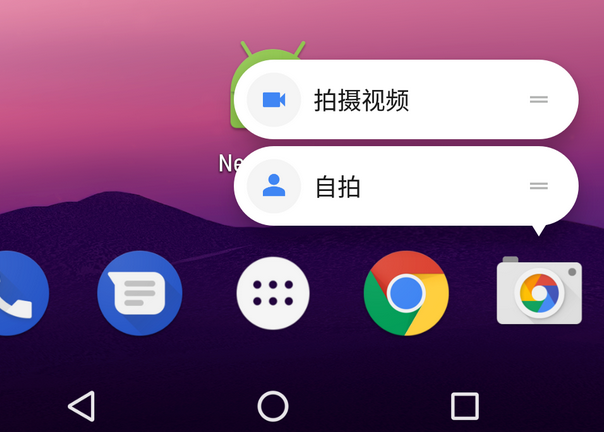
静态配置
静态配置一般用于固定的选项,需要在资源文件重定义。在res下建立xml目录并新建shortcuts.xml文件,这里面定义shortcut的显示内容和跳转intent,代码如下
<shortcuts xmlns:android="http://schemas.android.com/apk/res/android">

    <shortcut

        android:shortcutId="static_1"

        android:enabled="true"

        android:icon="@mipmap/ic_launcher"

        android:shortcutShortLabel="@string/static_shortcut_short_name_1"

        android:shortcutLongLabel="@string/static_shortcut_long_name_1" >

        <intent

            android:action="android.intent.action.VIEW"

            android:targetPackage="com.example.myapplication"

            android:targetClass="com.example.myapplication.TestPIPActivity" />

        <categories android:name="android.shortcut.conversation" />

    </shortcut>

</shortcuts>
- id: shortcut的id,必须惟一,否则后面的会覆盖前面的
- longLabel: 显示在弹出菜单中的label
- shortLabel: 通过拖拽显示在桌面上的label
- icon: 一个选项对应的icon
- intent: 跳转intent,必须设置,否则会抛出
java.lang.NullPointerException: Shortcut Intent must be provided的异常
之后还要在AndroidManifest中的activity中添加meta-data标签,代码如下
<?xml version="1.0" encoding="utf-8"?>

<manifest xmlns:android="http://schemas.android.com/apk/res/android"

    package="com.example.myapplication">

    <application

        android:allowBackup="true"

        android:icon="@mipmap/ic_launcher"

        android:label="@string/app_name"

        android:roundIcon="@mipmap/ic_launcher_round"

        android:supportsRtl="true"

        android:theme="@style/AppTheme">

        <activity

            android:name=".TestPIPActivity"

            android:supportsPictureInPicture="true"

            ></activity>

        <activity android:name=".MainActivity"

            android:resizeableActivity="true"

            >

            <intent-filter>

                <action android:name="android.intent.action.MAIN" />

                <category android:name="android.intent.category.LAUNCHER" />

            </intent-filter>

            <meta-data

                android:name="android.app.shortcuts"

                android:resource="@xml/shortcuts"/>

        </activity>

    </application>

</manifest>
这样就可以通过资源文件的配置生成shortcut。需要注意的是,shortcut的数量并不能无限增加,当数量超过4时就会抛出如下异常
动态生成
动态生成shortcut由ShortcutInfo构成,ShortcutInfo有几个主要属性与静态配置相同,下面就通过ShortcutManager动态的生成两个shortcut
    private void initShortcut() {

        ShortcutManager shortcutManager = getSystemService(ShortcutManager.class);

        ShortcutInfo shortcutInfo = new ShortcutInfo.Builder(this, "1")

                .setShortLabel("dynamic short 1")

                .setLongLabel("dynamic long 1")

                .setDisabledMessage("disable")

                .setIcon(Icon.createWithResource(this, R.mipmap.ic_launcher))

                .setIntent(new Intent(Intent.ACTION_VIEW, Uri.EMPTY, this, MainActivity.class))

                .build();

        ShortcutInfo shortcutInfo1 = new ShortcutInfo.Builder(this, "2")

                .setShortLabel("dynamic short 1")

                .setLongLabel("dynamic long 2")

                .setIcon(Icon.createWithResource(this, R.mipmap.ic_launcher))

                .setIntent(new Intent(Intent.ACTION_VIEW, Uri.EMPTY, this, SecondActivity.class))

                .build();

        List<ShortcutInfo> shortcutInfoList = new ArrayList<>();

        shortcutInfoList.add(shortcutInfo);

        shortcutInfoList.add(shortcutInfo1);

        shortcutManager.addDynamicShortcuts(shortcutInfoList);

    }
android7/8新特性 画中画、shortcut和分屏模式的更多相关文章
- Android7.0新特性,及Android N适配
新特性部分 Android 7.0 Nougat 提供新功能以提升性能.生产效率和安全性,主要新增了下面的新特性和优化: 一.新的Notification Android N 添加了很多新的notif ...
- 重新想象 Windows 8.1 Store Apps (92) - 其他新特性: CoreDispatcher, 日历, 自定义锁屏系列图片
[源码下载] 重新想象 Windows 8.1 Store Apps (92) - 其他新特性: CoreDispatcher, 日历, 自定义锁屏系列图片 作者:webabcd 介绍重新想象 Win ...
- Android N分屏模式Activity生命周期的变化
昨天Google发布了Android N Preview, balabala....我是用模拟器去验证的, 通过长按多任务窗口(口)进入分屏模式, 这里只进行了简单的测试, 不排除通过配置哪个参数, ...
- Android7.0 新特性
删除了三个隐式广播 1.监听网络变化的广播 CONNECTIVITY_ACTION,在Manifest.xml中注册的 不会受到,在前台运行的程序 registerReceiver()注册的广播可以接 ...
- FineUIMvc新特性速递(大间距模式,隐藏菜单垂直滚动条)
即将发布的 FineUIMvc 新版本会引入两个重要的特性,用来提升用户体验,现在就来先睹为快吧: 大间距模式 我们已经支持的显示模式有:紧凑模式,普通模式,大字体模式. 紧凑模式: 普通模式: 大字 ...
- Android N(7.0) 被美翻的新特性!
Tamic 专注移动开发!更多文章请关注 Csdn: http://blog.csdn.net/sk719887916/article/details/52612444 $ http://www.ji ...
- ios9和ios10的新特性
昨天面试了一个做ios开发的公司,其中面试官问我最新的ios系统版本是多少,以及它的特性是什么?由于自己是初学者,所以对这些没有关注过.今天特地搜索了一下关于ios9和ios10的新特性,并整理了一下 ...
- iOS开发——新特性OC篇&IOS9 SDK新特性
iOS9 SDK新特性 WWDC 2015苹果开发者大会是移动开发者一年一度的盛会,InfoQ中文站除了第一时间整理Keynote内容分享给大家之外,还邀请了资深的一线开发者分享他们的收获.本文为王巍 ...
- Android 7.0(牛轧糖)新特性
Android 7.0(牛轧糖)新特性 谷歌正式在I/O大会现场详细介绍了有关Android 7.0的大量信息.目前,我们已经知道,新一代Android操作系统将支持无缝升级,能够通过Vulkan A ...
随机推荐
- Spring 创建Bean的6种方式
前言 本文讲解了在Spring 应用中创建Bean的多种方式,包括自动创建,以及手动创建注入方式,实际开发中可以根据业务场景选择合适的方案. 方式1: 使用Spring XML方式配置,该方式用于在纯 ...
- Django rest framework 之版本
一.通过 QueryParameterVersioning 获取版本 通过 QueryParameterVersioning 从 get 请求中获取版本信息: 1.新建 app,名为 api,Proj ...
- Python 大文件处理
非内存资源可以使用with 在python中逐行读取大文件 在我们日常工作中,难免会有处理日志文件的时候,当文件小的时候,基本不用当心什么,直接用file.read()或readlines()就可以了 ...
- 洛谷 P1522 牛的旅行 Cow Tours
题目链接:https://www.luogu.org/problem/P1522 思路:编号,然后跑floyd,这是很清楚的.然后记录每个点在这个联通块中的最远距离. 然后分连通块,枚举两个点(不属于 ...
- 闲谈关于discuz内核缓存机制
Discuz! 缓存 Discuz! X2.5 的 config_global.php 中有这样一行代码 $_config['cache']['type'] = 'sql'; 这就是 Discuz! ...
- 13、Python文件处理、os模块、json/pickle序列化模块
一.字符编码 Python3中字符串默认为Unicode编码. str类型的数据可以编码成其他字符编码的格式,编码的结果为bytes类型. # coding:gbk x = '上' # 当程序执行时, ...
- 爬虫-retrying用法
文档:https://pypi.org/project/retrying/ 安装 pip install retrying 设置最大重试次数 # coding=utf-8 import request ...
- 为什么 JVM 不用 JIT 全程编译?
考虑到跨平台,所以无法使用AOT: 考虑到执行效率,所以无法全部使用JIT: 编译技术大约分为两种,一种AOT,只线下(offline)就将源代码编译成目标机器码,这是普遍用在系统程序语言中:另一种是 ...
- Codeforces Round #603 (Div. 2) A. Sweet Problem(数学)
链接: https://codeforces.com/contest/1263/problem/A 题意: You have three piles of candies: red, green an ...
- Mophues HDU - 4746 (莫比乌斯反演)
Mophues \[ Time Limit: 10000 ms\quad Memory Limit: 262144 kB \] 题意 求出满足 \(gcd\left(a,b\right) = k\), ...