
重构sql server的sys.sp_helptext存储
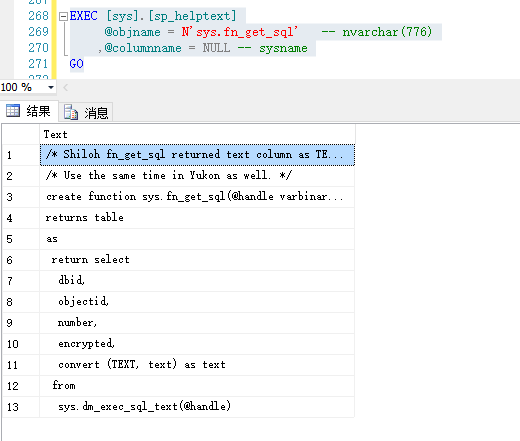

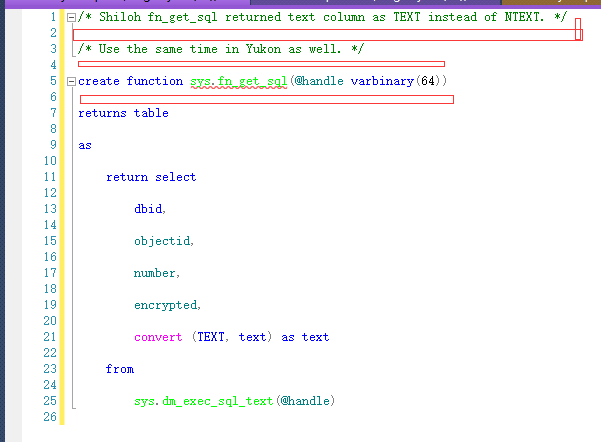

if object_id(N'dbo.usp_helptext', 'P') IS NOT NULL

begin

    drop procedure [dbo].[usp_helptext];

end

go

create procedure [dbo].[usp_helptext]

(

     @objname nvarchar(776)

    ,@columnname sysname = NULL

    ,@keeporiginal bit = NULL

)

as

begin

    set nocount on

    set @keeporiginal = ISNULL(@keeporiginal, 1);

    declare @dbname sysname

    ,@objid    int

    ,@BlankSpaceAdded   int

    ,@BasePos       int

    ,@CurrentPos    int

    ,@TextLength    int

    ,@LineId        int

    ,@AddOnLen      int

    ,@LFCR          int --lengths of line feed carriage return

    ,@DefinedLength int

    /* NOTE: Length of @SyscomText is 4000 to replace the length of

    ** text column in syscomments.

    ** lengths on @Line, #CommentText Text column and

    ** value for @DefinedLength are all 255. These need to all have

    ** the same values. 255 was selected in order for the max length

    ** display using down level clients

    */

    ,@SyscomText    nvarchar(4000)

    ,@Line          nvarchar(255)

    select @DefinedLength = 255

    select @BlankSpaceAdded = 0 /*Keeps track of blank spaces at end of lines. Note Len function ignores

                                    trailing blank spaces*/

    CREATE TABLE #CommentText

    (LineId    int

        ,Text  nvarchar(255) collate catalog_default)

    /*

    **  Make sure the @objname is local to the current database.

    */

    select @dbname = parsename(@objname,3)

    if @dbname is null

        select @dbname = db_name()

    else if @dbname <> db_name()

            begin

                    raiserror(15250,-1,-1)

                    return (1)

            end

    /*

    **  See if @objname exists.

    */

    select @objid = object_id(@objname)

    if (@objid is null)

            begin

            raiserror(15009,-1,-1,@objname,@dbname)

            return (1)

            end

    -- If second parameter was given.

    if ( @columnname is not null)

        begin

            -- Check if it is a table

            if (select count(*) from sys.objects where object_id = @objid and type in ('S ','U ','TF'))=0

                begin

                    raiserror(15218,-1,-1,@objname)

                    return(1)

                end

            -- check if it is a correct column name

            if ((select 'count'=count(*) from sys.columns where name = @columnname and object_id = @objid) =0)

                begin

                    raiserror(15645,-1,-1,@columnname)

                    return(1)

                end

        if (ColumnProperty(@objid, @columnname, 'IsComputed') = 0)

            begin

                raiserror(15646,-1,-1,@columnname)

                return(1)

            end

            declare ms_crs_syscom  CURSOR LOCAL

            FOR select text from syscomments where id = @objid and encrypted = 0 and number =

                            (select column_id from sys.columns where name = @columnname and object_id = @objid)

                            order by number,colid

            FOR READ ONLY

        end

    else if @objid < 0    -- Handle system-objects

        begin

            -- Check count of rows with text data

            if (select count(*) from master.sys.syscomments where id = @objid and text is not null) = 0

                begin

                    raiserror(15197,-1,-1,@objname)

                    return (1)

                end

            declare ms_crs_syscom CURSOR LOCAL FOR select text from master.sys.syscomments where id = @objid

                ORDER BY number, colid FOR READ ONLY

        end

    else

        begin

            /*

            **  Find out how many lines of text are coming back,

            **  and return if there are none.

            */

            if (select count(*) from syscomments c, sysobjects o where o.xtype not in ('S', 'U')

                and o.id = c.id and o.id = @objid) = 0

                    begin

                            raiserror(15197,-1,-1,@objname)

                            return (1)

                    end

            if (select count(*) from syscomments where id = @objid and encrypted = 0) = 0

                    begin

                            raiserror(15471,-1,-1,@objname)

                            return (0)

                    end

            declare ms_crs_syscom  CURSOR LOCAL

            FOR select text from syscomments where id = @objid and encrypted = 0

                    ORDER BY number, colid

            FOR READ ONLY

        end

    /*

    **  else get the text.

    */

    select @LFCR = 2

    select @LineId = 1

    open ms_crs_syscom

    fetch next from ms_crs_syscom into @SyscomText

    while @@fetch_status >= 0

    begin

        select  @BasePos    = 1

        select  @CurrentPos = 1

        select  @TextLength = LEN(@SyscomText)

        while @CurrentPos  != 0

        begin

            --Looking for end of line followed by carriage return

            select @CurrentPos =   CHARINDEX(char(13)+char(10), @SyscomText, @BasePos)

            --If carriage return found

            IF @CurrentPos != 0

            begin

                /*If new value for @Lines length will be > then the

                **set length then insert current contents of @line

                **and proceed.

                */

                while (isnull(LEN(@Line),0) + @BlankSpaceAdded + @CurrentPos-@BasePos + @LFCR) > @DefinedLength

                begin

                    select @AddOnLen = @DefinedLength-(isnull(LEN(@Line),0) + @BlankSpaceAdded)

                    insert #CommentText values

                    ( @LineId,

                        isnull(@Line, N'') + isnull(SUBSTRING(@SyscomText, @BasePos, @AddOnLen), N''))

                    select @Line = NULL, @LineId = @LineId + 1,

                            @BasePos = @BasePos + @AddOnLen, @BlankSpaceAdded = 0

                end

                -- 注释系统原来的使用如下修改

                --select @Line    = isnull(@Line, N'') + isnull(SUBSTRING(@SyscomText, @BasePos, @CurrentPos-@BasePos + @LFCR), N'')

                select @Line    = isnull(@Line, N'') + isnull(SUBSTRING(@SyscomText, @BasePos, @CurrentPos-@BasePos + (CASE @keeporiginal WHEN 1 THEN @LFCR ELSE 0 END)), N'')

                select @BasePos = @CurrentPos+2

                insert #CommentText values( @LineId, @Line )

                select @LineId = @LineId + 1

                select @Line = NULL

            end

            else

            --else carriage return not found

            begin

                IF @BasePos <= @TextLength

                begin

                    /*If new value for @Lines length will be > then the

                    **defined length

                    */

                    while (isnull(LEN(@Line),0) + @BlankSpaceAdded + @TextLength-@BasePos+1 ) > @DefinedLength

                    begin

                        select @AddOnLen = @DefinedLength - (isnull(LEN(@Line),0) + @BlankSpaceAdded)

                        INSERT #CommentText VALUES

                        ( @LineId,

                            isnull(@Line, N'') + isnull(SUBSTRING(@SyscomText, @BasePos, @AddOnLen), N''))

                        select @Line = NULL, @LineId = @LineId + 1,

                            @BasePos = @BasePos + @AddOnLen, @BlankSpaceAdded = 0

                    end

                    select @Line = isnull(@Line, N'') + isnull(SUBSTRING(@SyscomText, @BasePos, @TextLength-@BasePos+1 ), N'')

                    if LEN(@Line) < @DefinedLength and charindex(' ', @SyscomText, @TextLength+1 ) > 0

                    begin

                        select @Line = @Line + ' ', @BlankSpaceAdded = 1

                    end

                end

            end

        end

        FETCH NEXT from ms_crs_syscom into @SyscomText

    end

    IF @Line is NOT NULL

        INSERT #CommentText VALUES( @LineId, @Line )

    select Text from #CommentText order by LineId

    CLOSE  ms_crs_syscom

    DEALLOCATE     ms_crs_syscom

    DROP TABLE     #CommentText

    return (0) -- sp_helptext

end

go


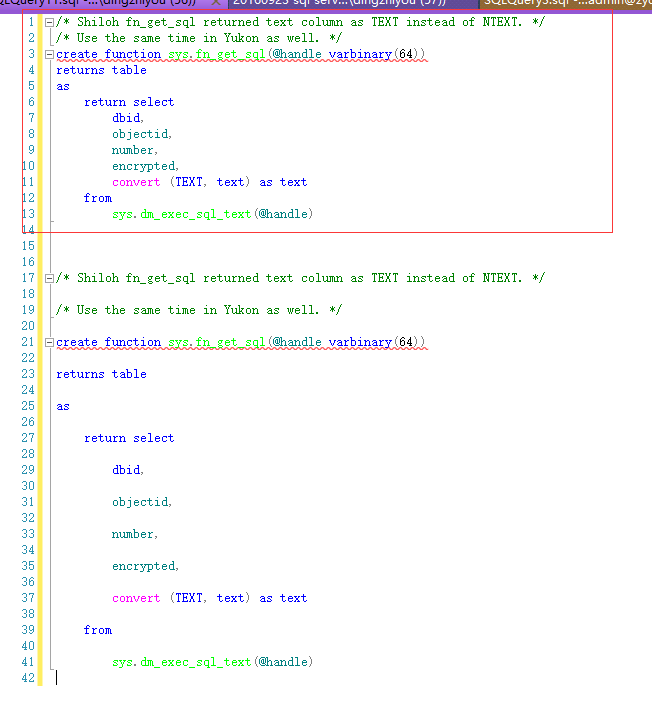

EXEC [sys].[sp_helptext]

     @objname = N'sys.fn_get_sql'    -- nvarchar(776)

    ,@columnname = NULL -- sysname

GO

EXEC [dbo].[usp_helptext]

     @objname = N'sys.fn_get_sql'    -- nvarchar(776)

    ,@columnname = NULL -- sysname

    ,@keeporiginal = 1 -- bit

GO
IF OBJECT_ID(N'[dbo].[uvm_MyTestView]', 'V') IS NOT NULL

BEGIN

    DROP VIEW [dbo].[uvm_MyTestView];

END

GO

CREATE VIEW [dbo].[uvm_MyTestView]

AS

    SELECT

          1 AS N'Col_1111111111111111111111111111111111111111111111111111111111111111111111111111111111111111111111111111111111111111111111111111', 2 AS [Col_2222222222222222222222222222222222222222222222222222222222222222222222222222222222222222222222222222222222222222222222222222]

GO


重构sql server的sys.sp_helptext存储的更多相关文章
- SQL Server 深入解析索引存储(下)
标签:SQL SERVER/MSSQL SERVER/数据库/DBA/索引体系结构/非聚集索引 概述 非聚集索引与聚集索引具有相同的 B 树结构,它们之间的显著差别在于以下两点: 基础表的数据行不按非 ...
- SQL Server 堆表行存储大小(Record Size)
一.本文所涉及的内容(Contents) 本文所涉及的内容(Contents) 背景(Contexts) 堆表行记录存储格式(Heap) 案例分析(Case) 参考文献(References) 二.背 ...
- SQL Server 深入解析索引存储(非聚集索引)
标签:SQL SERVER/MSSQL SERVER/数据库/DBA/索引体系结构/非聚集索引 概述 非聚集索引与聚集索引具有相同的 B 树结构,它们之间的显著差别在于以下两点: 基础表的数据行不按非 ...
- SQL Server 2014 聚集列存储
SQL Server 自2012以来引入了列存储的概念,至今2016对列存储的支持已经是非常友好了.由于我这边线上环境主要是2014,所以本文是以2014为基础的SQL Server 的列存储的介绍. ...
- SQL Server 深入解析索引存储(中)
标签:SQL SERVER/MSSQL SERVER/数据库/DBA/索引体系结构/堆 概述 本篇文章是关于堆的存储结构.堆是不含聚集索引的表(所以只有非聚集索引的表也是堆).堆的 sys.parti ...
- SQL Server 深入解析索引存储(上)
标签:SQL SERVER/MSSQL SERVER/数据库/DBA/索引体系结构/堆/聚集索引 概述 最近要分享一个课件就重新把这块知识整理了一遍出来,篇幅有点长,想要理解的透彻还是要上机实践. 聚 ...
- SQL Server索引 (原理、存储)聚集索引、非聚集索引、堆 <第一篇>
一.存储结构 在SQL Server中,有许多不同的可用排列规则选项. 二进制:按字符的数字表示形式排序(ASCII码中,用数字32表示空格,用68表示字母"D").因为所有内容都 ...
- SQL Server 表和索引存储结构
在上一篇文章中,我们介绍了SQL Server数据文件的页面类型,系统通过96个字节的头部信息和系统表从逻辑层面上将表的存储结构管理起来,具体到表的存储结构上,SQL Server引入对象.分区.堆或 ...
- SQL Server 深入解析索引存储(堆)
标签:SQL SERVER/MSSQL SERVER/数据库/DBA/索引体系结构/堆 概述 本篇文章是关于堆的存储结构.堆是不含聚集索引的表(所以只有非聚集索引的表也是堆).堆的 sys.parti ...
随机推荐
- u盘写入Ubuntu后容量变小,恢复方式
具体请参考网址:http://jingyan.baidu.com/article/59703552e754e48fc00740ed.html 经过验证,方法是可以的
- ABP理论学习之授权(Authorization)
返回总目录 本篇目录 介绍 定义权限 检查权限 使用AbpAuthorize特性 使用IPermissionChecker Razor视图 客户端(Javascript) 权限管理者 介绍 几乎所有的 ...
- 那些证书相关的玩意儿(SSL,X.509,PEM,DER,CRT,CER,KEY,CSR,P12等)
之前没接触过证书加密的话,对证书相关的这些概念真是感觉挺棘手的,因为一下子来了一大堆新名词,看起来像是另一个领域的东西,而不是我们所熟悉的编程领域的那些东西,起码我个人感觉如此,且很长时间都没怎么搞懂 ...
- Redis性能问题排查解决手册(七)
阅读目录: 性能相关的数据指标 内存使用率used_memory 命令处理总数total_commands_processed 延迟时间 内存碎片率 回收key 总结 性能相关的数据指标 通过Red ...
- ASP.NET MVC 从零开始 - 自动化部署(其二)
这篇文章是从我的 github 博客 http://lxconan.github.io 导入的. 这是这个系列的第五篇了,前四篇请参见: ASP.NET MVC 从零开始 – Create and R ...
- Ubuntu 16 安装ElasticSearch
首先安装Java,参见博客:http://www.cnblogs.com/1zhk/p/6056406.html 下载ElasticSearch安装包 curl -L -O https://artif ...
- Solr的原理及在项目中的使用实例.
前面已经讲过 如果安装及配置Solr服务器了, 那么现在我们就来正式在代码中使用Solr.1,这里Solr主要是怎么使用的呢? 当我们在前台页面搜索商品名称关键词时, 我们这时是在Solr库中去查找 ...
- javascript的快速排序法
在排序方式中,快速是比较普遍使用的,因为其速度快. 因为其是不断的递归,而且是根据基准点的左右两边开始递归,直到数组只有一个值的时候才返回. 这个基准点是自己定的. 一般取中间,比较好理解. < ...
- Discuz门户首页关键词和描述显示“首页”的解决方法
Discuz社区在后台设置好门户标题.关键字.描述,更新缓存,发现用户登录状态下,门户首页的关键字和描述正常显示:但在游客状态下不显示,在某工具中查看到的情况如下: 现找到两种解决办法:(记得修改前备 ...
- JS数字计算精度误差的解决方法
本篇文章主要是对javascript避免数字计算精度误差的方法进行了介绍,需要的朋友可以过来参考下,希望对大家有所帮助. 如果我问你 0.1 + 0.2 等于几?你可能会送我一个白眼,0.1 + 0. ...