
Httpd服务进阶知识-基于FASTCGI实现的LAMP架构
Httpd服务进阶知识-基于FASTCGI实现的LAMP架构
作者:尹正杰
版权声明:原创作品,谢绝转载!否则将追究法律责任。
一.httpd+php结合的方式
module: php

fastcgi : php-fpm

php-fpm:

    CentOS :

    PHP-5.3.2之前:默认不支持fpm机制;需要自行打补丁并编译安装

    httpd-2.2:默认不支持fcgi协议,需要自行编译此模块

    解决方案:编译安装httpd-2.4, php-5.3.+

    CentOS :

    httpd-2.4:rpm包默认编译支持fcgi模块

    php-fpm包:专用于将php运行于fpm模式
二.配置fastcgi实验准备
1>.虚拟机配置
[root@node101.yinzhengjie.org.cn ~]# cat /etc/redhat-release

CentOS Linux release 7.6. (Core)

[root@node101.yinzhengjie.org.cn ~]#

[root@node101.yinzhengjie.org.cn ~]# uname -r

3.10.-.el7.x86_64

[root@node101.yinzhengjie.org.cn ~]#

[root@node101.yinzhengjie.org.cn ~]# uname -m

x86_64

[root@node101.yinzhengjie.org.cn ~]#

[root@node101.yinzhengjie.org.cn ~]# free -h

              total        used        free      shared  buff/cache   available

Mem:           .7G        694M        .4G         20M        .6G        .7G

Swap:          .9G          0B        .9G

[root@node101.yinzhengjie.org.cn ~]#
2>.角色分配
node101.yinzhengjie.org.cn:

  HTTPD服务器

node102.yinzhengjie.org.cn:
  FASTCGI服务器

node103.yinzhengjie.org.cn:
  MariaDB服务器
三.基于FASTCGI方式实现连接数据库案例实战
1>.node101.yinzhengjie.org.cn节点操作
[root@node101.yinzhengjie.org.cn ~]# yum -y install  httpd

Loaded plugins: fastestmirror

Determining fastest mirrors

 * base: mirror.bit.edu.cn

 * extras: mirror.bit.edu.cn

 * updates: mirrors.huaweicloud.com

base                                                                                                                                                 | 3.6 kB  ::

extras                                                                                                                                               | 2.9 kB  ::

updates                                                                                                                                              | 2.9 kB  ::

(/): base//x86_64/group_gz                                                                                                                        |  kB  ::

(/): extras//x86_64/primary_db                                                                                                                    |  kB  ::

(/): updates//x86_64/primary_db                                                                                                                   | 5.8 MB  ::

(/): base//x86_64/primary_db                                                                                                                      | 6.0 MB  ::

Resolving Dependencies

--> Running transaction check

---> Package httpd.x86_64 :2.4.-.el7.centos will be installed

--> Processing Dependency: httpd-tools = 2.4.-.el7.centos for package: httpd-2.4.-.el7.centos.x86_64

--> Processing Dependency: libaprutil-.so.()(64bit) for package: httpd-2.4.-.el7.centos.x86_64

--> Processing Dependency: libapr-.so.()(64bit) for package: httpd-2.4.-.el7.centos.x86_64

--> Running transaction check

---> Package apr.x86_64 :1.4.-.el7 will be installed

---> Package apr-util.x86_64 :1.5.-.el7 will be installed

---> Package httpd-tools.x86_64 :2.4.-.el7.centos will be installed

--> Finished Dependency Resolution

Dependencies Resolved

============================================================================================================================================================================

 Package                                   Arch                                 Version                                            Repository                          Size

============================================================================================================================================================================

Installing:

 httpd                                     x86_64                               2.4.-.el7.centos                                base                               2.7 M

Installing for dependencies:

 apr                                       x86_64                               1.4.-.el7                                        base                                k

 apr-util                                  x86_64                               1.5.-.el7                                        base                                 k

 httpd-tools                               x86_64                               2.4.-.el7.centos                                base                                 k

Transaction Summary

============================================================================================================================================================================

Install   Package (+ Dependent packages)

Total download size: 3.0 M

Installed size: 9.9 M

Downloading packages:

(/): apr-util-1.5.-.el7.x86_64.rpm                                                                                                               |   kB  ::

(/): apr-1.4.-.el7.x86_64.rpm                                                                                                                    |  kB  ::

(/): httpd-2.4.-.el7.centos.x86_64.rpm                                                                                                          | 2.7 MB  ::

(/): httpd-tools-2.4.-.el7.centos.x86_64.rpm                                                                                                    |   kB  ::

----------------------------------------------------------------------------------------------------------------------------------------------------------------------------

Total                                                                                                                                       1.7 MB/s | 3.0 MB  ::

Running transaction check

Running transaction test

Transaction test succeeded

Running transaction

  Installing : apr-1.4.-.el7.x86_64                                                                                                                                   /

  Installing : apr-util-1.5.-.el7.x86_64                                                                                                                              /

  Installing : httpd-tools-2.4.-.el7.centos.x86_64                                                                                                                   /

  Installing : httpd-2.4.-.el7.centos.x86_64                                                                                                                         /

  Verifying  : apr-1.4.-.el7.x86_64                                                                                                                                   /

  Verifying  : httpd-tools-2.4.-.el7.centos.x86_64                                                                                                                   /

  Verifying  : apr-util-1.5.-.el7.x86_64                                                                                                                              /

  Verifying  : httpd-2.4.-.el7.centos.x86_64                                                                                                                         /

Installed:

  httpd.x86_64 :2.4.-.el7.centos

Dependency Installed:

  apr.x86_64 :1.4.-.el7                          apr-util.x86_64 :1.5.-.el7                          httpd-tools.x86_64 :2.4.-.el7.centos

Complete!

[root@node101.yinzhengjie.org.cn ~]#
[root@node101.yinzhengjie.org.cn ~]# yum -y install httpd
[root@node101.yinzhengjie.org.cn ~]# vim /etc/httpd/conf.d/fcgi.conf

[root@node101.yinzhengjie.org.cn ~]#

[root@node101.yinzhengjie.org.cn ~]# cat /etc/httpd/conf.d/fcgi.conf                                  #编辑配置文件将动态资源内容交给fastcgi服务器处理

DirectoryIndex index.php

ProxyRequests Off

ProxyPassMatch ^/(.*\.php)$ fcgi://172.30.1.102:9000/data/html/$1

[root@node101.yinzhengjie.org.cn ~]#

[root@node101.yinzhengjie.org.cn ~]# echo "172.30.1.101 node101.yinzhengjie.org.cn" > /var/www/html/index.html          #设置静态页面内容

[root@node101.yinzhengjie.org.cn ~]#

[root@node101.yinzhengjie.org.cn ~]# systemctl start httpd

[root@node101.yinzhengjie.org.cn ~]#

[root@node101.yinzhengjie.org.cn ~]# ss -ntl

State      Recv-Q Send-Q                                         Local Address:Port                                                        Peer Address:Port

LISTEN                                                                   *:                                                                     *:*

LISTEN                                                                   *:                                                                     *:*

LISTEN                                                                  :::                                                                    :::*

[root@node101.yinzhengjie.org.cn ~]#
2>.node102.yinzhengjie.org.cn节点操作
[root@node102.yinzhengjie.org.cn ~]# yum -y install php-fpm php-mysql

Loaded plugins: fastestmirror

Determining fastest mirrors

 * base: mirror.bit.edu.cn

 * extras: mirror.bit.edu.cn

 * updates: mirror.jdcloud.com

base                                                                                                                      | 3.6 kB  ::

extras                                                                                                                    | 2.9 kB  ::

updates                                                                                                                   | 2.9 kB  ::

(/): base//x86_64/group_gz                                                                                             |  kB  ::

(/): extras//x86_64/primary_db                                                                                         |  kB  ::

(/): updates//x86_64/primary_db                                                                                        | 5.8 MB  ::

(/): base//x86_64/primary_db                                                                                           | 6.0 MB  ::

Resolving Dependencies

--> Running transaction check

---> Package php-fpm.x86_64 :5.4.-46.1.el7_7 will be installed

--> Processing Dependency: php-common(x86-) = 5.4.-46.1.el7_7 for package: php-fpm-5.4.-46.1.el7_7.x86_64

---> Package php-mysql.x86_64 :5.4.-46.1.el7_7 will be installed

--> Processing Dependency: php-pdo(x86-) = 5.4.-46.1.el7_7 for package: php-mysql-5.4.-46.1.el7_7.x86_64

--> Running transaction check

---> Package php-common.x86_64 :5.4.-46.1.el7_7 will be installed

--> Processing Dependency: libzip.so.()(64bit) for package: php-common-5.4.-46.1.el7_7.x86_64

---> Package php-pdo.x86_64 :5.4.-46.1.el7_7 will be installed

--> Running transaction check

---> Package libzip.x86_64 :0.10.-.el7 will be installed

--> Finished Dependency Resolution

Dependencies Resolved

=================================================================================================================================================

 Package                           Arch                          Version                                    Repository                      Size

=================================================================================================================================================

Installing:

 php-fpm                           x86_64                        5.4.-46.1.el7_7                          updates                        1.4 M

 php-mysql                         x86_64                        5.4.-46.1.el7_7                          updates                         k

Installing for dependencies:

 libzip                            x86_64                        0.10.-.el7                               base                             k

 php-common                        x86_64                        5.4.-46.1.el7_7                          updates                         k

 php-pdo                           x86_64                        5.4.-46.1.el7_7                          updates                          k

Transaction Summary

=================================================================================================================================================

Install   Packages (+ Dependent packages)

Total download size: 2.2 M

Installed size: 8.8 M

Downloading packages:

(/): php-common-5.4.-46.1.el7_7.x86_64.rpm                                                                            |  kB  ::

(/): php-fpm-5.4.-46.1.el7_7.x86_64.rpm                                                                               | 1.4 MB  ::

(/): php-mysql-5.4.-46.1.el7_7.x86_64.rpm                                                                             |  kB  ::

(/): php-pdo-5.4.-46.1.el7_7.x86_64.rpm                                                                               |   kB  ::

(/): libzip-0.10.-.el7.x86_64.rpm                                                                                     |   kB  ::

-------------------------------------------------------------------------------------------------------------------------------------------------

Total                                                                                                            5.7 MB/s | 2.2 MB  ::

Running transaction check

Running transaction test

Transaction test succeeded

Running transaction

  Installing : libzip-0.10.-.el7.x86_64                                                                                                    /

  Installing : php-common-5.4.-46.1.el7_7.x86_64                                                                                           /

  Installing : php-pdo-5.4.-46.1.el7_7.x86_64                                                                                              /

  Installing : php-mysql-5.4.-46.1.el7_7.x86_64                                                                                            /

  Installing : php-fpm-5.4.-46.1.el7_7.x86_64                                                                                              /

  Verifying  : php-common-5.4.-46.1.el7_7.x86_64                                                                                           /

  Verifying  : libzip-0.10.-.el7.x86_64                                                                                                    /

  Verifying  : php-pdo-5.4.-46.1.el7_7.x86_64                                                                                              /

  Verifying  : php-mysql-5.4.-46.1.el7_7.x86_64                                                                                            /

  Verifying  : php-fpm-5.4.-46.1.el7_7.x86_64                                                                                              /

Installed:

  php-fpm.x86_64 :5.4.-46.1.el7_7                                     php-mysql.x86_64 :5.4.-46.1.el7_7

Dependency Installed:

  libzip.x86_64 :0.10.-.el7               php-common.x86_64 :5.4.-46.1.el7_7               php-pdo.x86_64 :5.4.-46.1.el7_7

Complete!

[root@node102.yinzhengjie.org.cn ~]#
[root@node102.yinzhengjie.org.cn ~]# yum -y install php-fpm php-mysql
[root@node102.yinzhengjie.org.cn ~]# rpm -ql php-fpm

/etc/logrotate.d/php-fpm

/etc/php-fpm.conf

/etc/php-fpm.d

/etc/php-fpm.d/www.conf

/etc/sysconfig/php-fpm

/run/php-fpm

/usr/lib/systemd/system/php-fpm.service

/usr/lib/tmpfiles.d/php-fpm.conf

/usr/sbin/php-fpm

/usr/share/doc/php-fpm-5.4.

/usr/share/doc/php-fpm-5.4./fpm_LICENSE

/usr/share/doc/php-fpm-5.4./php-fpm.conf.default

/usr/share/fpm

/usr/share/fpm/status.html

/usr/share/man/man8/php-fpm..gz

/var/log/php-fpm

[root@node102.yinzhengjie.org.cn ~]#
[root@node102.yinzhengjie.org.cn ~]# rpm -ql php-fpm #查看php-fpm软件包安装了哪些文件
[root@node102.yinzhengjie.org.cn ~]# rpm -q --scripts php-fpm

preinstall scriptlet (using /bin/sh):

# Add the "apache" user as we don't require httpd

getent group  apache >/dev/null || \

  groupadd -g  -r apache

getent passwd apache >/dev/null || \

  useradd -r -u  -g apache -s /sbin/nologin \

    -d /usr/share/httpd -c "Apache" apache

exit

postinstall scriptlet (using /bin/sh):

if [ $ -eq  ] ; then

        # Initial installation

        systemctl preset php-fpm.service >/dev/null >& || :

fi

preuninstall scriptlet (using /bin/sh):

if [ $ -eq  ] ; then

        # Package removal, not upgrade

        systemctl --no-reload disable php-fpm.service > /dev/null >& || :

        systemctl stop php-fpm.service > /dev/null >& || :

fi

postuninstall scriptlet (using /bin/sh):

systemctl daemon-reload >/dev/null >& || :

if [ $ -ge  ] ; then

        # Package upgrade, not uninstall

        systemctl try-restart php-fpm.service >/dev/null >& || :

fi

# Handle upgrading from SysV initscript to native systemd unit.

# We can tell if a SysV version of php-fpm was previously installed by

# checking to see if the initscript is present.

[root@node102.yinzhengjie.org.cn ~]#
[root@node102.yinzhengjie.org.cn ~]# rpm -q --scripts php-fpm #安装php-fpm服务会做一些初始化配置,比如创建apache用户等
[root@node102.yinzhengjie.org.cn ~]# egrep -v "^;|^ *$" /etc/php-fpm.d/www.conf

[www]

listen = 127.0.0.1:                              #监听IP地址需要修改哟

listen.allowed_clients = 127.0.0.1                   #将这一行使用";"进行注释掉,它表示允许访问的客户端,注释它后允许所有客户端访问。

user = apache

group = apache

pm = dynamic

pm.max_children =

pm.start_servers =

pm.min_spare_servers =

pm.max_spare_servers =

slowlog = /var/log/php-fpm/www-slow.log

php_admin_value[error_log] = /var/log/php-fpm/www-error.log

php_admin_flag[log_errors] = on

php_value[session.save_handler] = files

php_value[session.save_path] = /var/lib/php/session

[root@node102.yinzhengjie.org.cn ~]#

[root@node102.yinzhengjie.org.cn ~]# vim /etc/php-fpm.d/www.conf

[root@node102.yinzhengjie.org.cn ~]#

[root@node102.yinzhengjie.org.cn ~]# egrep -v "^;|^ *$" /etc/php-fpm.d/www.conf

[www]

listen =

user = apache

group = apache

pm = dynamic

pm.max_children =

pm.start_servers =

pm.min_spare_servers =

pm.max_spare_servers =

slowlog = /var/log/php-fpm/www-slow.log

php_admin_value[error_log] = /var/log/php-fpm/www-error.log

php_admin_flag[log_errors] = on

php_value[session.save_handler] = files

php_value[session.save_path] = /var/lib/php/session

[root@node102.yinzhengjie.org.cn ~]#
[root@node102.yinzhengjie.org.cn ~]# vim /etc/php-fpm.d/www.conf #修改配置文件
[root@node102.yinzhengjie.org.cn ~]# ss -ntl

State       Recv-Q Send-Q                           Local Address:Port                                          Peer Address:Port

LISTEN                                                      *:                                                       *:*

LISTEN                                                     :::                                                      :::*

[root@node102.yinzhengjie.org.cn ~]#

[root@node102.yinzhengjie.org.cn ~]# systemctl start php-fpm

[root@node102.yinzhengjie.org.cn ~]#

[root@node102.yinzhengjie.org.cn ~]# ss -ntl

State       Recv-Q Send-Q                           Local Address:Port                                          Peer Address:Port

LISTEN                                                      *:                                                     *:*

LISTEN                                                      *:                                                       *:*

LISTEN                                                     :::                                                      :::*

[root@node102.yinzhengjie.org.cn ~]#
[root@node102.yinzhengjie.org.cn ~]# systemctl start php-fpm #启动php-fpm服务
[root@node102.yinzhengjie.org.cn ~]# mkdir /data/html -pv

mkdir: created directory ‘/data’

mkdir: created directory ‘/data/html’

[root@node102.yinzhengjie.org.cn ~]#

[root@node102.yinzhengjie.org.cn ~]# vim /data/html/pdo2.php

[root@node102.yinzhengjie.org.cn ~]#

[root@node102.yinzhengjie.org.cn ~]# cat /data/html/pdo2.php

<?php

try {

$user='jason';

$pass='yinzhengjie';

$dbh = new PDO('mysql:host=172.30.1.103;dbname=mysql', $user, $pass);

foreach($dbh->query('SELECT user,host,password from user') as $row) {

    print_r($row);

}

$dbh = null;

} catch (PDOException $e) {

    print "Error!: ". $e->getMessage(). "<br/>";

    die();

}

?>

[root@node102.yinzhengjie.org.cn ~]#

[root@node102.yinzhengjie.org.cn ~]# ll /data/html/

total

-rw-r--r--  root root  Dec  : pdo2.php

[root@node102.yinzhengjie.org.cn ~]#

[root@node102.yinzhengjie.org.cn ~]#
[root@node102.yinzhengjie.org.cn ~]# cat /data/html/pdo2.php #编写php连接数据库的测试代码
3>.node103.yinzhengjie.org.cn节点操作
[root@node103.yinzhengjie.org.cn ~]# yum -y install mariadb-server

Loaded plugins: fastestmirror

Determining fastest mirrors

 * base: mirror.bit.edu.cn

 * extras: mirror.bit.edu.cn

 * updates: mirror.jdcloud.com

base                                                                                                                      | 3.6 kB  ::

extras                                                                                                                    | 2.9 kB  ::

updates                                                                                                                   | 2.9 kB  ::

(/): base//x86_64/primary_db                                                                                           | 6.0 MB  ::

(/): base//x86_64/group_gz                                                                                             |  kB  ::

(/): extras//x86_64/primary_db                                                                                         |  kB  ::

(/): updates//x86_64/primary_db                                                                                        | 5.8 MB  ::

Resolving Dependencies

--> Running transaction check

---> Package mariadb-server.x86_64 :5.5.-.el7 will be installed

--> Processing Dependency: mariadb-libs(x86-) = :5.5.-.el7 for package: :mariadb-server-5.5.-.el7.x86_64

--> Processing Dependency: mariadb(x86-) = :5.5.-.el7 for package: :mariadb-server-5.5.-.el7.x86_64

--> Processing Dependency: perl-DBI for package: :mariadb-server-5.5.-.el7.x86_64

--> Processing Dependency: perl-DBD-MySQL for package: :mariadb-server-5.5.-.el7.x86_64

--> Processing Dependency: perl(DBI) for package: :mariadb-server-5.5.-.el7.x86_64

--> Running transaction check

---> Package mariadb.x86_64 :5.5.-.el7 will be installed

---> Package mariadb-libs.x86_64 :5.5.-.el7_5 will be updated

---> Package mariadb-libs.x86_64 :5.5.-.el7 will be an update

---> Package perl-DBD-MySQL.x86_64 :4.023-.el7 will be installed

---> Package perl-DBI.x86_64 :1.627-.el7 will be installed

--> Processing Dependency: perl(RPC::PlServer) >= 0.2001 for package: perl-DBI-1.627-.el7.x86_64

--> Processing Dependency: perl(RPC::PlClient) >= 0.2000 for package: perl-DBI-1.627-.el7.x86_64

--> Running transaction check

---> Package perl-PlRPC.noarch :0.2020-.el7 will be installed

--> Processing Dependency: perl(Net::Daemon) >= 0.13 for package: perl-PlRPC-0.2020-.el7.noarch

--> Processing Dependency: perl(Net::Daemon::Test) for package: perl-PlRPC-0.2020-.el7.noarch

--> Processing Dependency: perl(Net::Daemon::Log) for package: perl-PlRPC-0.2020-.el7.noarch

--> Running transaction check

---> Package perl-Net-Daemon.noarch :0.48-.el7 will be installed

--> Finished Dependency Resolution

Dependencies Resolved

=================================================================================================================================================

 Package                                Arch                          Version                                  Repository                   Size

=================================================================================================================================================

Installing:

 mariadb-server                         x86_64                        :5.5.-.el7                           base                          M

Installing for dependencies:

 mariadb                                x86_64                        :5.5.-.el7                           base                        8.7 M

 perl-DBD-MySQL                         x86_64                        4.023-.el7                              base                         k

 perl-DBI                               x86_64                        1.627-.el7                              base                         k

 perl-Net-Daemon                        noarch                        0.48-.el7                               base                          k

 perl-PlRPC                             noarch                        0.2020-.el7                            base                          k

Updating for dependencies:

 mariadb-libs                           x86_64                        :5.5.-.el7                           base                         k

Transaction Summary

=================================================================================================================================================

Install   Package  (+ Dependent packages)

Upgrade             (  Dependent package)

Total download size:  M

Downloading packages:

Delta RPMs disabled because /usr/bin/applydeltarpm not installed.

(/): mariadb-libs-5.5.-.el7.x86_64.rpm                                                                               |  kB  ::

(/): mariadb-5.5.-.el7.x86_64.rpm                                                                                    | 8.7 MB  ::

(/): perl-DBD-MySQL-4.023-.el7.x86_64.rpm                                                                              |  kB  ::

(/): perl-DBI-1.627-.el7.x86_64.rpm                                                                                    |  kB  ::

(/): perl-Net-Daemon-0.48-.el7.noarch.rpm                                                                              |   kB  ::

(/): perl-PlRPC-0.2020-.el7.noarch.rpm                                                                                |   kB  ::

(/): mariadb-server-5.5.-.el7.x86_64.rpm                                                                             |   MB  ::

-------------------------------------------------------------------------------------------------------------------------------------------------

Total                                                                                                            7.4 MB/s |   MB  ::

Running transaction check

Running transaction test

Transaction test succeeded

Running transaction

  Updating   : :mariadb-libs-5.5.-.el7.x86_64                                                                                            /

  Installing : :mariadb-5.5.-.el7.x86_64                                                                                                 /

  Installing : perl-Net-Daemon-0.48-.el7.noarch                                                                                             /

  Installing : perl-PlRPC-0.2020-.el7.noarch                                                                                               /

  Installing : perl-DBI-1.627-.el7.x86_64                                                                                                   /

  Installing : perl-DBD-MySQL-4.023-.el7.x86_64                                                                                             /

  Installing : :mariadb-server-5.5.-.el7.x86_64                                                                                          /

  Cleanup    : :mariadb-libs-5.5.-.el7_5.x86_64                                                                                          /

  Verifying  : :mariadb-libs-5.5.-.el7.x86_64                                                                                            /

  Verifying  : perl-Net-Daemon-0.48-.el7.noarch                                                                                             /

  Verifying  : :mariadb-5.5.-.el7.x86_64                                                                                                 /

  Verifying  : perl-DBD-MySQL-4.023-.el7.x86_64                                                                                             /

  Verifying  : :mariadb-server-5.5.-.el7.x86_64                                                                                          /

  Verifying  : perl-DBI-1.627-.el7.x86_64                                                                                                   /

  Verifying  : perl-PlRPC-0.2020-.el7.noarch                                                                                               /

  Verifying  : :mariadb-libs-5.5.-.el7_5.x86_64                                                                                          /

Installed:

  mariadb-server.x86_64 :5.5.-.el7

Dependency Installed:

  mariadb.x86_64 :5.5.-.el7       perl-DBD-MySQL.x86_64 :4.023-.el7   perl-DBI.x86_64 :1.627-.el7   perl-Net-Daemon.noarch :0.48-.el7

  perl-PlRPC.noarch :0.2020-.el7

Dependency Updated:

  mariadb-libs.x86_64 :5.5.-.el7

Complete!

[root@node103.yinzhengjie.org.cn ~]#
[root@node103.yinzhengjie.org.cn ~]# yum -y install mariadb-server
[root@node103.yinzhengjie.org.cn ~]# mysql_secure_installation

NOTE: RUNNING ALL PARTS OF THIS SCRIPT IS RECOMMENDED FOR ALL MariaDB

      SERVERS IN PRODUCTION USE!  PLEASE READ EACH STEP CAREFULLY!

In order to log into MariaDB to secure it, we'll need the current

password for the root user.  If you've just installed MariaDB, and

you haven't set the root password yet, the password will be blank,

so you should just press enter here.

Enter current password for root (enter for none):

OK, successfully used password, moving on...

Setting the root password ensures that nobody can log into the MariaDB

root user without the proper authorisation.

Set root password? [Y/n] y

New password:

Re-enter new password:

Password updated successfully!

Reloading privilege tables..

 ... Success!

By default, a MariaDB installation has an anonymous user, allowing anyone

to log into MariaDB without having to have a user account created for

them.  This is intended only for testing, and to make the installation

go a bit smoother.  You should remove them before moving into a

production environment.

Remove anonymous users? [Y/n] y

 ... Success!

Normally, root should only be allowed to connect from 'localhost'.  This

ensures that someone cannot guess at the root password from the network.

Disallow root login remotely? [Y/n] n

 ... skipping.

By default, MariaDB comes with a database named 'test' that anyone can

access.  This is also intended only for testing, and should be removed

before moving into a production environment.

Remove test database and access to it? [Y/n] y

 - Dropping test database...

 ... Success!

 - Removing privileges on test database...

 ... Success!

Reloading the privilege tables will ensure that all changes made so far

will take effect immediately.

Reload privilege tables now? [Y/n] y

 ... Success!

Cleaning up...

All done!  If you've completed all of the above steps, your MariaDB

installation should now be secure.

Thanks for using MariaDB!

[root@node103.yinzhengjie.org.cn ~]#

[root@node103.yinzhengjie.org.cn ~]#
[root@node103.yinzhengjie.org.cn ~]# mysql_secure_installation
[root@node103.yinzhengjie.org.cn ~]# mysql -uroot -pyinzhengjie

Welcome to the MariaDB monitor.  Commands end with ; or \g.

Your MariaDB connection id is

Server version: 5.5.-MariaDB MariaDB Server

Copyright (c) , , Oracle, MariaDB Corporation Ab and others.

Type 'help;' or '\h' for help. Type '\c' to clear the current input statement.

MariaDB [(none)]> GRANT ALL ON *.* TO jason@'172.30.1.%' IDENTIFIED BY 'yinzhengjie';

Query OK,  rows affected (0.00 sec)

MariaDB [(none)]> QUIT

Bye

[root@node103.yinzhengjie.org.cn ~]#

[root@node103.yinzhengjie.org.cn ~]#
[root@node103.yinzhengjie.org.cn ~]# mysql -uroot -pyinzhengjie #在数据库中授权,允许172.30.1.0/24网络主机访问
4>.测试静态资源访问(访问:http://node101.yinzhengjie.org.cn/)

5>.测试动态页面访问(http://node101.yinzhengjie.org.cn/pdo2.php)

四.基于FASTCGI方式实现搭建workpress(软件环境我就不重复安装了,依旧是基于上面的环境直接配置php程序的)
1>.node101.yinzhengjie.org.cn(将workpress博客项目解压一份到httpd服务器的网站根目录中,如果是静态资源直接在httpd服务器访问,生产环境一般fastcgi和httpd是部署在一起的)
[root@node101.yinzhengjie.org.cn ~]# unzip wordpress-5.0-zh_CN.zip

[root@node101.yinzhengjie.org.cn ~]#

[root@node101.yinzhengjie.org.cn ~]# mv wordpress /var/www/html/

[root@node101.yinzhengjie.org.cn ~]#

[root@node101.yinzhengjie.org.cn ~]# ll

total

-rw-r--r--  root root  Oct  : wordpress-5.0-zh_CN.zip

[root@node101.yinzhengjie.org.cn ~]#

[root@node101.yinzhengjie.org.cn ~]# ll /var/www/html/

total

-rw-r--r--  root root    Dec  : index.html

drwxr-xr-x  root root  Dec    wordpress

[root@node101.yinzhengjie.org.cn ~]# ll /var/www/html/wordpress/

total

-rw-r--r--   root root    Sep    index.php

-rw-r--r--   root root  Jan     license.txt

-rw-r--r--   root root   Dec    readme.html

-rw-r--r--   root root   May     wp-activate.php

drwxr-xr-x   root root   Dec    wp-admin

-rw-r--r--   root root    Dec    wp-blog-header.php

-rw-r--r--   root root   May     wp-comments-post.php

-rw-r--r--   root root   Dec    wp-config-sample.php

drwxr-xr-x   root root     Dec    wp-content

-rw-r--r--   root root   Aug    wp-cron.php

drwxr-xr-x  root root   Dec    wp-includes

-rw-r--r--   root root   Nov    wp-links-opml.php

-rw-r--r--   root root   Aug    wp-load.php

-rw-r--r--   root root  Oct    wp-login.php

-rw-r--r--   root root   Jan    wp-mail.php

-rw-r--r--   root root  Oct    wp-settings.php

-rw-r--r--   root root  Apr    wp-signup.php

-rw-r--r--   root root   Oct    wp-trackback.php

-rw-r--r--   root root   Sep     xmlrpc.php

[root@node101.yinzhengjie.org.cn ~]#
2>.node102.yinzhengjie.org.cn(将workpress博客项目解压一份到fastcgi的网站根目录中,如果是动态资源会切换到fastcgi服务器访问,生产环境一般fastcgi和httpd是部署在一起的)
[root@node102.yinzhengjie.org.cn ~]# ll

total

-rw-r--r--  root root  Dec  : wordpress-5.0-zh_CN.zip

[root@node102.yinzhengjie.org.cn ~]#

[root@node102.yinzhengjie.org.cn ~]# unzip wordpress-5.0-zh_CN.zip

[root@node102.yinzhengjie.org.cn ~]#

[root@node102.yinzhengjie.org.cn ~]# mv wordpress /data/html/

[root@node102.yinzhengjie.org.cn ~]#

[root@node102.yinzhengjie.org.cn ~]# ll /data/html/

total

-rw-r--r--  root root   Dec  : pdo2.php

drwxr-xr-x  root root  Dec    wordpress

[root@node102.yinzhengjie.org.cn ~]#

[root@node102.yinzhengjie.org.cn ~]# cd /data/html/wordpress/

[root@node102.yinzhengjie.org.cn /data/html/wordpress]#

[root@node102.yinzhengjie.org.cn /data/html/wordpress]# ls

index.php    wp-activate.php     wp-comments-post.php  wp-cron.php        wp-load.php   wp-settings.php   xmlrpc.php

license.txt  wp-admin            wp-config-sample.php  wp-includes        wp-login.php  wp-signup.php

readme.html  wp-blog-header.php  wp-content            wp-links-opml.php  wp-mail.php   wp-trackback.php

[root@node102.yinzhengjie.org.cn /data/html/wordpress]#

[root@node102.yinzhengjie.org.cn /data/html/wordpress]# cp wp-config-sample.php wp-config.php

[root@node102.yinzhengjie.org.cn /data/html/wordpress]#

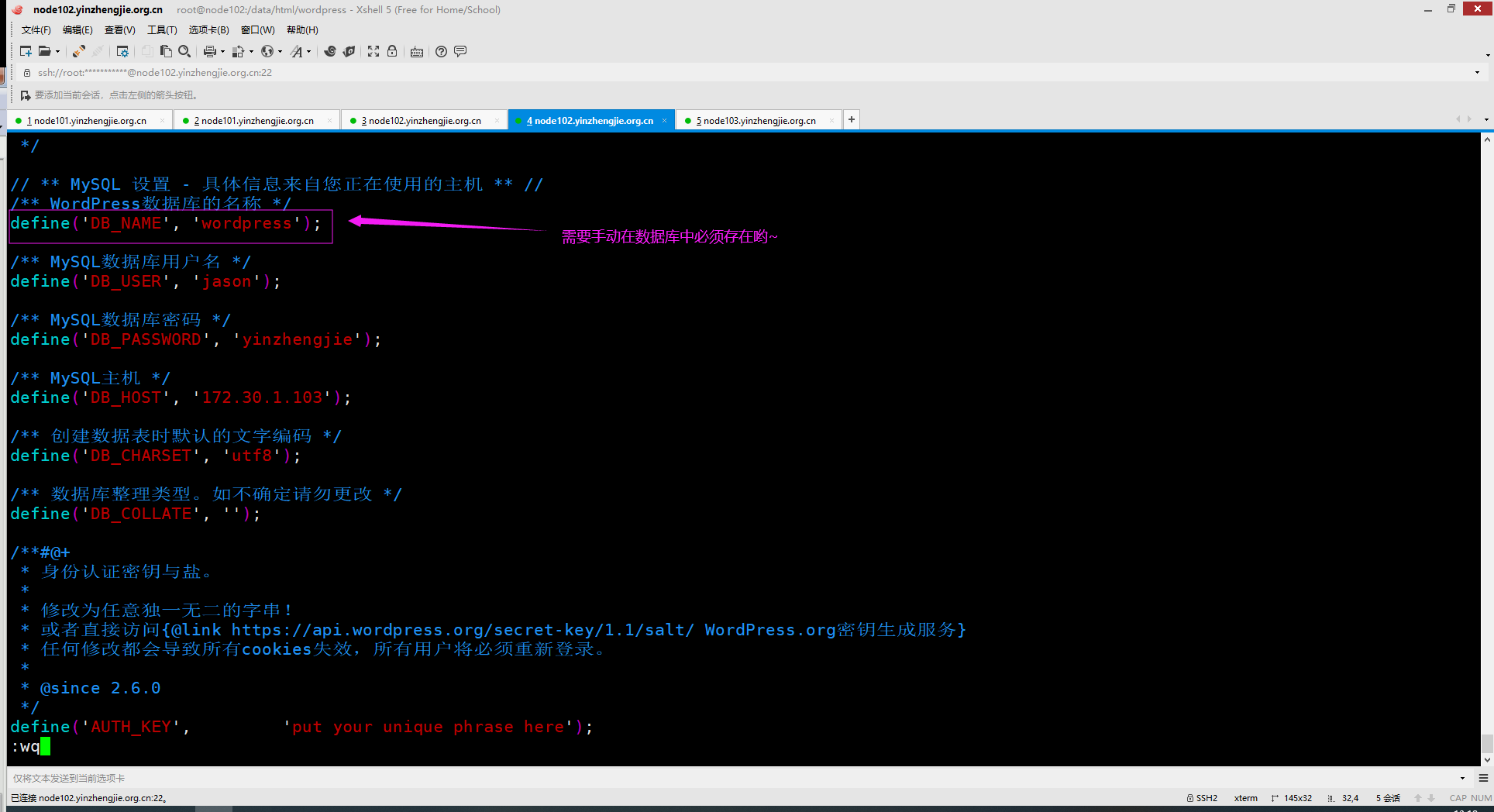
[root@node102.yinzhengjie.org.cn /data/html/wordpress]# vim wp-config.php           #需要修改连接数据库相关的参数,如下图所示。
3>.node103.yinzhengjie.org.cn
[root@node103.yinzhengjie.org.cn ~]# mysql -uroot -pyinzhengjie

Welcome to the MariaDB monitor.  Commands end with ; or \g.

Your MariaDB connection id is

Server version: 5.5.-MariaDB MariaDB Server

Copyright (c) , , Oracle, MariaDB Corporation Ab and others.

Type 'help;' or '\h' for help. Type '\c' to clear the current input statement.

MariaDB [(none)]>

MariaDB [(none)]> CREATE DATABASE wordpress DEFAULT CHARACTER SET = utf8mb4;          #创建数据库

Query OK,  row affected (0.00 sec)

MariaDB [(none)]>

MariaDB [(none)]> QUIT

Bye

[root@node103.yinzhengjie.org.cn ~]#

[root@node103.yinzhengjie.org.cn ~]#
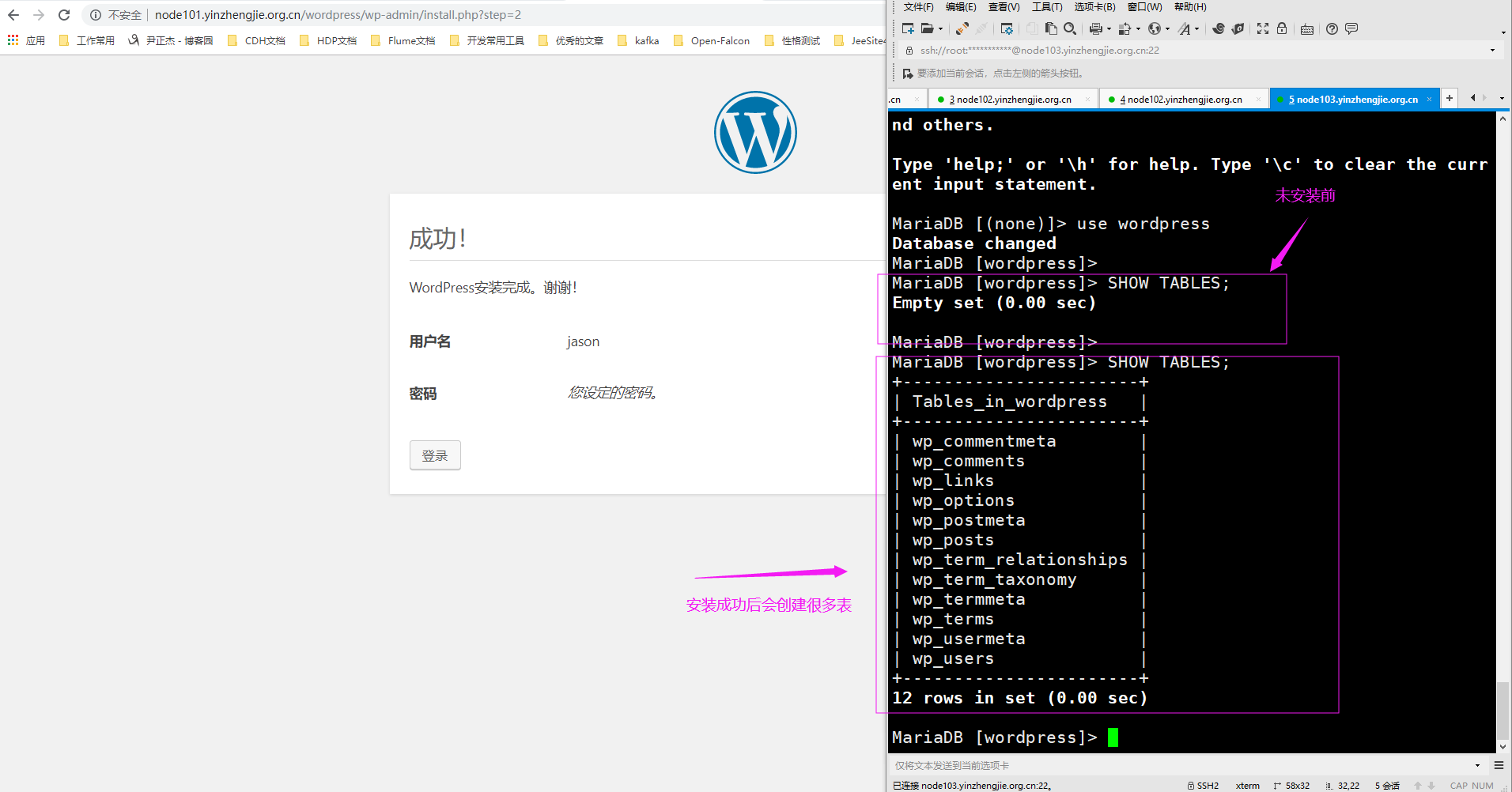
4>.访问wordpress博客程序开始webUI界面安装
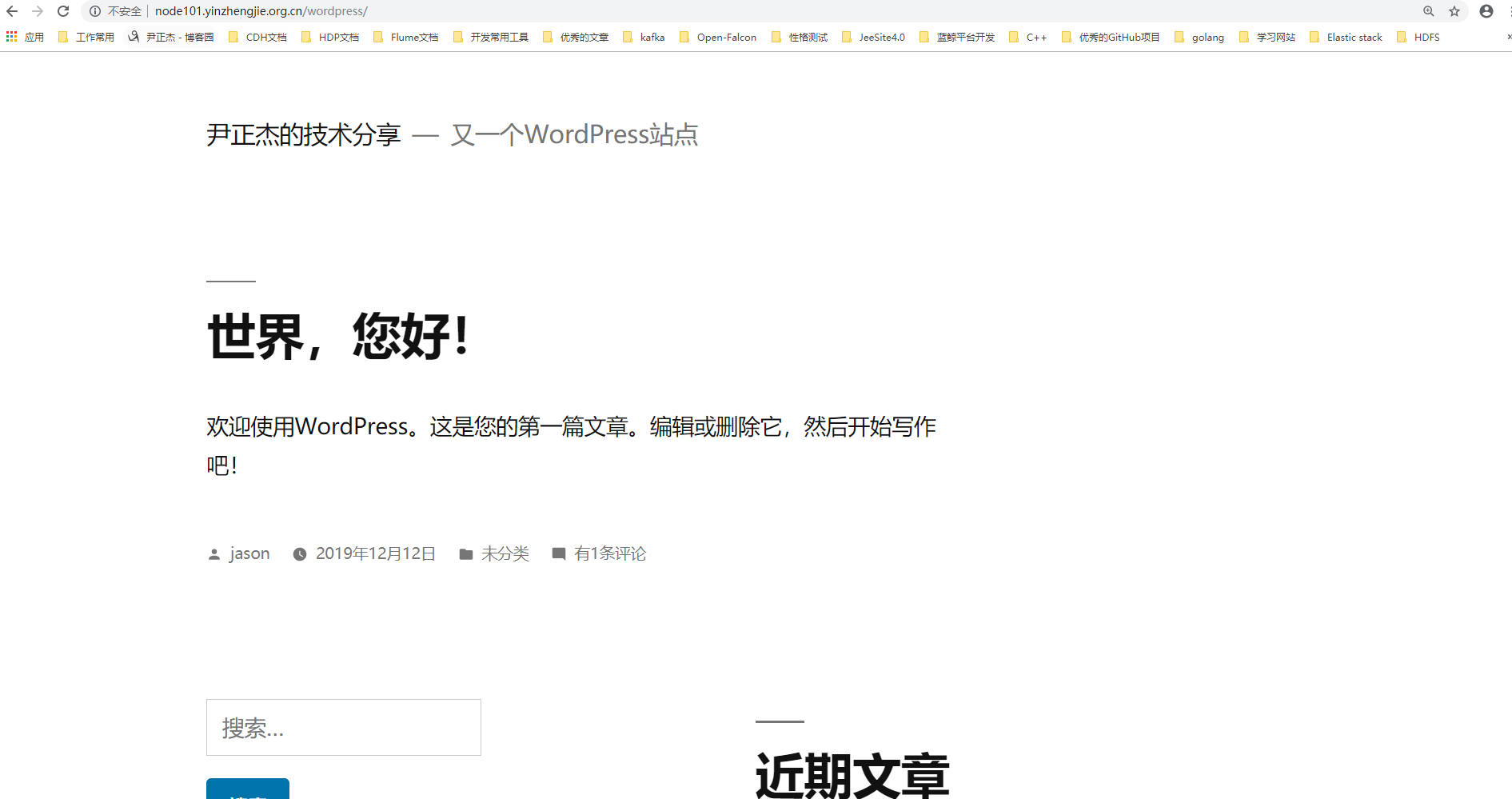
5>.访问博客首页
6>.测试httpd基于fastcgi的性能
[root@node101.yinzhengjie.org.cn ~]# ab -c  -n  http://node101.yinzhengjie.org.cn/wordpress/

This is ApacheBench, Version 2.3 <$Revision:  $>

Copyright  Adam Twiss, Zeus Technology Ltd, http://www.zeustech.net/

Licensed to The Apache Software Foundation, http://www.apache.org/

Benchmarking node101.yinzhengjie.org.cn (be patient).....done

Server Software:        Apache/2.4.

Server Hostname:        node101.yinzhengjie.org.cn

Server Port:

Document Path:          /wordpress/

Document Length:         bytes

Concurrency Level:

Time taken for tests:   23.124 seconds

Complete requests:

Failed requests:

Write errors:

Total transferred:       bytes

HTML transferred:        bytes

Requests per second:    4.32 [#/sec] (mean)

Time per request:       4624.791 [ms] (mean)

Time per request:       231.240 [ms] (mean, across all concurrent requests)

Transfer rate:          48.17 [Kbytes/sec] received

Connection Times (ms)

              min  mean[+/-sd] median   max

Connect:               0.1

Processing:     1265.3

Waiting:        1176.6

Total:          1265.3

Percentage of the requests served within a certain time (ms)

  %

  %

  %

  %

  %

  %

  %

  %

 %    (longest request)

[root@node101.yinzhengjie.org.cn ~]#
7>.至此,FASTCGI方式安装PHP程序完成
感兴趣的小伙伴可以在使用基于FastCGI的方式安装一下phpadmin或Discuz!程序。
Httpd服务进阶知识-基于FASTCGI实现的LAMP架构的更多相关文章
- Httpd服务进阶知识-基于Apache Modele的LAMP架构之Discuz!案例
Httpd服务进阶知识-基于Apache Modele的LAMP架构之Discuz!论坛案例 作者:尹正杰 版权声明:原创作品,谢绝转载!否则将追究法律责任. 一.安装依赖包及数据库 博主推荐阅读: ...
- Httpd服务进阶知识-基于Apache Modele的LAMP架构之WordPress案例
Httpd服务进阶知识-基于Apache Modele的LAMP架构之WordPress案例 作者:尹正杰 版权声明:原创作品,谢绝转载!否则将追究法律责任. 一.安装依赖包及数据库授权 博主推荐阅读 ...
- Httpd服务进阶知识-基于Apache Modele的LAMP架构之PhpMyAdmin案例
Httpd服务进阶知识-基于Apache Modele的LAMP架构之PhpMyAdmin案例 作者:尹正杰 版权声明:原创作品,谢绝转载!否则将追究法律责任. 一.常见LAMP应用 PhpMyAdm ...
- Httpd服务进阶知识-LAMP源码编译安装
Httpd服务进阶知识-LAMP源码编译安装 作者:尹正杰 版权声明:原创作品,谢绝转载!否则将追究法律责任. 想必大家都知道,动态资源交给fastcgi程序处理,静态资源依旧由httpd服务器处理 ...
- Httpd服务进阶知识-LAMP架构概述
Httpd服务进阶知识-LAMP架构概述 作者:尹正杰 版权声明:原创作品,谢绝转载!否则将追究法律责任. 一.LAMP架构概述 1>.什么是LAM(M)P架构 L: linux A: apa ...
- Httpd服务进阶知识-HTTP协议详解
Httpd服务进阶知识-HTTP协议详解 作者:尹正杰 版权声明:原创作品,谢绝转载!否则将追究法律责任. 一.WEB开发概述 1>.C/S编程 CS即客户端.服务器编程. 客户端.服务端之间需 ...
- Httpd服务进阶知识-调用操作系统的Sendfile机制
Httpd服务进阶知识-调用操作系统的Sendfile机制 作者:尹正杰 版权声明:原创作品,谢绝转载!否则将追究法律责任. 一.不用 sendfile 的传统网络传输过程 read(file, tm ...
- Httpd服务入门知识-Httpd服务常见配置案例之基于客户端来源地址实现访问控制
Httpd服务入门知识-Httpd服务常见配置案例之基于客户端来源地址实现访问控制 作者:尹正杰 版权声明:原创作品,谢绝转载!否则将追究法律责任. 一.Options 1>.OPTIONS指 ...
- Httpd服务入门知识-Httpd服务常见配置案例之基于用户账号实现访问控制
Httpd服务入门知识-Httpd服务常见配置案例之基于用户账号实现访问控制 作者:尹正杰 版权声明:原创作品,谢绝转载!否则将追究法律责任. 一.基于用户的访问控制概述 认证质询: WWW-Auth ...
随机推荐
- vs连接oracle
参考: https://www.cnblogs.com/gguozhenqian/p/4262813.html
- pose_graph的优化变量和优化函数
1.优化变量 优化变量就是vertex,也就是pose,pose-graph的优化目标就是,调整所有vertex的位置来尽量满足所有边的约束. 上述的还是表层的理解,深一步理解: pose-graph ...
- JVM系列之二:编译过程
1. Java的编译和执行 编译包括两种情况: 1,源码编译成字节码2,字节码编译成本地机器码(符合本地系统专属的指令) 解释执行也包括两种情况: 1,源码解释执行2,字节码解释执行 解释和编译执行的 ...
- Hbase(一)了解Hbase与Phoenix
前言 HBase是一个分布式的.面向列的开源数据库,该技术来源于 Fay Chang 所撰写的Google论文“Bigtable:一个结构化数据的分布式存储系统”.就像Bigtable利用了Googl ...
- IE浏览器卡死提示是否停止运行此脚本的解决办法
IE浏览器经常卡死,报是否停止运行此脚本,严重影响使用体验,下面小编教大家怎么解决这个问题,供大家参考! 1.启动IE浏览器,点击上方菜单栏位的工具,如下图所示 2.在工具栏位选择internet选项 ...
- mknod命令的使用
1.mknod命令 在Linux系统下,mknod命令可用于系统下字符设备文件和块设备文件的创建. (1)命令语法 mknod(选项)(参数) (2)常用选项说明 -Z:设置安全的上下文. -m:设置 ...
- MySql Packet for query is too large问题解决方案
MySQL会限制Server接受的数据包大小.有时候插入.更新或查询时数据包的大小,会受 max_allowed_packet 参数限制,导致操作失败.报错信息为: Caused by: com.my ...
- windows下elasticsearch安装ik分词器后无法启动
windows下elasticsearch安装ik分词器后启动报如下图错误: 然后百度说是elasticsearch路径有空格,一看果然我的路径有空格,然后重新换个路径就好了.
- AntDesign vue学习笔记(三)嵌套路由使用
本项目目前结构如下 1.Login页面=>MainFrm页面=>MainFrm左部菜单,右边是显示区域可以切换子页面. 2.当点击左部菜单时,右边的子页面随着进行切换. 实现关键代码如下1 ...
- html 显示 pdf
html 显示 pdf文件四种方式: 1. <embed src="pdf/wobu.pdf" type="application/pdf" width= ...