
Android AIDL SERVICE 双向通信 详解
http://www.cnblogs.com/punkisnotdead/p/5062631.html
起因 是这个blog 提到了 用webview 的时候 用开启子进程的方式 可以极大避免内存泄露。然后有很多人私信我 这种情况下
如何 相互通信的问题。当然广播是一个比较不错的选择,只不过广播的方法 能够传递的值比较有限。messenger 也只能做
单向传递消息。(当然你如果用2个 是可以双向的。单独的messenger是只能单向的)。
so,这里给出一个简单的小例子,教你如何处理 AIDL service双向通信的问题.
首先来建立一下这个例子的 模型,
1.我们假定有一个service 运行在 独立进程上,这个进程 就好像是餐厅一样。
2.我们的主进程呢,就好像是一个个顾客, 每次我们进入餐厅的时候 ,餐厅都会告诉我们 谁谁谁 进入了餐厅。
3.上述2条 我们注意看一下 餐厅的容量是有限的,所以我们的顾客进去以后吃完了就必须要出来。不然 餐厅的资源就有可能会被浪费 其他顾客就无法进入。
4.所以有一种场景是 当你的主进程也就是顾客 进入餐厅以后,万一你的主进程因为某种原因被杀死了,(比如退到后台的时候 内存不够 被kill掉)那你的service进程就必须要保证
把这个顾客移出掉,不然有限的资源 迟早会被耗尽,而且逻辑上也说不通。
下面就来实现这个需求。
首先看下 项目结构:
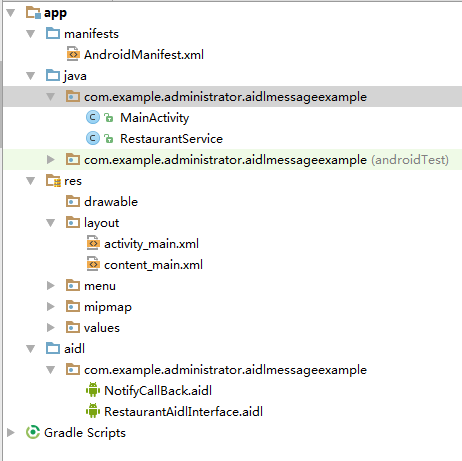
然后看一下我们的aidl文件:
 // RestaurantAidlInterface.aidl

 package com.example.administrator.aidlmessageexample;

 import com.example.administrator.aidlmessageexample.NotifyCallBack;

 // Declare any non-default types here with import statements

 //这个就是aidl文件

 interface RestaurantAidlInterface {

     //新来了一个顾客

     void join(IBinder token,String name);

     //走了一个顾客

     void leave();

     //注册回调接口

     void registerCallBack(NotifyCallBack cb);

     void unregisterCallBack(NotifyCallBack cb);

 }
 // NotifyCallBack.aidl

 package com.example.administrator.aidlmessageexample;

 // Declare any non-default types here with import statements

 interface NotifyCallBack {

     void notifyMainUiThread(String name,boolean joinOrLeave);

 }
然后看看我们的service:
 package com.example.administrator.aidlmessageexample;

 import android.app.Service;

 import android.content.Intent;

 import android.os.IBinder;

 import android.os.IBinder.DeathRecipient;

 import android.os.RemoteCallbackList;

 import android.os.RemoteException;

 import android.support.annotation.Nullable;

 import java.util.ArrayList;

 import java.util.List;

 import java.util.Random;

 /**

  * Created by Administrator on 2016/1/25.

  */

 public class RestaurantService extends Service {

     //这个list 就是用来存储当前餐厅有多少顾客 注意我们为什么没有用顾客的名字来存储?

     //而是用了这个CustomerClient的类 看这个类的注释即可明白

     private List<CustomerClient> mClientsList = new ArrayList<>();

     //上面用CustomerClient 的原因是因为害怕客户端异常销毁时,服务器收不到消息 造成资源浪费等异常

     //同样的 我们在服务端通知客户端消息的时候 也害怕 服务端 会异常销毁 导致客户端收不到消息

     //好在谷歌早就为我们考虑到这种情况  提供了RemoteCallbackList 来完成对应的功能

     //避免我们再重复一遍上述的过程

     private RemoteCallbackList<NotifyCallBack> mCallBacks = new RemoteCallbackList<>();

     private final RestaurantAidlInterface.Stub mBinder = new RestaurantAidlInterface.Stub() {

         @Override

         public void join(IBinder token, String name) throws RemoteException {

             CustomerClient cl = new CustomerClient(token, name);

             mClientsList.add(cl);

             notifyCallBack(name, true);

         }

         @Override

         public void leave() throws RemoteException {

             //顾客离开的时候 我们随机让他离开一个就行了

             int length = mClientsList.size();

             int randomIndex = new Random().nextInt(length-1);

             mClientsList.remove(randomIndex);

             notifyCallBack(mClientsList.get(randomIndex).mCustomerName, false);

         }

         @Override

         public void registerCallBack(NotifyCallBack cb) throws RemoteException {

             mCallBacks.register(cb);

         }

         @Override

         public void unregisterCallBack(NotifyCallBack cb) throws RemoteException {

             mCallBacks.unregister(cb);

         }

     };

     private void notifyCallBack(String customerName, boolean joinOrLeave) {

         final int len = mCallBacks.beginBroadcast();

         for (int i = 0; i < len; i++) {

             try {

                 // 通知回调

                 mCallBacks.getBroadcastItem(i).notifyMainUiThread(customerName, joinOrLeave);

             } catch (RemoteException e) {

                 e.printStackTrace();

             }

         }

         mCallBacks.finishBroadcast();

     }

     @Override

     public void onDestroy() {

         //销毁回调资源 否则要内存泄露

         mCallBacks.kill();

         super.onDestroy();

     }

     @Nullable

     @Override

     public IBinder onBind(Intent intent) {

         return mBinder;

     }

     //http://developer.android.com/intl/zh-cn/reference/android/os/Binder.html#linkToDeath(android.os.IBinder.DeathRecipient, int)

     //实际上 这个接口 就是用来 当客户端自己发生崩溃时, 我们的服务端也能收到这个崩溃的消息

     //并且会调用binderDied 这个回调方法,所以你看这个内部类的代码 就明白了 无非就是保证当客户端异常销毁的时候

     //我们服务端也要保证收到这个消息 然后做出相应的应对

     final class CustomerClient implements DeathRecipient {

         public final IBinder mToken;

         public CustomerClient(IBinder mToken, String mCustomerName) {

             this.mToken = mToken;

             this.mCustomerName = mCustomerName;

         }

         public final String mCustomerName;

         @Override

         public void binderDied() {

             //我们的应对方法就是当客户端 也就是顾客异常消失的时候 我们要把这个list里面 的对象也移出掉

             if (mClientsList.indexOf(this) >= 0) {

                 mClientsList.remove(this);

             }

         }

     }

 }
 <!-- 这个地方用开启子进程的方式来实现这个service 注意你们可以把主进程关闭以后 看看这个子进程

         service list里面持有的那些对象能否收到 这个异常关闭的消息-->

         <service

             android:name=".RestaurantService"

             android:enabled="true"

             android:exported="true"

             android:process="com.android.test.process">

             <intent-filter>

                 <action android:name="com.example.administrator.aidlmessageexample.RestaurantAidlInterface" />

             </intent-filter>

         </service>
然后再看看 客户端 也就是主进程的编写:
 package com.example.administrator.aidlmessageexample;

 import android.content.ComponentName;

 import android.content.DialogInterface;

 import android.content.Intent;

 import android.content.ServiceConnection;

 import android.os.Binder;

 import android.os.Bundle;

 import android.os.IBinder;

 import android.os.IInterface;

 import android.os.Parcel;

 import android.os.RemoteException;

 import android.support.design.widget.FloatingActionButton;

 import android.support.design.widget.Snackbar;

 import android.support.v7.app.AppCompatActivity;

 import android.support.v7.widget.Toolbar;

 import android.view.View;

 import android.view.Menu;

 import android.view.MenuItem;

 import android.widget.Button;

 import android.widget.TextView;

 import android.widget.Toast;

 import org.w3c.dom.Text;

 import java.io.FileDescriptor;

 import java.util.Random;

 public class MainActivity extends AppCompatActivity implements View.OnClickListener {

     private Button bt, bt2, bt3, bt4;

     private RestaurantAidlInterface mService;

     private TextView tv;

     private ServiceConnection mServiceConnection = new ServiceConnection() {

         @Override

         public void onServiceConnected(ComponentName name, IBinder service) {

             mService = RestaurantAidlInterface.Stub.asInterface(service);

             try {

                 //我们这个demo里面 只注册了一个回调 实际上可以注册很多个回调 因为service里面 我们存的是list callback

                 mService.registerCallBack(mNotifyCallBack);

             } catch (RemoteException e) {

                 e.printStackTrace();

             }

         }

         @Override

         public void onServiceDisconnected(ComponentName name) {

             try {

                 mService.unregisterCallBack(mNotifyCallBack);

             } catch (RemoteException e) {

                 e.printStackTrace();

             }

             mService = null;

         }

     };

     private NotifyCallBack mNotifyCallBack = new NotifyCallBack.Stub() {

         @Override

         public void notifyMainUiThread(String name, boolean joinOrLeave) throws RemoteException {

             String toastStr = "";

             if (joinOrLeave) {

                 toastStr = name + "进入了餐厅";

             } else {

                 toastStr = name + "离开了餐厅";

             }

             tv.setText(toastStr);

         }

     };

     @Override

     protected void onCreate(Bundle savedInstanceState) {

         super.onCreate(savedInstanceState);

         setContentView(R.layout.activity_main);

         bt = (Button) this.findViewById(R.id.bt);

         bt2 = (Button) this.findViewById(R.id.bt2);

         bt3 = (Button) this.findViewById(R.id.bt3);

         bt4 = (Button) this.findViewById(R.id.bt4);

         tv = (TextView) this.findViewById(R.id.tv);

         bt.setOnClickListener(this);

         bt2.setOnClickListener(this);

         bt3.setOnClickListener(this);

         bt4.setOnClickListener(this);

         Toolbar toolbar = (Toolbar) findViewById(R.id.toolbar);

         setSupportActionBar(toolbar);

         FloatingActionButton fab = (FloatingActionButton) findViewById(R.id.fab);

         fab.setOnClickListener(new View.OnClickListener() {

             @Override

             public void onClick(View view) {

                 Snackbar.make(view, "Replace with your own action", Snackbar.LENGTH_LONG)

                         .setAction("Action", null).show();

             }

         });

     }

     @Override

     public boolean onCreateOptionsMenu(Menu menu) {

         // Inflate the menu; this adds items to the action bar if it is present.

         getMenuInflater().inflate(R.menu.menu_main, menu);

         return true;

     }

     @Override

     public boolean onOptionsItemSelected(MenuItem item) {

         // Handle action bar item clicks here. The action bar will

         // automatically handle clicks on the Home/Up button, so long

         // as you specify a parent activity in AndroidManifest.xml.

         int id = item.getItemId();

         //noinspection SimplifiableIfStatement

         if (id == R.id.action_settings) {

             return true;

         }

         return super.onOptionsItemSelected(item);

     }

     @Override

     public void onClick(View v) {

         switch (v.getId()) {

             case R.id.bt:

                 bindService();

                 break;

             case R.id.bt2:

                 unbindService();

                 break;

             case R.id.bt3:

                 addCustomer();

                 break;

             case R.id.bt4:

                 leaveCustomer();

                 break;

         }

     }

     private void bindService() {

         Intent intent = new Intent(RestaurantAidlInterface.class.getName());

         bindService(intent, mServiceConnection, BIND_AUTO_CREATE);

     }

     private void unbindService() {

         unbindService(mServiceConnection);

     }

     private void leaveCustomer() {

         try {

             // mService.registerCallBack(mNotifyCallBack);

             mService.leave();

         } catch (RemoteException e) {

             e.printStackTrace();

         }

     }

     private void addCustomer() {

         try {

             mService.join(new Binder(), getRandomString(6));

         } catch (RemoteException e) {

             e.printStackTrace();

         }

     }

     public static String getRandomString(int length) { //length表示生成字符串的长度

         String base = "abcdefghijklmnopqrstuvwxyz0123456789";

         Random random = new Random();

         StringBuffer sb = new StringBuffer();

         for (int i = 0; i < length; i++) {

             int number = random.nextInt(base.length());

             sb.append(base.charAt(number));

         }

         return sb.toString();

     }

 }
最后跑一下效果(客户端进程异常结束 服务端进程收到消息 无法演示在gif里面,你们可以回去自己演示 看log日志 即可。直接用adb shell 命令 结束客户端进程 就行了)

Android AIDL SERVICE 双向通信 详解的更多相关文章
- Android中Service(服务)详解
http://blog.csdn.net/ryantang03/article/details/7770939 Android中Service(服务)详解 标签: serviceandroidappl ...
- Android中Service 使用详解(LocalService + RemoteService)
Service 简介: Service分为本地服务(LocalService)和远程服务(RemoteService): 1.本地服务依附在主进程上而不是独立的进程,这样在一定程度上节约了资源,另外L ...
- Android进阶笔记:AIDL内部实现详解 (一)
AIDL内部实现详解 (一) AIDL的作用是实现跨进程通讯使用方法也非常的简单,他的设计模式是典型的C/S架构.使用AIDL只要在Client端和Server端的项目根目录下面创建一个aidl的文件 ...
- Android的init过程详解(一)
Android的init过程详解(一) Android的init过程(二):初始化语言(init.rc)解析 本文使用的软件版本 Android:4.2.2 Linux内核:3.1.10 本文及后续几 ...
- Android开发–Intent-filter属性详解
Android开发–Intent-filter属性详解 2011年05月09日 ⁄ Andriod ⁄ 暂无评论 ⁄ 被围观 1,396 views+ 如果一个 Intent 请求在一片数据上执行一个 ...
- Android开发之MdiaPlayer详解
Android开发之MdiaPlayer详解 MediaPlayer类可用于控制音频/视频文件或流的播放,我曾在<Android开发之基于Service的音乐播放器>一文中介绍过它的使用. ...
- 《Android NFC 开发实战详解 》简介+源码+样章+勘误ING
<Android NFC 开发实战详解>简介+源码+样章+勘误ING SkySeraph Mar. 14th 2014 Email:skyseraph00@163.com 更多精彩请直接 ...
- Android开发之InstanceState详解
Android开发之InstanceState详解 本文介绍Android中关于Activity的两个神秘方法:onSaveInstanceState() 和 onRestoreInstanceS ...
- ANDROID L——Material Design详解(UI控件)
转载请注明本文出自大苞米的博客(http://blog.csdn.net/a396901990),谢谢支持! Android L: Google已经确认Android L就是Android Lolli ...
随机推荐
- Codeforces Round #335 (Div. 2) A. Magic Spheres 模拟
A. Magic Spheres Carl is a beginner magician. He has a blue, b violet and c orange magic spheres. ...
- JavaScript基于对象编程
js面向对象特征介绍 javascript是一种面向(基于)对象的动态脚本语言,是一种基于对象(Object)和事件驱动(EventDirven)并具有安全性能的脚本语言.它具有面向对象语言所特有的各 ...
- java volatile 和Transient 关键字
java关键字volatile volatile修饰的成员变量在每次被线程访问时,都强迫从主内存中重读该成员变量的值.而且,当成员变量发生变化时,强迫线程将变化值回写到主内存.这样在任何时刻,两个不同 ...
- linux 下Time_wait过多问题解决
linux 下Time_wait过多问题解决 net.ipv4.tcp_syncookies = 1表示开启SYN Cookies.当出现SYN等待队列溢出时,启用cookies来处理,可防范少量SY ...
- 针对安卓java入门:条件语句和循环语句
条件语句: if(){..} if(){}else{..} if(){..}else if(){..} if(){..}else if(){..}else{..} switch(x){ case x: ...
- JVM生产环境参数实例及分析
java application项目(非web项目) 改进前: -Xms128m-Xmx128m-XX:NewSize=64m-XX:PermSize=64m-XX:+UseConcMarkSweep ...
- 调试EF源代码环境配置
下载EF6的源代码,运行build编译,Nuget会自动下载所需的DLL. 打开EF的工程,可以在EF解决方案下直接新建调试用的项目代码 添加EF引用时选择解决方案中的Entity Framework ...
- AES加密和解密
using System; using System.Security.Cryptography; using System.Text; using System.IO; namespace AES ...
- 快速获取Windows系统上的国家和地区信息
Windows系统上包含了200多个国家和地区的数据,有时候编程需要这些资料.以下代码可以帮助你快速获取这些信息.将Console语句注释掉,可以更快的完成分析. static void Main(s ...
- SPA与DPA 攻击【转】
转自:http://blog.sina.com.cn/s/blog_6cb58dbf0102v7ym.html SPA SPA是一种直接解释能量消耗测定值的技术.系统消耗能量的大小随微处理器执行的指令 ...