
使用企业微信的API给指定用户发送消息
上个月比较忙,等不忙了继续写点基础教程(五一还在高铁上写项目在)。因为公司的原因,自己学习了点JavaWeb的知识,重新写了一个简单的后台管理,用于记录用户注册信息的。其中有这样的一个要求,就是在用户注册完成之后,能发送一个提示信息,当时我第一个想法是用qq做消息提醒,但是网上找了半天,发现企鹅把相关的接口给关了,然后继续搜索发现了可以用企业微信,但是网上的一些教程不算很详细,自己还是琢磨了半天,然后今天整理一下发给大家。
首先是准备工作,几个jar包:

数据库和servlet看个人所需。没有的话网上搜索一下。几个相关的java文件和对应的代码
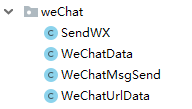
public class SendWX {

  //发送消息的执行方法

    public void send(String tel, String sec) {

        WeChatMsgSend swx = new WeChatMsgSend();

        try {
       //这里的token获取待会会说从哪儿具体得到

            String token = swx.getToken("wqd51b29a3fb154c92", "KWSGMIpqSmJ_wY8ettuAWafhfAdfTUKN3OParcIfaaY");

            String postdata = swx.createpostdata("ErShiYi", "text", 1000002, "content", "手机号:" + tel + "\n内容:" + sec);

            String resp = swx.post("utf-8", WeChatMsgSend.CONTENT_TYPE, (new WeChatUrlData()).getSendMessage_Url(), postdata, token);

            System.out.println("获取到的token======>" + token);

            System.out.println("请求数据======>" + postdata);

            System.out.println("发送微信的响应数据======>" + resp);

        } catch (Exception e) {

            e.getStackTrace();

        }

    }

}
/**

 * 微信消息发送实体类

 * @author PC-MXF

 *

 */

public class WeChatData {

    //发送微信消息的URLString sendMsgUrl="https://qyapi.weixin.qq.com/cgi-bin/message/send?access_token=";

    /**

     * 成员账号

     */

    private String touser;

    /**

     * 消息类型

     */

    private String msgtype;

    /**

     * 企业用用的agentid

     */

    private String agentid;

    /**

     * 十几接收map类型数据

     */

    private Object text;

    public String getTouser() {

        return touser;

    }

    public void setTouser(String touser) {

        this.touser = touser;

    }

    public String getMsgtype() {

        return msgtype;

    }

    public void setMsgtype(String msgtype) {

        this.msgtype = msgtype;

    }

    public String getAgentid() {

        return agentid;

    }

    public void setAgentid(String agentid) {

        this.agentid = agentid;

    }

    public Object getText() {

        return text;

    }

    public void setText(Object text) {

        this.text = text;

    }

}
/**

 * 微信发送消息

 *

 * @author PC-MXF

 *

 */

public class WeChatMsgSend {

    private CloseableHttpClient httpClient;

    /**

     * 用于提交登录数据

     */

    private HttpPost httpPost;

    /**

     * 用于获得登陆后页面

     */

    private HttpGet httpGet;

    public static final String CONTENT_TYPE = "Content-Type";

    SimpleDateFormat df = new SimpleDateFormat("yyyy-MM-dd HH:mm:ss");

    private static Gson gson = new Gson();

    /**

     * 微信授权请求,GET类型,获取授权响应,用于其他方法截取token

     *

     * @param Get_Token_Url

     * @return String 授权响应内容

     * @throws IOException

     */

    protected String toAuth(String Get_Token_Url) throws IOException {

        httpClient = HttpClients.createDefault();

        httpGet = new HttpGet(Get_Token_Url);

        CloseableHttpResponse response = httpClient.execute(httpGet);

        String resp = "";

        try {

            HttpEntity entity = response.getEntity();

            resp = EntityUtils.toString(entity, "utf-8");

            EntityUtils.consume(entity);

        } catch (Exception e) {

            e.getStackTrace();

        } finally {

            response.close();

        }

        LoggerFactory.getLogger(getClass()).info(" resp:{}", resp);

        return resp;

    }

    /**

     * corpid应用组织编号 corpsecret应用秘钥 获取toAuth(String

     * Get_Token_Url)返回结果中键值对中access_token键的值

     *

     * @param

     */

    public String getToken(String corpid, String corpsecret) throws IOException {

        WeChatMsgSend sw = new WeChatMsgSend();

        WeChatUrlData uData = new WeChatUrlData();

        uData.setGet_Token_Url(corpid, corpsecret);

        String resp = sw.toAuth(uData.getGet_Token_Url());

        System.out.println("resp=====:" + resp);

        try {

            Map<String, Object> map = gson.fromJson(resp, new TypeToken<Map<String, Object>>() {

            }.getType());

            return map.get("access_token").toString();

        } catch (Exception e) {

            e.getStackTrace();

            return resp;

        }

    }

    /**

     * 创建微信发送请求post数据 touser发送消息接收者 ,msgtype消息类型(文本/图片等), application_id应用编号。

     * 本方法适用于text型微信消息,contentKey和contentValue只能组一对

     *

     * @param touser

     * @param msgtype

     * @param application_id

     * @param contentKey

     * @param contentValue

     * @return

     */

    public String createpostdata(String touser, String msgtype, int application_id, String contentKey,

                                 String contentValue) {

        WeChatData wcd = new WeChatData();

        wcd.setTouser(touser);

        wcd.setAgentid(application_id + "");

        wcd.setMsgtype(msgtype);

        Map<Object, Object> content = new HashMap<Object, Object>();

        content.put(contentKey, contentValue);

        wcd.setText(content);

        return gson.toJson(wcd);

    }

    /**

     * @Title  创建微信发送请求post实体,charset消息编码    ,contentType消息体内容类型,

     * url微信消息发送请求地址,data为post数据,token鉴权token

     * @param charset

     * @param contentType

     * @param url

     * @param data

     * @param token

     * @return

     * @throws IOException

     */

    public String post(String charset, String contentType, String url, String data, String token) throws IOException {

        CloseableHttpClient httpclient = HttpClients.createDefault();

        httpPost = new HttpPost(url + token);

        httpPost.setHeader(CONTENT_TYPE, contentType);

        httpPost.setEntity(new StringEntity(data, charset));

        CloseableHttpResponse response = httpclient.execute(httpPost);

        String resp;

        try {

            HttpEntity entity = response.getEntity();

            resp = EntityUtils.toString(entity, charset);

            EntityUtils.consume(entity);

        } finally {

            response.close();

        }

        LoggerFactory.getLogger(getClass()).info("call [{}], param:{}, resp:{}", url, data, resp);

        return resp;

    }

}
/**

 * 微信授权请求

 * @author PC-MXF

 *

 */

public class WeChatUrlData {

    /**

     *  企业Id

     */

    private String corpid;

    /**

     * secret管理组的凭证密钥

     */

    private String corpsecret;

    /**

     * 获取ToKen的请求

     */

    private String Get_Token_Url;

    /**

     * 发送消息的请求

     */

    private String SendMessage_Url;

    public String getCorpid() {

        return corpid;

    }

    public void setCorpid(String corpid) {

        this.corpid = corpid;

    }

    public String getCorpsecret() {

        return corpsecret;

    }

    public void setCorpsecret(String corpsecret) {

        this.corpsecret = corpsecret;

    }

    public String getGet_Token_Url() {

        return Get_Token_Url;

    }

    public void setGet_Token_Url(String corpid,String corpsecret) {

        Get_Token_Url = "https://qyapi.weixin.qq.com/cgi-bin/gettoken?corpid="+corpid+"&corpsecret="+corpsecret;

    }

    public String getSendMessage_Url() {

        SendMessage_Url = "https://qyapi.weixin.qq.com/cgi-bin/message/send?access_token=";

        return SendMessage_Url;

    }

    public void setSendMessage_Url(String sendMessage_Url) {

        SendMessage_Url = sendMessage_Url;

    }

}
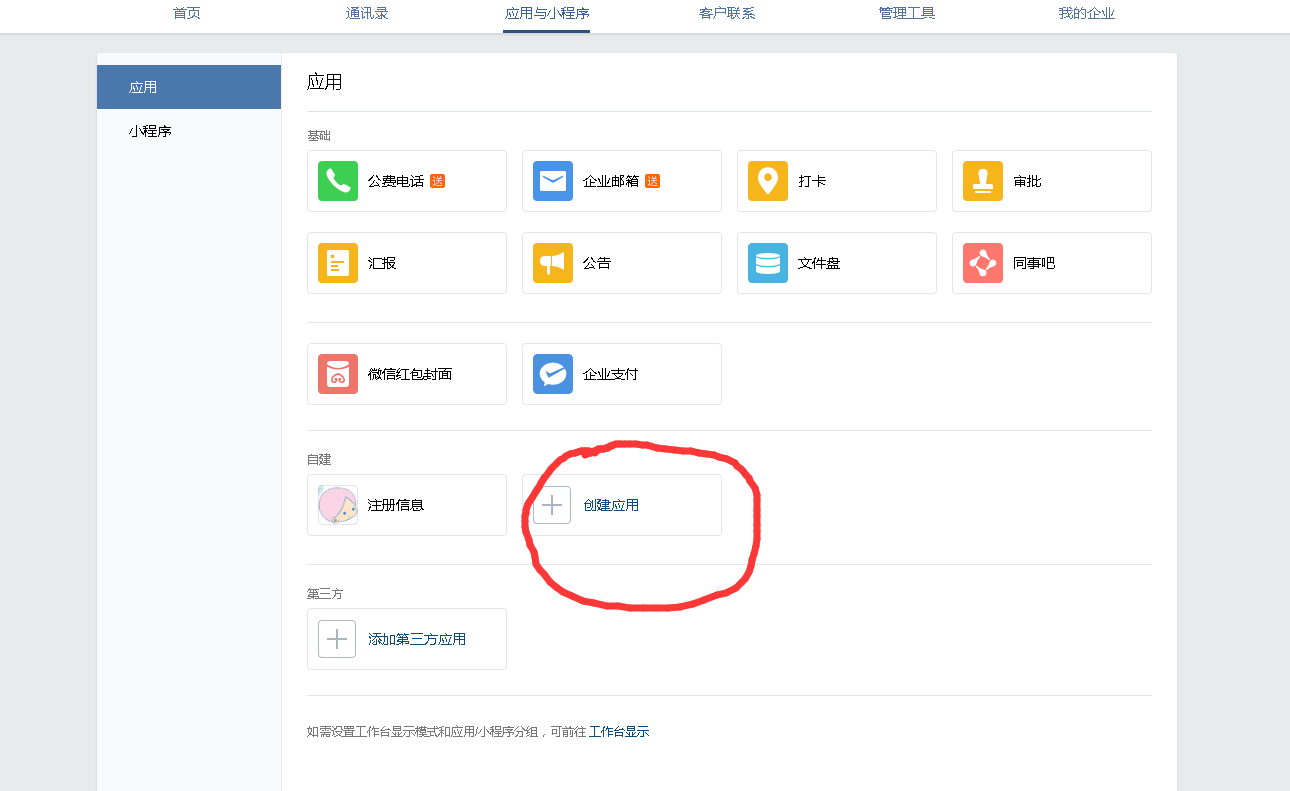
相关的代码准备完成之后,开始创建企业微信,打开企业微信官网:https://work.weixin.qq.com/注册,并登陆。点击应用与小程序,自建里面创建应用:
然后进入自己创建的应用,找到这两个信息,

分别对应的是

然后打开我的企业最下面有个企业ID


对应的是上面的getToken()第一个参数。下面的swx.createpostdata方法的第一个参数是用户名称,打开通讯录:

点进去你想要给他发送消息的公司成员:

这个账号即为用户的名称,修改为自己想要的。就可以发送文本信息。还有其他的相关的功能,可以自己去查看一下企业微信API寻找,比如发送图片等。
使用企业微信的API给指定用户发送消息的更多相关文章
- java集成WebSocket向指定用户发送消息
一.WebSocket简单介绍 随着互联网的发展,传统的HTTP协议已经很难满足Web应用日益复杂的需求了.近年来,随着HTML5的诞生,WebSocket协议被提出,它实现了浏览器与服务器的全双工通 ...
- 用C#调用Windows API向指定窗口发送按键消息 z
用C#调用Windows API向指定窗口发送 一.调用Windows API. C#下调用Windows API方法如下: 1.引入命名空间:using System.Runtime.Interop ...
- 2.Vue 获取企业微信的Code并把Code发送的后台进行验证
1 . 在企业微信配置请求的页面写入下面代码 mounted() { //获取微信请求的的Code let code = this.$route.query.code; if (code) { thi ...
- 【转】用C#调用Windows API向指定窗口发送
一.调用Windows API. C#下调用Windows API方法如下: 1.引入命名空间:using System.Runtime.InteropServices; 2.引用需要使用的方法,格式 ...
- 用C#调用Windows API向指定窗口发送按键消息
一.调用Windows API. C#下调用Windows API方法如下: 1.引入命名空间:using System.Runtime.InteropServices; 2.引用需要使用的方法,格式 ...
- 向指定用户发送WebSocket消息并处理对方不在线的情况
使用SimpMessagingTemplate发送消息 使用org.springframework.messaging.simp.SimpMessagingTemplate类可以在服务端的任意地方给客 ...
- 用requests登录微信网页版,并接收发送消息
首先,网页版微信登录大致分为以下几个流程(都是大家可以通过抓包得到): 1.登陆主页后,会生成一个UUID,这是个用户标识,在后面请求二维码会用到 def get_uuid(self): '''获取u ...
- 【小程序】微信小程序绑定企业微信后怎样获取到用户信息
一.获取access_token 1.https://qyapi.weixin.qq.com/cgi-bin/gettoken?corpid=ID&corpsecret=SECRECT Cor ...
- 微信程序开发系列教程(二)使用JavaScript给微信用户发送消息
我之前的文章 微信程序开发系列教程(一)开发环境搭建 介绍了微信开发环境的搭建,这篇文章我们就来一步步开发一些具体的功能. 功能需求:当有微信用户关注了您的公众号之后,您用JavaScript发送一个 ...
随机推荐
- nova boot添加volume_type参数支持
早前由于添加了全SSD的高性能Ceph集群,区别于现有的HDD集群,在OpenStack端需要能够选择使用两种集群.Cinder配置多Ceph后端的文档早已整理,整理文件夹时发现这篇为nova boo ...
- 关于RelativeLayout设置垂直居中对齐不起作用的问题
直接上代码 1.原有代码:(红色字体部分不起作用,无法让RelativeLayout中的textview居中) <RelativeLayout Android:id="@+id/aut ...
- c++实验5
设计并实现一个机器宠物类MachinePets #include <iostream> #include <string> using namespace std; class ...
- jmeter配置分布式调度:远程启动其他机器实现多台pc一起并发
原文转自:https://www.cnblogs.com/whitewasher/p/6946207.html Jmeter分布式部署测试-----远程连接多台电脑做压力性能测试 在使用Jmeter进 ...
- php 实现栈与队列
<?php class queueOp{ /* * 队尾入队 * Return:处理之后队列的元素个数 */ public function tailEnquque($arr,$val){ re ...
- LeetCode——Problem1:two sum
早就想刷LeetCode了,但一直在拖,新学期开学,开始刷算法. 我准备从Python和C++两种语言刷.一方面我想做机器学习,以后用Python会比较多,联系一下.另一方面C++或者C语言更接近底层 ...
- JavaScript: __proto__和prototype
图来源于:http://www.cnblogs.com/smoothLily/p/4745856.html 个人的理解: 1. 所有对象都有 __proto__属性,返回该对象的原型对象.例如f1由语 ...
- C#从大图中截取一部分图片
#region 从大图中截取一部分图片 /// <summary> /// 从大图中截取一部分图片 /// </summary> /// <param name=&quo ...
- 【转】Unity3d中制作Loading场景进度条所遇到的问题 LoadLevelAsync,AsyncOperation
背景 通常游戏的主场景包含的资源较多,这会导致加载场景的时间较长.为了避免这个问题,可以首先加载Loading场景,然后再通过Loading场景来加载主场景.因为Loading场景包含的资源较少,所以 ...
- eclipse删除svn下载的文件后如何恢复
Team右键-->与资源库同步-->覆盖/更新