
使用企业微信的API给指定用户发送消息
上个月比较忙,等不忙了继续写点基础教程(五一还在高铁上写项目在)。因为公司的原因,自己学习了点JavaWeb的知识,重新写了一个简单的后台管理,用于记录用户注册信息的。其中有这样的一个要求,就是在用户注册完成之后,能发送一个提示信息,当时我第一个想法是用qq做消息提醒,但是网上找了半天,发现企鹅把相关的接口给关了,然后继续搜索发现了可以用企业微信,但是网上的一些教程不算很详细,自己还是琢磨了半天,然后今天整理一下发给大家。
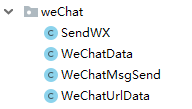
首先是准备工作,几个jar包:

数据库和servlet看个人所需。没有的话网上搜索一下。几个相关的java文件和对应的代码
public class SendWX {

  //发送消息的执行方法

    public void send(String tel, String sec) {

        WeChatMsgSend swx = new WeChatMsgSend();

        try {
       //这里的token获取待会会说从哪儿具体得到

            String token = swx.getToken("wqd51b29a3fb154c92", "KWSGMIpqSmJ_wY8ettuAWafhfAdfTUKN3OParcIfaaY");

            String postdata = swx.createpostdata("ErShiYi", "text", 1000002, "content", "手机号:" + tel + "\n内容:" + sec);

            String resp = swx.post("utf-8", WeChatMsgSend.CONTENT_TYPE, (new WeChatUrlData()).getSendMessage_Url(), postdata, token);

            System.out.println("获取到的token======>" + token);

            System.out.println("请求数据======>" + postdata);

            System.out.println("发送微信的响应数据======>" + resp);

        } catch (Exception e) {

            e.getStackTrace();

        }

    }

}
/**

 * 微信消息发送实体类

 * @author PC-MXF

 *

 */

public class WeChatData {

    //发送微信消息的URLString sendMsgUrl="https://qyapi.weixin.qq.com/cgi-bin/message/send?access_token=";

    /**

     * 成员账号

     */

    private String touser;

    /**

     * 消息类型

     */

    private String msgtype;

    /**

     * 企业用用的agentid

     */

    private String agentid;

    /**

     * 十几接收map类型数据

     */

    private Object text;

    public String getTouser() {

        return touser;

    }

    public void setTouser(String touser) {

        this.touser = touser;

    }

    public String getMsgtype() {

        return msgtype;

    }

    public void setMsgtype(String msgtype) {

        this.msgtype = msgtype;

    }

    public String getAgentid() {

        return agentid;

    }

    public void setAgentid(String agentid) {

        this.agentid = agentid;

    }

    public Object getText() {

        return text;

    }

    public void setText(Object text) {

        this.text = text;

    }

}
/**

 * 微信发送消息

 *

 * @author PC-MXF

 *

 */

public class WeChatMsgSend {

    private CloseableHttpClient httpClient;

    /**

     * 用于提交登录数据

     */

    private HttpPost httpPost;

    /**

     * 用于获得登陆后页面

     */

    private HttpGet httpGet;

    public static final String CONTENT_TYPE = "Content-Type";

    SimpleDateFormat df = new SimpleDateFormat("yyyy-MM-dd HH:mm:ss");

    private static Gson gson = new Gson();

    /**

     * 微信授权请求,GET类型,获取授权响应,用于其他方法截取token

     *

     * @param Get_Token_Url

     * @return String 授权响应内容

     * @throws IOException

     */

    protected String toAuth(String Get_Token_Url) throws IOException {

        httpClient = HttpClients.createDefault();

        httpGet = new HttpGet(Get_Token_Url);

        CloseableHttpResponse response = httpClient.execute(httpGet);

        String resp = "";

        try {

            HttpEntity entity = response.getEntity();

            resp = EntityUtils.toString(entity, "utf-8");

            EntityUtils.consume(entity);

        } catch (Exception e) {

            e.getStackTrace();

        } finally {

            response.close();

        }

        LoggerFactory.getLogger(getClass()).info(" resp:{}", resp);

        return resp;

    }

    /**

     * corpid应用组织编号 corpsecret应用秘钥 获取toAuth(String

     * Get_Token_Url)返回结果中键值对中access_token键的值

     *

     * @param

     */

    public String getToken(String corpid, String corpsecret) throws IOException {

        WeChatMsgSend sw = new WeChatMsgSend();

        WeChatUrlData uData = new WeChatUrlData();

        uData.setGet_Token_Url(corpid, corpsecret);

        String resp = sw.toAuth(uData.getGet_Token_Url());

        System.out.println("resp=====:" + resp);

        try {

            Map<String, Object> map = gson.fromJson(resp, new TypeToken<Map<String, Object>>() {

            }.getType());

            return map.get("access_token").toString();

        } catch (Exception e) {

            e.getStackTrace();

            return resp;

        }

    }

    /**

     * 创建微信发送请求post数据 touser发送消息接收者 ,msgtype消息类型(文本/图片等), application_id应用编号。

     * 本方法适用于text型微信消息,contentKey和contentValue只能组一对

     *

     * @param touser

     * @param msgtype

     * @param application_id

     * @param contentKey

     * @param contentValue

     * @return

     */

    public String createpostdata(String touser, String msgtype, int application_id, String contentKey,

                                 String contentValue) {

        WeChatData wcd = new WeChatData();

        wcd.setTouser(touser);

        wcd.setAgentid(application_id + "");

        wcd.setMsgtype(msgtype);

        Map<Object, Object> content = new HashMap<Object, Object>();

        content.put(contentKey, contentValue);

        wcd.setText(content);

        return gson.toJson(wcd);

    }

    /**

     * @Title  创建微信发送请求post实体,charset消息编码    ,contentType消息体内容类型,

     * url微信消息发送请求地址,data为post数据,token鉴权token

     * @param charset

     * @param contentType

     * @param url

     * @param data

     * @param token

     * @return

     * @throws IOException

     */

    public String post(String charset, String contentType, String url, String data, String token) throws IOException {

        CloseableHttpClient httpclient = HttpClients.createDefault();

        httpPost = new HttpPost(url + token);

        httpPost.setHeader(CONTENT_TYPE, contentType);

        httpPost.setEntity(new StringEntity(data, charset));

        CloseableHttpResponse response = httpclient.execute(httpPost);

        String resp;

        try {

            HttpEntity entity = response.getEntity();

            resp = EntityUtils.toString(entity, charset);

            EntityUtils.consume(entity);

        } finally {

            response.close();

        }

        LoggerFactory.getLogger(getClass()).info("call [{}], param:{}, resp:{}", url, data, resp);

        return resp;

    }

}
/**

 * 微信授权请求

 * @author PC-MXF

 *

 */

public class WeChatUrlData {

    /**

     *  企业Id

     */

    private String corpid;

    /**

     * secret管理组的凭证密钥

     */

    private String corpsecret;

    /**

     * 获取ToKen的请求

     */

    private String Get_Token_Url;

    /**

     * 发送消息的请求

     */

    private String SendMessage_Url;

    public String getCorpid() {

        return corpid;

    }

    public void setCorpid(String corpid) {

        this.corpid = corpid;

    }

    public String getCorpsecret() {

        return corpsecret;

    }

    public void setCorpsecret(String corpsecret) {

        this.corpsecret = corpsecret;

    }

    public String getGet_Token_Url() {

        return Get_Token_Url;

    }

    public void setGet_Token_Url(String corpid,String corpsecret) {

        Get_Token_Url = "https://qyapi.weixin.qq.com/cgi-bin/gettoken?corpid="+corpid+"&corpsecret="+corpsecret;

    }

    public String getSendMessage_Url() {

        SendMessage_Url = "https://qyapi.weixin.qq.com/cgi-bin/message/send?access_token=";

        return SendMessage_Url;

    }

    public void setSendMessage_Url(String sendMessage_Url) {

        SendMessage_Url = sendMessage_Url;

    }

}
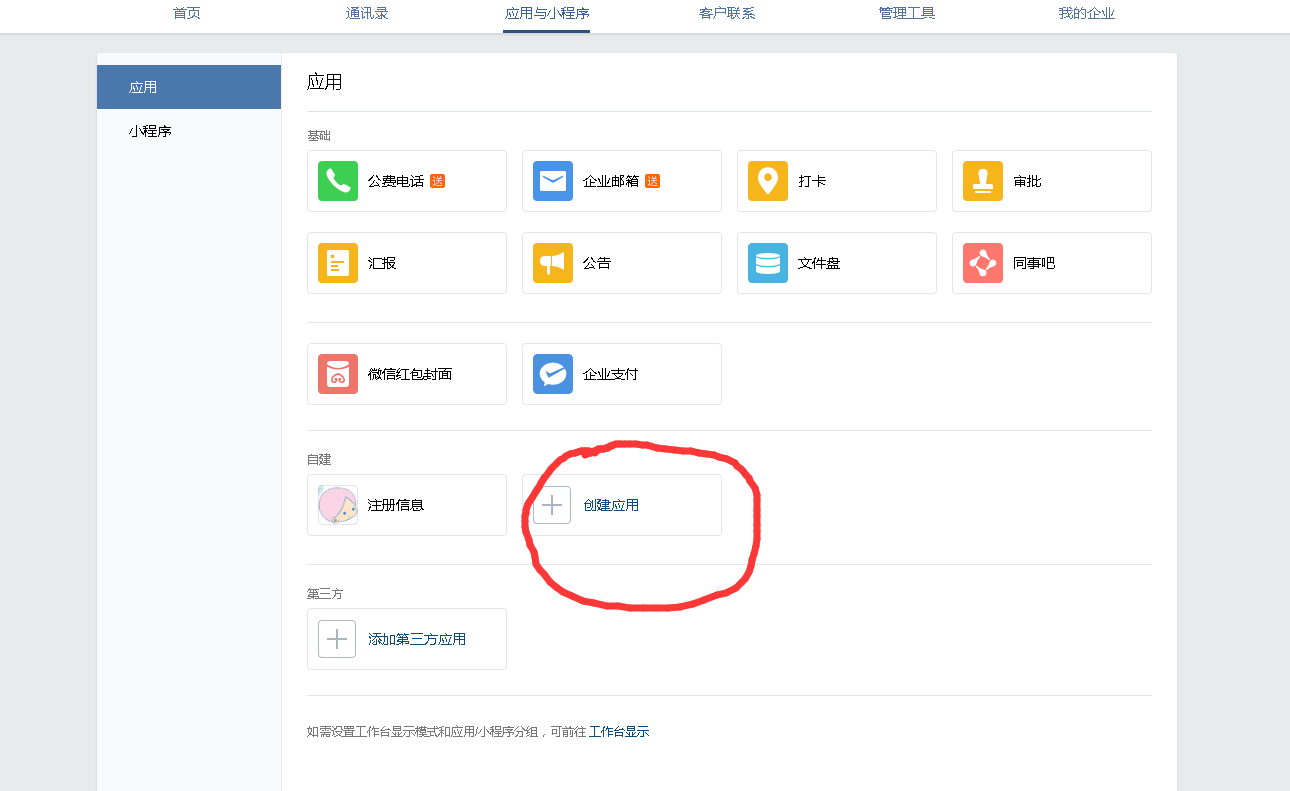
相关的代码准备完成之后,开始创建企业微信,打开企业微信官网:https://work.weixin.qq.com/注册,并登陆。点击应用与小程序,自建里面创建应用:
然后进入自己创建的应用,找到这两个信息,

分别对应的是

然后打开我的企业最下面有个企业ID


对应的是上面的getToken()第一个参数。下面的swx.createpostdata方法的第一个参数是用户名称,打开通讯录:

点进去你想要给他发送消息的公司成员:

这个账号即为用户的名称,修改为自己想要的。就可以发送文本信息。还有其他的相关的功能,可以自己去查看一下企业微信API寻找,比如发送图片等。
使用企业微信的API给指定用户发送消息的更多相关文章
- java集成WebSocket向指定用户发送消息
一.WebSocket简单介绍 随着互联网的发展,传统的HTTP协议已经很难满足Web应用日益复杂的需求了.近年来,随着HTML5的诞生,WebSocket协议被提出,它实现了浏览器与服务器的全双工通 ...
- 用C#调用Windows API向指定窗口发送按键消息 z
用C#调用Windows API向指定窗口发送 一.调用Windows API. C#下调用Windows API方法如下: 1.引入命名空间:using System.Runtime.Interop ...
- 2.Vue 获取企业微信的Code并把Code发送的后台进行验证
1 . 在企业微信配置请求的页面写入下面代码 mounted() { //获取微信请求的的Code let code = this.$route.query.code; if (code) { thi ...
- 【转】用C#调用Windows API向指定窗口发送
一.调用Windows API. C#下调用Windows API方法如下: 1.引入命名空间:using System.Runtime.InteropServices; 2.引用需要使用的方法,格式 ...
- 用C#调用Windows API向指定窗口发送按键消息
一.调用Windows API. C#下调用Windows API方法如下: 1.引入命名空间:using System.Runtime.InteropServices; 2.引用需要使用的方法,格式 ...
- 向指定用户发送WebSocket消息并处理对方不在线的情况
使用SimpMessagingTemplate发送消息 使用org.springframework.messaging.simp.SimpMessagingTemplate类可以在服务端的任意地方给客 ...
- 用requests登录微信网页版,并接收发送消息
首先,网页版微信登录大致分为以下几个流程(都是大家可以通过抓包得到): 1.登陆主页后,会生成一个UUID,这是个用户标识,在后面请求二维码会用到 def get_uuid(self): '''获取u ...
- 【小程序】微信小程序绑定企业微信后怎样获取到用户信息
一.获取access_token 1.https://qyapi.weixin.qq.com/cgi-bin/gettoken?corpid=ID&corpsecret=SECRECT Cor ...
- 微信程序开发系列教程(二)使用JavaScript给微信用户发送消息
我之前的文章 微信程序开发系列教程(一)开发环境搭建 介绍了微信开发环境的搭建,这篇文章我们就来一步步开发一些具体的功能. 功能需求:当有微信用户关注了您的公众号之后,您用JavaScript发送一个 ...
随机推荐
- 求 1 到 n 的所有数的约数和
求 1 到 n 的所有数的约数和 暴力方法就是枚举每个数,算出他的约数和即可,这样有点慢. 另一种思路,枚举约数,判断他是谁的约数,并记录(即他的倍数有多少个),在乘以他自己. n/i求的是n以内,i ...
- Not a git repository (or any of the parent directories): .git解决
首先git init .然后在执行就行了.意思应该是当前目录不是git.
- day21&22&23:线程、进程、协程
1.程序工作原理 进程的限制:每一个时刻只能有一个线程来工作.多进程的优点:同时利用多个cpu,能够同时进行多个操作.缺点:对内存消耗比较高当进程数多于cpu数量的时候会导致不能被调用,进程不是越多越 ...
- cf979d Kuro and GCD and XOR and SUM
set做法 正解是trie-- 主要是要学会 \(a\ \mathrm{xor}\ b \leq a+b\) 这种操作 #include <iostream> #include <c ...
- 数据库路由中间件MyCat - 使用篇(1)
此文已由作者张镐薪授权网易云社区发布. 欢迎访问网易云社区,了解更多网易技术产品运营经验. 基本概念 直接介绍概念太枯燥了,还是拿个和背景篇相似的例子介绍 业务场景:客户完成下单,快递员接受并更新运单 ...
- 极简Node教程-七天从小白变大神(一:你需要Express)
如果说用一句话来概括Node那就是:它开启了JavaScript服务器端语言. Node系列的文章并不会从一开始长篇概论的讲Node的历史,安装,以及其他很琐碎的事情.只会专门介绍关于Node或者准确 ...
- Android坐标getLeft,getRight,getTop,getBottom,getLocationInWindow和getLocationOnScreen
Android中获取坐标点的一些方法解释 一.getLocationInWindow和getLocationOnScreen的区别 // location [0]--->x坐标,location ...
- Android view相关与自定义View
一.关于view的机制的问答 1.gesturedetector和ontouchevent的区别 gesturedetector指的是手势检测器,根据动态手势的运动特性,提出了速率边沿检测算法来分割手 ...
- Tomcat网站根目录的配置
在</Host>前插入: <Host> … … <Context path="" docBase="E:\Users\Administrat ...
- BZOJ1562 [NOI2009]变换序列 【KM算法】
题目 输入格式 输出格式 输入样例 5 1 1 2 2 1 输出样例 1 2 4 0 3 提示 30%的数据中N≤50: 60%的数据中N≤500: 100%的数据中N≤10000. 题解 每个位置可 ...