
pentaho bi server 配置MySQL数据库
软件版本:
jdk 1.7
MySQL 5.5
biserver-ce-6.1.0.1-196 (选择右下方的所有选项See All Activities)
一、前置环境安装
1、安装jdk(略)
2、安装MySQL
windows下安装MySQL(略)
centos下在线安装MySQL
在线安装Mysql

    °、查看mysql的依赖

        rpm -qa | grep mysql

    °、删除mysql的依赖

        rpm -e --nodeps `rpm -qa | grep mysql`

    °、yum安装mysql

        yum -y install mysql-server

    °、启动mysql服务

        service mysqld start

    °、加入到开机启动项

        chkconfig mysqld on

    °、初始化配置mysql服务

        whereis mysql_secure_installation

        执行脚本/usr/bin/mysql_secure_installation

    °、访问mysql服务

        mysql -h localhost -uroot -proot

    问题:Host '192.168.10.1' is not allowed to connect to this MySQL server

    解决办法:

        mysql> grant all privileges on *.* to 'root'@'%' identified by 'root';

        mysql> flush privileges;
二、首次启动(使用默认HSQLDB)
1、将下载好的压缩包解压到指定目录

2、设置环境变量:PENTAHO_HOME
计算机右击“属性”à“高级系统设置”—>“环境变量”à“新建”,按图所示,根据自己机器实际情况添加环境变量,指向安装好的JRE
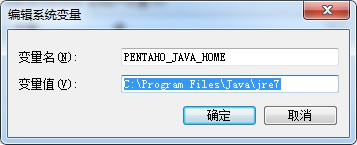
3、启动 bi server
双击 start-pentaho.bat,即可启动server,首次启动等待时间较长,成功启动服务器后会有startup in ... s的提示。
启动成功后访问地址:http://localhost:8080/pentaho
三、配置MySQL为默认数据库
1、导入数据库文件 (biserver-ce\data\mysql5目录)
create_jcr_mysql.sql
create_quartz_mysql.sql :为Quartz计划任务器创建资源库。
create_repository_mysql.sql :创建hibernate 数据库,用于存储用户授权认证,solution repository以及数据源。
※在此版本中缺少了sample_data脚本,可以从5.4之前的版本的包中找到。
2、添加MySQL驱动
复制mysql的驱动包到 /opt/ptools/biserver-ce/tomcat/lib/ 目录下
复制mysql的驱动包到 \biserver-ce\tomcat\webapps\pentaho\WEB-INF\lib
3、biserver-ce/pentaho-solutions/system 目录下
(1) pentaho.xml
关闭前台显示用户列表
<login-show-users-list>false</login-show-users-list>
注释测试数据
<!--
<sampledata-datasource>
<name>SampleData</name>
<host>localhost</host>
<type>Hypersonic</type>
<port>9001</port>
<access>NATIVE</access>
<username>pentaho_user</username>
<password>password</password>
<max-active>20</max-active>
<max-idle>5</max-idle>
<max-wait>1000</max-wait>
<query>select count(*) from INFORMATION_SCHEMA.SYSTEM_SEQUENCES</query>
</sampledata-datasource> -->
(2)applicationContext-spring-security-jdbc.properties
注释HSQLDB 配置 ,新增MySQL 配置
datasource.driver.classname=com.mysql.jdbc.Driver

datasource.url=jdbc:mysql://localhost:3306/hibernate

datasource.username=root

datasource.password=root

datasource.validation.query=SELECT USER()
(3)applicationContext-spring-security-hibernate.properties
注释HSQLDB 配置 ,新增MySQL 配置
jdbc.driver=com.mysql.jdbc.Driver

jdbc.url=jdbc:mysql://localhost:3306/hibernate

jdbc.username=hibuser

jdbc.password=password

hibernate.dialect=org.hibernate.dialect.MySQL5InnoDBDialect
(4)\biserver-ce\pentaho-solutions\system\hibernate\hibernate-settings.xml
修改配置文件为 MySQL 配置
<config-file>system/hibernate/mysql5.hibernate.cfg.xml</config-file>
(5)\biserver-ce\pentaho-solutions\system\quartz\quartz.properties
org.quartz.jobStore.driverDelegateClass = org.quartz.impl.jdbcjobstore.StdJDBCDelegate
(6)\biserver-ce\pentaho-solutions\system\simple-jndi\jdbc.properties
注释HSQL 配置,添加MySQL配置
SampleData/type=javax.sql.DataSource

SampleData/driver=com.mysql.jdbc.Driver

SampleData/url=jdbc:mysql://localhost:3306/sampledata

SampleData/user=pentaho_user

SampleData/password=password

Hibernate/type=javax.sql.DataSource

Hibernate/driver=com.mysql.jdbc.Driver

Hibernate/url=jdbc:mysql://localhost:3306/hibernate

Hibernate/user=hibuser

Hibernate/password=password

Quartz/type=javax.sql.DataSource

Quartz/driver=com.mysql.jdbc.Driver

Quartz/url=jdbc:mysql://localhost:3306/quartz

Quartz/user=pentaho_user

Quartz/password=password

Shark/type=javax.sql.DataSource

Shark/driver=com.mysql.jdbc.Driver

Shark/url=jdbc:mysql://localhost:3306/shark

Shark/user=sa

Shark/password=

SampleDataAdmin/type=javax.sql.DataSource

SampleDataAdmin/driver=com.mysql.jdbc.Driver

SampleDataAdmin/url=jdbc:mysql://localhost:3306/sampledata

SampleDataAdmin/user=pentaho_admin

SampleDataAdmin/password=password
(7)\biserver-ce\tomcat\webapps\pentaho\META-INF\context.xml
<?xml version="1.0" encoding="UTF-8"?>

<Context path="/pentaho" docbase="webapps/pentaho/">

  <Resource name="jdbc/Hibernate" auth="Container" type="javax.sql.DataSource"

    factory="org.apache.commons.dbcp.BasicDataSourceFactory" maxActive="" maxIdle=""

    maxWait="" username="hibuser" password="password"

    driverClassName="com.mysql.jdbc.Driver" url="jdbc:mysql://localhost:3306/hibernate"

    validationQuery="select user()" />


    <Resource name="jdbc/Quartz" auth="Container" type="javax.sql.DataSource"

      factory="org.apache.commons.dbcp.BasicDataSourceFactory" maxActive="" maxIdle=""

      maxWait="" username="pentaho_user" password="password"

      driverClassName="com.mysql.jdbc.Driver" url="jdbc:mysql://localhost:3306/quartz"

      validationQuery="select user()"/>

</Context>
(8)\biserver-ce\tomcat\webapps\pentaho\WEB-INF\web.xml
<!-- [BEGIN HSQLDB DATABASES] -->

 <!-- <context-param>

    <param-name>hsqldb-databases</param-name>

    <param-value>sampledata@../../data/hsqldb/sampledata,hibernate@../../data/hsqldb/hibernate,quartz@../../data/hsqldb/quartz</param-value>

  </context-param>   -->

  <!-- [END HSQLDB DATABASES] -->

  <!-- [BEGIN HSQLDB STARTER] -->

  <!--<listener>

    <listener-class>org.pentaho.platform.web.http.context.HsqldbStartupListener</listener-class>

  </listener> -->

  <!-- [END HSQLDB STARTER] -->
4、启动bi Server,打开浏览器,http://localhost:8080/pentaho/
pentaho bi server 配置MySQL数据库的更多相关文章
- 原创教程:SpagoBI4.2汉化及配置Mysql数据库教程
SpagoBI4.2汉化及配置Mysql数据库教程 商务智能套件SpagoBI提供一个基于J2EE的框架用于管理BI对象如报表.OLAP分析.仪表盘.记分卡以及数据挖掘模型等的开源BI产品.它提供的B ...
- 迅美VPS安装和配置MySQL数据库教程
MySQL相关教程与知识: 迅美VPS安装和配置MySQL数据库教程 navicat8管理MySQL教程-创建数据库和导入数据 navicat8管理MySQL教程-管理建立用户和分配 ...
- CentOS6.7下使用非root用户(普通用户)编译安装与配置mysql数据库并使用shell脚本定时任务方式实现mysql数据库服务随机自动启动
CentOS6.7下使用非root用户(普通用户)编译安装与配置mysql数据库并使用shell脚本定时任务方式实现mysql数据库服务随机自动启动1.关于mysql?MySQL是一个关系型数据库管理 ...
- 【入门】Spring-Boot项目配置Mysql数据库
前言 前面参照SpringBoot官网,自动生成了简单项目点击打开链接 配置数据库和代码遇到的问题 问题1:cannot load driver class :com.mysql.jdbc.Drive ...
- 在linux下安装并配置mysql数据库
在linux下安装并配置mysql数据库 工具/原料 MySql5.6 CentOS 方法/步骤 1 查找以前是否安装有mysql,使用下面命令: rpm -qa|grep -i mysql ...
- 在oracle配置mysql数据库的dblink
本文介绍如何在oracle配置mysql数据库的dblink:虽然dblink使用很占资源:俗称“性能杀手”.但有些场景不得不使用它.例如公司使用数据库是oracle:可能其他部门或者CP合作公司使用 ...
- 阿里云CentOs服务器 安装与配置mysql数据库
阿里云CentOs服务器 安装与配置mysql数据库 以上为Linux安装mysql数据库 Linux 安装mysql 数据库 一下为mysql 安装教程 Using username "r ...
- Ubuntu Server下MySql数据库备份脚本代码
明: 我这里要把MySql数据库存放目录/var/lib/mysql下面的pw85数据库备份到/home/mysql_data里面,并且保存为mysqldata_bak_2012_04_11.tar. ...
- 配置MySQL数据库
一.配置MySQL数据库 1.解压绿色版mysql,如下图 二.安装服务 1.运行cmd(管理员版本,否则没有权限),如下图 2.运行命令mysqld –install安装服务,如下图: 如果不需要m ...
随机推荐
- node入门学习(二)
一.模块系统 1.创建模块和引用模块 //如何创建一个模块 exports.hello = function(){ console.log('hello worl'); }; //这创建了一个模块 / ...
- vim出现自动补全的问题
当使用vim编辑文件自动补全文件名称的时候,可能会出现_arguments:451: _vim_files: function definition file not found的错误,这个时候一般都 ...
- Java并发编程中的设计模式解析(一)
Java并发编程,除了被用于各种Web应用.分布式系统和大数据系统,构成高并发系统的核心基础外,其本身也蕴含着大量的设计模式思想在里面.这一系列文章主要是结合Java源码,对并发编程中使用到的.实现的 ...
- 本地存储—localStorage(HTML5)
https://my.oschina.net/jgy/blog/99631 localStorage简介 今夜死活睡不着,决定整理下最近搞得localStorage…… 先简单说下阐述下:localS ...
- BZOJ 3173 最长上升子序列(树状数组+二分+线段树)
给定一个序列,初始为空.现在我们将1到N的数字插入到序列中,每次将一个数字插入到一个特定的位置.每插入一个数字,我们都想知道此时最长上升子序列长度是多少? 由于序列是顺序插入的,所以当前插入的数字对之 ...
- 【Java并发编程】之七:使用synchronized获取互斥锁的几点说明
在并发编程中,多线程同时并发访问的资源叫做临界资源,当多个线程同时访问对象并要求操作相同资源时,分割了原子操作就有可能出现数据的不一致或数据不完整的情况,为避免这种情况的发生,我们会采取同步机制,以确 ...
- 基于c的简易计算器一
#include <stdio.h> #include <stdlib.h> #include <string.h> #include <malloc.h&g ...
- java并发编程中CountDownLatch和CyclicBarrier的使用
在多线程程序设计中,经常会遇到一个线程等待一个或多个线程的场景,遇到这样的场景应该如何解决? 如果是一个线程等待一个线程,则可以通过await()和notify()来实现: 如果是一个线程等待多个线程 ...
- JVM工作原理 - 内存空间
大多数 JVM 将内存区域划分为 Method Area(Non-Heap)(方法区) ,Heap(堆) , Program Counter Register(程序计数器) , VM Stack( ...
- 关于AC自动机和DP的联系
首先是描述个大概.不说一些特殊的DP 或者借用矩阵来状态转移 (这些本质都是一样的). 只讲AC自动机和DP的关系(个人理解). AC自动机 又可以叫做状态机. 我一开始的认为.AC 自动机提供了一些 ...