
[svc]logstash和filebeat之间ssl加密
cfssl生成证书
wget https://pkg.cfssl.org/R1.2/cfssl_linux-amd64 -O     /usr/local/bin/cfssl

wget https://pkg.cfssl.org/R1.2/cfssljson_linux-amd64 -O      /usr/local/bin/cfssljson

wget https://pkg.cfssl.org/R1.2/cfssl-certinfo_linux-amd64 -O /usr/local/bin/cfssl-certinfo

chmod +x /usr/local/bin/cfssl*

cd;mkdir keys;cd keys

cat > ca-config.json <<EOF

{

  "signing": {

    "default": {

      "expiry": "8760h"

    },

    "profiles": {

      "app": {

        "usages": [

            "signing",

            "key encipherment",

            "server auth",

            "client auth"

        ],

        "expiry": "8760h"

      }

    }

  }

}

EOF

cat > ca-csr.json <<EOF

{

  "CN": "k8s",

  "key": {

    "algo": "rsa",

    "size": 2048

  },

  "names": [

    {

      "C": "CN",

      "ST": "BeiJing",

      "L": "BeiJing",

      "O": "k8s",

      "OU": "System"

    }

  ]

}

EOF

cfssl gencert -initca ca-csr.json | cfssljson -bare ca

cd /root/keys

cat > app-csr.json <<EOF

{

  "CN": "app",

  "hosts": [

    "127.0.0.1",

    "192.168.1.11",

    "192.168.1.12"

  ],

  "key": {

    "algo": "rsa",

    "size": 2048

  },

  "names": [

    {

      "C": "CN",

      "ST": "BeiJing",

      "L": "BeiJing",

      "O": "k8s",

      "OU": "System"

    }

  ]

}

EOF

cfssl gencert -ca=/root/keys/ca.pem \

  -ca-key=/root/keys/ca-key.pem \

  -config=/root/keys/ca-config.json \

  -profile=app app-csr.json | cfssljson -bare app

openssl x509  -noout -text -in  app.pem
可以看到san里包含了n1 和 n2的ip. 这里计划logstash(的ip)和filebeat(的ip)使用同一套证书
实验环境
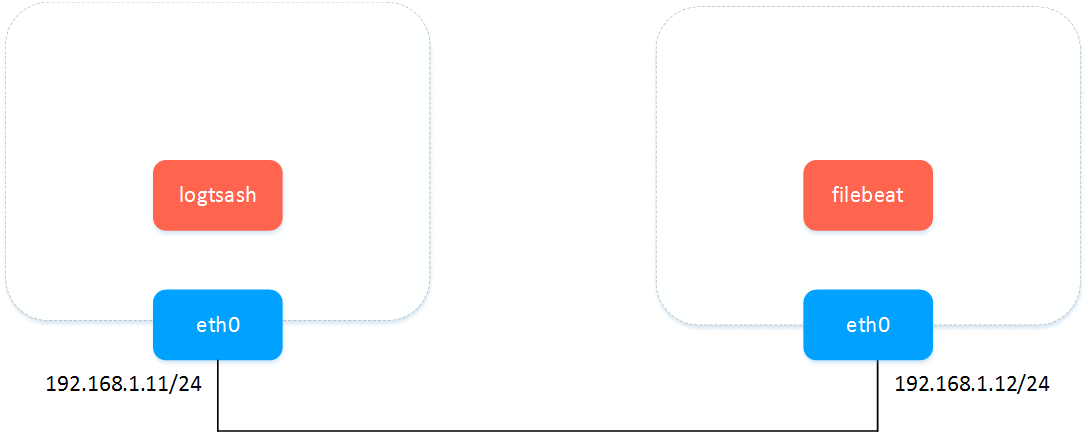
logstash&filebeat之间传数据-明文
logstash配置
cat > pipeline.conf <<EOF

input {

  beats {

    port => 5044

  }

  stdin {

    codec => "json"

  }

}

output {

  stdout { codec => rubydebug }

}

EOF

bin/logstash -f pipeline.conf --config.reload.automatic
filebeat多输入(不能多输出)参考: https://www.elastic.co/guide/en/beats/filebeat/current/migration-configuration.html
cat > filebeat.yml <<EOF

filebeat.prospectors:

- type: log

  enabled: true

  paths:

    - /tmp/ma.txt

- type: stdin

output.logstash:

  hosts: ["192.168.1.11:5044"]

# output.console:

#  pretty: true

EOF

./filebeat -e -c filebeat.yml -d "publish"
测试文字
helloworld helloworld helloworld helloworld helloworld helloworld helloworld helloworld helloworld helloworld helloworld helloworld helloworld helloworld helloworld helloworld helloworld helloworld helloworld helloworld helloworld helloworld helloworld helloworld helloworld helloworld helloworld helloworld helloworld helloworld helloworld helloworld helloworld helloworld helloworld helloworld helloworld helloworld helloworld helloworld helloworld helloworld helloworld helloworld helloworld helloworld helloworld helloworld helloworld helloworld helloworld helloworld helloworld helloworld helloworld helloworld helloworld helloworld helloworld helloworld helloworld helloworld helloworld helloworld helloworld helloworld helloworld helloworld helloworld helloworld helloworld helloworld helloworld helloworld helloworld helloworld helloworld helloworld helloworld helloworld helloworld helloworld helloworld helloworld helloworld helloworld helloworld
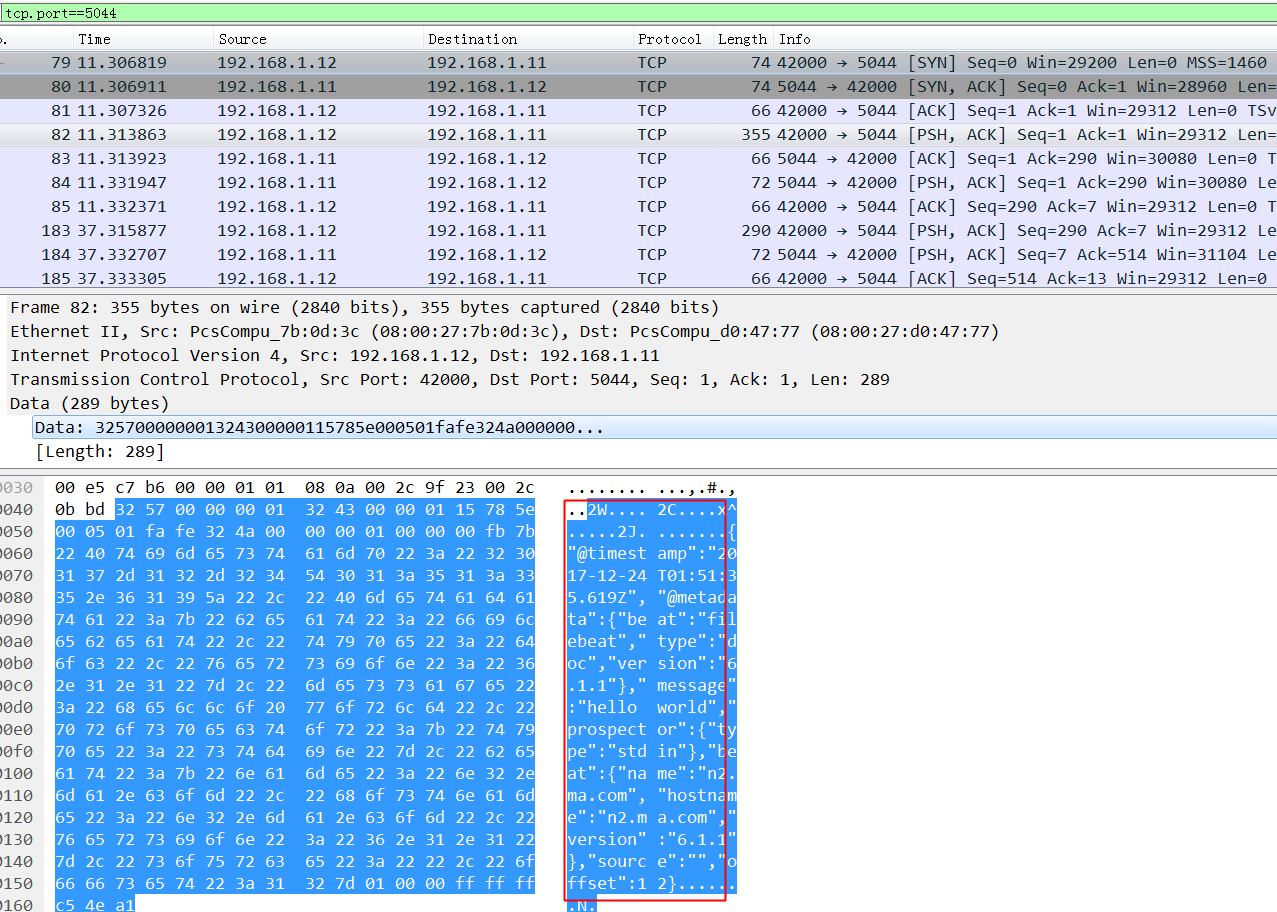
wireshark抓包: 不加密的时候,可以看到这玩意依稀可以看到依稀传输内容,如果互联网传输的话会有隐患.
logstash&filebeat之间传数据-ssl加密
- logstash配置ssl
参考: https://www.elastic.co/guide/en/beats/filebeat/current/configuring-ssl-logstash.html
cat > pipeline.conf <<EOF

input {

  beats {

    port => 5044

    ssl => true

    ssl_certificate_authorities => ["/root/keys/ca.pem"]

    ssl_certificate => "/root/keys/app.pem"

    ssl_key => "/root/keys/app-key.pem"

    ssl_verify_mode => "force_peer"

  }

  stdin {

    codec => "json"

  }

}

output {

  stdout { codec => rubydebug }

}

EOF

bin/logstash -f pipeline.conf --config.reload.automatic
- filebeat配置ssl
filebeat.prospectors:

- type: log

  enabled: true

  paths:

    - /tmp/ma.txt

output.logstash:

  hosts: ["192.168.1.12:5043"]

output.logstash.ssl.certificate_authorities: ["/root/keys/ca.pem"]

output.logstash.ssl.certificate: "/root/keys/app.pem"

output.logstash.ssl.key: "/root/keys/app-key.pem"

output.console:

  pretty: true

./filebeat -e -c filebeat.yml -d "publish"
wireshark抓包: 看不到任何传输内容,依稀看到证书的subject(公开的).
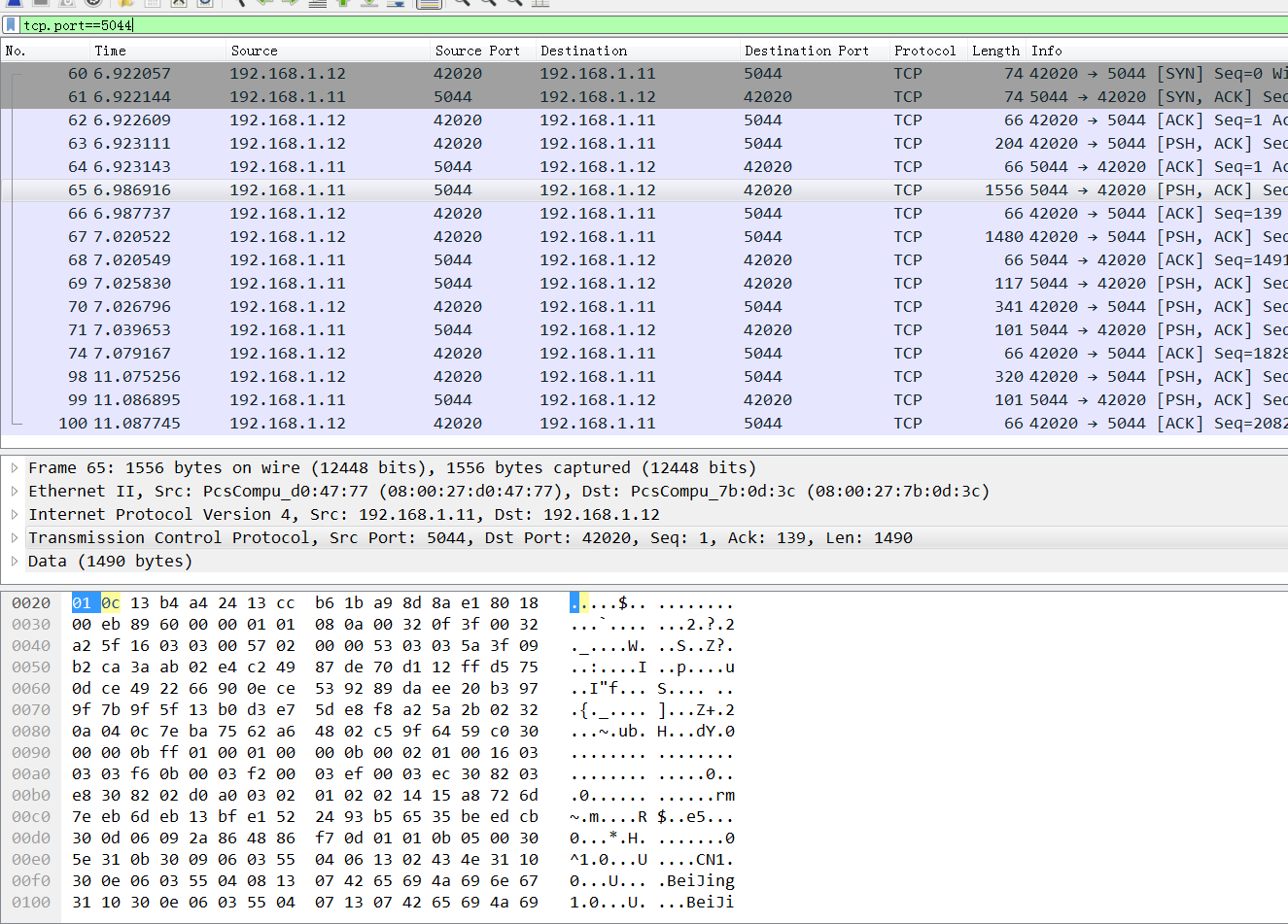
报错doesn't contain any IP SANs
2017/12/24 02:33:59.242540 output.go:74: ERR Failed to connect: x509: cannot validate certificate for 192.168.1.11 because it doesn't contain any IP SANs

2017/12/24 02:34:15.289558 output.go:74: ERR Failed to connect: x509: cannot validate certificate for 192.168.1.11 because it doesn't contain any IP SANs
ssl验证流程:
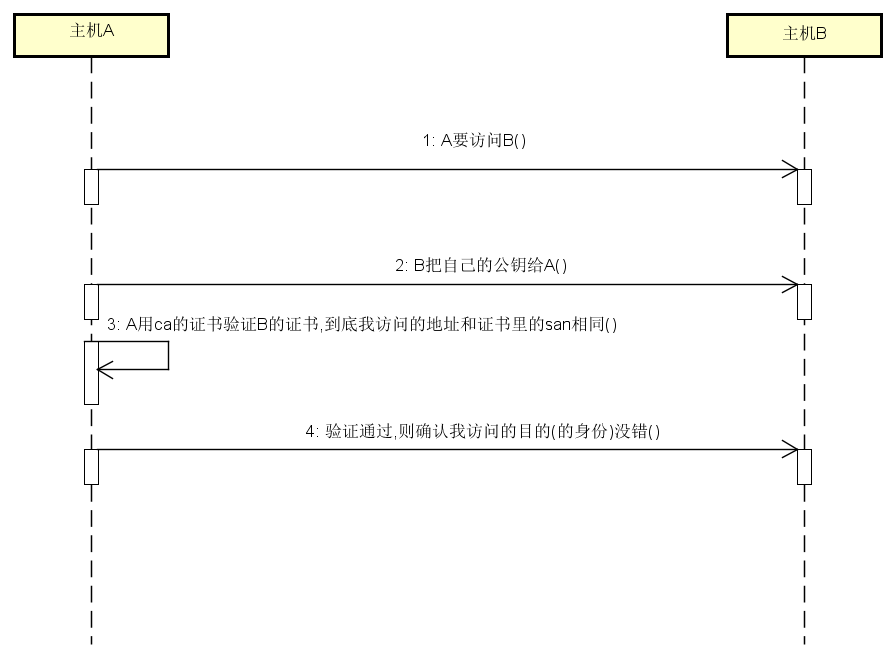
报错原因: 我生成证书请求的时候 hosts字段(即san)为空.
cd /root/keys

cat > app-csr.json <<EOF

{

  "CN": "192.168.1.12",

  "hosts": [],

  "key": {

    "algo": "rsa",

    "size": 2048

  },

  "names": [

    {

      "C": "CN",

      "ST": "BeiJing",

      "L": "BeiJing",

      "O": "k8s",

      "OU": "System"

    }

  ]

}

EOF

cfssl gencert -ca=/root/keys/ca.pem \

  -ca-key=/root/keys/ca-key.pem \

  -config=/root/keys/ca-config.json \

  -profile=app app-csr.json | cfssljson -bare app

openssl x509  -noout -text -in  app.pem
[svc]logstash和filebeat之间ssl加密的更多相关文章
- Filebeat与Logstash配置SSL加密通信
为了保证应用日志数据的传输安全,我们可以使用SSL相互身份验证来保护Filebeat和Logstash之间的连接. 这可以确保Filebeat仅将加密数据发送到受信任的Logstash服务器,并确保L ...
- Chapter 1 Securing Your Server and Network(5):使用SSL加密会话
原文:Chapter 1 Securing Your Server and Network(5):使用SSL加密会话 原文出处:http://blog.csdn.net/dba_huangzj/art ...
- ELK 架构之 Logstash 和 Filebeat 配置使用(采集过滤)
相关文章: ELK 架构之 Elasticsearch 和 Kibana 安装配置 ELK 架构之 Logstash 和 Filebeat 安装配置 ELK 使用步骤:Spring Boot 日志输出 ...
- 利用Fiddler和Wireshark解密SSL加密流量
原文地址:http://kelvinh.github.io/blog/2014/01/12/decrypt-ssl-using-fiddler-and-wireshark/ Fiddler是一个著名的 ...
- Vsftpd支持SSL加密传输
ftp传输数据是明文,弄个抓包软件就可以通过数据包来分析到账号和密码,为了搭建一个安全性比较高ftp,可以结合SSL来解决问题 SSL(Secure Socket Layer)工作于传输层和应用程 ...
- .net mvc 站点自带简易SSL加密传输 Word报告自动生成(例如 导出数据库结构) 微信小程序:动画(Animation) SignalR 设计理念(一) ASP.NET -- WebForm -- ViewState ASP.NET -- 一般处理程序ashx 常用到的一些js方法,记录一下 CryptoJS与C#AES加解密互转
.net mvc 站点自带简易SSL加密传输 因项目需要,传输数据需要加密,因此有了一些经验,现简易抽出来分享! 请求:前端cryptojs用rsa/aes 或 rsa/des加密,后端.net ...
- 170228、Linux操作系统安装ELK stack日志管理系统--(1)Logstash和Filebeat的安装与使用
安装测试环境:Ubuntu 16.04.2 LTS 前言 (1)ELK是Elasticsearch,Logstash,Kibana 开源软件的集合,对外是作为一个日志管理系统的开源方案.它可以从任何来 ...
- YS端对端之间SSL通信安全问题
1.简介: 传统的互联网,SSL通信主要基于客户端和服务器之间,在物联网时代,端和端之间的加密通信将变得很普遍,在YS业务中主要的端和端通信为: (1).客户端(移动APP,YS工作 ...
- spice在桌面虚拟化中的应用系列之三(USB映射实现,SSL加密,密码认证,多客户端支持)
本系列其它文章 spice在桌面虚拟化中的应用系列之一(spice简介,性能优化等) spice在桌面虚拟化中的应用系列之二(Linux平台spice客户端的编译安装,支持USB映射) 1.spice ...
随机推荐
- Opera Unit如何自定义My Opera的网页界面
1 双击Opera Unite Home进入你的个人主页 2 点击你的头像进入你的个人信息设置页面,然后点击右上角的设置图标 3 在下拉菜单中选择"Customize design" ...
- Discuz常见小问题-如何修改favourite图标
1做好一个ico图标之后,直接替换目录下的对应文件即可, 如果没效果刷新浏览器或更新后台CSS缓存.
- Linux集群监控工具简介:Ganglia和Nagios
11年时候,曾经对 Ganglia 和 Nagios有一定接触,这是两个用于监视数据中心的工具.这两个工具被大量用于高性能计算(HPC)环境中,但是它们对于其他环境也具有很大的吸引力(例如云.呈现集群 ...
- 虎嗅: 小米盒子vs乐视盒子
机顶盒并非新鲜概念,可一旦和互联网发生了跨界关系,就会产生奇妙的反应.自年初小米盒子和乐视盒子分别在突破重重阻碍成功发售之后,互联网企业进军硬件制造领域的趋势愈发明显.今天我们拿到了两家的盒子产品,从 ...
- 微信小程序 - 实现购物车结算
示例源码下载:小程序-实现购物车结算
- Oracle体系结构二(学习笔记)
- 20个常用java代码段
下面是20个非常有用的Java程序片段,希望能对你有用. 1. 字符串有整型的相互转换 String a = String.valueOf(2); //integer to numeric strin ...
- MariaDB与MySQL并存
以下是MariaDB官方文档说明,MariaDB如何安装在已经存在MySQL实例的主机上: https://mariadb.com/kb/en/library/installing-mariadb-a ...
- 新浪微博api出现认证失败问题 (获取code字段值的问题)
出现该提示的原因:`` - 说: (2015-10-30 18:06:14)回调地址不一致,`` - 说: (2015-10-30 18:07:38)请在编辑开发者信息中将网站地址和应用信息--高级信 ...
- Windwos在cmd如何复制文本
生活的琐事,总是要解决. 01.Win+R打开运行窗口 cmd--回车 02. 勾选快速编辑模式 注意: 快速编辑模式就是可以Ctrl+c(复制).Ctrl+v(粘贴)