
使用Android Studio与ArcGIS Android SDK的开发环境部署和HelloWorld
android studio(以下简称AS)是google推荐的android专用IDE,替代目前主流的eclipse,另外arcgis也把AS作为推荐的android IDE
本文不介绍android SDK的部署和AS的安装
以下网站应该是AS的官方中国官网,有很多AS相关基础教程和AS的下载(不用翻墙下载了),强烈推荐
http://www.android-studio.org/
本文代码以arcgis android SDK中的arcgis-android-sdk-v10.2.4\samples\Maps\HelloWorld为基础
环境:Android SDK API 19,android studio 1.0,arcgis android SDK 10.2.4,小米4+MIUI v6
首先new一个project,一直next就行
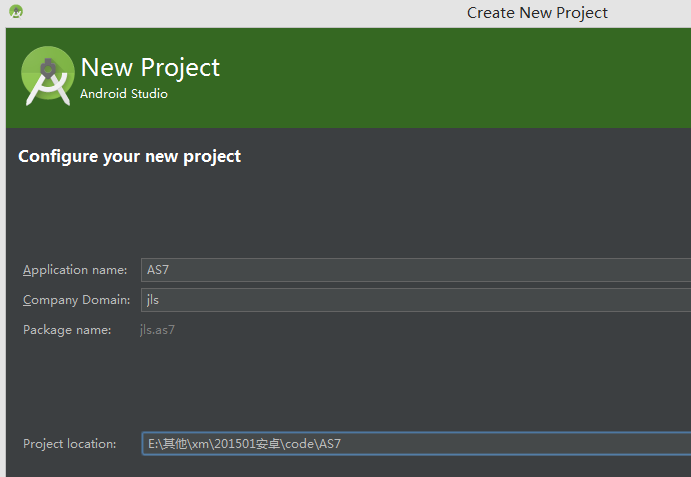
新建project后,把这里切换到project
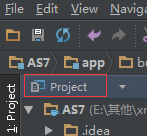
打开以下文件
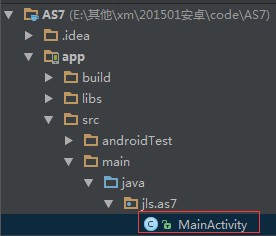
把代码改为
 package jls.as7;

 import android.app.Activity;

 import android.os.Bundle;

 import android.view.Menu;

 import android.view.MenuItem;

 import com.esri.android.map.MapView;

 public class MainActivity extends Activity {

     MapView mMapView;

     @Override

     protected void onCreate(Bundle savedInstanceState) {

         super.onCreate(savedInstanceState);

         setContentView(R.layout.activity_main);

         // After the content of this Activity is set, the map can be accessed programmatically from the layout.

         mMapView = (MapView) findViewById(R.id.map);

     }

     @Override

     protected void onPause() {

         super.onPause();

         // Call MapView.pause to suspend map rendering while the activity is paused, which can save battery usage.

         if (mMapView != null)

         {

             mMapView.pause();

         }

     }

     @Override

     protected void onResume() {

         super.onResume();

         // Call MapView.unpause to resume map rendering when the activity returns to the foreground.

         if (mMapView != null)

         {

             mMapView.unpause();

         }

     }

 }
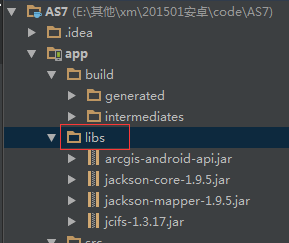
打开arcgis android SDK的压缩包,在libs目录下,找到如下几个jar包
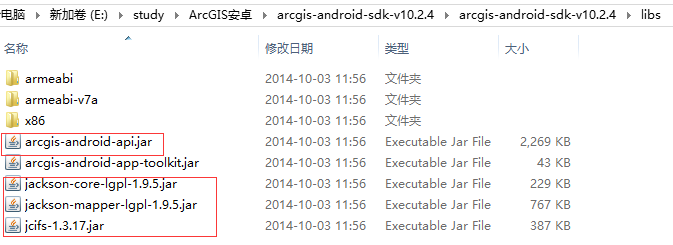
复制到代码里如下目录
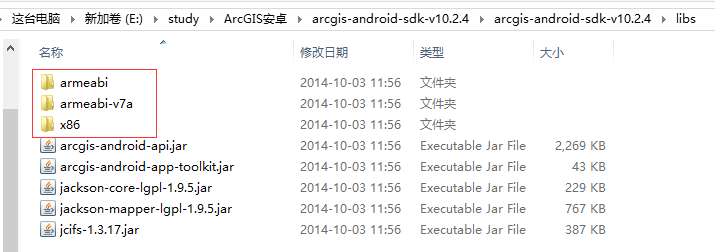
同样是arcgis SDK的libs目录下,把以下几个文件夹
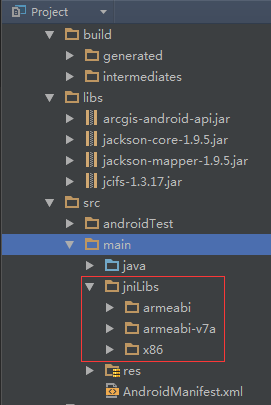
复制到代码的如下目录(jniLibs目录默认不存在,要手动新建)
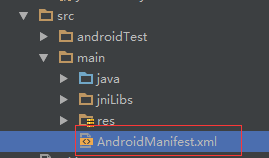
打开AndroidManifest.xml,在manifest节点下,添加如下内容
<uses-permission android:name="android.permission.INTERNET" />
<uses-permission android:name="android.permission.WRITE_EXTERNAL_STORAGE" />
<uses-permission android:name="android.permission.ACCESS_FINE_LOCATION" />
<uses-feature
android:glEsVersion="0x00020000"
android:required="true" />
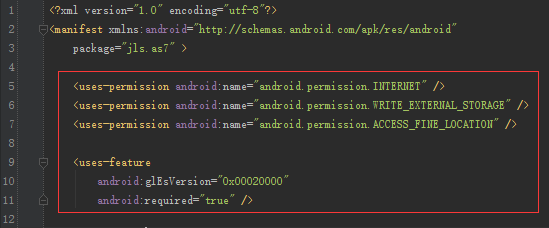
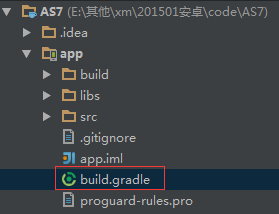
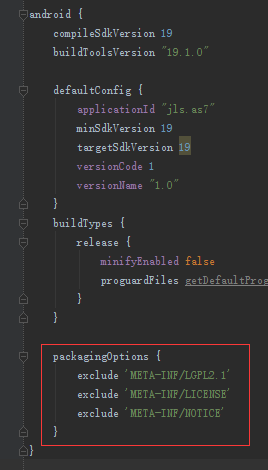
打开moudle的build.gradle,在android节点下添加如下代码
packagingOptions {
exclude 'META-INF/LGPL2.1'
exclude 'META-INF/LICENSE'
exclude 'META-INF/NOTICE'
}
到此配置完毕,插上手机,Run运行程序

使用Android Studio与ArcGIS Android SDK的开发环境部署和HelloWorld的更多相关文章
- 《ArcGIS Runtime SDK for Android开发笔记》——(5)、基于Android Studio构建ArcGIS Android开发环境(离线部署)(转)
1.前言 在上一篇的内容里我们介绍了基于Android Studio构建ArcGIS Runtime SDK for Android开发环境的基本流程,流程中我们采用的是基于Gradle的构建方式,在 ...
- 《ArcGIS Runtime SDK for Android开发笔记》——(4)、基于Android Studio构建ArcGIS Android开发环境
1.前言 2015年1月15日,发布ArcGIS Runtime SDK for Android v10.2.5版本.从该版本开始默认支持android studio开发环境,示例代码的默认开发环境也 ...
- 《ArcGIS Runtime SDK for Android开发笔记》——(6)、基于Android Studio的ArcGIS Android工程结构解析
1.前言 Android Studio 是第一个Google官方的 Android 开发环境.其他工具,例如 Eclipse,在 Android Studio 发布之前已经有了大规模的使用.为了帮助开 ...
- 使用Android Studio和Genymotion模拟器搭建Andriod开发环境
一.Android Studio下载 1.打开http://www.android.com/ 2.依照下图步骤打开下载页面 a.在页脚部分点击“App Developer Resources” b.点 ...
- 在Android Studio上进行OpenCV 3.1开发环境配置
开发环境: Windows 7 x 64 家庭版 Android Studio 1.5.1(Gradle版本2.8) JDK 1.8.0 Android 6.0(API 23) OpenCV 3.1. ...
- Android Studio 0.4 + PhoneGap 3.3 开发环境的搭建
最近在尝试HTML5移动平台下的开发 由于安卓的方便性,首先开始了安卓的试验 现在安卓下的开发工具首选 Android Studio (写这文章的时候,是0.4) 而跨平台的HTML5 App比较出名 ...
- 【转】在Android Studio中下载Android SDK的两种方式(Android Studio3.0、windows)
在Android Studio中下载Android SDK的两种方式(Android Studio3.0.windows) 方式一.设置HTTP Proxy1. 打开Settings2. 点击HTTP ...
- android studio :com.android.support:appcompat-v7:21.+ 报错
android studio :com.android.support:appcompat-v7:21.+ 报错: 在project——>app——>build.gradle修改: app ...
- Android Studio开发环境部署
Step0:背景,那些年-- Step1:安装JDK Step2:安装Android Studio 其他问题1:安装Android Studio之前没有先安装JDK 其他问题2:No JVM inst ...
随机推荐
- HDU 4540 威威猫系列故事——打地鼠
威威猫系列故事--打地鼠 Time Limit: 300/100 MS (Java/Others) Memory Limit: 65535/32768 K (Java/Others) Total Su ...
- 基于XMPP协议的手机多方多端即时通讯方案
一.开发背景 1.国际背景 随着Internet技术的高速发展,即时通信已经成为一种广泛使用的通信方式.1996年Mirabilis公司推出了世界上第一个即时通信系统ICQ,不到10年间,即时通信(I ...
- 【LR】OSGI性能测试实例
其实我们就两点Ø 确定测试登录最大并发用户数:Ø 事务平均响应时间 (两个查询) 得到这个任务 如何展开测试工作呢? 一.WindowsResources 设置(其实不监控 设不设都行 我感觉) ...
- R 环境内存限制的更改
由于R语言非常消耗内存,所以做较大数据的处理时需要增加内存空间,有以下种方式: 一. 在未开启R之前,在cmd中,输入下面指令 r −−max−mem− s i z e =4Gb 二. 在开启R之后, ...
- mybatis源码学习: 动态代理的应用(慢慢改)
动态代理概述 在学spring的时候知道使用动态代理实现aop,入门的列子:需要计算所有方法的调用时间.可以每个方法开始和结束都获取当前时间咋办呢.类似这样: long current=system. ...
- MATLAB Coder从MATLAB生成C/C++代码步骤
MATLAB Coder可以从MATLAB代码生成独立的.可读性强.可移植的C/C++代码. 使用MATLAB Coder产生代码的3个步骤: 准备用于产生代码的MATLAB算法: 检查MATLAB代 ...
- 【原创】开发Kafka通用数据平台中间件
开发Kafka通用数据平台中间件 (含本次项目全部代码及资源) 目录: 一. Kafka概述 二. Kafka启动命令 三.我们为什么使用Kafka 四. Kafka数据平台中间件设计及代码解析 五. ...
- Flex SDK包内文件夹内容说明
打开SDK目录,让我们看看SDK中都包含了哪些内容: ant包含Flex对Ant的支持库,JAR和Java源码都有,方便我们基于Ant完成对项目的构建 asdoc基于ASDOC我们可以很方便的生成代码 ...
- dom 侧栏分享
<!doctype html> <html> <head> <meta charset="utf-8"> <title> ...
- 企业部署Linux应用将拥有更低的整体拥有成本
企业部署Linux应用将拥有更低的整体拥有成本 使用Linux能为企业的IT解决方案降低TCO(整体拥有成本Total Cost of The Ownership)吗?在面临这个问题时,很多企 ...