
cocos2d-x 节点操作 -->J2ME
cocos2d-x 的节点操作涉及到以下几点
1. 节点之间的关系
2. 节点的添加操作
3. 节点的删除操作
4. 节点的查找操作
5. 节点的替换操作
6. 节点属性操作
0. 节点操作相关参数
    /** 当前节点的Z轴顺序 **/

    private int m_nZOrder = 0;

    /** 当前节点的子节点 **/

    private Vector m_vChildren = new Vector();

    /** 当前节点的父节点 **/

    private CCNode m_Parent;
.csharpcode, .csharpcode pre
{
font-size: small;
color: black;
font-family: consolas, "Courier New", courier, monospace;
background-color: #ffffff;
/*white-space: pre;*/
}
.csharpcode pre { margin: 0em; }
.csharpcode .rem { color: #008000; }
.csharpcode .kwrd { color: #0000ff; }
.csharpcode .str { color: #006080; }
.csharpcode .op { color: #0000c0; }
.csharpcode .preproc { color: #cc6633; }
.csharpcode .asp { background-color: #ffff00; }
.csharpcode .html { color: #800000; }
.csharpcode .attr { color: #ff0000; }
.csharpcode .alt
{
background-color: #f4f4f4;
width: 100%;
margin: 0em;
}
.csharpcode .lnum { color: #606060; }
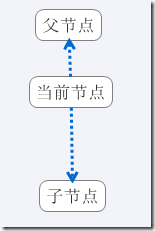
1. 节点之间的关系
2. 节点的添加操作
/**
      * addChild(给当前节点添加子节点)

      * @Title: addChild

      * @Description:

      *    1. 如果节点为null或者已经有父节点的话则退出

      *    2. 节点的插入采用插入排序的算法

      * @param  _node   : 子节点

      * @param  _zOrder : z轴序列

      * @param  tag     : 标识符

      * @return void    返回类型

     */

    public void addChild(CCNode _node,int _zOrder,int tag)

  public void addChild(CCNode _node,int _zOrder)

  public void addChild(CCNode _node)
在添加节点的时候,为了保证添加的zOrder序列都在对应的位置,我们在每次添加节点的时候,都进行一次排序
      /**

      * sortChildrens(排序所有节点)

      * @Title: sortChildrens

      * @Description: TODO

     */

    public void insertSortChildrens(CCNode node)

    {

        int len = m_vChildren.size();

        if(len == 0)

        {

            m_vChildren.addElement(node);

            return;

        }

        //倒插排序法

        for(int i = len-1;i >= 0;i--)

        {

            if(node.getZOrder() >= ((CCNode)m_vChildren.elementAt(i)).getZOrder())

            {

                m_vChildren.insertElementAt(node, i+1);

                return;

            }

        }

    }
.csharpcode, .csharpcode pre
{
font-size: small;
color: black;
font-family: consolas, "Courier New", courier, monospace;
background-color: #ffffff;
/*white-space: pre;*/
}
.csharpcode pre { margin: 0em; }
.csharpcode .rem { color: #008000; }
.csharpcode .kwrd { color: #0000ff; }
.csharpcode .str { color: #006080; }
.csharpcode .op { color: #0000c0; }
.csharpcode .preproc { color: #cc6633; }
.csharpcode .asp { background-color: #ffff00; }
.csharpcode .html { color: #800000; }
.csharpcode .attr { color: #ff0000; }
.csharpcode .alt
{
background-color: #f4f4f4;
width: 100%;
margin: 0em;
}
.csharpcode .lnum { color: #606060; }
.csharpcode, .csharpcode pre
{
font-size: small;
color: black;
font-family: consolas, "Courier New", courier, monospace;
background-color: #ffffff;
/*white-space: pre;*/
}
.csharpcode pre { margin: 0em; }
.csharpcode .rem { color: #008000; }
.csharpcode .kwrd { color: #0000ff; }
.csharpcode .str { color: #006080; }
.csharpcode .op { color: #0000c0; }
.csharpcode .preproc { color: #cc6633; }
.csharpcode .asp { background-color: #ffff00; }
.csharpcode .html { color: #800000; }
.csharpcode .attr { color: #ff0000; }
.csharpcode .alt
{
background-color: #f4f4f4;
width: 100%;
margin: 0em;
}
.csharpcode .lnum { color: #606060; }
3. 节点的删除操作
     *  public void removeChild(CCNode node,boolean cleanup)

     *  public void removeChild(CCNode node)

     *  public void removeFromParentAndCleanup(boolean cleanup)

     *  public void removeFromParent()

     *  public void removeAllChildrenWithCleanup(boolean cleanup)

     *  public void removeChildByTag(int tag,boolean cleanup)
.csharpcode, .csharpcode pre
{
font-size: small;
color: black;
font-family: consolas, "Courier New", courier, monospace;
background-color: #ffffff;
/*white-space: pre;*/
}
.csharpcode pre { margin: 0em; }
.csharpcode .rem { color: #008000; }
.csharpcode .kwrd { color: #0000ff; }
.csharpcode .str { color: #006080; }
.csharpcode .op { color: #0000c0; }
.csharpcode .preproc { color: #cc6633; }
.csharpcode .asp { background-color: #ffff00; }
.csharpcode .html { color: #800000; }
.csharpcode .attr { color: #ff0000; }
.csharpcode .alt
{
background-color: #f4f4f4;
width: 100%;
margin: 0em;
}
.csharpcode .lnum { color: #606060; }
4. 节点的查找操作
     *  public CCNode getChildByTag(int tag)

     *  public CCNode getChildIndex(int index)
.csharpcode, .csharpcode pre
{
font-size: small;
color: black;
font-family: consolas, "Courier New", courier, monospace;
background-color: #ffffff;
/*white-space: pre;*/
}
.csharpcode pre { margin: 0em; }
.csharpcode .rem { color: #008000; }
.csharpcode .kwrd { color: #0000ff; }
.csharpcode .str { color: #006080; }
.csharpcode .op { color: #0000c0; }
.csharpcode .preproc { color: #cc6633; }
.csharpcode .asp { background-color: #ffff00; }
.csharpcode .html { color: #800000; }
.csharpcode .attr { color: #ff0000; }
.csharpcode .alt
{
background-color: #f4f4f4;
width: 100%;
margin: 0em;
}
.csharpcode .lnum { color: #606060; }
5. 节点的替换操作
    /**

     *

      * reorderChild(重新排序当前节点的Z轴序列)

      * @Title: reorderChild

      * @Description: TODO

      * @param  node      : 当前节点

      * @param  zOrder    : Z轴序列

      * @return void    返回类型

     */

    public void reorderChild(CCNode node,int zOrder)
.csharpcode, .csharpcode pre
{
font-size: small;
color: black;
font-family: consolas, "Courier New", courier, monospace;
background-color: #ffffff;
/*white-space: pre;*/
}
.csharpcode pre { margin: 0em; }
.csharpcode .rem { color: #008000; }
.csharpcode .kwrd { color: #0000ff; }
.csharpcode .str { color: #006080; }
.csharpcode .op { color: #0000c0; }
.csharpcode .preproc { color: #cc6633; }
.csharpcode .asp { background-color: #ffff00; }
.csharpcode .html { color: #800000; }
.csharpcode .attr { color: #ff0000; }
.csharpcode .alt
{
background-color: #f4f4f4;
width: 100%;
margin: 0em;
}
.csharpcode .lnum { color: #606060; }
6. 节点属性操作
     *  public Vector getChildren()

     *  public int getChildrenCount()
.csharpcode, .csharpcode pre
{
font-size: small;
color: black;
font-family: consolas, "Courier New", courier, monospace;
background-color: #ffffff;
/*white-space: pre;*/
}
.csharpcode pre { margin: 0em; }
.csharpcode .rem { color: #008000; }
.csharpcode .kwrd { color: #0000ff; }
.csharpcode .str { color: #006080; }
.csharpcode .op { color: #0000c0; }
.csharpcode .preproc { color: #cc6633; }
.csharpcode .asp { background-color: #ffff00; }
.csharpcode .html { color: #800000; }
.csharpcode .attr { color: #ff0000; }
.csharpcode .alt
{
background-color: #f4f4f4;
width: 100%;
margin: 0em;
}
.csharpcode .lnum { color: #606060; }
7
.csharpcode, .csharpcode pre
{
font-size: small;
color: black;
font-family: consolas, "Courier New", courier, monospace;
background-color: #ffffff;
/*white-space: pre;*/
}
.csharpcode pre { margin: 0em; }
.csharpcode .rem { color: #008000; }
.csharpcode .kwrd { color: #0000ff; }
.csharpcode .str { color: #006080; }
.csharpcode .op { color: #0000c0; }
.csharpcode .preproc { color: #cc6633; }
.csharpcode .asp { background-color: #ffff00; }
.csharpcode .html { color: #800000; }
.csharpcode .attr { color: #ff0000; }
.csharpcode .alt
{
background-color: #f4f4f4;
width: 100%;
margin: 0em;
}
.csharpcode .lnum { color: #606060; }
cocos2d-x 节点操作 -->J2ME的更多相关文章
- 深入理解DOM节点操作
× 目录 [1]创建节点 [2]插入节点 [3]移除节点[4]替换节点[5]复制节点 前面的话 一般地,提起操作会想到“增删改查”这四个字,而DOM节点操作也类似地对应于此,接下来将详细介绍DOM的节 ...
- 深入学习jQuery节点操作
× 目录 [1]创建节点 [2]插入节点 [3]删除节点[4]复制节点[5]替换节点[6]包裹节点 前面的话 DOM节点操作包括创建节点.插入节点.移除节点.替换节点和复制节点.jQuery也有类似的 ...
- Query节点操作,jQuery插入节点,jQuery删除节点,jQuery Dom操作
一.创建节点 var box = $('<div>节点</div>'); //创建一个节点,或者var box = "<div>节点</div> ...
- 第6章 DOM节点操作
一.创建节点 为了使页面更加智能化,有时我们想动态的在 html 结构页面添加一个元素标签,那么 在插入之前首先要做的动作就是:创建节点. varbox=$('<div id="box ...
- js节点操作
在看<javascript高级程序设计>,看到节点操作这一块,觉得我只知道用appendChild(),太肤浅了,记录下学到的东西. 每个节点都有一个 parentNode 属性,该属性指 ...
- js 节点 document html css 表单节点操作
js 节点 document html css 表单节点操作 节点操作:访问.属性.创建 (1)节点的访问:firstChild.lastChild.childNodes.parentChild(父子 ...
- ligerui_ligerTree_004_对"ligerTree"节点操作
ligerTree节点操作: 源码地址:http://download.csdn.net/detail/poiuy1991719/8571255 效果图: 代码: json.txt: [ { text ...
- ext 树节点操作
ext 树节点操作 tree :树 node:节点 1.全部展开 tree.expandAll(); 2.全部收缩 tree.collapseAll(); 3.得到父节点 node.parent ...
- JavaScript 节点操作Dom属性和方法(转)
JavaScript 节点操作Dom属性和方法 一些常用的dom属性和方法,列出来作为手册用. 属性: 1.Attributes 存储节点的属性列表(只读) 2.childNodes 存储 ...
随机推荐
- CF 335A(Banana-贪心-priority_queue是大根堆)
A. Banana time limit per test 2 seconds memory limit per test 256 megabytes input standard input out ...
- org.apache.hadoop.conf-Configuration
终于遇到第一块硬骨头 Hadoop没有使用java.util.Properties管理配置文件,而是自己定义了一套配置文件管理系统和自己的API. package org.apache.hadoop. ...
- iOS一分钟学会环形进度条
有几篇博客写到了怎么实现环形进度条,大多是使用Core Graph来实现,实现比较麻烦且效率略低,只是一个小小的进度条而已,我们当然是用最简单而且效率高的方式来实现.先看一下这篇博客,博客地址:htt ...
- iOS网络监测如何区分2、3、4G?
你可以在Github下载这个Demo 首先,引入系统的Reachability类,不知道怎么引入的话,在Xcode,按下shift+command+0,搜索Reachability,看到图中所选的工程 ...
- jquery 和 $
而jQuery就是jQuery库提供的一个函数.(好像也不仅仅只是函数, 因为还有 $.ajax(options) 这样的使用,等同 jQuery.ajax(options)) 这个函数的作用是根据 ...
- [Java] 转:多线程 (并发)总结
一概念 二创建多线程方法 三线程常用方法不完整可以自己查阅JDK文档 四线程的生命周期与转换 五同步 六竞争者消费者 七线程池 八JDK 线程工具 线程基础: 1. 创建 2. 状态切换 3. sle ...
- nodejs的mysql模块学习(九)连接池集群
连接池集群 连接池集群可以提供多个主机连接 创建连接池集群 //创建连接池集群 var poolCluster = mysql.createPoolCluster(); //添加配置 config是一 ...
- 【Android Studio使用教程2】Android Studio创建项目
创建项目 首先,先指出Android Studio中的两个概念. Project 和 Module .在Android Studio中, Project 的真实含义是工作空间, Module 为一个具 ...
- 强大的矢量图形库:Raphael JS 中文帮助文档及教程
Raphael 是一个用于在网页中绘制矢量图形的 Javascript 库.它使用 SVG W3C 推荐标准和 VML 作为创建图形的基础,你可以通过 JavaScript 操作 DOM 来轻松创建出 ...
- Mindjet MindManager 2016/2017 折腾记录
https://community.mindjet.com/mindjet/topics/ensure-2017-64-bit-version-installation Mindmanager sho ...