
Robot Framework + Pywinauto 框架实现Windows GUI Automation
Robot Framework is a generic test automation framework for acceptance testing and acceptance test-driven development (ATDD). It has easy-to-use tabular test data syntax and it utilizes the keyword-driven testing approach.
Its testing capabilities can be extended by test libraries implemented either with Python or Java, and users can create new higher-level keywords from existing ones using the same syntax that is used for creating test cases.
Robot Framework itself is open source software and most of the libraries and tools in the ecosystem are also open source.
With a lot of standard and external libraries.
Pywinauto is a GUI automation library written in pure Python and well developed for Windows GUI. At its simplest it allows you to send mouse and keyboard actions to dialogs and controls on both Windows and Linux, while more complex text-based actions are supported on Windows only so far (Linux AT-SPI support is under development).
This big release introduces MS UI Automation (UIA) support (WinForms, WPF, Qt, browsers, Store apps and more).
Modules keyboard and mouse can be used out of any window context now. And they work on Linux as well! Multi-backend architecture allows to add new platforms support.
Robot Framework + Pywinauto
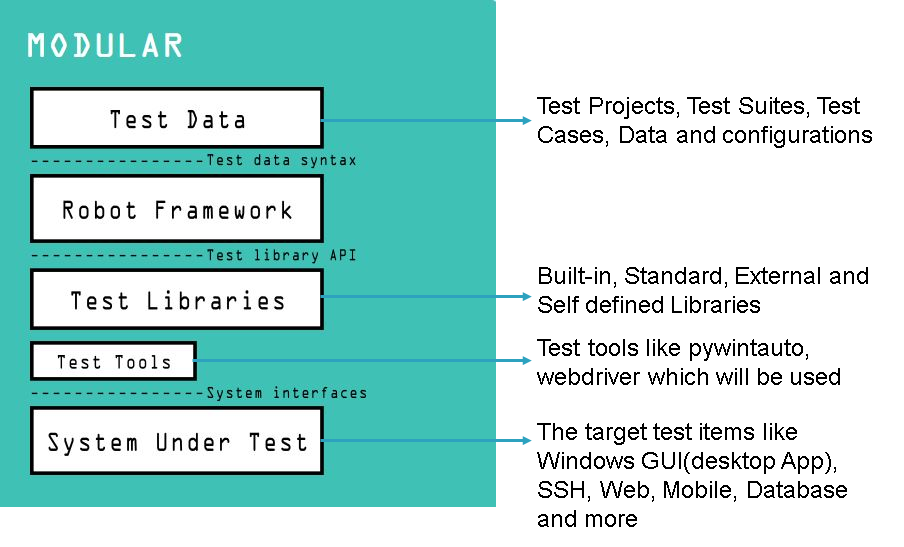
1. Encapsulate the pywinauto codes(functions) to self defined libraries for Robot Framework
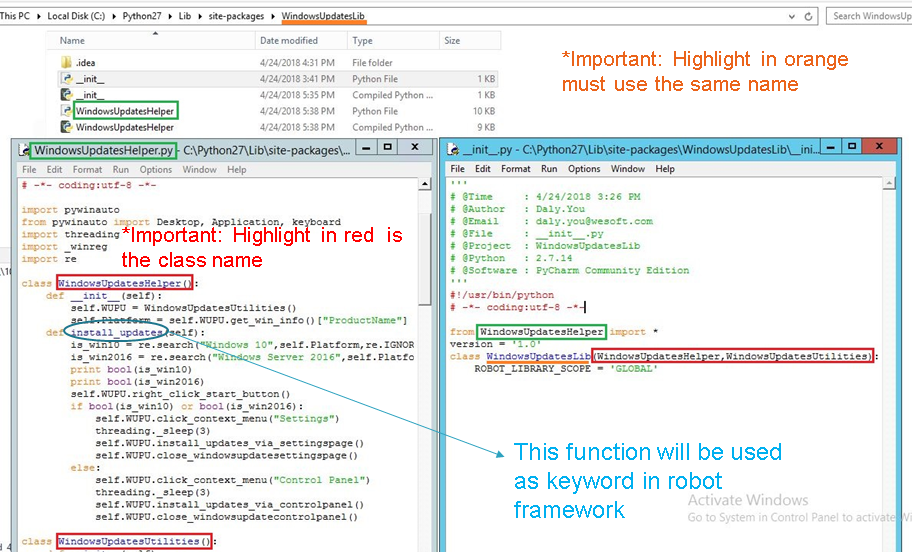
2. Add self defined Library to robot framework
2.1 Method#1: Add Library in Test Suite
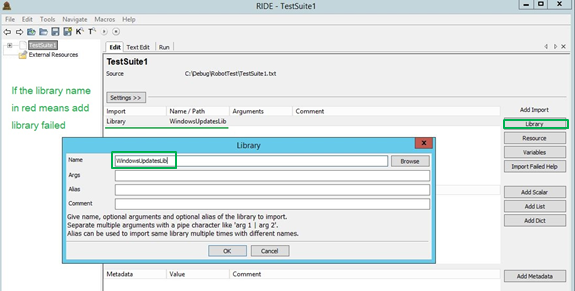
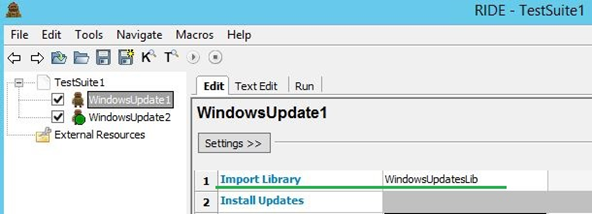
2.2 Method#2: Import the Library directly in the Test Case
Launch RIDE
1. Add New Project:
2. Add New Test Suite:

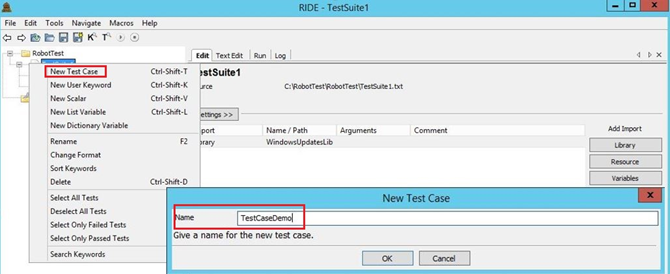
3. Add New Test Case:
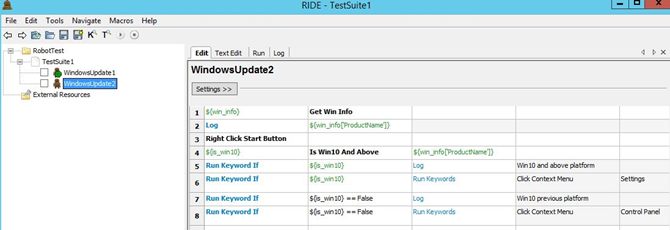
4. Write test case:
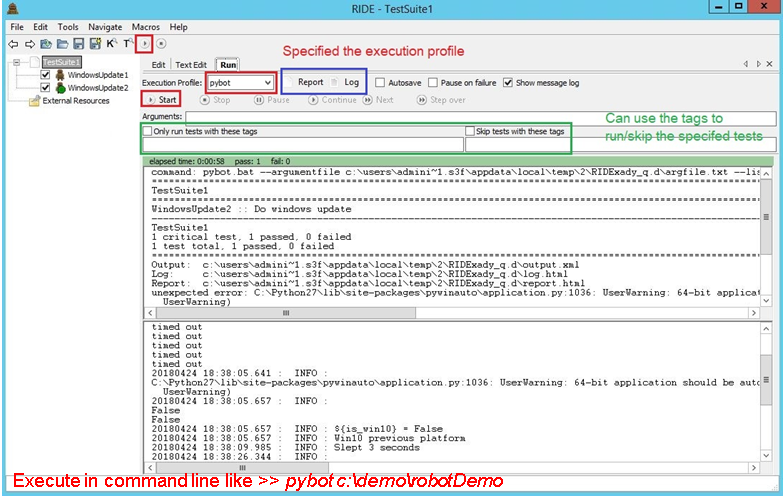
Run the Scripts via RIDE
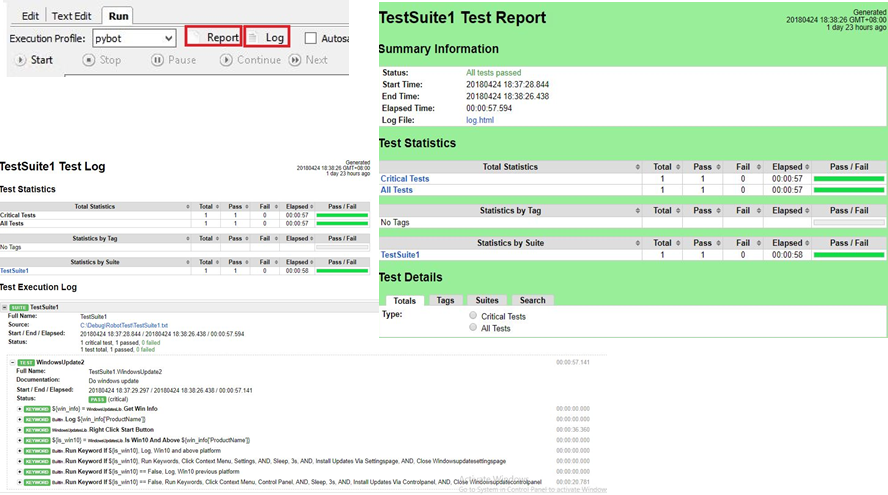
Click Log/Report button to view the Log/Report in browser:
ENV Preparation
1. Install Python
Install python 2. x or python 3.x (https://wiki.python.org/moin/Python2orPython3)
Notes:
1.1 Add python.exe to the PATH Environmental Variable(Can check this via installation)
1.2 RIDE does not support Python3
1.3 pip is already installed if you are using Python 2 >=2.7.9 or Python 3 >=3.4
2. Install wxPython (For RIDE UI)
Method#1: pip install wxPython
Method#2: cd to the source code and run python setup.py install in command line
Method#3: install wxPython-xxx.exe(You need to install wxPython 2.8.12.1 with unicode support to run RIDE)
3. Install Robot Framework
Method#1: pip install robotframework
Method#2: cd to the source code and run python setup.py install in command line
4. Install RIDE
Method#1: pip install robotframework-ride
Method#2: cd to the source code and run python setup.py install in command line
5. Install pywinatuo
Method#1: pip install pywinauto
Method#2: cd to the source code and run python setup.py install in command line
Notes: If pip can work, can install item#2 to item#5 together via one command: pip install -r requirements.txt
Add PYTHONPATH in Environmental Variable
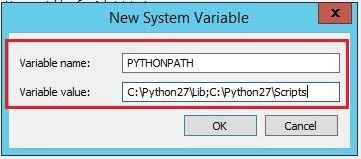
Notes:
1. If the self defined library does not in the PATH, you can add related directory to the PYTHONPATH
IDE
For Python:
Eclipse (Use Python plugin)
PyCharm
For RobotFramework:
RIDE (A lightweight and intuitive editor for Robot Framework test data.)
Start RIDE: cd to x:\Python27\Scripts\ and execute python ride.py in command line
Eclipse (Use RobotFramework plugin)
Tools
GUI Inspect Tool
1. Swapy.exe
This tool based on
Pywinauto 0.5.4
2. Inspect.exe
3. AccExplorer.exe
RIDE Settings
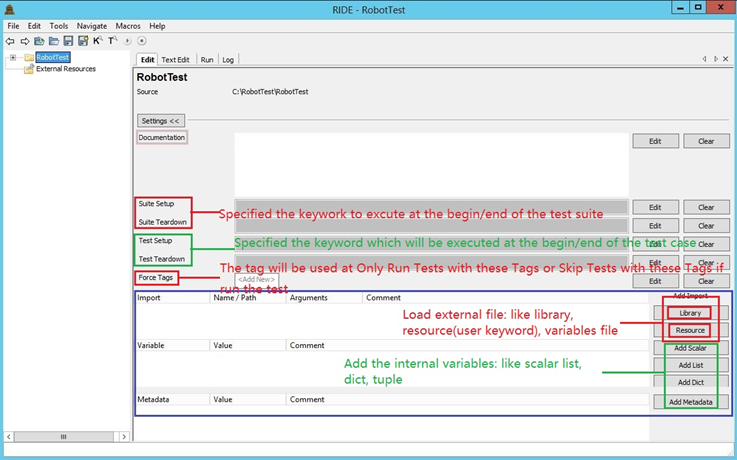
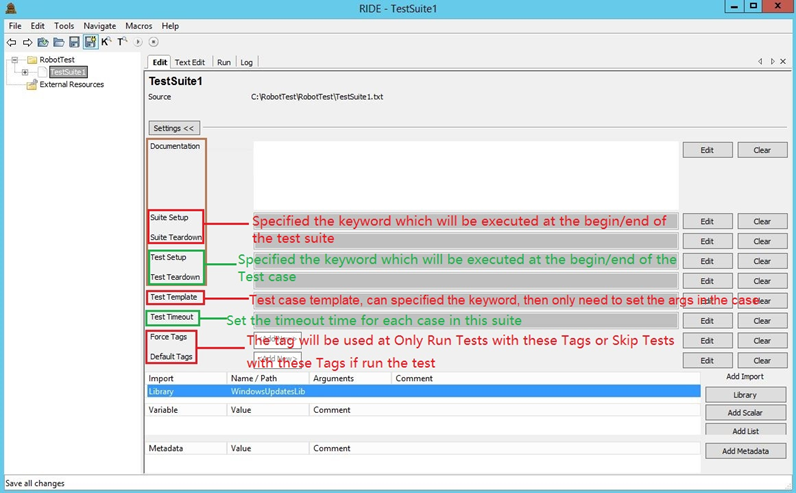
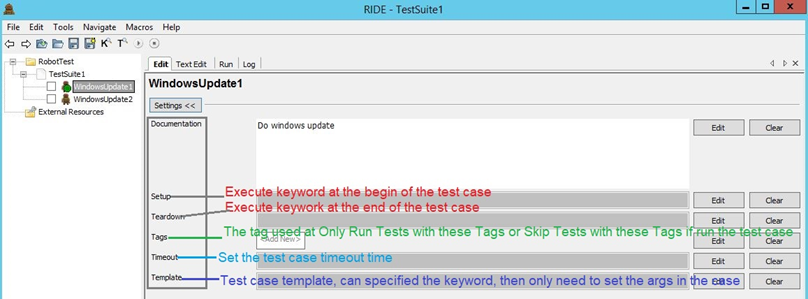
WebSite:
http://robotframework.org/
https://pypi.org/project/robotframework/
https://github.com/robotframework/robotframework
http://pywinauto.github.io/
https://pywinauto.readthedocs.io/en/latest/
https://github.com/pywinauto/pywinauto/releases
Robot Framework + Pywinauto 框架实现Windows GUI Automation的更多相关文章
- Robot Framework自动化框架搭建的步骤
我把自己之前搭建Robot Framework自动化测试框架的步骤整理了一下,感兴趣的同学可以参考一下. Robot Framework自动化测试框架+ 可视化编辑工具RIDE+Selenium2 ...
- 三年磨一剑,robot framework 自动化测试框架核心指南,真正讲透robot framework自动化测试框架(笔者新书上架)。
序 关于自动化测试的工具和框架其实有很多.自动化测试在测试IT行业中扮演着越来越重要的角色,不管是在传统的IT行业还是高速发展的互联网行业或是如今的大数据和大热的人工智能领域,都离不开测试,也更加离不 ...
- Robot Framework自动化测试框架核心指南-如何使用Java编写自定义的RobotFramework Lib
如何使用Java编写自定义的RobotFramework Lib 本文包括2个章节 1. Robot Frdamwork中如何调用java Lib库 2.使用 java编写自定义的Lib 本文作者为: ...
- Robot Framework自动化测试框架核心指南-如何做好自动化测试平台框架的设计
自动化测试如果需要能高效快速的支撑软件项目的测试,项目的快速迭代以及上线,除了以上我们介绍的需要许多的Lib来支持以及需要高效的去编写自动化测试案例外,还需要一个好的自动化测试框架平台来支撑我们的自动 ...
- Robot Framework自动化测试框架初探
Robot Framework是一款python语言编写,通用的功能自动化测试框架.它使用了比较易用的表格数据语法,基于关键字驱动测试,主要用来验收测试和验收测试驱动开发(ATDD). 本文主要介绍R ...
- 基于Python3.7 Robot Framework自动化框架搭建
一.Robot Framework 和 Selenium 的区别(面试常问) 主流自动化测试框架有Robot Framework 和 Selenium,请根据实际场景选用不同的框架,以下总结各自优缺点 ...
- Robot Framework测试框架学习笔记
一.Robot Framework框架简介 Robot Framework是一种基于Python的可扩展关键字驱动自动化测试框架,通常用于端到端的可接收测试和可接收测试驱动的开发.可以 ...
- Robot Framework测试框架用例脚本设计方法
Robot Framework介绍 Robot Framework是一个通用的关键字驱动自动化测试框架.测试用例以HTML,纯文本或TSV(制表符分隔的一系列值)文件存储.通过测试库中实现的关键字驱动 ...
- Robot Framework 自动化框架大纲
Python + Robot Framework 环境搭建 Android SDK + Appium 环境搭建 RobotFramework - AppiumLibrary 之元素定位 RobotFr ...
随机推荐
- Android简易实战教程--第九话《短信备份~二》
这一篇,承接地八话.使用高效的方式备份短信--xml序列化器. 存储短信,要以对象的方式存储.首先创建javabean: package com.itydl.createxml.domain; pub ...
- 【Unity Shaders】《Unity Shaders and Effects Cookbook》总结篇
我的唠叨 不知不觉,从发表第一篇关于<Unity Shaders and Effects Cookbook>已经快十个月了.一开始的初衷就是学习笔记,毕竟将来回过头去看的时候,再看英文难免 ...
- JVM的内存区域模型
首先要明白一个概念,就是JVM的内存区域划分与java的内存区域模型是两个不同的概念,前者指的是在java中jvm会将一个程序划分为哪些块来存储对应的数据,后者是一个更宏观上的j概念,指的是java线 ...
- RabbitMQ消息队列(七):适用于云计算集群的远程调用(RPC)
在云计算环境中,很多时候需要用它其他机器的计算资源,我们有可能会在接收到Message进行处理时,会把一部分计算任务分配到其他节点来完成.那么,RabbitMQ如何使用RPC呢?在本篇 ...
- (NO.00003)iOS游戏简单的机器人投射游戏成形记(二十一)
回到Xcode中,在MainScene.h接口中添加碰撞协议: @interface MainScene : CCNode <CCPhysicsCollisionDelegate> //. ...
- Linux的资源管理器
说是资源管理器,其实就是使用命令来对Linux运行系统的参数的查看.下面就一起看一看怎么像在windows下查看资源管理器吧. 1.查看进程(额,自然是电脑上正在运行的进程咯) ps aux 其中a ...
- Android官方技术文档翻译——Gradle 插件用户指南(6)
没想到翻译这篇<Gradle 插件用户指南>拖了差不多一个月,还跨年了.不过还好,在2号时终于一口气把剩下的给翻译完了(其实那天剩下的也就不到一章). 今天先发一下第六章,明天再发第七章. ...
- ShapeDrawable做放大镜效果
引用一下ShapeDrawable的类的说明: java.lang.Object ? android.graphics.drawable.Drawable ? android.grap ...
- 一堆C++人找不出内存泄露
一堆C++人找不出内存泄露 内存泄露就像痔疮对于男人,对于C/C++程序员来说,是顽疾.尤其一堆C++人聚集在一起,准备把程序深处的虫子抓出来的时候,那景象是热火朝天,不亦乐乎. 突然,小白甲发布了一 ...
- python屏幕的交互(读取输出信息)input,raw_input的区别
>>> input("your name?") your name?sam Traceback (most recent call last): File & ...