
iOS-CYLTabBarController【好用的TabbarController】
用TabbarController进行模块分类和管理,这里推荐一个CYLTabBarController,只需两个数组就可以使用和管理;
1.导入CYLTabBarController
使用cocoapods导入即可 pod 'CYLTabBarController', '~> 1.14.1',终端 pod install 即可
2.配置
新建一个基于 NSObject 类 MainTabBarControllerConfig,用于配置CYLTabBarController及管理;头文件引入
#import <CYLTabBarController.h>
.h
@interface MainTabBarControllerConfig : NSObject
///CYLTabBarController

@property (nonatomic,strong) CYLTabBarController *mainTabBarController;

@end
.m
@implementation MainTabBarControllerConfig

- (CYLTabBarController *)mainTabBarController{

    if (!_mainTabBarController) {

        UIEdgeInsets imageInsets = UIEdgeInsetsZero;

        UIOffset titlePositionAdjustment = UIOffsetZero;

        _mainTabBarController = [CYLTabBarController tabBarControllerWithViewControllers:[self arrayViewControllerItem] tabBarItemsAttributes:[self arrayAttributesItem] imageInsets:imageInsets titlePositionAdjustment:titlePositionAdjustment];

        [self customizeTabBarAppearance:_mainTabBarController];

    }

    return _mainTabBarController;

}

- (NSArray *)arrayViewControllerItem{

    BookcaseNavViewController *bookcaseNavi = [wkj_getSboardBookcase instantiateViewControllerWithIdentifier:@"BookcaseNavViewController"];

    AskKaoLaNavViewController *askKlNavi = [wkj_getSboardAskKaoLa instantiateViewControllerWithIdentifier:@"AskKaoLaNavViewController"];

    DiscoverNavViewController *discoverNavi = [wkj_getSboardDiscover instantiateViewControllerWithIdentifier:@"DiscoverNavViewController"];

    UserNavViewController *userNavi = [wkj_getSboardUser instantiateViewControllerWithIdentifier:@"UserNavViewController"];

    ///返回需要加载的模块

    return @[bookcaseNavi,discoverNavi,askKlNavi,userNavi];

}

- (NSArray *)arrayAttributesItem{

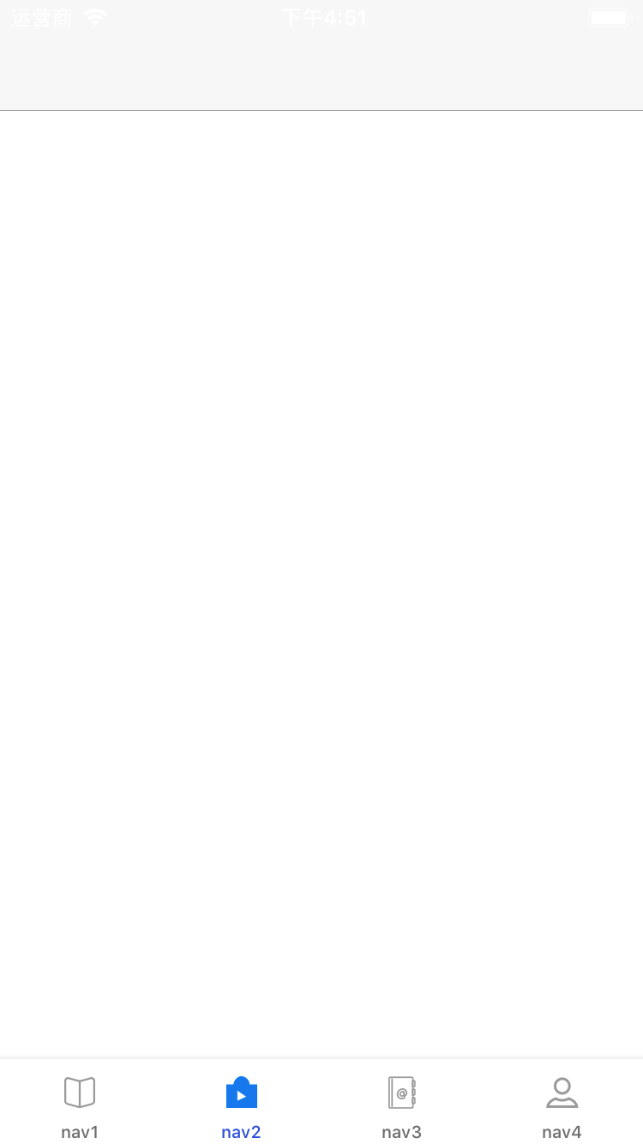
    NSDictionary *bookcaseItemsAttributes =@{CYLTabBarItemTitle : @"nav1",

                                                CYLTabBarItemImage : @"bar_tk_01",

                                                /* NSString and UIImage are supported*/

                                                CYLTabBarItemSelectedImage : @"bar_tk_02",};

    NSDictionary *discoverItemsAttributes = @{CYLTabBarItemTitle : @"nav2",

                                              CYLTabBarItemImage : @"bar_kc_01",

                                              CYLTabBarItemSelectedImage : @"bar_kc_02",};

    NSDictionary *askklItemsAttributes = @{CYLTabBarItemTitle : @"nav3",

                                           CYLTabBarItemImage : @"bar_dzs_01",

                                           CYLTabBarItemSelectedImage : @"bar_dzs_02",};

    NSDictionary *userItemsAttributes = @{CYLTabBarItemTitle : @"nav4",

                                          CYLTabBarItemImage : @"bar_wd_01",

                                          CYLTabBarItemSelectedImage : @"bar_wd_02"};

    NSArray *tabBarItemsAttributes = @[bookcaseItemsAttributes,

                                       discoverItemsAttributes,

                                       askklItemsAttributes,

                                       userItemsAttributes];

    return tabBarItemsAttributes;

}

/**

 *  更多TabBar自定义设置:比如:tabBarItem 的选中和不选中文字和背景图片属性、tabbar 背景图片属性等等

 */

- (void)customizeTabBarAppearance:(CYLTabBarController *)tabBarController {

    // Customize UITabBar height

    // 自定义 TabBar 高度

    //     tabBarController.tabBarHeight = CYLTabBarControllerHeight;

    // set the text color for unselected state

    // 普通状态下的文字属性

    NSMutableDictionary *normalAttrs = [NSMutableDictionary dictionary];

    normalAttrs[NSForegroundColorAttributeName] = [UIColor grayColor];

    // set the text color for selected state

    // 选中状态下的文字属性

    NSMutableDictionary *selectedAttrs = [NSMutableDictionary dictionary];

    selectedAttrs[NSForegroundColorAttributeName] = Wonderful_BlueColor6;

    // set the text Attributes

    // 设置文字属性

    UITabBarItem *tabBar = [UITabBarItem appearance];

    [tabBar setTitleTextAttributes:normalAttrs forState:UIControlStateNormal];

    [tabBar setTitleTextAttributes:selectedAttrs forState:UIControlStateSelected];

    // Set the dark color to selected tab (the dimmed background)

    // TabBarItem选中后的背景颜色

    // [self customizeTabBarSelectionIndicatorImage];

    // update TabBar when TabBarItem width did update

    // If your app need support UIDeviceOrientationLandscapeLeft or UIDeviceOrientationLandscapeRight,

    // remove the comment '//'

    // 如果你的App需要支持横竖屏,请使用该方法移除注释 '//'

    // [self updateTabBarCustomizationWhenTabBarItemWidthDidUpdate];

    // set the bar shadow image

    // This shadow image attribute is ignored if the tab bar does not also have a custom background image.So at least set somthing.

    [[UITabBar appearance] setBackgroundImage:[[UIImage alloc] init]];

    [[UITabBar appearance] setBackgroundColor:[UIColor whiteColor]];

    [[UITabBar appearance] setShadowImage:[UIImage imageNamed:@"tapbar_top_line"]];

    // set the bar background image

    // 设置背景图片

    //     UITabBar *tabBarAppearance = [UITabBar appearance];

    //     [tabBarAppearance setBackgroundImage:[UIImage imageNamed:@"tab_bar"]];

    // remove the bar system shadow image

    // 去除 TabBar 自带的顶部阴影

    // [[UITabBar appearance] setShadowImage:[[UIImage alloc] init]];

}
3.使用
在AppDelegate.m didFinishLaunchingWithOptions:(NSDictionary *)launchOptions 方法中
- (BOOL)application:(UIApplication *)application didFinishLaunchingWithOptions:(NSDictionary *)launchOptions {

    // Override point for customization after application launch.

//    /加载中间自定义按钮

//    [TabbarPlusButton registerPlusButton];

    MainTabBarControllerConfig *tabbarConfig = [[MainTabBarControllerConfig alloc]init];

    CYLTabBarController *mainTabbarController = tabbarConfig.mainTabBarController;

    [self.window setRootViewController:mainTabbarController];

    return YES;

}
4.自定义按钮
加入中间按钮之前,确保上面的功能已经实现;新建一个基于 CYLPlusButton 的类 TabbarPlusButton,实现代理 CYLPlusButtonSubclassing
.h
@interface TabbarPlusButton : CYLPlusButton<CYLPlusButtonSubclassing>

@end
.m
@implementation TabbarPlusButton
- (instancetype)initWithFrame:(CGRect)frame {
if (self = [super initWithFrame:frame]) {
self.titleLabel.textAlignment = NSTextAlignmentCenter;
self.adjustsImageWhenHighlighted = NO;
}
return self;
}
//上下结构的 button
- (void)layoutSubviews {
[super layoutSubviews];
// 控件大小,间距大小
// 注意:一定要根据项目中的图片去调整下面的0.7和0.9,Demo之所以这么设置,因为demo中的 plusButton 的 icon 不是正方形。
CGFloat const imageViewEdgeWidth = self.bounds.size.width * 0.7;
CGFloat const imageViewEdgeHeight = imageViewEdgeWidth * 0.9;
CGFloat const centerOfView = self.bounds.size.width * 0.5;
CGFloat const labelLineHeight = self.titleLabel.font.lineHeight;
CGFloat const verticalMargin = (self.bounds.size.height - labelLineHeight - imageViewEdgeHeight) * 0.5;
// imageView 和 titleLabel 中心的 Y 值
CGFloat const centerOfImageView = verticalMargin + imageViewEdgeHeight * 0.5;
CGFloat const centerOfTitleLabel = imageViewEdgeHeight + verticalMargin * + labelLineHeight * 0.5 + ;
//imageView position 位置
self.imageView.bounds = CGRectMake(, , imageViewEdgeWidth, imageViewEdgeHeight);
self.imageView.center = CGPointMake(centerOfView, centerOfImageView);
//title position 位置
self.titleLabel.bounds = CGRectMake(, , self.bounds.size.width, labelLineHeight);
self.titleLabel.center = CGPointMake(centerOfView, centerOfTitleLabel);
}
#pragma mark -
#pragma mark - CYLPlusButtonSubclassing Methods
/*
*
Create a custom UIButton with title and add it to the center of our tab bar
*
*/
+ (id)plusButton {
TabbarPlusButton *button = [[TabbarPlusButton alloc] init];
///中间按钮图片
UIImage *buttonImage = [UIImage imageNamed:@"post_normal"];
[button setImage:buttonImage forState:UIControlStateNormal];
[button setTitle:@"发布" forState:UIControlStateNormal];
[button setTitleColor:[UIColor grayColor] forState:UIControlStateNormal];
[button setTitle:@"发布" forState:UIControlStateSelected];
[button setTitleColor:[UIColor blueColor] forState:UIControlStateSelected];
button.titleLabel.font = [UIFont systemFontOfSize:9.5];
[button sizeToFit]; // or set frame in this way `button.frame = CGRectMake(0.0, 0.0, 250, 100);`
// button.frame = CGRectMake(0.0, 0.0, 250, 100);
// button.backgroundColor = [UIColor redColor];
// if you use `+plusChildViewController` , do not addTarget to plusButton.
[button addTarget:button action:@selector(clickPublish) forControlEvents:UIControlEventTouchUpInside];
return button;
}
/*
*
Create a custom UIButton without title and add it to the center of our tab bar
*
*/
//+ (id)plusButton
//{
//
// UIImage *buttonImage = [UIImage imageNamed:@"hood.png"];
// UIImage *highlightImage = [UIImage imageNamed:@"hood-selected.png"];
//
// CYLPlusButtonSubclass* button = [CYLPlusButtonSubclass buttonWithType:UIButtonTypeCustom];
//
// button.autoresizingMask = UIViewAutoresizingFlexibleRightMargin | UIViewAutoresizingFlexibleLeftMargin | UIViewAutoresizingFlexibleBottomMargin | UIViewAutoresizingFlexibleTopMargin;
// button.frame = CGRectMake(0.0, 0.0, buttonImage.size.width, buttonImage.size.height);
// [button setBackgroundImage:buttonImage forState:UIControlStateNormal];
// [button setBackgroundImage:highlightImage forState:UIControlStateHighlighted];
// [button addTarget:button action:@selector(clickPublish) forControlEvents:UIControlEventTouchUpInside];
//
// return button;
//}
#pragma mark -
#pragma mark - Event Response
- (void)clickPublish {
CYLTabBarController *tabBarController = [self cyl_tabBarController];
UIViewController *viewController = tabBarController.selectedViewController;
UIActionSheet *actionSheet = [[UIActionSheet alloc] initWithTitle:nil
delegate:nil
cancelButtonTitle:@"取消"
destructiveButtonTitle:nil
otherButtonTitles:@"拍照", @"从相册选取", @"淘宝一键转卖", nil];
[actionSheet showInView:viewController.view];
}
#pragma mark - UIActionSheetDelegate
- (void)actionSheet:(UIActionSheet *)actionSheet didDismissWithButtonIndex:(NSInteger)buttonIndex {
NSLog(@"buttonIndex = %@", @(buttonIndex));
}
#pragma mark - CYLPlusButtonSubclassing
//+ (UIViewController *)plusChildViewController {
// UIViewController *plusChildViewController = [[UIViewController alloc] init];
// plusChildViewController.view.backgroundColor = [UIColor redColor];
// plusChildViewController.navigationItem.title = @"PlusChildViewController";
// UIViewController *plusChildNavigationController = [[UINavigationController alloc]
// initWithRootViewController:plusChildViewController];
// return plusChildNavigationController;
//}
//
//+ (NSUInteger)indexOfPlusButtonInTabBar {
// return 4;
//}
//
//+ (BOOL)shouldSelectPlusChildViewController {
// BOOL isSelected = CYLExternPlusButton.selected;
// if (isSelected) {
// NSLog(@"
iOS-CYLTabBarController【好用的TabbarController】的更多相关文章
- iOS 在使用UINavigationController和TabBarController时view的frame
可能是以前记错了,总认为在ios6上使用了UINavigationController或者TabBarController会因为多了bar而影响子controller的view的frame大小.今天在 ...
- iOS:CYLTabBarController的具体使用实例:实现新浪微博的主流框架
使用CocoaPods或者手动集成将CYLTabBarController这个第三方框架导入项目后,截图如下: 在AppDelegate.m类中实现的代码如下: // AppDelegate.m // ...
- iOS的非常全的三方库,插件,大牛博客
转自: http://www.cnblogs.com/zyjzyj/p/6015625.html github排名:https://github.com/trending, github搜索:http ...
- iOS 第三方库、插件、知名博客总结
iOS 第三方库.插件.知名博客总结 用到的组件 1.通过CocoaPods安装 项目名称 项目信息 AFNetworking 网络请求组件 FMDB 本地数据库组件 SDWebImage 多个缩略图 ...
- ios很好的开源库
Tim9Liu9/TimLiu-iOS 自己总结的iOS.mac开源项目及库,持续更新.. 目录 UI 下拉刷新 模糊效果 AutoLayout 富文本 图表 表相关与Tabbar 隐藏与显示 HUD ...
- iOS - 第三方库总结篇
Swift版本点击这里 欢迎加入QQ群交流: 594119878 About A curated list of iOS objective-C ecosystem. How to Use Simpl ...
- iOS:CYLTabBarController【低耦合集成TabBarController】
导航 与其他自定义TabBarController的区别 集成后的效果 项目结构 使用CYLTabBarController 第一步:使用CocoaPods导入CYLTabBarController ...
- iOS 自定义选项卡-CYLTabBarController
正常的选项卡流程 cocoapods就不说了 创建一个CYLTabBarControllerConfig类 #import <Foundation/Foundation.h> #impor ...
- iOS 如何使用TabbarController
xcode中给我内置很多app模版,不过很多时候我们需要更加灵活的初始化项目.下面我就简单介绍一下,如何从0开始制作一个tabbar app. 创建个项目,由于我们从头开始写程序,因此理论上对模版没有 ...
- 【iOS】自己定义TabBarController
一.自己定义的思路 iOS中的TabBarController确实已经非常强大了.大部分主流iOS应用都会採用. 可是往往也不能满足所有的需求,因此须要自己定义TabBar,自己定义须要对系统的Tab ...
随机推荐
- TSP(个人模版)
O(n^2)TSP: #include<stdio.h> #include<string.h> #include<algorithm> #include<io ...
- HDU_5523Game
Game Time Limit: 2000/1000 MS (Java/Others) Memory Limit: 131072/131072 K (Java/Others) Total Sub ...
- float浮动属性的基本常识
CSS 浮动 请看下图,当把框 1 向右浮动时,它脱离文档流并且向右移动,直到它的右边缘碰到包含框的右边缘: 再请看下图,当框 1 向左浮动时,它脱离文档流并且向左移动,直到它的左边缘碰到包含框的左边 ...
- linux基本命令学习01
=============================================================================Unix/Linux最主要的应用领域是基础服务 ...
- c++(递归和堆栈)
看过我前面博客的朋友都清楚,函数调用主要依靠ebp和esp的堆栈互动来实现的.那么递归呢,最主要的特色就是函数自己调用自己.如果一个函数调用的是自己本身,那么这个函数就是递归函数. 我们可以看一下普通 ...
- ubantu下su命令Authentication failure失败的解决方式
Ubuntu安装后,root用户默认是被锁定了的,不允许登录,也不允许 su 到 root . 可以使用: sudo passwd 来重新设置root密码,后即可登陆root. ortonwu@ubu ...
- C++ 默认参数(转载)
函数的默认参数值,即在定义参数的时候同时给它一个初始值.在调用函数的时候,我们可以省略含有默认值的参数.也就是说,如果用户指定了参数值,则使用用户指定的值,否则使用默认参数的值. void Func( ...
- 独立服务器 云主机、VPS以及虚拟主机三者之间的区别是什么?哪个更好?
https://www.zhihu.com/question/21442353#answer-2442764 云主机(如 EC2,[1] )和 VPS (如 Linode,[2])都是完整的操作系统( ...
- 【jsp】MyEclipse10.7.1最新版+破解下载
MyEclipse企业级工作平台[1](MyEclipse Enterprise Workbench ,简称MyEclipse)是对EclipseIDE的扩展,利用它我们可以在数据库和JavaEE的开 ...
- UML图学习之三 状态图
状态图(Statechart Diagram)主要用于描述一个对象在其生存期间的动态行为,表现为一个对象所经历的状态序列,引起状态转移的事件(Event),以及因状态转移而伴随的动作(Action). ...