
NancyFX 第十二章 通道截拦
所有的好的Web框架都有一套好的通道截拦的机制,Nancy在我看来是处理最好的。那什么是请求通道那?下面的图可能说的比较清楚些:
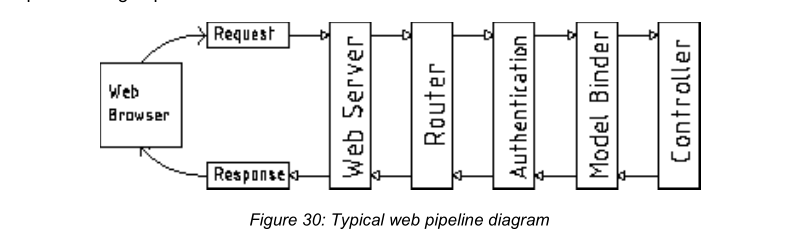
正如名称中描述的,一个典型的Web请求在到达最终响应前会穿过一定数量的模块,然后反向通过这些模块到达浏览器。
请求到底要经过多少类型的模块需要根据框架而定。有的多,有的少。越多的处理,响应的就越慢。
定位一个轻量级和模块化的Web框架,它的通道中有很少的环节,使得开发人员可以更好的控制模块如何、在什么情况下可以与框架进行交互。
当我们谈论通道截拦的时候,主要是指Nancy公开的几个主要回调点(钩子函数),使得你可以在请求链的回调点加入你自己的模块或代码段。
到目前为止,你可以见到了Nancy众多的功能 -- 身份验证就是一个好的例子。 -- 你可能会想在通道处理中会需要很多代码量来支撑这个功能。
事实是,Nancy基本上没有在身份验证方面编写什么代码,即使你调用身份验证的方法,在通道中也不会添加什么代码处理。只有在你添加了this.RequiresAuthentication();行后,请求通道才会进行身份验证截拦。
验证部分也就是注册了路由模块的Before 和 After 管道,让我们看下面的验证校验页面:
using Nancy;

using Nancy.Responses;

using Nancy.Security;

namespace nancybook.modules

{

    public class AuthRoutes : NancyModule

    {

       public AuthRoutes() : base("/auth")

       {

           Before += ctx =>

           {

             return (this.Context.CurrentUser == null)

                  ? new HtmlResponse(HttpStatusCode.Unauthorized)

                  : null;

           };

           Get[@"/"] = _ => View["auth/index"];

        }

    }

}
上面的处理其实和 RequiresAuthentication 的功能是一样的。
通过这一段代码,你可以很清晰的看到两种结果。首先可能会返回null, 这不会影响到处理进程,其实是不会有什么影响。
再者就是返回一个响应对象(例子中是 403 Unauthorized),进程不会再往下执行,而是直接返回给客户端。
当然你可能已经意识到这不仅能用于身份验证,还可以做一些资源的检查,其他条件的校验或者返回异常信息等不一样的结果。
假如你想提供某种形式的前端缓存,例如 你可以拦截 Before管道,判断请求是否已经缓存,如果已经缓存就返回缓存的版本。只有在没有缓存或缓存过期的时候访问路由模块的处理程序。
你也可以像下面提供After处理:
After += ctx =>

{

//... Code here ...

}
在启用After管道的时候,你已经可以访问到相应对象了(路由处理程序生成的),通过Nancy上下文就可以对它进行随意的修改。
比如你可以检查一些环境变量,在返回到浏览器前可以修改已经生成的200 ok 的相应为403响应。
我想,你可以更加倾向于使用After管道来缓存客户端请求,下次相同请求就可以查找预先的缓存,而不是再一次到数据库中读取。
值得注意的是附加在路由模块上的代码会在该模块的每次请求中调用,这也就意味着你的代码要耗时长一点,客户端的请求响应速度会被减缓。
应用级别的挂接
你也可以在整个应用级别上注册Before或After管道,而不只是在模块基础上。启用应用级别的意味着每个模块、每个路由都会触发注册的挂接,无论怎么定义。另外,如果你注册了一个应用级的挂接,并在一个特殊的模块上也单独做了注册挂接,两个挂接都会被调用,应用级的优先。
这也意味着在应用级别的挂接上返回一个响应对象,模块级别的挂接就不再会被调用。同理,模块级别的挂接返回了响应对象,模块的处理也就不会被调用。
你可以定义一个bootstrapper ,重载ApplicationStartup 或RequestStartup 方法来注册应用级别的挂接。这两个方法会暴露一个Pipelines 参数,它包含BeforeRequest 或AfterRequest 属性,可以像使用Before 或After挂接一样来看待。
你也将会使用到OnError属性,可以用来在应用系统中实现一个异常处理程序。举个例子,在你的数据库检索代码中,如果检索不到一条客户端请求的记录,你可以会抛出一个Database Object not found 的自定义异常。你可以使用自定义的bootstrapper
来拦截这个异常,然后返回一个404 文件未找到异常,就类似下面:
using System.Text;

using Nancy;

using Nancy.Authentication.Forms;

using Nancy.Bootstrapper;

using Nancy.Conventions;

using Nancy.Session;

using Nancy.TinyIoc;

namespace nancybook

{

    public class CustomBootstrapper : DefaultNancyBootstrapper

    {

        protected override void ApplicationStartup(

         TinyIoCContainer container,

         IPipelines pipelines)

       {

           base.ApplicationStartup(container, pipelines);

           // Add an error handler to catch our entity not found exceptions

           pipelines.OnError += (context, exception) =>

           {

           // If we've raised an EntityNotFound exception in our data layer

           if (exception is EntityNotFoundException)

           return new Response()

           {

              StatusCode = HttpStatusCode.NotFound,

              ContentType = "text/html",

              Contents = (stream) =>

              {

                  var errorMessage = Encoding.UTF8.GetBytes("Entity not

                  found");

                  stream.Write(errorMessage, , errorMessage.Length);

              }

           };

           // If none of the above handles our exception, then pass it on as  a 500
           throw exception;
           };
       }
   }
}
输出缓存
using System;

using System.Collections.Specialized;

using System.Runtime.Caching;

using Nancy;

namespace nancybook

{

    public class CacheService

    {

       private static readonly NameValueCollection _config = new

          NameValueCollection();

       private readonly MemoryCache _cache = new MemoryCache("NancyCache",

          _config);

       private readonly CacheItemPolicy _standardPolicy = new CacheItemPolicy

       {

           Priority = CacheItemPriority.NotRemovable,

           SlidingExpiration = TimeSpan.FromSeconds() // This can be changed

       };

       public void AddItem(string itemKey, Response itemToAdd)

       {

           _cache.Add(new CacheItem(itemKey, itemToAdd), _standardPolicy);

       }

       public Response GetItem(string itemKey)

       {

           return (Response)_cache.Get(itemKey);

       }

   }

}
protected override void ConfigureApplicationContainer(TinyIoCContainer

container)

{

    base.ConfigureApplicationContainer(container);

    container.Register<CacheService>().AsSingleton();

}
using System;

using System.Collections.Generic;

using System.Runtime.InteropServices;

using nancybook.Models;

using Nancy;

namespace nancybook.modules

{

    public class CachingRoutes : NancyModule

    {

        readonly CacheService _myCache;

        public CachingRoutes(CacheService myCache) : base("/caching")

        {

            _myCache = myCache;

            Get["/"] = x =>

            {

               var cacheData = new CacheDemo() {WhenRequested = DateTime.Now};

              return View["caching/index.html", cacheData];

            };

           Before += ctx =>

           {

              string key = ctx.Request.Path;

              var cacheObject = _myCache.GetItem(key);

              return cacheObject;

           };

            After += ctx =>

           {

                if(ctx.Response.StatusCode != HttpStatusCode.OK)

                {

                  return;

                }

                string key = ctx.Request.Path;

                if(_myCache.GetItem(key) == null)

                   _myCache.AddItem(key, ctx.Response);

           };

       }

   }

}
<!DOCTYPE html>

<html lang="en">

<head>

<meta charset="utf-8">

<meta http-equiv="X-UA-Compatible" content="IE=edge">

<meta name="viewport" content="width=device-width, initial-scale=1">

<title>Nancy Demo | Caching Example</title>

<link href="~/content/bootstrap.min.css" rel="stylesheet"

type="text/css"/>

</head>

<body>

<div class="container">

<div class="page-header">

<h1 style="display: inline-block">Nancy Demo <small>Caching

Example</small></h1>

<h1 style="display: inline-block" class="pull-right"><small><a

href="~/" title="Click to return to demo home page">home <span

class="glyphicon glyphicon-home"></span></a></small></h1>

</div>

<h4>This page was requested at <strong class="textsuccess">@Model.WhenRequested</strong></h4>

<br/><br/>

<p class="lead">This example uses before and after filters attached

directly to the module servicing this request.</p>

<p>If you observe the time this page was created when refreshing it,

you'll see the page is handled by an output cache; this cache has a sliding

window of  seconds.</p>

<p>

As long as you’re refreshing the page, you'll reset the timer and the

cache will continue to wait  seconds after the last request before

expiring. If you request the page then

leave it for  seconds before re-requesting it, you'll see you get a

new copy.

</p>

</div>

<script src="~/scripts/jquery-2.1.3.min.js"></script>

<script src="~/scripts/bootstrap.min.js"></script>

</body>

</html>
CacheDemo.cs
using System;

namespace nancybook.Models

{

    public class CacheDemo

    {

        public DateTime WhenRequested { get; set; }

    }

}
总结
NancyFX 第十二章 通道截拦的更多相关文章
- Introduction to 3D Game Programming with DirectX 12 学习笔记之 --- 第十二章:几何着色器(The Geometry Shader)
原文:Introduction to 3D Game Programming with DirectX 12 学习笔记之 --- 第十二章:几何着色器(The Geometry Shader) 代码工 ...
- PRML读书会第十二章 Continuous Latent Variables(PCA,Principal Component Analysis,PPCA,核PCA,Autoencoder,非线性流形)
主讲人 戴玮 (新浪微博: @戴玮_CASIA) Wilbur_中博(1954123) 20:00:49 我今天讲PRML的第十二章,连续隐变量.既然有连续隐变量,一定也有离散隐变量,那么离散隐变量是 ...
- <构建之法>第十一章、十二章有感
十一章:软件设计与实现 工作时要懂得平衡进度和质量.我一直有一个困扰:像我们团队这次做 男神女神配 社区交友网,我负责主页的设计及内容模块,有个队友负责网站的注册和登录模块,有个队友负责搜索模块,有个 ...
- sql 入门经典(第五版) Ryan Stephens 学习笔记 (第六,七,八,九,十章,十一章,十二章)
第六章: 管理数据库事务 事务 是 由第五章 数据操作语言完成的 DML ,是对数据库锁做的一个操作或者修改. 所有事务都有开始和结束 事务可以被保存和撤销 如果事务在中途失败,事务中的任何部分都不 ...
- 《Linux命令行与shell脚本编程大全》 第二十二章 学习笔记
第二十二章:使用其他shell 什么是dash shell Debian的dash shell是ash shell的直系后代,ash shell是Unix系统上原来地Bourne shell的简化版本 ...
- 《Android群英传》读书笔记 (5) 第十一章 搭建云端服务器 + 第十二章 Android 5.X新特性详解 + 第十三章 Android实例提高
第十一章 搭建云端服务器 该章主要介绍了移动后端服务的概念以及Bmob的使用,比较简单,所以略过不总结. 第十三章 Android实例提高 该章主要介绍了拼图游戏和2048的小项目实例,主要是代码,所 ...
- [CSAPP笔记][第十二章并发编程]
第十二章 并发编程 如果逻辑控制流在时间上是重叠,那么它们就是并发的(concurrent).这种常见的现象称为并发(concurrency). 硬件异常处理程序,进程和Unix信号处理程序都是大家熟 ...
- perl5 第十二章 Perl5中的引用/指针
第十二章 Perl5中的引用/指针 by flamephoenix 一.引用简介二.使用引用三.使用反斜线(\)操作符四.引用和数组五.多维数组六.子程序的引用 子程序模板七.数组与子程序八.文件句 ...
- 第十二章——SQLServer统计信息(4)——在过滤索引上的统计信息
原文:第十二章--SQLServer统计信息(4)--在过滤索引上的统计信息 前言: 从2008开始,引入了一个增强非聚集索引的新功能--过滤索引(filter index),可以使用带有where条 ...
随机推荐
- CentOS7上安装并配置Nginx、PHP、MySql
一.Nginx 1.安装nginx yum install nginx 2.启动nginx systemctl start nginx 除了systemctl start nginx之外,常用的相关命 ...
- 使用 neon-wallet-db + neon-js + NEO-cli /rpc 搭建轻钱包服务端
本文将搭建一个不具有任何功能的NEO轻钱包,所有的精力都仅集中于成功运行neon-wallet-db项目并搭配全节点的neo-cli /rpc接口为轻钱包客户端提供服务. 首先需要准备几个项目: ne ...
- DxPackNet 4.保存音视频为本地avi文件
捕获到了音视频后要保存到本地文件,这是很常见的应用场景,DxPackNet保存视频文件也比较简单 用 IAviStreamWriter avi文件写入流即可 1.初始化相关设备,设定好数据捕获的回调 ...
- MySQL 之 视图、触发器、存储过程、函数、事物与数据库锁
浏览目录: 1.视图 2.触发器 3.存储过程 4.函数 5.事物 6.数据库锁 7.数据库备份 1.视图 视图:是一个虚拟表,其内容由查询定义.同真实的表一样,视图包含一系列带有名称的列和行数据 视 ...
- 转 Caffe学习系列(4):激活层(Activiation Layers)及参数
在激活层中,对输入数据进行激活操作(实际上就是一种函数变换),是逐元素进行运算的.从bottom得到一个blob数据输入,运算后,从top输入一个blob数据.在运算过程中,没有改变数据的大小,即输入 ...
- C/C++使用MySQL
一直找不到关于C/C++连接Mysql数据库的详细api书籍和网站,刷了下网页,找到一篇Linux 下C/C++连接数据库的博客,留着以后自己用. 首先需要编译.安装MySQL,安装完成后,将MySQ ...
- ERROR 1045 (28000): Access denied for user xxx & ERROR 1449 (HY000): The user specified as a definer xxx does not exists
今天在一个修改过权限的MySQL数据库遇到了"ERROR 1045 (28000): Access denied for user 'xxx'@'xxx.xxx.xxx.xxx' (usin ...
- NLP+语义分析(四)︱中文语义分析研究现状(CIPS2016、角色标注、篇章分析)
摘录自:CIPS2016 中文信息处理报告<第二章 语义分析研究进展. 现状及趋势>P14 CIPS2016> 中文信息处理报告下载链接:http://cips-upload.bj. ...
- eclipse生成【带有外部jar包】的java可执行jar包
之前有写过一篇使用eclipse生成java可执行jar包,但是最近的一次使用中无论如何都不成功,当双击执行打成的jar时,弹出如下错误: could not find the main class: ...
- javascript 学习笔记 -内部类
js的内部类 javascript内部有一些可以直接使用的类 javascript主要有以下 object Array Math boolean String D ...