
lombok在IntelliJ IDEA下的使用
lombok是一款可以精减java代码、提升开发人员生产效率的辅助工具,利用注解在编译期自动生成setter/getter/toString()/constructor之类的代码。代码越少,意味着出bug的可能性越低。
官网地址:https://projectlombok.org/ 首页有一段几分钟的演示视频,看完就明白是怎么回事了。
先来二段对比代码:
这是用lombok后的java代码:
import lombok.*;

import lombok.extern.slf4j.Slf4j;

import java.io.ByteArrayInputStream;

import java.io.*;

import java.util.ArrayList;

@Data

@Slf4j

@AllArgsConstructor

public class Something {

    private String name;

    private final String country;

    private final Object lockObj = new Object();

    public void sayHello(@NonNull String target) {

        String content = String.format("hello,%s", target);

        System.out.println(content);

        log.info(content);

    }

    public void addBalabala() {

        val list = new ArrayList<String>();

        list.add("haha");

        System.out.println(list.size());

    }

    @SneakyThrows(IOException.class)

    public void closeBalabala() {

        @Cleanup InputStream is = new ByteArrayInputStream("hello world".getBytes());

        System.out.println(is.available());

    }

    @Synchronized("lockObj")

    public void lockMethod() {

        System.out.println("test lock method");

    }

}
等效于下面这段java代码:
import java.beans.ConstructorProperties;

import java.io.ByteArrayInputStream;

import java.io.IOException;

import java.util.ArrayList;

import java.util.Collections;

import lombok.NonNull;

import org.slf4j.Logger;

import org.slf4j.LoggerFactory;

public class Something {

    private static final Logger log = LoggerFactory.getLogger(Something.class);

    private String name;

    private final String country;

    private final Object lockObj = new Object();

    public void sayHello(@NonNull String target) {

        if(target == null) {

            throw new NullPointerException("target");

        } else {

            String content = String.format("hello,%s", new Object[]{target});

            System.out.println(content);

            log.info(content);

        }

    }

    public void addBalabala() {

        ArrayList list = new ArrayList();

        list.add("haha");

        System.out.println(list.size());

    }

    public void closeBalabala() {

        try {

            ByteArrayInputStream $ex = new ByteArrayInputStream("hello world".getBytes());

            try {

                System.out.println($ex.available());

            } finally {

                if(Collections.singletonList($ex).get(0) != null) {

                    $ex.close();

                }

            }

        } catch (IOException var6) {

            throw var6;

        }

    }

    public void lockMethod() {

        Object var1 = this.lockObj;

        synchronized(this.lockObj) {

            System.out.println("test lock method");

        }

    }

    public String getName() {

        return this.name;

    }

    public String getCountry() {

        return this.country;

    }

    public Object getLockObj() {

        return this.lockObj;

    }

    public void setName(String name) {

        this.name = name;

    }

    public boolean equals(Object o) {

        if(o == this) {

            return true;

        } else if(!(o instanceof Something)) {

            return false;

        } else {

            Something other = (Something)o;

            if(!other.canEqual(this)) {

                return false;

            } else {

                label47: {

                    String this$name = this.getName();

                    String other$name = other.getName();

                    if(this$name == null) {

                        if(other$name == null) {

                            break label47;

                        }

                    } else if(this$name.equals(other$name)) {

                        break label47;

                    }

                    return false;

                }

                String this$country = this.getCountry();

                String other$country = other.getCountry();

                if(this$country == null) {

                    if(other$country != null) {

                        return false;

                    }

                } else if(!this$country.equals(other$country)) {

                    return false;

                }

                Object this$lockObj = this.getLockObj();

                Object other$lockObj = other.getLockObj();

                if(this$lockObj == null) {

                    if(other$lockObj != null) {

                        return false;

                    }

                } else if(!this$lockObj.equals(other$lockObj)) {

                    return false;

                }

                return true;

            }

        }

    }

    protected boolean canEqual(Object other) {

        return other instanceof Something;

    }

    public int hashCode() {

        boolean PRIME = true;

        byte result = 1;

        String $name = this.getName();

        int result1 = result * 59 + ($name == null?0:$name.hashCode());

        String $country = this.getCountry();

        result1 = result1 * 59 + ($country == null?0:$country.hashCode());

        Object $lockObj = this.getLockObj();

        result1 = result1 * 59 + ($lockObj == null?0:$lockObj.hashCode());

        return result1;

    }

    public String toString() {

        return "Something(name=" + this.getName() + ", country=" + this.getCountry() + ", lockObj=" + this.getLockObj() + ")";

    }

    @ConstructorProperties({"name", "country"})

    public Something(String name, String country) {

        this.name = name;

        this.country = country;

    }

}
大概减少了2/3的代码,各种注解的详细用法,请参考:https://projectlombok.org/features/index.html
IDEA下使用时,可以通过插件的形式安装,插件下载地址:https://github.com/mplushnikov/lombok-intellij-plugin/releases
然后
Plugins -> Install plugin from disk... 选择下载的zip包安装,重启idea即可。
另外,还有一个关键设置: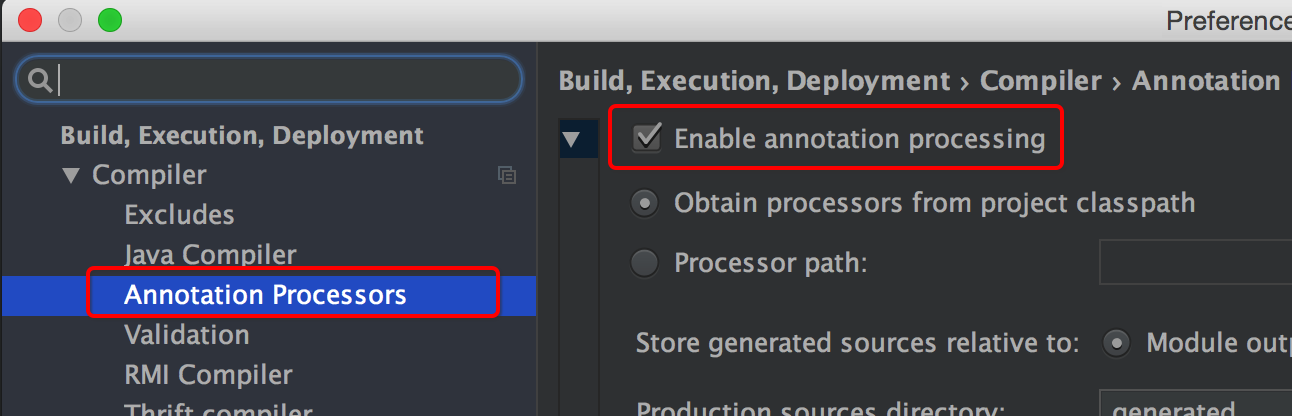
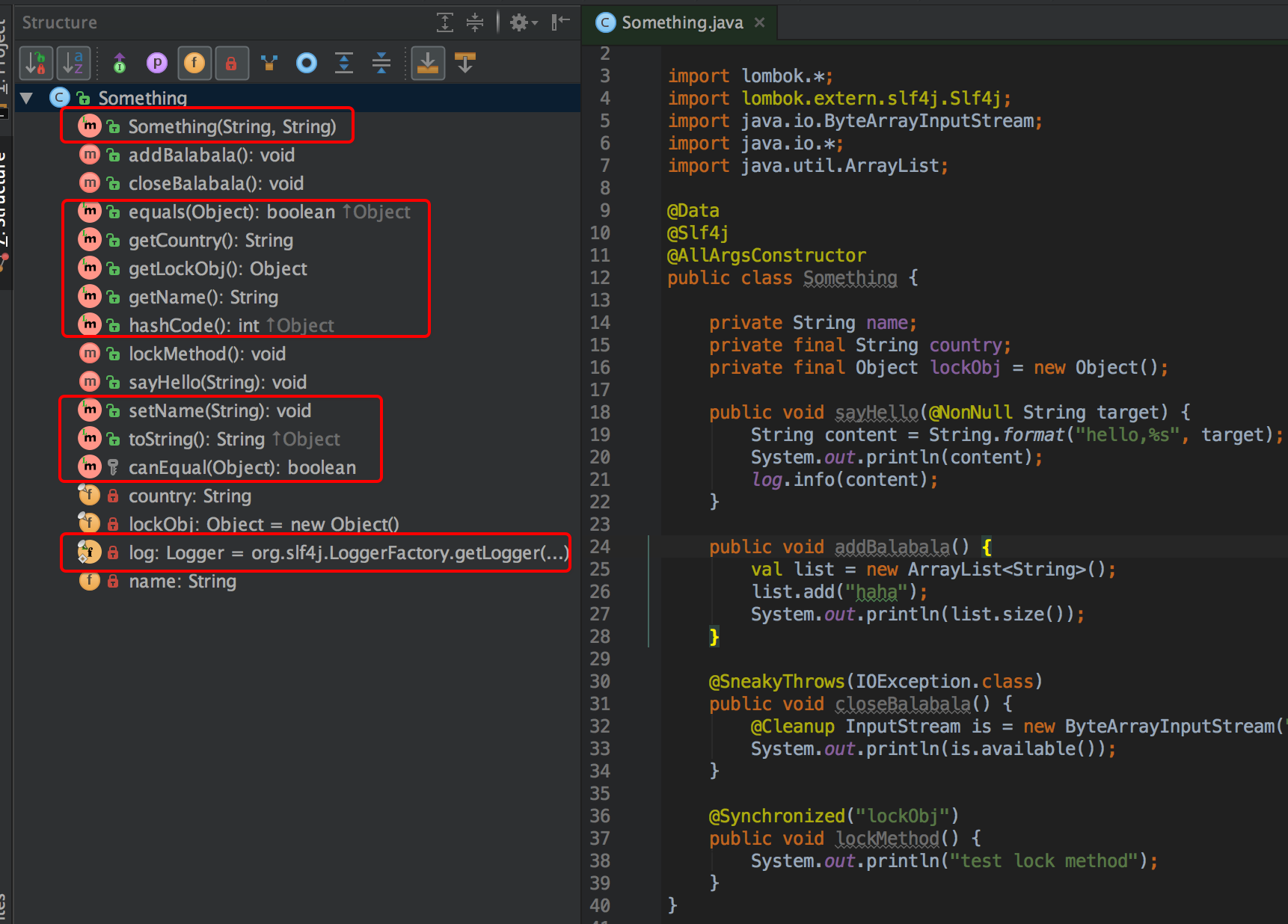
为了让设置生效,建议再重启一次idea,然后就可以开心的编码了,可以ide里可以直接看到生成的方法:(下图中打红圈的都是自动生成的)
lombok在IntelliJ IDEA下的使用的更多相关文章
- 40.lombok在IntelliJ IDEA下的使用
转自:https://www.cnblogs.com/yjmyzz/p/lombok-with-intellij-idea.html lombok是一款可以精减java代码.提升开发人员生产效率的辅助 ...
- IntelliJ IDEA 下的版本控制介绍
不管是个人开发或是团队开发,版本控制都是可以很好地被使用的,目前我找不到任何开发者不使用版本控制的理由.而且对于 IDE 来讲,集成版本控制的本身就是它最大的亮点之一,很多开发者也是为此而使用它. 在 ...
- Intellij IDEA下导出Java工程的可运行JAR包
Intellij IDEA下导出Java工程的可运行JAR包 昨天一直向导出一个Java工程的可运行JAR包,然后查阅网上的资料以及自己一遍一遍的尝试,均以失败告终.可以导出JAR包,但是导出的JAR ...
- IntelliJ IDEA下Git的配置与使用(命令行下)
1. 安装Git并配置好Git 安装与配置参见Git与码云(Git@OSC)入门-如何在实验室和宿舍同步你的代码(1)中的2.在本机安装Git与3.1 配置git. 2. 创建远程仓库 在gitee. ...
- IntelliJ IDEA下的使用git
1.git简介 git是目前流行的分布式版本管理系统.它拥有两套版本库,本地库和远程库,在不进行合并和删除之类的操作时这两套版本库互不影响.也因此其近乎所有的操作都是本地执行,所以在断网的情况下任然可 ...
- webstorm和intellij idea下如何自动编译sass和scss文件
webstorm和intellij idea下如何自动编译sass和scss文件 https://segmentfault.com/a/1190000008996504 https://www.jia ...
- (转)IntelliJ IDEA下的使用git
1.git简介 Git是目前流行的分布式版本管理系统.它拥有两套版本库,本地库和远程库,在不进行合并和删除之类的操作时这两套版本库互不影响.也因此其近乎所有的操作都是本地执行,所以在断网的情况下任然可 ...
- IntelliJ IDEA下SVN配置及使用
一.在IDEA中使用SVN,首先需要下载安装 TortoiseSVN 插件. 打开 TortoiseSVN 下载地址,选择适合自己的系统类型下载. 接下来,进行安装即可.选择Modify,默认 com ...
- 解决Intellij Idea下修改jsp页面不自动更新
解决Intellij Idea下修改jsp页面不自动更新 On frame deactivation:被设置成了Do nothing 解决办法:改为Update resources(更新资源)或者Up ...
随机推荐
- Oracle基础维护01-常用管理命令总结
概览: 1.Oracle 内存管理 2.Oracle 数据库启动关闭 3.Oracle 参数文件 4.Oracle 控制文件 5.Oracle redo日志文件 6.Oracle undo表空间管理 ...
- OSGi 基本原理
定义 OSGi(Open Service Gateway Initiative)技术是面向Java的动态模型系统. 这个框架实现了一个优雅.完整和动态地组价模型.应用程序(称为bundle)无序重新引 ...
- Python (一) 简介、安装
一.简介 Python:是著名的"龟叔"Guido van Rossum在1989年圣诞节期间,为了打发无聊的圣诞节而编写的一个编程语言. 那么Python 究竟是来做什么的? 首 ...
- 【设计模式】单例模式 c++实现
单例模式一般应用在整个应用中只会存在一个对象.比如应用类,游戏场景类,工具类等. 实现方式: 头文件 singleton.h: #ifndef _SINGLETON_H_ #define _SINGL ...
- html和html5详解
最近看群里聊天聊得最火热的莫过于手机网站和html5这两个词.可能有人会问,这两者有什么关系呢?随着这移动互联网快速发展的时代,尤其是4G时代已经来临的时刻,加上微软对"XP系统" ...
- NSURLConnection实现文件上传和AFNetworking实现文件上传
请求的步骤分为4步 1.创建请求 2.设置请求头(告诉服务器这是一个文件上传的请求) 3.设置请求体 4.发送请求 NSURLConnection实现文件上传 // 1.创建请求 NSURL *url ...
- [Android]Android端ORM框架——RapidORM(v2.1)
以下内容为原创,欢迎转载,转载请注明 来自天天博客:http://www.cnblogs.com/tiantianbyconan/p/6020412.html [Android]Android端ORM ...
- Android HandlerThread 总结使用
转载请标明出处:http://www.cnblogs.com/zhaoyanjun/p/6062880.html 本文出自[赵彦军的博客] 前言 以前我在 [Android Handler.Loop ...
- AC算法学习笔记
1.算法流程图 (1) void Init() 此函数是初始化函数,用来给fail数组和goto数组初始化值. (2) void GotoFunction(string x) 这个函数的作 ...
- 【译】Spring 4 自动装配、自动检测、组件扫描示例
前言 译文链接:http://websystique.com/spring/spring-auto-detection-autowire-component-scanning-example-with ...