
正则表达式(Regular expressions)使用笔记
Regular expressions are a powerful language for matching text patterns. This page gives a basic introduction to regular expressions themselves sufficient for our Python exercises and shows how regular expressions work in Python. The Python "re" module provides regular expression support.
In Python a regular expression search is typically written as:
match = re.search(pat, str)
The re.search() method takes a regular expression pattern and a string and searches for that pattern within the string. If the search is successful, search() returns a match object or None otherwise. Therefore, the search is usually immediately followed by an if-statement to test if the search succeeded, as shown in the following example which searches for the pattern 'word:' followed by a 3 letter word (details below):
str = 'an example word:cat!!'

match = re.search(r'word:\w\w\w', str)

# If-statement after search() tests if it succeeded

  if match:

    print 'found', match.group() ## 'found word:cat'

  else:

    print 'did not find'
The code match = re.search(pat, str) stores the search result in a variable named "match". Then the if-statement tests the match -- if true the search succeeded and match.group() is the matching text (e.g. 'word:cat'). Otherwise if the match is false (None to be more specific), then the search did not succeed, and there is no matching text.
The 'r' at the start of the pattern string designates a python "raw" string which passes through backslashes without change which is very handy for regular expressions (Java needs this feature badly!). I recommend that you always write pattern strings with the 'r' just as a habit.
Note: match.group() returns a string of matched expression(type:str)
Basic Patterns
The power of regular expressions is that they can specify patterns, not just fixed characters. Here are the most basic patterns which match single chars:
- a, X, 9, < -- ordinary characters just match themselves exactly. The meta-characters which do not match themselves because they have special meanings are: . ^ $ * + ? { [ ] \ | ()
- . (a period) -- matches any single character except newline '\n'
- \w -- (lowercase w) matches a "word" character: a letter or digit or underbar [a-zA-Z0-9_]. Note that although "word" is the mnemonic for this, it only matches a single word char, not a whole word. \W (upper case W) matches any non-word character.
- \b -- boundary between word and non-word
- \s -- (lowercase s) matches a single whitespace character -- space, newline, return, tab, form [ \n\r\t\f]. \S (upper case S) matches any non-whitespace character.
- \t, \n, \r -- tab, newline, return
- \d -- decimal digit [0-9]
- ^ = start, $ = end -- match the start or end of the string
- \ -- inhibit the "specialness" of a character. So, for example, use \. to match a period or \\ to match a slash. If you are unsure if a character has special meaning, such as '@', you can put a slash in front of it, @, to make sure it is treated just as a character.

Basic Features
The basic rules of regular expression search for a pattern within a string are:
- The search proceeds through the string from start to end, stopping at the first match found
- All of the pattern must be matched, but not all of the string
- If
match = re.search(pat, str)is successful, match is not None and in particular match.group() is the matching text
Repetition
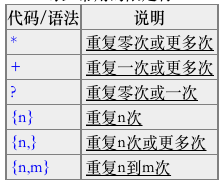
Things get more interesting when you use + and * to specify repetition in the pattern
- + -- 1 or more occurrences of the pattern to its left, e.g. 'i+' = one or more i's
- '*' -- 0 or more occurrences of the pattern to its left
- ? -- match 0 or 1 occurrences of the pattern to its left
Leftmost & Largest
First the search finds the leftmost match for the pattern, and second it tries to use up as much of the string as possible -- i.e. + and * go as far as possible (the + and * are said to be "greedy").
 ## i+ = one or more i's, as many as possible.

  match = re.search(r'pi+', 'piiig') =>  found, match.group() == "piii"

  ## Finds the first/leftmost solution, and within it drives the +

  ## as far as possible (aka 'leftmost and largest').

  ## In this example, note that it does not get to the second set of i's.

  match = re.search(r'i+', 'piigiiii') =>  found, match.group() == "ii"

  ## \s* = zero or more whitespace chars

  ## Here look for 3 digits, possibly separated by whitespace.

  match = re.search(r'\d\s*\d\s*\d', 'xx1 2   3xx') =>  found, match.group() == "1 2   3"

  match = re.search(r'\d\s*\d\s*\d', 'xx12  3xx') =>  found, match.group() == "12  3"

  match = re.search(r'\d\s*\d\s*\d', 'xx123xx') =>  found, match.group() == "123"

  ## ^ = matches the start of string, so this fails:

  match = re.search(r'^b\w+', 'foobar') =>  not found, match == None

  ## but without the ^ it succeeds:

  match = re.search(r'b\w+', 'foobar') =>  found, match.group() == "bar"
Emails Example
Suppose you want to find the email address inside the string 'xyz alice-b@google.com purple monkey'. We'll use this as a running example to demonstrate more regular expression features. Here's an attempt using the pattern r'\w+@\w+':
  str = 'purple alice-b@google.com monkey dishwasher'

  match = re.search(r'\w+@\w+', str)

  if match:

    print match.group()  ## 'b@google'
The search does not get the whole email address in this case because the \w does not match the '-' or '.' in the address. We'll fix this using the regular expression features below.
Square Brackets
Square brackets can be used to indicate a set of chars, so [abc] matches 'a' or 'b' or 'c'. The codes \w, \s etc. work inside square brackets too with the one exception that dot (.) just means a literal dot. For the emails problem, the square brackets are an easy way to add '.' and '-' to the set of chars which can appear around the @ with the pattern r'[\w.-]+@[\w.-]+' to get the whole email address:
 match = re.search(r'[\w.-]+@[\w.-]+', str)

  if match:

    print match.group()  ## 'alice-b@google.com'
You can also use a dash to indicate a range, so
- [a-z] matches all lowercase letters.
- To use a dash without indicating a range, put the dash last, e.g. [abc-].
- An up-hat (^) at the start of a square-bracket set inverts it, so [^ab] means any char except 'a' or 'b'.
Group Extraction
The "group" feature of a regular expression allows you to pick out parts of the matching text. Suppose for the emails problem that we want to extract the username and host separately. To do this, add parenthesis ( ) around the username and host in the pattern, like this: r'([\w.-]+)@([\w.-]+)'. In this case, the parenthesis do not change what the pattern will match, instead they establish logical "groups" inside of the match text. On a successful search, match.group(1) is the match text corresponding to the 1st left parenthesis, and match.group(2) is the text corresponding to the 2nd left parenthesis. The plain match.group() is still the whole match text as usual.
str = 'purple alice-b@google.com monkey dishwasher'

  match = re.search('([\w.-]+)@([\w.-]+)', str)

  if match:

    print match.group()   ## 'alice-b@google.com' (the whole match)

    print match.group(1)  ## 'alice-b' (the username, group 1)

    print match.group(2)  ## 'google.com' (the host, group 2)
A common workflow(工作流程) with regular expressions is that you write a pattern for the thing you are looking for, adding parenthesis groups to extract the parts you want.
Note: match.group(1) is the match text corresponding to the 1st left parenthesis, and match.group(2) is the text corresponding to the 2nd left parenthesis
findall
findall() is probably the single most powerful function in the re module. Above we used re.search() to find the first match for a pattern. findall() finds all the matches and returns them as a list of strings(list), with each string representing one match.
  ## Suppose we have a text with many email addresses

  str = 'purple alice@google.com, blah monkey bob@abc.com blah dishwasher'

  ## Here re.findall() returns a list of all the found email strings

  emails = re.findall(r'[\w\.-]+@[\w\.-]+', str) ## ['alice@google.com', 'bob@abc.com']

  for email in emails:

    # do something with each found email string

    print email
findall With Files
For files, you may be in the habit of writing a loop to iterate over the lines of the file, and you could then call findall() on each line. Instead, let findall() do the iteration for you -- much better! Just feed the whole file text into findall() and let it return a list of all the matches in a single step (recall that f.read() returns the whole text of a file in a single string):
 # Open file

  f = open('test.txt', 'r')

  # Feed the file text into findall(); it returns a list of all the found strings

  strings = re.findall(r'some pattern', f.read())
findall and Groups
The parenthesis ( ) group mechanism can be combined with findall(). If the pattern includes 2 or more parenthesis groups, then instead of returning a list of strings, findall() returns a list of tuples. Each tuple represents one match of the pattern, and inside the tuple is the group(1), group(2) .. data. So if 2 parenthesis groups are added to the email pattern, then findall() returns a list of tuples, each length 2 containing the username and host, e.g. ('alice', 'google.com').
  str = 'purple alice@google.com, blah monkey bob@abc.com blah dishwasher'

  tuples = re.findall(r'([\w\.-]+)@([\w\.-]+)', str)

  print tuples  ## [('alice', 'google.com'), ('bob', 'abc.com')]

  for tuple in tuples:

    print tuple[0]  ## username

    print tuple[1]  ## host
Once you have the list of tuples, you can loop over it to do some computation for each tuple. If the pattern includes no parenthesis, then findall() returns a list of found strings as in earlier examples. If the pattern includes a single set of parenthesis, then findall() returns a list of strings corresponding to that single group.
Obscure optional feature:
Sometimes you have paren ( ) groupings in the pattern, but which you do not want to extract. In that case, write the parens with a ?: at the start, e.g. (?: ) and that left paren will not count as a group result.
- Reference:
Thanks!
正则表达式(Regular expressions)使用笔记的更多相关文章
- Introducing Regular Expressions 学习笔记
Introducing Regular Expressions 读书笔记 工具: regexbuddy:http://download.csdn.net/tag/regexbuddy%E7%A0%B4 ...
- 【Python学习笔记】Coursera课程《Using Python to Access Web Data 》 密歇根大学 Charles Severance——Week2 Regular Expressions课堂笔记
Coursera课程<Using Python to Access Web Data > 密歇根大学 Charles Severance Week2 Regular Expressions ...
- 正则表达式-Regular expression学习笔记
正则表达式 正则表达式(Regular expression)是一种符号表示法,被用来识别文本模式. 最近在学习正则表达式,今天整理一下其中的一些知识点 grep - 打印匹配行 grep 是个很强大 ...
- 学习笔记之正则表达式 (Regular Expressions)
正则表达式_百度百科 http://baike.baidu.com/link?url=ybgDrN2WQQKN64_gu-diCqdeDqL8LQ-jiQ-ftzzPaNUa9CmgBRDNnyx50 ...
- 正则表达式Regular expressions
根据某种匹配模式来寻找strings中的某些单词 举例:如果我们想要找到字符串The dog chased the cat中单词 the,我们可以使用下面的正则表达式: /the/gi 我们可以把这个 ...
- 正则表达式 Regular Expressions
python method search wordlist = [w for w in nltk.corpus.words.words('en' ) ifw.islower()] print [w f ...
- 自学Zabbix8.1 Regular expressions 正则表达式
点击返回:自学Zabbix之路 点击返回:自学Zabbix4.0之路 点击返回:自学zabbix集锦 自学Zabbix8.1 Regular expressions 正则表达式 1. 配置 点击Adm ...
- 正则表达式备忘录-Regular Expressions Cheatsheet中文版
正则表达式备忘录Regular Expressions Cheatsheet中文版原文:https://www.maketecheasier.com/cheatsheet/regex/ 测试文件a.t ...
- Python之Regular Expressions(正则表达式)
在编写处理字符串的程序或网页时,经常会有查找符合某些复杂规则的字符串的需要.正则表达式就是用于描述这些规则的工具.换句话说,正则表达式就是记录文本规则的代码. 很可能你使用过Windows/Dos下用 ...
随机推荐
- JVM的运行原理以及JDK 7增加的新特性(二)
JVM结构 Java编写的代码会按照下图的流程来执行 类装载器装载负责装载编译后的字节码,并加载到运行时数据区(Runtime Data Area),然后执行引擎执行会执行这些字节码. 类加载器(Cl ...
- 阿里云服务器连接邮箱SMTP服务器time out的解决
给官方提了个工单,回复如下: 去年9月底开始,出于上级对垃圾邮件管控的要求,新购VPC服务器限制了25端口,我们建议您使用邮件服务商的加密465端口. 或者您查询下所希望访问的发信服务是否提供了像阿里 ...
- java面试题,附个人理解答案
一,面向对象的特征:1.抽象 包括数据抽象跟行为抽象,将对象共同的特征取出形成一个类2.继承 被继承类为基类/超类,继承类为子类/派生类3.封装 多次使用道德数据或方法,封装成类,方便多次重复调用4. ...
- 人脸姿态校正算法 附完整C++示例代码
在一些特殊情况下,经常需要依据图像中的人脸,对图片进行倾斜矫正. 例如拍照角度幅度过大之类的情况,而进行人工矫正确实很叫人头大. 那是不是可以有一种算法,可以根据人脸的信息对图片进行角度的修复呢? 答 ...
- JWT实现用户权限认证
网上的java基础教程曾教会我们,将用户登录信息存在session(服务器端)中,需要验证的时候拿出来作对比以达到身份 验证的效果.但这种方式暴露的问题也是可想而知的: 1.Seesion:每次认证用 ...
- Flask类的属性和方法大全
Flask Property__class____dict____doc____module__app_ctx_globals_classconfig_classdebugdefault_config ...
- dw cs6 trial
试用版: https://helpx.adobe.com/x-productkb/policy-pricing/cs6-product-downloads.html English/Japanese: ...
- Spark Streaming入门
欢迎大家前往腾讯云+社区,获取更多腾讯海量技术实践干货哦~ 本文将帮助您使用基于HBase的Apache Spark Streaming.Spark Streaming是Spark API核心的一个扩 ...
- ZooKeeper的安装
一.准备 需要提前安装好Java 准备好zookeeper的软件包:软件包地址 二.部署 解压zookeeper压缩包到指定目录 执行如下命令: .tar.gz -C /opt/ 三.修改配置 ...
- 关于Linux虚拟化技术KVM的科普 科普三(From OenHan)
http://oenhan.com/archives,包括<KVM源代码分析1:基本工作原理>.<KVM源代码分析2:虚拟机的创建与运行>.<KVM源代码分析3:CPU虚 ...