
CAGradientLayer的一些属性解析
CAGradientLayer的一些属性解析
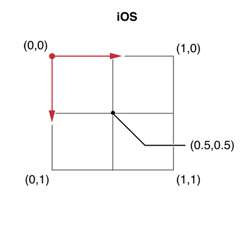
iOS中Layer的坐标系统:
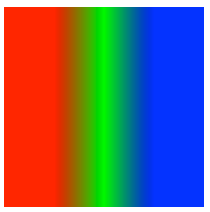
效果:
- (void)viewDidLoad

{

    [super viewDidLoad];

    CAGradientLayer *colorLayer = [CAGradientLayer layer];

    colorLayer.frame    = (CGRect){CGPointZero, CGSizeMake(, )};

    colorLayer.position = self.view.center;

    [self.view.layer addSublayer:colorLayer];

    // 颜色分配

    colorLayer.colors = @[(__bridge id)[UIColor redColor].CGColor,

                          (__bridge id)[UIColor greenColor].CGColor,

                          (__bridge id)[UIColor blueColor].CGColor];

    // 颜色分割线

    colorLayer.locations  = @[@(0.25), @(0.5), @(0.75)];

    // 起始点

    colorLayer.startPoint = CGPointMake(, );

    // 结束点

    colorLayer.endPoint   = CGPointMake(, );

}

颜色分配严格遵守Layer的坐标系统,locations,startPoint,endPoint都是以Layer坐标系统进行计算的.
而locations并不是表示颜色值所在位置,它表示的是颜色在Layer坐标系相对位置处要开始进行渐变颜色了.

CAGradientLayer 的这四个属性 colors locations startPoint endPoint 都是可以进行动画的哦.
附录:
稍微复杂点的动画效果

#import "RootViewController.h"

#import "YXGCD.h"

@interface RootViewController ()

@property (nonatomic, strong) GCDTimer  *timer;

@end

@implementation RootViewController

- (void)viewDidLoad

{

    [super viewDidLoad];

    CAGradientLayer *colorLayer = [CAGradientLayer layer];

    colorLayer.backgroundColor = [UIColor blueColor].CGColor;

    colorLayer.frame    = (CGRect){CGPointZero, CGSizeMake(, )};

    colorLayer.position = self.view.center;

    [self.view.layer addSublayer:colorLayer];

    // 颜色分配

    colorLayer.colors = @[(__bridge id)[UIColor cyanColor].CGColor,

                          (__bridge id)[UIColor orangeColor].CGColor,

                          (__bridge id)[UIColor magentaColor].CGColor];

    // 起始点

    colorLayer.startPoint = CGPointMake(, );

    // 结束点

    colorLayer.endPoint   = CGPointMake(, );

    _timer = [[GCDTimer alloc] initInQueue:[GCDQueue mainQueue]];

    [_timer event:^{

        static CGFloat test = - 0.1f;

        if (test >= 1.1)

        {

            test = - 0.1f;

            [CATransaction setDisableActions:YES];

            colorLayer.locations  = @[@(test), @(test + 0.05), @(test + 0.1)];

        }

        else

        {

            [CATransaction setDisableActions:NO];

            colorLayer.locations  = @[@(test), @(test + 0.05), @(test + 0.1)];

        }

        test += 0.1f;

    } timeInterval:NSEC_PER_SEC];

    [_timer start];

}

@end

    _timer = [[GCDTimer alloc] initInQueue:[GCDQueue mainQueue]];

    [_timer event:^{

        static CGFloat test = - 0.1f;

        if (test >= 1.1)

        {

            test = - 0.1f;

            [CATransaction setDisableActions:NO];

            colorLayer.locations  = @[@(test), @(test + 0.01), @(test + 0.011)];

        }

        else

        {

            [CATransaction setDisableActions:NO];

            colorLayer.locations  = @[@(test), @(test + 0.01), @(test + 0.011)];

        }

        test += 0.1f;

    } timeInterval:NSEC_PER_SEC];

    [_timer start];
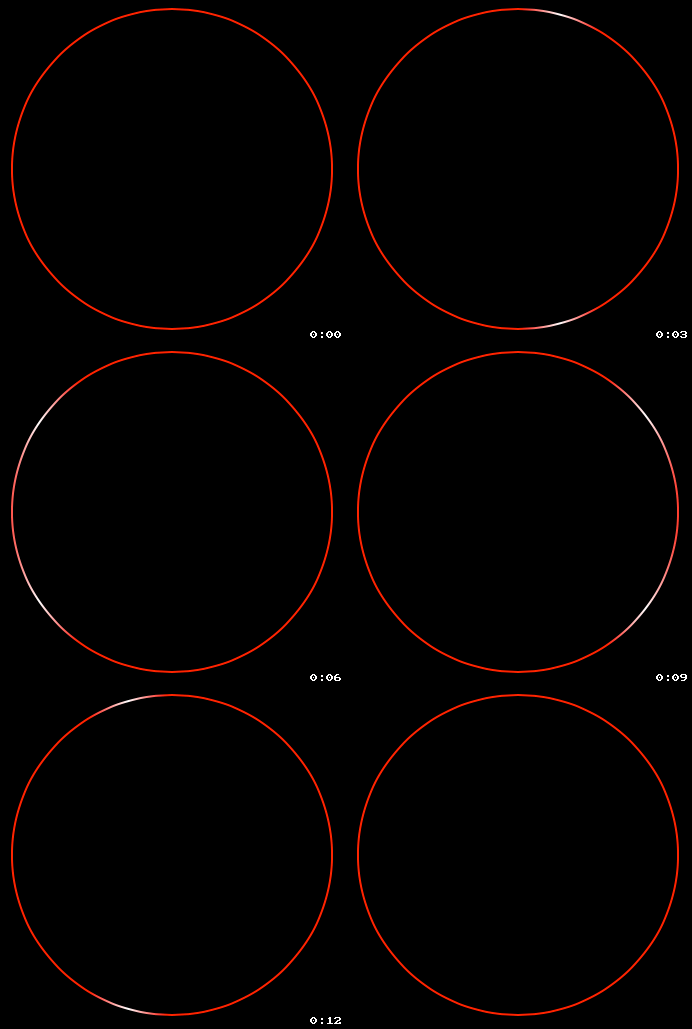
配合CAShapeLayer使用
//

//  RootViewController.m

//

//  Copyright (c) 2014年 Y.X. All rights reserved.

//

#import "RootViewController.h"

#import "YXGCD.h"

@interface RootViewController ()

@property (nonatomic, strong) GCDTimer  *timer;

@end

// 将常数转换为度数

#define   DEGREES(degrees)  ((M_PI * (degrees))/ 180.f)

@implementation RootViewController

- (void)viewDidLoad

{

    [super viewDidLoad];

    self.view.backgroundColor = [UIColor blackColor];

    CAGradientLayer *colorLayer = [CAGradientLayer layer];

    colorLayer.backgroundColor = [UIColor blueColor].CGColor;

    colorLayer.frame    = (CGRect){CGPointZero, CGSizeMake(200, 200)};

    colorLayer.position = self.view.center;

    [self.view.layer addSublayer:colorLayer];

    // 颜色分配

    colorLayer.colors = @[(__bridge id)[UIColor redColor].CGColor,

                          (__bridge id)[UIColor whiteColor].CGColor,

                          (__bridge id)[UIColor redColor].CGColor];

    colorLayer.locations  = @[@(-0.2), @(-0.1), @(0)];

    // 起始点

    colorLayer.startPoint = CGPointMake(0, 0);

    // 结束点

    colorLayer.endPoint   = CGPointMake(1, 0);

    CAShapeLayer *circle = [RootViewController LayerWithCircleCenter:CGPointMake(102, 100)

                                                              radius:80

                                                          startAngle:DEGREES(0)

                                                            endAngle:DEGREES(360)

                                                           clockwise:YES

                                                     lineDashPattern:nil];

    circle.strokeColor = [UIColor redColor].CGColor;

    [self.view.layer addSublayer:circle];

    circle.strokeEnd = 1.f;

    colorLayer.mask = circle;

    _timer = [[GCDTimer alloc] initInQueue:[GCDQueue mainQueue]];

    [_timer event:^{

        static int i = 0;

        if (i++ % 2 == 0)

        {

            CABasicAnimation* fadeAnim = [CABasicAnimation animationWithKeyPath:@"locations"];

            fadeAnim.fromValue = @[@(-0.2), @(-0.1), @(0)];

            fadeAnim.toValue   = @[@(1.0), @(1.1), @(1.2)];

            fadeAnim.duration  = 1.5;

            [colorLayer addAnimation:fadeAnim forKey:nil];

        }

    } timeInterval:NSEC_PER_SEC];

    [_timer start];

}

+ (CAShapeLayer *)LayerWithCircleCenter:(CGPoint)point

                                 radius:(CGFloat)radius

                             startAngle:(CGFloat)startAngle

                               endAngle:(CGFloat)endAngle

                              clockwise:(BOOL)clockwise

                        lineDashPattern:(NSArray *)lineDashPattern

{

    CAShapeLayer *layer = [CAShapeLayer layer];

    // 贝塞尔曲线(创建一个圆)

    UIBezierPath *path = [UIBezierPath bezierPathWithArcCenter:CGPointMake(0, 0)

                                                        radius:radius

                                                    startAngle:startAngle

                                                      endAngle:endAngle

                                                     clockwise:clockwise];

    // 获取path

    layer.path = path.CGPath;

    layer.position = point;

    // 设置填充颜色为透明

    layer.fillColor = [UIColor clearColor].CGColor;

    // 获取曲线分段的方式

    if (lineDashPattern)

    {

        layer.lineDashPattern = lineDashPattern;

    }

    return layer;

}

@end
转http://www.cnblogs.com/YouXianMing/p/3793913.html
CAGradientLayer的一些属性解析的更多相关文章
- CAGradientLayer的一些属性解析-b
CAGradientLayer的一些属性解析 iOS中Layer的坐标系统: 效果: - (void)viewDidLoad { [super viewDidLoad]; CAGradientLaye ...
- Activity设置全屏显示的两种方式及系统自带theme属性解析
转载说明:原贴地址:http://blog.csdn.net/a_running_wolf/article/details/50480386 设置Activity隐藏标题栏.设置Activity全屏显 ...
- PE知识复习之PE的各种头属性解析
PE知识复习之PE的各种头属性解析 一丶DOS头结构体 typedef struct _IMAGE_DOS_HEADER { // DOS .EXE header WORD e_magic; // M ...
- 【Spring源码深度解析学习系列】复杂标签属性解析(四)
一.创建用于属性承载的BeanDefinition BeanDefiniton是一个接口,在Spring中存在三种实现:RootBeanDefinition.ChildBeanDefinition.G ...
- CALayer的additive属性解析
CALayer的additive属性解析 效果: 源码:https://github.com/RylanJIN/ShareOfCoreAnimation // // CAPartAViewContro ...
- Atitit.注解and属性解析(2)---------语法分析 生成AST attilax总结 java .net
Atitit.注解and属性解析(2)---------语法分析 生成AST attilax总结 java .net 1. 应用场景:::因为要使用ui化的注解 1 2. 使用解释器方式来实现生成 ...
- HTTP中的请求头和响应头属性解析
HTTP中的请求头和响应头属性解析 下面总结一下平时web开发中,HTTP请求的相关过程以及重要的参数意义 一次完整的HTTP请求所经历的7个步骤 说明:HTTP通信机制是在一次完整的HTTP通信过程 ...
- cocos2d-x 3.0游戏实例学习笔记《卡牌塔防》第七步---英雄要升级&属性--解析csv配置文件
/* 说明: **1.本次游戏实例是<cocos2d-x游戏开发之旅>上的最后一个游戏,这里用3.0重写并做下笔记 **2.我也问过木头本人啦.他说:随便写,第一别全然照搬代码:第二能够说 ...
- springMVC自定义方法属性解析器
使用场景例子: 用户登陆系统一般会往Session里放置一个VO对象,然后在controller里会来获取用户的userId等信息. 之前的写法是:@SessionAttributes配合@Model ...
随机推荐
- AsyncTask和Handler对比(转)
1 ) AsyncTask实现的原理,和适用的优缺点 AsyncTask,是android提供的轻量级的异步类,可以直接继承AsyncTask,在类中实现异步操作,并提供接口反馈当前异步执行的程度(可 ...
- Sql Server,如何去含有非数字的nvarchar,再转为为数值
菜鸟一枚,今天做项目时,突然遇到一个问题: 在数据库中中存放的nvarchar类型的“时间”,例如:‘08:00’,而我需要进行时间的范围比较,这时就想到了将nvarchar类型转化为int类型. 这 ...
- MVC导出数据到EXCEL新方法:将视图或分部视图转换为HTML后再直接返回FileResult
导出EXCEL方法总结 MVC导出数据到EXCEL的方法有很多种,常见的是: 1.采用EXCEL COM组件来动态生成XLS文件并保存到服务器上,然后转到该文件存放路径即可: 优点:可设置丰富的EXC ...
- Java魔法堂:类加载机制入了个门
一.前言 当在CMD/SHELL中输入 $ java Main<CR><LF> 后,Main程序就开始运行了,但在运行之前总得先把Main.class及其所依赖的类加载到JVM ...
- RAID磁盘阵列的搭建(以raid0、raid1、raid5、raid10为例)
mdadm工具的使用 -C或--creat 建立一个新阵列 -r 移除设备 -A 激活磁盘阵列 -l 或--level= 设定磁盘阵列的级别 -D或--detail 打印阵列设备的详细信息 -n或-- ...
- 网页颜色分辨测试小游戏的js化辨别及优化
相信大家都玩过一种网页游戏,通俗的可以叫颜色分辨测试游戏(这个名字对不对我也不知道,不要在意这些细节),也就是下面截图这个玩意,一看就明白:细细把玩过一段时间,作为一个一百米开外男女不分的弱视青年,每 ...
- CentOS7上让Jexus开机自启动
昨天刚用了一下CentOS7,很自然的就安装了mono和Jexus,用的都是目前最新版mono4.2.2.10和jexus5.8.0 mono和jexus的具体安装方法,园子里已经有了很多教程,这里就 ...
- 基于C#的MongoDB数据库开发应用(1)--MongoDB数据库的基础知识和使用
在花了不少时间研究学习了MongoDB数据库的相关知识,以及利用C#对MongoDB数据库的封装.测试应用后,决定花一些时间来总结一下最近的研究心得,把这个数据库的应用单独作为一个系列来介绍,希望从各 ...
- WinForm打印
WinForm打印要用打印控件: PageSetupDialog:打印设置对话框 PrintDialog:打印对话框 PrintDocument:要打印的对象,非常重要 PrintPreviewCon ...
- Dapper小型ORM的使用(随便吐槽下公司)
近来公司又有新项目要做,之前做项目用过蛮多ORM,包括ef,NetTiers,ServiceStack.OrmLite等ROM,每种ORM都有一定的坑(或者说是使用者的问题吧~~).用来用去都觉的有一 ...