
String常用方法测试
String.Equals()使用方法
用来比较String两个对象所表示的字符串是否相同
public class StringEquals {
public static void main(String[] args) {
String s1=new String("Hello");
String s2=new String("Hello");
System.out.println(s1==s2); //false
System.out.println(s1.equals(s2)); //true
String s3="Hello";
String s4="Hello";
System.out.println(s3==s4); //true
System.out.println(s3.equals(s4)); //true
}
}
类的对象不能直接用==比较 比较的是两个String对象 不能用来比较对象和常量
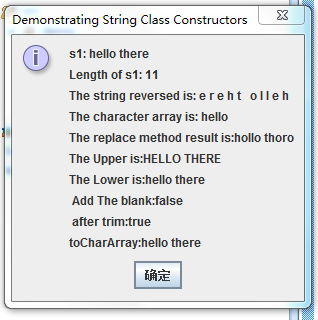
对一些string 方法的测试 代码如下:
package demo;
//StringMisc.java
//This program demonstrates the length, charAt and getChars
//methods of the String class.
//
//Note: Method getChars requires a starting point
//and ending point in the String. The starting point is the
//actual subscript from which copying starts. The ending point
//is one past the subscript at which the copying ends.
import javax.swing.*;
public class Stringmisc {
public static void main( String args[] )
{
String s1, output,s2,s3;
char charArray[];
s1 = new String( "hello there" );
charArray = new char[ 5 ];
// output the string
output = "s1: " + s1;
// test the length method
output += "\nLength of s1: " + s1.length();
// loop through the characters in s1 and display reversed
output += "\nThe string reversed is: ";
for ( int i = s1.length() - 1; i >= 0; i-- )
output += s1.charAt( i ) + " ";
// copy characters from string into char array
//四个参数的含义
//1.被拷贝字符在字串中的起始位置
//2.被拷贝的最后一个字符在字串中的下标再加1
//3.目标字符数组
//4.拷贝的字符放在字符数组中的起始下标
s1.getChars( 0, 5, charArray, 0 );
output += "\nThe character array is: ";
for ( int i = 0; i < charArray.length;i++ )
output += charArray[ i ];
//test the replace method
s2 = s1.replace("e","o"); //replace方法完了转换后是返回一个新的对象,如果没有找到需要替换的字符串则返回原对象
output +="\nThe replace method result is:"+s2;
//test the toUpperCase and tpLowerCase
s2 = s1.toUpperCase(); //toUpperCase 是把所有字符串变为大写
s3 = s1.toLowerCase(); //toLowerCase 是吧所有字符串变为小写
output += "\nThe Upper is:"+s2;
output += "\nThe Lower is:"+s3;
//test The trim //去掉字符串首位的空格
s2 = " Hello There ";
s3 = "Hello There";
output += "\n Add The blank:"+s3.equals(s2);
s2 = s2.trim();
output += "\n after trim:" + s2.equals(s3);
//test the toCharArray //把字符串存入一个字符数组中
char array[] = s1.toCharArray();
output += "\ntoCharArray:";
for ( int i = 0; i < array.length;i++ )
output += array[ i ];
JOptionPane.showMessageDialog( null, output,
"Demonstrating String Class Constructors",
JOptionPane.INFORMATION_MESSAGE );
System.exit( 0 );
}
}
String常用方法测试的更多相关文章
- Javascript语言精粹之String常用方法分析
Javascript语言精粹之String常用方法分析 1. String常用方法分析 1.1 String.prototype.slice() slice(start,end)方法复制string的 ...
- JAVA之旅(十六)——String类,String常用方法,获取,判断,转换,替换,切割,子串,大小写转换,去除空格,比较
JAVA之旅(十六)--String类,String常用方法,获取,判断,转换,替换,切割,子串,大小写转换,去除空格,比较 过节耽误了几天,我们继续JAVA之旅 一.String概述 String时 ...
- String常用方法
1. String StringBuffer StringBuilder的区别: 001.在执行速度方法 StringBuilder > StringBuffer > String 002 ...
- JVM内存分配及String常用方法
一,JVM内存分配和常量池 在介绍String类之前,先来简单分析一下在JVM中,对内存的使用是如何进行分配的.如下图所示(注意:在jdk1.8之后便没有方法区了): 如上JVM将内存分为 ...
- String常用方法解析
package com.javaBase.string; import java.util.Locale; /** * 〈一句话功能简述〉; * 〈String类中常用的方法整理〉 * * @auth ...
- Java中String常用方法总结
package cn.zhang.Array; /** * String类的一些常用方法 * @author 张涛 * */ public class TestString { public stat ...
- Java 中String常用方法
java中String的常用方法 1.length() 字符串的长度 例:char chars[]={'a','b'.'c'}; String s=new String(chars); int len ...
- Java中String常用方法
java中String的常用方法1.length() 字符串的长度 例:char chars[]={'a','b'.'c'}; String s=new String(chars); int len= ...
- 类String 常用方法
字符串当中的常用方法之比较相关的方法 public boolean equals (object obj):将此字符串与指定的对象进行比较(只有参数是字符串并且内容相同才会返回true) public ...
随机推荐
- 任务9user表建表语句
create table user( id int not null auto_increment primary key, username ) not null default '', pwd ) ...
- java new Date()得到的时间和系统时间不一样
造成这种问题的原因是:操作系统时区跟JVM的时区不一致. [root@paas244 ~]# timedatectl Local time: Thu 2016-12-29 15:35:44 CST U ...
- Android四大核心组件之ContentProvider
实验内容 学习ContextProvider用法 编码实现简单ContextProvider功能 实验要求 通过简单代码了解ContextProvider功能和用法 实验步骤 ContextProvi ...
- Could not find a getter for id in class 的异常
检查.hbm.xml里边的id是否大小写一致
- Liunx下的系统负荷
uptime命令回显中的load average所表示的意思和w命令相似,都是表示过去的1分钟.5分钟和15分钟内进程队列中的平均进程数量. 这里需要注意的是load aver ...
- debian bcm43* 无线网卡驱动
deb http://httpredir.debian.org/debian/ jessie main contrib non-free # apt-get update# apt-get insta ...
- Android Animation(动画)
前言 Android 平台提供实现动画的解决方案(三种) 一.3.0以前,android支持两种动画: (1)Frame Animation:顺序播放事先做好的图像,与gif图片原理类似,是一种逐帧动 ...
- js事件监听/鼠标滚轮/行为/冒泡/键盘的兼容性写法
addEvent:function(el,type,fn,capture) { if (window.addEventListener) { if (type === "mousewheel ...
- 闭包内的微观世界和js垃圾回收机制
一.什么是闭包? 官方”的解释是:闭包是一个拥有许多变量和绑定了这些变量的环境的表达式(通常是一个函数),因而这些变量也是该表达式的一部分.相信很少有人能直接看懂这句话,因为他描述的太学术.其实这句话 ...
- tk画图
Page 387 of chapter 7 """ 6-23 page 343 play media files """ def odd() ...