
IMPORT FROM 表数据导入
The type of the file to be imported. You can specify either comma-separated values or control file formats. For more information on CSV and control file formats, see Examples.
- CSV FILE :该文件存储的为表数据
- CONTROL FILE:该文件是控制文件,即将导入的脚本写在这个文件里,然后还是通过这个 IMPORT 语句执行这个脚本控制文件即可,这样就不需要将导数的语句直接贴在SQL编辑器里运行了
The complete path and file name of the file to import.
The target table name, with optional schema name, where the imported data will be stored.
<import_from_option> ::= THREADS <number_of_threads>
| BATCH <number_of_records_of_each_commit>
| TABLE LOCK
| NO TYPE CHECK
| SKIP FIRST <number_of_rows_to_skip> ROW
| COLUMN LIST IN FIRST ROW [<with_schema_flexibility>]
| COLUMN LIST ( <column_name_list> ) [<with_schema_flexibility>]
| RECORD DELIMITED BY <string_for_record_delimiter>
| FIELD DELIMITED BY <string_for_field_delimiter>
| OPTIONALLY ENCLOSED BY <character_for_optional_enclosure>
| DATE FORMAT <string_for_date_format>
| TIME FORMAT <string_for_time_format>
| TIMESTAMP FORMAT <string_for_timestamp_format>
| ERROR LOG <file_path_of_error_log>
| FAIL ON INVALID DATA
The number of threads that can be used for concurrent import. The default value is 1 and maximum allowed is 256.
The number of records to be inserted in each commit.
Can be used for faster data loading for column store tables. 可以加快列存储表数据的导入
It is recommended to specify this option carefully as it incurs table locks in exclusive mode as well as explicit hard merges and savepoints after data loading is finished. The performance gain from this option can vary according to the table constraints (like primary key) and optimization of other layers (like persistency or DML command).
Specifies that the record will be inserted without checking the type of each field.
<number_of_rows_to_skip> ::= <unsigned_integer>
Skips the specified number of rows in the import file.
Indicates that the column list is stored in the first row of the CSV import file.
<column_name_list> ::= <column_name> [{, <column_name>}...]
The column list for the data being imported. The name list has one or more column names. The ordering of the column names has to match the order of the column data in the CSV file and the columns in the target table.
The record delimiter used in the CSV file being imported.
The field delimiter of the CSV file.
The optional enclosure character used to delimit field data.
The format that date strings are encoded with in the import data:
- Y : year
- MM : month
- MON : name of month
- DD : day
- 'YYYYMMDD' = 20120520
- 'YYYY-MM-DD' = 2012-05-20
- 'YYYY-MON-DD' : 2012-MAY-20
The format that time strings are encoded with in the import data:
- HH24 : hour
- MI : minute
- SS : second
For example:
- 'HH24MISS' : 143025
- 'HH24:MI:SS' : 14:30:25
TIMESTAMP FORMAT <string_for_timestamp_format> ::= <string_literal>
The format that timestamp strings are encoded with in the import data.
- 'YYYY-MM-DD HH24:MI:SS' : 2012-05-20 14:30:25
When specified, a log file of errors generated is stored in this file. Please ensure the file path you use is writeable by the database.
指定错误日志文件(含路径)
When specified, the IMPORT FROM command fails unless all the entries import successfully.
The option WITH SCHEMA FLEXIBILITY will create missing columns in flexible tables during CSV imports, as specified in the header (first row) of the CSV file or column list. By default, missing columns in flexible tables are not created automatically during data imports.
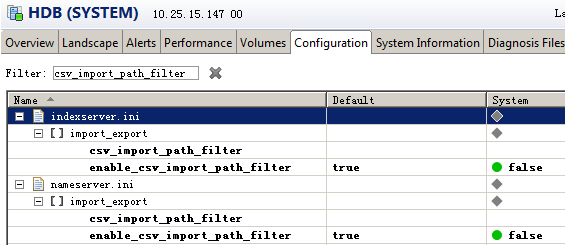
ALTER SYSTEM ALTER CONFIGURATION ('indexserver.ini', 'system') set ('import_export', 'enable_csv_import_path_filter') = 'false' with reconfigure

ALTER SYSTEM ALTER CONFIGURATION ('indexserver.ini', 'system') set ('import_export', 'csv_import_path_filter') = '/A;/B' with reconfigure
Note that once you add a path '/A' to path filter every sub-path of '/A' will be automatically added as well.
- Dynamic Tiering
Example 1 - Importing CSV Data
1,"DATA1","2012-05-20","14:30:25",123456

2,"DATA2","2012-05-21","15:30:25",234567

3,"DATA3","2012-05-22","16:30:25",345678

4,"DATA4","2012-05-23","17:30:25",456789

Example 2 - Importing using a control file
You can create a control file /usr/sap/HDB/home/Desktop/data/data.ctl and add the contents shown below to the file.
ERROR LOG '/usr/sap/HDB/home/Desktop/data/data.err'
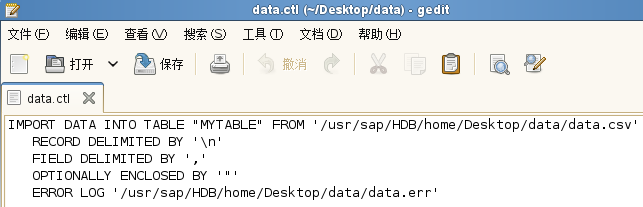 You execute the following command to import the data using the control file.
Example 3 - Import using date formats
1,"DATA1","05-20-2012","14:30:25",123456

2,"DATA2","05-21-2012","15:30:25",234567

3,"DATA3","05-22-2012","16:30:25",345678

4,"DATA4","05-23-2012","17:30:25",456789
DATE FORMAT 'MM-DD-YYYY';
Example 4 - Import using COLUMN LIST
CREATE TABLE COLLIST ( A INT, B VARCHAR(10), C DATE, D DECIMAL );
You create a CSV text file '/usr/sap/HDB/home/Desktop/data/data_col_list.csv' and add the following contents.
现在
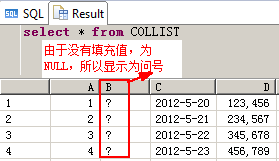
data_col_list.csv文件里的内容如下,B列值没有提供,并且CSV里的第一列要存到D列里,第二列要存到C里,第三列要存储到A列里
You execute the following commands to import the data using a column list.
COLUMN LIST ("D", "C", "A");
CREATE COLUMN TABLE FLEX ( X INT ) WITH SCHEMA FLEXIBILITY;--WITH SCHEMA FLEXIBILITY选项只能用于列式存储的表
创建一个可伸缩的表,只有X一列,使用上面的data_col_list.csv文件,文件里有3列,且都没存储到X列里
You execute the following commands to import previously created data_col_list.csv without explicitly adding columns.
WITH SCHEMA FLEXIBILITY;
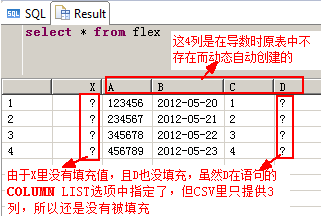

在自动创建缺失的列时,好像无法指定类型,默认类型全为 nvarchar(5000)?这不太好吧!是否有办法指定呢?
IMPORT FROM 表数据导入的更多相关文章
- Excel表数据导入Sql Server数据库中
Excel表数据导入Sql Server数据库的方法很多,这里只是介绍了其中一种: 1.首先,我们要先在test数据库中新建一个my_test表,该表具有三个字段tid int类型, tname nv ...
- 把execel表数据导入mysql数据库
今天,是我来公司第二周的第一天. 作为新入职的实习生,目前还没适合我的实质项目工作,今天的学习任务是: 把execel表数据导入到mysql数据库,再练习下java操作JDBC. 先了解下execel ...
- SqlServer一张表数据导入另一张表,收藏使用,工作中更新数据错误很有用
sql一张表数据导入另一张表 1.如果2张表的字段一致,并且希望插入全部数据,可以用这种方法: INSERT INTO 目标表 SELECT * FROM 来源表; 2.比如要将 arti ...
- HBase(三): Azure HDInsigt HBase表数据导入本地HBase
目录: hdfs 命令操作本地 hbase Azure HDInsight HBase表数据导入本地 hbase hdfs命令操作本地hbase: 参见 HDP2.4安装(五):集群及组件安装 , ...
- Excel表数据导入数据库表中
***Excel表数据导入到数据库表中 通过数据库表的模板做成‘Excel’表的数据导入到数据库相应的表中(注意:主表 和 从表的关系,要先导‘主表’在导入从表) 过程:通过数据库的导入工具—先导入为 ...
- C# DateTime的11种构造函数 [Abp 源码分析]十五、自动审计记录 .Net 登陆的时候添加验证码 使用Topshelf开发Windows服务、记录日志 日常杂记——C#验证码 c#_生成图片式验证码 C# 利用SharpZipLib生成压缩包 Sql2012如何将远程服务器数据库及表、表结构、表数据导入本地数据库
C# DateTime的11种构造函数 别的也不多说没直接贴代码 using System; using System.Collections.Generic; using System.Glob ...
- java基于xml配置的通用excel单表数据导入组件(四、DAO主处理类)
package XXXXX.manage.importexcel; import java.beans.IntrospectionException; import java.io.BufferedR ...
- 利用Sql实现将指定表数据导入到另一个数据库示例
因为工作中经常需要将数据从一个数据库导入到另一个数据库中,所以将这个功能写成一个存储过程,以方便调用.现在粘贴出来供大家参考: 注意:1,以下示例中用到了syscolumns,sysobjects等系 ...
- java基于xml配置的通用excel单表数据导入组件(五、Action处理类)
package xxxxxx.manage.importexcel; import java.io.File; import java.util.HashMap; import java.util.M ...
随机推荐
- css给div添加0.5px的边框
具体代码实现如下: <!DOCTYPE html> <html lang="en"> <head> <meta charset=" ...
- ios移动端部分手机不支持background-attachment: fixed 的解决办法
ios系统和某些移动端background-attachment:fixed不兼容性,没有任何效果,但可以hack一下就可以了,代码如下: ps:想在哪个标签加背景,可以在它class后:before ...
- 查看https是否支持ATS
nscurl --ats-diagnostics --verbose https://我的域名
- leetcode pow(x,n)实现
题目描述: 自己实现pow(double x, int n)方法 实现思路: 考虑位运算.考虑n的二进制表示形式,以n=51(110011)为例,x^51 = x^1*x^2*x^16*x^32,因此 ...
- Leetcode: Unique Substrings in Wraparound String
Consider the string s to be the infinite wraparound string of "abcdefghijklmnopqrstuvwxyz" ...
- git 远程版本库,github提供服务原理,git自动更新发送邮件
1.安装好Linux,安装好Git(192.168.1.239) 2.创建一个用户zph(让此用户提供git on server),密码设置为12345678 # useradd zph # pass ...
- hduoj 1286 找新朋友
http://acm.hdu.edu.cn/showproblem.php?pid=1286 找新朋友 Time Limit: 2000/1000 MS (Java/Others) Memory Li ...
- 【原创】linux 批量清空文本内容
清空所有PHP文件 find . -name '*.php'|xargs sed -i '1,$d' 清空所有文件 find . -type f|xargs sed -i '1,$d'
- Linux上 .vimrc文件
在Linux上面对VIM编辑器的格式的设置通常可以提升工作效率,下面对工作机器上的.vimrc文件的内容进行一总结,以备后续的查询 set smarttab set tabstop=4 set shi ...
- Windows api实现桌面任务栏隐藏\显示
//隐藏任务栏 HWND hWnd = ::FindWindow(TEXT("Shell_traywnd"),TEXT("")); ::SetWindowPos ...