
salesforce 零基础学习(二十七)VF页面等待(loading)效果制作
进行查询的情况下,显示友好的等待效果可以让用户更好的了解目前的状态以及减少用户消极的等待,例如下图所示。
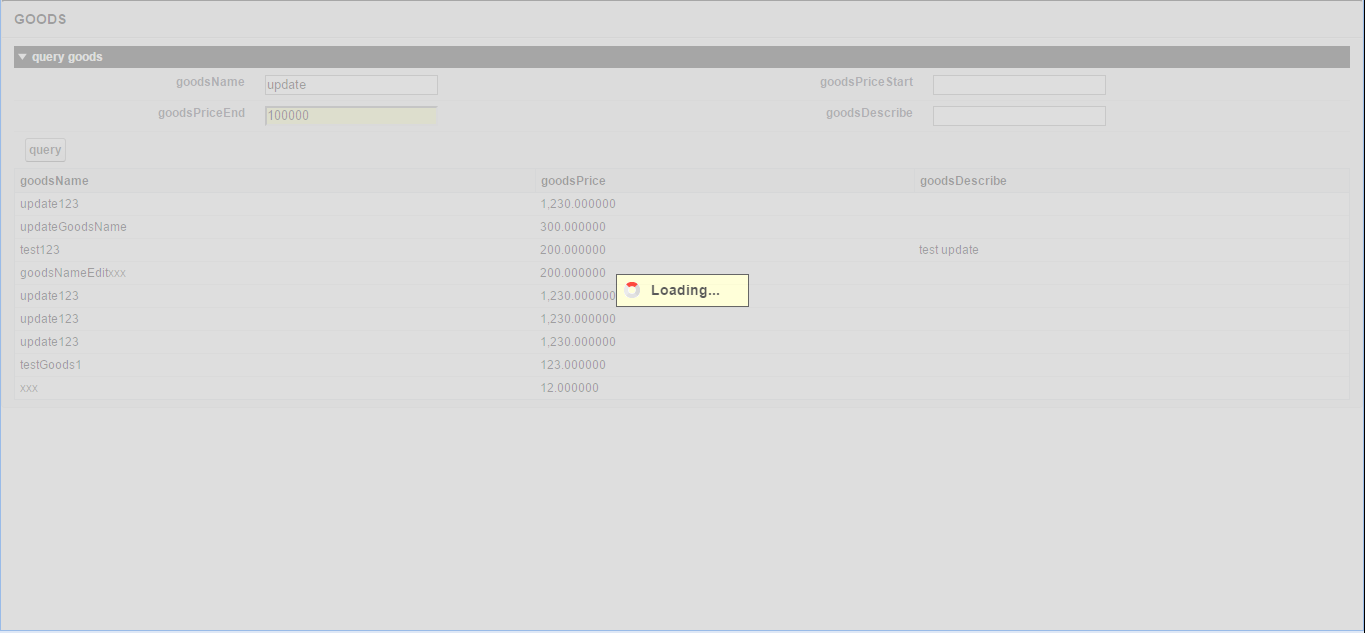
VF提供了<apex:actionStatus>标签,,此标签用于显示一个AJAX请求更新的状态。一个AJAX请求状态可以显示为进展或完成。
实现上述效果的主要步骤如下:
1.创建一个Component:StatusSpinner.component
其中需要在salesforce中上传一个静态资源,显示loading的gif图片,有需要的可以进行下载:http://files.cnblogs.com/files/zero-zyq/loading.gif

 <apex:component >

 <apex:attribute name="Message"

     type="String"

     description="Messaging show in loading status spinner"

     default="Loading..."/>

 <apex:actionStatus id="LoadingStatusSpinner">

      <apex:facet name="start">

           <div id="loadingDiv" class="loadingDiv" >

                <span id="loadingHolder" class="loadingHolder">

                     <img class="loadingImage" title="Loading..." alt="Loading..." src="/img/loading.gif"/>

                     <span class="loadingDescription">{!message}</span>

                </span>

           </div>

      </apex:facet>

 </apex:actionStatus>

 <style>

 .loadingImage { vertical-align:bottom; }.loadingDescription { padding:0 1.5em 0 0.5em; }

 .loadingHolder {

      background-color: #FFFFCC;

      border: 1px solid #333333;

      font-size: 1.2em;

      font-weight: bold;

      padding: 0.5em;

      position: relative;

      top: 45%;

      white-space: nowrap;

 }

 .loadingDiv {

      background-color: lightgrey;

      opacity: .75;

      filter: alpha(opacity=75); /* IE's opacity*/

      text-align: center;

      width: 100%;

      height: 100%;

      position: fixed;

      z-index: 300;

      top: 0;

      left: 0;

 }

 </style>

 </apex:component>
2.创建GoodsController
 public with sharing class GoodsController {

        public List<GOODS__c> goodsList{get;set;}

        //public GOODS__c goods{get;set;}

        public String goodsName{get;set;}

        public Decimal goodsPriceStart{get;set;}

        public Decimal goodsPriceEnd{get;set;}

        public String goodsDescribe{get;set;}

        public GoodsController() {

            goodsList = new List<GOODS__c>();

            refreshData();

        }

        //刷新数据作用

        public void refreshData() {

            Boolean isStatus = true;

            String goodsQueryString = 'SELECT   GoodsBrand__c,'+

                                       'GoodsDescribe__c,GoodsName__c, GoodsPrice__c,'+

                                        '  Id FROM Goods__c where IsDeleted = false limit 100';

            goodsList = Database.query(goodsQueryString);

        }

        public void query() {

            String goodsSql = 'SELECT GoodsBrand__c,'+

                               'GoodsDescribe__c,GoodsName__c ,  GoodsPrice__c,'+

                                ' Id FROM GOODS__c where IsDeleted = false ';

            if(goodsName.length() >0) {

                goodsName = '%' + goodsName + '%';

                goodsSql += ' and GoodsName__c like :goodsName ';

            }

            if(goodsDescribe.length() > 0) {

                goodsDescribe = '%' + goodsDescribe + '%';

                goodsSql += ' and GoodsDescribe__c like :goodsDescribe';

            }

            if(String.valueOf(goodsPriceStart).length()>0) {

                goodsSql += ' and GoodsPrice__c >= :goodsPriceStart';

            }

            if(String.valueOf(goodsPriceEnd).length()>0) {

                goodsSql += ' and GoodsPrice__c <= :goodsPriceEnd';

            }

            goodsSql += ' limit 100';

            goodsList = Database.query(goodsSql);

            goodsName = goodsName.remove('%');

            goodsDescribe = goodsDescribe.remove('%');

        }

 }
3.创建GoodsListPage:页面中将Component引入进来,然后在apex:commandButton标签上绑定action,设置status值,status值为apex:actionStatus的Id,设置reRender为table的Id,以便查询后重新渲染table列表。
 <apex:page controller="GoodsController" showHeader="false">

     <c:StatusSpinner />

     <apex:messages />

     <apex:form >

         <apex:pageBlock title="GOODS" id="page">

             <apex:pageBlockSection title="query goods">

                 <apex:inputText value="{!goodsName}" label="goodsName"

                     id="goodsName" />

                 <apex:inputText value="{!goodsPriceStart}"

                     label="goodsPriceStart" />

                 <apex:inputText value="{!goodsPriceEnd}"

                     label="goodsPriceEnd" />

                 <apex:inputText value="{!goodsDescribe}"

                     label="goodsDescribe" />

                 <apex:commandButton value="query" action="{!query}" status="LoadingStatusSpinner" reRender="resultGoods"/>

             </apex:pageBlockSection>

             <apex:pageBlockTable value="{!goodsList}" var="goods" id="resultGoods">

                 <apex:column headervalue="goodsName">

                     <apex:outputField value="{!goods.GoodsName__c}"/>

                 </apex:column>

                 <apex:column headervalue="goodsPrice">

                     <apex:outputField value="{!goods.GoodsPrice__c}" />

                 </apex:column>

                 <apex:column headervalue="goodsDescribe">

                     <apex:outputField value="{!goods.GoodsDescribe__c}" />

                 </apex:column>

             </apex:pageBlockTable>

         </apex:pageBlock>

     </apex:form>

 </apex:page>
通过以上三个步骤,便可以实现查询显示等待效果。
总结:apex:actionStatus可以相对较好的显示等待(loading)效果,不过相关限制较多,需要相关commandButton等标签提供reRender属性。比如不能在inputFile中使用此标签因为inputFile的页面不能reRender,如果类似上面demo中简单的查询或者ajax请求进行查询可以使用此种方式,如果存在inputFile的页面,慎用。
salesforce 零基础学习(二十七)VF页面等待(loading)效果制作的更多相关文章
- 【转】【Salesforce】salesforce 零基础学习(十七)Trigger用法
看本篇之前可以相应阅读以下Trigger相关文章: 1.https://developer.salesforce.com/page/Trigger_Frameworks_and_Apex_Trigge ...
- salesforce 零基础学习(十七)Trigger用法
看本篇之前可以相应阅读以下Trigger相关文章: 1.https://developer.salesforce.com/page/Trigger_Frameworks_and_Apex_Trigge ...
- salesforce 零基础学习(五十二)Trigger使用篇(二)
第十七篇的Trigger用法为通过Handler方式实现Trigger的封装,此种好处是一个Handler对应一个sObject,使本该在Trigger中写的代码分到Handler中,代码更加清晰. ...
- salesforce零基础学习(八十二)审批邮件获取最终审批人和审批意见
项目中,审批操作无处不在.配置审批流时,我们有时候会用到queue,related user设置当前步骤的审批人,审批人可以一个或者多个.当审批人有多个时,邮件中获取当前记录的审批人和审批意见就不能随 ...
- salesforce零基础学习(八十七)Apex 中Picklist类型通过Control 字段值获取Dependent List 值
注:本篇解决方案内容实现转自:http://mysalesforceescapade.blogspot.com/2015/03/getting-dependent-picklist-values-fr ...
- salesforce零基础学习(八十九)使用 input type=file 以及RemoteAction方式上传附件
在classic环境中,salesforce提供了<apex:inputFile>标签用来实现附件的上传以及内容获取.salesforce 零基础学习(二十四)解析csv格式内容中有类似的 ...
- salesforce零基础学习(八十)使用autoComplete 输入内容自动联想结果以及去重实现
项目中,我们有时候会需要实现自动联想功能,比如我们想输入用户或者联系人名称,去联想出系统中有的相关的用户和联系人,当点击以后获取相关的邮箱或者其他信息等等.这种情况下可以使用jquery ui中的au ...
- salesforce零基础学习(九十六)Platform Event浅谈
本篇参考:https://developer.salesforce.com/blogs/2018/07/which-streaming-event-do-i-use.html https://trai ...
- salesforce零基础学习(一百一十)list button实现的一些有趣事情
本篇参考: salesforce零基础学习(九十五)lightning out https://developer.salesforce.com/docs/component-library/docu ...
- salesforce 零基础学习(六十八)http callout test class写法
此篇可以参考: https://developer.salesforce.com/docs/atlas.en-us.apexcode.meta/apexcode/apex_classes_restfu ...
随机推荐
- Parameter Passing / Request Parameters in JSF 2.0 (转)
This Blog is a compilation of various methods of passing Request Parameters in JSF (2.0 +) (1) f:vi ...
- 使用sklearn优雅地进行数据挖掘
目录 1 使用sklearn进行数据挖掘 1.1 数据挖掘的步骤 1.2 数据初貌 1.3 关键技术2 并行处理 2.1 整体并行处理 2.2 部分并行处理3 流水线处理4 自动化调参5 持久化6 回 ...
- C# IGUID的生成
GUID(全局统一标识符)是指在一台机器上生成的数字,它保证对在同一时空中的所有机器都是唯一的.通常平台会提供生成GUID的API.生成算法很有意思,用到了以太网卡地址.纳秒级时间.芯片ID码和许多可 ...
- PYTHON学习之路_PYTHON基础(6)
学习内容: Python模块介绍 1.time &datetime模块 2.random 3.shutil 4.shelve 5.xml处理 6.configparser 7.hashlib ...
- 网上搜集了点资料,学web的人互相分享共同进步吧(php编码的好习惯必须养成)
网上搜集了点资料,学web的人互相分享共同进步吧 一.优秀的代码应该是什么样的? 优秀的PHP代码应该是结构化的.大段的代码应该被分割整理成一个个函数或方法,而那些不起眼的小段代码则应该加上注释,以便 ...
- linux ssh config
Host code.engineering.redhat.com HostName code.engineering.redhat.com Port 29418 User jiall ...
- 初步了解yield_python
yield 关键字是在学习python生成器(Generator)时遇到的,对于它及Generator至今我还不能很深入的理解,当前只是把所理解的知识作下记录,以便以后翻查. yield关键字是用来定 ...
- mac下配置openCV
预备工作: 1.下载Homebrew 在Terminal中输入: ruby -e "$(curl -fsSkL raw.github.com/mxcl/homebrew/go)" ...
- Struts2+Spring+Hibernate(SSH)框架的搭建
首先需要下载struts2 ,spring4,hibernate5 的资源包; struts2资源包下载路径:http://www.apache.org/spring资源包下载路径:http://p ...
- 学习Word2vec
有感于最近接触到的一些关于深度学习的知识,遂打算找个东西来加深理解.首选的就是以前有过接触,且火爆程度非同一般的word2vec.严格来说,word2vec的三层模型还不能算是完整意义上的深度学习,本 ...