
[Unity插件]Lua行为树(十二):行为树管理
之前运行的行为树,都是一颗总树,那么实际上会有很多的总树,因此需要对行为树进行管理。
BTBehaviorManager.lua
 BTBehaviorManager = {};

 local this = BTBehaviorManager;

 this.isEachFrameCall = false;--是否是每帧调用

 this.printTreeStr = "";

 this.trees = {};

 function this.RunTree()

     if (isEachFrameCall) then

     else

         while (true) do

             local isAllFinish = this.OnUpdate();

             if (isAllFinish) then

                 break;

             end

         end

     end

 end

 function this.OnUpdate()

     local count = ;

     for i=,#this.trees do

         local tree = this.trees[i];

         if (tree.executionStatus == BTTaskStatus.Inactive) then --第一次执行

             print("第一次执行:" .. tree.name);

             tree:OnUpdate();

         elseif (tree.executionStatus == BTTaskStatus.Running) then --第二次以及以后执行

             print("第二次以及以后执行:" .. tree.name);

             tree:OnUpdate();

         else

             count = count + ;

         end

     end

     if (count == #this.trees) then

         return true;

     else

         return false;

     end

 end

 --添加行为树

 function this.AddTree(task)

     table.insert(this.trees, task);

 end

 --深度优先,打印树结构

 function this.PrintTree(task)

     this.printTreeStr = "";

     this.AddToPrintTreeStr(task);

     print(this.printTreeStr);

 end

 function this.AddToPrintTreeStr(task)

     local taskType = task.taskType;

     this.printTreeStr = this.printTreeStr .. task:ToString() .. "\n";

     if (taskType == BTTaskType.Root) then

         this.AddToPrintTreeStr(task.startTask);

     elseif (taskType == BTTaskType.Composite or taskType == BTTaskType.Decorator) then

         for i=,#task.childTasks do

             this.AddToPrintTreeStr(task.childTasks[i]);

         end

     else

     end

 end
说明:
1.因为是运行在Sublime环境下的,所以这里使用while循环模拟每帧调用
2.关于AddTree和OnUpdate是否会冲突的问题。AddTree会增加trees的长度,但是在lua中for的三个表达式在循环开始前一次性求值,以后不再进行求值。比如#this.trees这个表达式只会在循环开始前执行一次,其结果用在后面的循环中。也就是说,如果在for循环过程中执行了AddTree方法,新增的元素会添加在后面,不会影响for循环的。
测试:
1.多行为树执行
TestBehaviorTree.lua
 TestBehaviorTree = BTBehaviorTree:New();

 local this = TestBehaviorTree;

 this.name = "TestBehaviorTree";

 function this:New()

     local o = {};

     setmetatable(o, self);

     self.__index = self;

     o:Init();

     return o;

 end

 function this:Init()

     local parallel = BTParallel:New();

     local action = self:GetBTActionUniversal();

     local action2 = self:GetBTActionUniversal2();

     self:SetStartTask(parallel);

     parallel:AddChild(action);

     parallel:AddChild(action2);

 end

 function this:GetBTActionUniversal()

     local count = ;

     local a = function ()

         if (count <= ) then

             count = count + ;

             print("");

             return BTTaskStatus.Running;

         else

             return BTTaskStatus.Success;

         end

     end

     local universal = BTActionUniversal:New(nil, a);

     return universal;

 end

 function this:GetBTActionUniversal2()

     local universal = BTActionUniversal:New(nil, function ()

         return BTTaskStatus.Success;

     end);

     return universal;

 end
TestBehaviorTree2.lua
 TestBehaviorTree2 = BTBehaviorTree:New();

 local this = TestBehaviorTree2;

 this.name = "TestBehaviorTree2";

 function this:New()

     local o = {};

     setmetatable(o, self);

     self.__index = self;

     o:Init();

     return o;

 end

 function this:Init()

     local repeater = BTRepeater:New();

     local sequence = BTSequence:New();

     local log = BTLog:New("This is a other tree!!!");

     local log2 = BTLog:New("This is a other tree 2!!!");

     self:SetStartTask(repeater);

     repeater:AddChild(sequence);

     sequence:AddChild(log);

     sequence:AddChild(log2);

 end
TestMain.lua
 require "BehaviorTree/Core/Init"

 require "BehaviorTree/Test/TestBehaviorTree"

 require "BehaviorTree/Test/TestBehaviorTree2"

 local tree = TestBehaviorTree:New();

 local tree2 = TestBehaviorTree2:New();

 tree.name = "tree";

 tree2.name = "tree2";

 BTBehaviorManager.AddTree(tree);

 BTBehaviorManager.AddTree(tree2);

 BTBehaviorManager.RunTree();
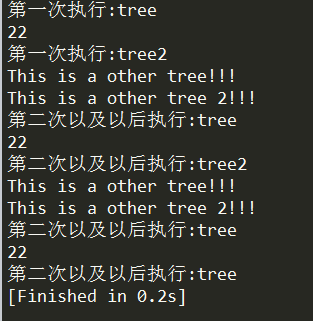
输出如下:
2.for循环中添加行为树
TestBehaviorTree3.lua
 TestBehaviorTree3 = BTBehaviorTree:New();

 local this = TestBehaviorTree3;

 this.name = "TestBehaviorTree3";

 function this:New()

     local o = {};

     setmetatable(o, self);

     self.__index = self;

     o:Init();

     return o;

 end

 function this:Init()

     local repeater = BTRepeater:New();

     local log = BTLog:New("This is TestBehaviorTree3 tree!!!");

     self:SetStartTask(repeater);

     repeater:AddChild(log);

 end
BTBehaviorManager.lua
 BTBehaviorManager = {};

 local this = BTBehaviorManager;

 this.isEachFrameCall = false;--是否是每帧调用

 this.printTreeStr = "";

 this.trees = {};

 function this.RunTree()

     if (isEachFrameCall) then

     else

         while (true) do

             local isAllFinish = this.OnUpdate();

             if (isAllFinish) then

                 break;

             end

         end

     end

 end

 local temp = false;

 function this.OnUpdate()

     local count = ;

     for i=,#this.trees do

         if (not temp) then

             temp = true;

             require "BehaviorTree/Test/TestBehaviorTree3"

             local tree3 = TestBehaviorTree3:New();

             tree3.name = "tree3";

             this.AddTree(tree3);

         end

         local tree = this.trees[i];

         if (tree.executionStatus == BTTaskStatus.Inactive) then --第一次执行

             print("第一次执行:" .. tree.name);

             tree:OnUpdate();

         elseif (tree.executionStatus == BTTaskStatus.Running) then --第二次以及以后执行

             print("第二次以及以后执行:" .. tree.name);

             tree:OnUpdate();

         else

             count = count + ;

         end

     end

     print("------------------------------");

     if (count == #this.trees) then

         return true;

     else

         return false;

     end

 end

 --添加行为树

 function this.AddTree(task)

     table.insert(this.trees, task);

 end

 --深度优先,打印树结构

 function this.PrintTree(task)

     this.printTreeStr = "";

     this.AddToPrintTreeStr(task);

     print(this.printTreeStr);

 end

 function this.AddToPrintTreeStr(task)

     local taskType = task.taskType;

     this.printTreeStr = this.printTreeStr .. task:ToString() .. "\n";

     if (taskType == BTTaskType.Root) then

         this.AddToPrintTreeStr(task.startTask);

     elseif (taskType == BTTaskType.Composite or taskType == BTTaskType.Decorator) then

         for i=,#task.childTasks do

             this.AddToPrintTreeStr(task.childTasks[i]);

         end

     else

     end

 end
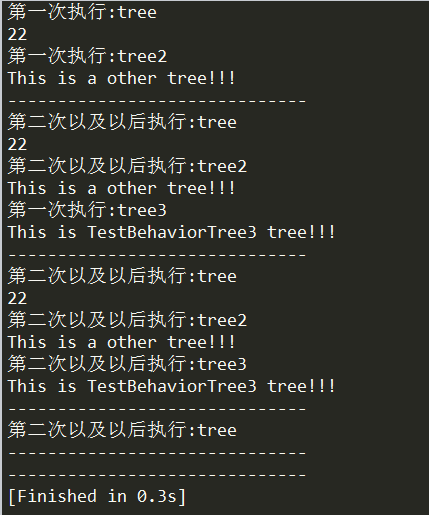
输出如下。可以看到,在第一帧时,添加了行为树tree3,但是并不影响tree和tree2的执行,而在第二帧以及以后的帧时,tree3也开始执行了。
[Unity插件]Lua行为树(十二):行为树管理的更多相关文章
- [Unity插件]Lua行为树(七):行为树嵌套
在上一篇的基础上,可以测试下行为树的嵌套,所谓的行为树嵌套,就是在一棵行为树下的某一个分支,接入另一棵行为树. 以下面这棵行为树为例: TestBehaviorTree2.lua TestBehavi ...
- [Unity插件]Lua行为树(二):树结构
参考链接:https://blog.csdn.net/u012740992/article/details/79366251 在行为树中,有四种最基本的节点,其继承结构如下: Action->T ...
- [Unity插件]Lua行为树(十):通用行为和通用条件节点
在行为树中,需要扩展的主要是行为节点和条件节点.一般来说,每当要创建一个节点时,就要新建一个节点文件.而对于一些简单的行为节点和条件节点,为了去掉新建文件的过程,可以写一个通用版本的行为节点和条件节点 ...
- [Unity插件]Lua行为树(一):BehaviorDesigner源码分析
BehaviorDesigner是Unity上的一款行为树插件,不过这个插件是用C#编写的,编写出来的行为树也是依赖于C#的,不利于热更,所以有必要写一个lua版本的. 首先下载BehaviorDes ...
- [Unity插件]Lua行为树(三):组合节点Sequence
Sequence的继承关系如下: Sequence->Composite->ParentTask->Task 上一篇已经实现了简单版本的ParentTask和Task(基于Behav ...
- [Unity插件]Lua行为树(六):打印树结构
经过前面的文章,已经把行为树中的四种基本类型节点介绍了下.接下来可以整理一下,打印一下整棵行为树.注意点如下: 1.可以把BTBehaviorTree也当作一种节点,这样就可以方便地进行行为树嵌套了 ...
- [Unity插件]Lua行为树(四):条件节点和行为节点
条件节点和行为节点,这两种节点本身的设计比较简单,项目中编写行为树节点一般就是扩展这两种节点,而Decorator和Composite节点只需要使用内置的就足够了. 它们的继承关系如下: Condit ...
- [Unity插件]Lua行为树(十一):组合节点Parallel
Parallel节点类似Sequence节点,不同在于Parallel会每帧执行所有的节点.当所有节点返回成功时返回成功,当其中一个节点返回失败时,返回失败并且结束所有的子节点运行. 例如说,给Seq ...
- [Unity插件]Lua行为树(九):条件节点调整
先看一下之前的条件节点是怎么设计的: BTConditional.lua BTConditional = BTTask:New(); local this = BTConditional; this. ...
随机推荐
- 学习大数据基础框架hadoop需要什么基础
什么是大数据?进入本世纪以来,尤其是2010年之后,随着互联网特别是移动互联网的发展,数据的增长呈爆炸趋势,已经很难估计全世界的电子设备中存储的数据到底有多少,描述数据系统的数据量的计量单位从MB(1 ...
- 【转】python:让源码更安全之将py编译成so
python:让源码更安全之将py编译成so 应用场景 Python是一种面向对象的解释型计算机程序设计语言,具有丰富和强大的库,使用其开发产品快速高效. python的解释特性是将py编译为独有的二 ...
- java远程调用linux的命令或者脚本
转载自:http://eksliang.iteye.com/blog/2105862 Java通过SSH2协议执行远程Shell脚本(ganymed-ssh2-build210.jar) 使用步骤如下 ...
- ionic platform add ios, Error:spawn EACCES
RT: cordova ionic 环境搭建好之后,需要添加平台才能打包,添加平台如果出错:Error:spawn EACCES, 原因是因为没添加hooks, 请使用 ionic add hooks ...
- 关于SD-SDI,HD-SDI,3G-SDI行号的问题
关于SD-SDI,HD-SDI,3G-SDI行号的问题 1.资料来源 2.行号的插入信号 SD-SDI mode的信号不需要行号 HD-SDI,3G-SDI mode的信号必须插入行号 3.edh的插 ...
- Pandas的使用(1)
Pandas的使用(1) 1.绘图 import pandas as pd import numpy as np import matplotlib.pyplot as plt ts = pd.Ser ...
- python show slave status
#!/usr/bin/env python import MySQLdbimport contextlib @contextlib.contextmanagerdef mysql(Host,Port, ...
- Python数据库编程
http://lizhenliang.blog.51cto.com/7876557/1874283 http://blog.itpub.net/22664653/list/1/?cid=86471
- 无法连接到 OPC服务器[无此类接口支持(异常来自HRESULT:0x80004002(E_NOINTERFACE))]
来源:https://stackoverrun.com/cn/q/10400663 无法连接到ABB Freelance OPC服务器[无此类接口支持(异常来自HRESULT:0x80004002(E ...
- Centos 安装Sublime text 3
1.下载sublime3 http://www.sublimetext.com/3 2.解压缩,即为安装. # cd /opt # tar xjf /home/alex/Downloads/subli ...