
Hibernate 再接触 Hello world 模拟Hibernate
没有Hibernate以前
Cilent 客户端 new出一个对象 然后执行JDBC 然后这样的访问数据库并不是面向对象语言
使用Hibernate以后
Cilent new 出一个对象后 访问配置文件 产生sessionfactory 然后opensession 获得一个session 拿到session后直接save 不用具体的拼sql语句
OR 即hibernate帮我们屏蔽了 R relationship 这层关系 只需要面向对象就好了
第一个小程序
首先引入相关jar包 透了懒 以前弄过 所以全部复制过来了 ‘
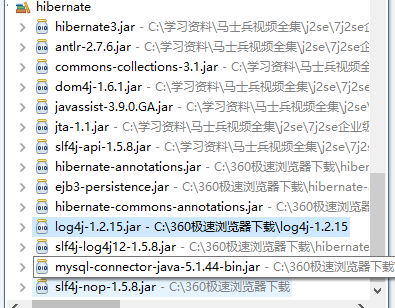
首先第一步 copy过来hibernate的配置文件
Hibernate.cfg.xml
<!DOCTYPE hibernate-configuration PUBLIC

        "-//Hibernate/Hibernate Configuration DTD 3.0//EN"

        "http://hibernate.sourceforge.net/hibernate-configuration-3.0.dtd">

<hibernate-configuration>

    <session-factory>

        <!-- Database connection settings -->

        <property name="connection.driver_class">com.mysql.jdbc.Driver</property>

        <property name="connection.url">jdbc:mysql://localhost/hibernate</property>

        <property name="connection.username">root</property>

        <property name="connection.password"></property>

        <!-- JDBC connection pool (use the built-in) -->

        <!-- <property name="connection.pool_size"></property> -->

        <!-- SQL dialect -->

        <property name="dialect">org.hibernate.dialect.MySQLDialect</property>

        <!-- Enable Hibernate's automatic session context management -->

        <!-- <property name="current_session_context_class">thread</property> -->

        <!-- Disable the second-level cache  -->

       <!--  <property name="cache.provider_class">org.hibernate.cache.NoCacheProvider</property> -->

        <!-- Echo all executed SQL to stdout -->

        <property name="show_sql">true</property>

        <!-- Drop and re-create the database schema on startup -->

        <property name="hbm2ddl.auto">update</property>

        <mapping resource="com/easy/Student.hbm.xml"/>

        <!-- <mapping class="com.bjsxt.hibernate.Teacher"/>  -->

    </session-factory>

</hibernate-configuration>
先建立一个model Student
package com.easy;

public class student {

    private int id;

    private String name;

    private int age;

    public int getId() {

        return id;

    }

    public void setId(int id) {

        this.id = id;

    }

    public String getName() {

        return name;

    }

    public void setName(String name) {

        this.name = name;

    }

    public int getAge() {

        return age;

    }

    public void setAge(int age) {

        this.age = age;

    }

}
先建立一个Xml版本的
创建Student.hbm.xml 建立映射关系
<?xml version="1.0"?>

<!DOCTYPE hibernate-mapping PUBLIC

        "-//Hibernate/Hibernate Mapping DTD 3.0//EN"

        "http://hibernate.sourceforge.net/hibernate-mapping-3.0.dtd">

<hibernate-mapping >

    <class name="com.easy.student">

        <id name="id" />

        <property name="name" />

        <property name="age" />

    </class>

</hibernate-mapping>
建立测试类
package com.easy;

import org.hibernate.Session;

import org.hibernate.SessionFactory;

import org.hibernate.cfg.Configuration;

public class studenttest {

      public static void main(String[] args){

          student  su = new student();

          su.setId();

          su.setName("不成功");

          su.setAge();

          Configuration cf = new Configuration();

          SessionFactory sf = cf.configure().buildSessionFactory();

          Session session = sf.openSession();

          session.beginTransaction();

          session.save(su);

          session.getTransaction().commit();

          session.close();

          sf.close();

      }

}
创建数据库 hibernate 然后创建表student
该表应该有 id name age字段
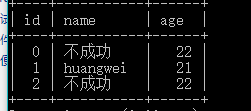
插入成功
建立Annotation 版本 记得加入jar包哦
加入注解
注意包是javax.persistentce
package com.easy;

import javax.persistence.Entity;

import javax.persistence.Id;

@Entity

public class student {

    private int id;

    private String name;

    private int age;

    @Id

    public int getId() {

        return id;

    }

    public void setId(int id) {

        this.id = id;

    }

    public String getName() {

        return name;

    }

    public void setName(String name) {

        this.name = name;

    }

    public int getAge() {

        return age;

    }

    public void setAge(int age) {

        this.age = age;

    }

}
hibernate.cfg.xml
<!DOCTYPE hibernate-configuration PUBLIC

        "-//Hibernate/Hibernate Configuration DTD 3.0//EN"

        "http://hibernate.sourceforge.net/hibernate-configuration-3.0.dtd">

<hibernate-configuration>

    <session-factory>

        <!-- Database connection settings -->

        <property name="connection.driver_class">com.mysql.jdbc.Driver</property>

        <property name="connection.url">jdbc:mysql://localhost/hibernate</property>

        <property name="connection.username">root</property>

        <property name="connection.password"></property>

        <!-- JDBC connection pool (use the built-in) -->

        <!-- <property name="connection.pool_size"></property> -->

        <!-- SQL dialect -->

        <property name="dialect">org.hibernate.dialect.MySQLDialect</property>

        <!-- Enable Hibernate's automatic session context management -->

         <property name="current_session_context_class">thread</property>

        <!-- Disable the second-level cache  -->

       <!--  <property name="cache.provider_class">org.hibernate.cache.NoCacheProvider</property> -->

        <!-- Echo all executed SQL to stdout -->

        <property name="show_sql">true</property>

        <!-- Drop and re-create the database schema on startup -->

        <property name="hbm2ddl.auto">update</property>

       <!--  <mapping resource="com/easy/Student.hbm.xml"/> -->

        <mapping class="com.easy.student"/>

    </session-factory>

</hibernate-configuration>
test
package com.easy;

import org.hibernate.Session;

import org.hibernate.SessionFactory;

import org.hibernate.cfg.AnnotationConfiguration;

import org.hibernate.cfg.Configuration;

public class studenttest {

      public static void main(String[] args){

          student  su = new student();

          su.setId();

          su.setName("不成功");

          su.setAge();

          Configuration cf = new AnnotationConfiguration();

          SessionFactory sf = cf.configure().buildSessionFactory();

          Session session = sf.openSession();

          session.beginTransaction();

          session.save(su);

          session.getTransaction().commit();

          session.close();

          sf.close();

      }

}
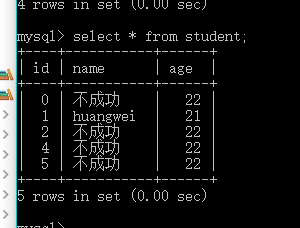
插入成功
Hibernate 再接触 Hello world 模拟Hibernate的更多相关文章
- Hibernate 再接触 关系映射 一对一单向外键关联
对象之间的关系 数据库之间的关系只有外键 注意说关系的时候一定要反面也要说通 CRUD 数据库之间设计 主键关联 单向的外键关联 中间表 一对一单向外键关联 Husband.java package ...
- Hibernate 再接触 基础配置 搭建Log4j环境 Junit日志环境等
<!-- Drop and re-create the database schema on startup --> <property name="hbm2ddl.aut ...
- Hibernate 再接触 悲观锁和乐观锁
为什么取1248 二进制 CRUD 移位效率高 在并发和效率选择一个平衡点 一般不会考虑幻读 因为我们不会再一个事务里查询两次,(只能设置为seralizable) 悲观锁和乐观锁的前提是read-u ...
- Hibernate 再接触 一级缓存 二级缓存 查询缓存
缓存 就是把本来应该放在硬盘里的东西放在内存里 将来存内存里读 一级缓存: session缓存 二级缓存: sessionFactory级别的 (适合经常访问,数据量有限,改动不大) 很多的se ...
- Hibernate 再接触 性能优化
Sessionclear 否则session缓存里越来越多 Java有内存泄露吗? 在语法中没有(垃圾自动回收) 但是在实际中会有 比如读文件没有关什么的 1+N问题 解决方法:把fetch设置为la ...
- Hibernate 再接触 CRUD
1.save 一对多双向 package com.bjsxt.hibernate; import java.util.HashSet; import java.util.Set; import jav ...
- Hibernate 再接触 核心开发接口
1.可以重载方法进行配置文件的指定 sessionFactory = new AnnotationConfiguration().configure("hibernate.xml" ...
- Hibernate 再接触 ID生成策略
Xml 方法 在student.hbm.xml中 <generator class="uuid"></generator> 取值如下 1.identity: ...
- Hibernate 再接触 HQL
Category.java package com.bjsxt.hibernate; import javax.persistence.Entity; import javax.persistence ...
随机推荐
- iOS NSUserDefaults
一.介绍 NSUserDefaults适合存储请练级的本地数据,对于一些简单的数据(NSString类型)来说是首选,但是如果我们自定义了一个对象,对象保存的是一些信息,这是就不能直接存储到NSUse ...
- 反射中的BindingFlags
不指定绑定标志 BindingFlags.Default 表示忽略 name 的大小写,不应考虑成员名的大小写 BindingFlags.IgnoreCase 只应考虑在所提供类型的层次结构级别 ...
- CS229 7.2 应用机器学习方法的技巧,准确率,召回率与 F值
建立模型 当使用机器学习的方法来解决问题时,比如垃圾邮件分类等,一般的步骤是这样的: 1)从一个简单的算法入手这样可以很快的实现这个算法,并且可以在交叉验证集上进行测试: 2)画学习曲线以决定是否更多 ...
- 锚点定位,jquery定位到页面指定位置
jquery锚点定位 $('body,html').animate({scrollTop: $('#ter1').offset().top}, 500);#ter1是你要定位的id对象,500是0.5 ...
- windows下mysql5.7 root密码重置
1.在mysql根目录下新建配置文件my.ini(因为我安装的mysql-5.7.24安装完成后未看到该配置文件,所以新建一个,有的直接修改即可) [mysqld] skip-grant-tables ...
- JavaWeb学习总结(三)——Tomcat服务器学习和使用
收藏 JavaWeb学习总结(三)——Tomcat服务器学习和使用 http://www.cnblogs.com/xdp-gacl/p/3744053.html
- Jquery在表格中搜索关键字
<!DOCTYPE html><html><head> <title>ddd</title></head><body> ...
- gentoo: startx: drmsetmaster failed: permission denied
今天更新了 xorg-server 之后, startx 就进不了 X了,但是可以用 sudo startx 进入 X,所以感觉很奇怪. 后来终于在 gentoo 官方论坛上面找到答案了. https ...
- 一些被提问频率最高的12个php面试题,以及对应的常规回答。
一些被提问频率最高的12个php面试题,以及对应的常规回答.1.问题:请用最简单的语言告诉我php是什么?回答:php全称:hypertext preprocessor,是一种用来开发动态网站的服务器 ...
- Callable和Future 多线程
参考:https://www.cnblogs.com/fengsehng/p/6048609.html