
Hibernate 再接触 Hello world 模拟Hibernate
没有Hibernate以前
Cilent 客户端 new出一个对象 然后执行JDBC 然后这样的访问数据库并不是面向对象语言
使用Hibernate以后
Cilent new 出一个对象后 访问配置文件 产生sessionfactory 然后opensession 获得一个session 拿到session后直接save 不用具体的拼sql语句
OR 即hibernate帮我们屏蔽了 R relationship 这层关系 只需要面向对象就好了
第一个小程序
首先引入相关jar包 透了懒 以前弄过 所以全部复制过来了 ‘
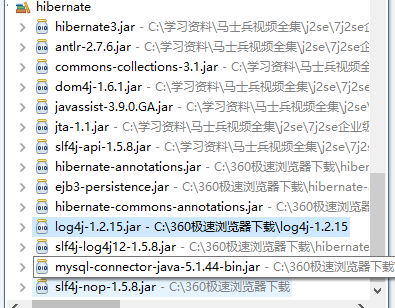
首先第一步 copy过来hibernate的配置文件
Hibernate.cfg.xml
<!DOCTYPE hibernate-configuration PUBLIC

        "-//Hibernate/Hibernate Configuration DTD 3.0//EN"

        "http://hibernate.sourceforge.net/hibernate-configuration-3.0.dtd">

<hibernate-configuration>

    <session-factory>

        <!-- Database connection settings -->

        <property name="connection.driver_class">com.mysql.jdbc.Driver</property>

        <property name="connection.url">jdbc:mysql://localhost/hibernate</property>

        <property name="connection.username">root</property>

        <property name="connection.password"></property>

        <!-- JDBC connection pool (use the built-in) -->

        <!-- <property name="connection.pool_size"></property> -->

        <!-- SQL dialect -->

        <property name="dialect">org.hibernate.dialect.MySQLDialect</property>

        <!-- Enable Hibernate's automatic session context management -->

        <!-- <property name="current_session_context_class">thread</property> -->

        <!-- Disable the second-level cache  -->

       <!--  <property name="cache.provider_class">org.hibernate.cache.NoCacheProvider</property> -->

        <!-- Echo all executed SQL to stdout -->

        <property name="show_sql">true</property>

        <!-- Drop and re-create the database schema on startup -->

        <property name="hbm2ddl.auto">update</property>

        <mapping resource="com/easy/Student.hbm.xml"/>

        <!-- <mapping class="com.bjsxt.hibernate.Teacher"/>  -->

    </session-factory>

</hibernate-configuration>
先建立一个model Student
package com.easy;

public class student {

    private int id;

    private String name;

    private int age;

    public int getId() {

        return id;

    }

    public void setId(int id) {

        this.id = id;

    }

    public String getName() {

        return name;

    }

    public void setName(String name) {

        this.name = name;

    }

    public int getAge() {

        return age;

    }

    public void setAge(int age) {

        this.age = age;

    }

}
先建立一个Xml版本的
创建Student.hbm.xml 建立映射关系
<?xml version="1.0"?>

<!DOCTYPE hibernate-mapping PUBLIC

        "-//Hibernate/Hibernate Mapping DTD 3.0//EN"

        "http://hibernate.sourceforge.net/hibernate-mapping-3.0.dtd">

<hibernate-mapping >

    <class name="com.easy.student">

        <id name="id" />

        <property name="name" />

        <property name="age" />

    </class>

</hibernate-mapping>
建立测试类
package com.easy;

import org.hibernate.Session;

import org.hibernate.SessionFactory;

import org.hibernate.cfg.Configuration;

public class studenttest {

      public static void main(String[] args){

          student  su = new student();

          su.setId();

          su.setName("不成功");

          su.setAge();

          Configuration cf = new Configuration();

          SessionFactory sf = cf.configure().buildSessionFactory();

          Session session = sf.openSession();

          session.beginTransaction();

          session.save(su);

          session.getTransaction().commit();

          session.close();

          sf.close();

      }

}
创建数据库 hibernate 然后创建表student
该表应该有 id name age字段
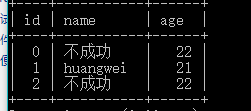
插入成功
建立Annotation 版本 记得加入jar包哦
加入注解
注意包是javax.persistentce
package com.easy;

import javax.persistence.Entity;

import javax.persistence.Id;

@Entity

public class student {

    private int id;

    private String name;

    private int age;

    @Id

    public int getId() {

        return id;

    }

    public void setId(int id) {

        this.id = id;

    }

    public String getName() {

        return name;

    }

    public void setName(String name) {

        this.name = name;

    }

    public int getAge() {

        return age;

    }

    public void setAge(int age) {

        this.age = age;

    }

}
hibernate.cfg.xml
<!DOCTYPE hibernate-configuration PUBLIC

        "-//Hibernate/Hibernate Configuration DTD 3.0//EN"

        "http://hibernate.sourceforge.net/hibernate-configuration-3.0.dtd">

<hibernate-configuration>

    <session-factory>

        <!-- Database connection settings -->

        <property name="connection.driver_class">com.mysql.jdbc.Driver</property>

        <property name="connection.url">jdbc:mysql://localhost/hibernate</property>

        <property name="connection.username">root</property>

        <property name="connection.password"></property>

        <!-- JDBC connection pool (use the built-in) -->

        <!-- <property name="connection.pool_size"></property> -->

        <!-- SQL dialect -->

        <property name="dialect">org.hibernate.dialect.MySQLDialect</property>

        <!-- Enable Hibernate's automatic session context management -->

         <property name="current_session_context_class">thread</property>

        <!-- Disable the second-level cache  -->

       <!--  <property name="cache.provider_class">org.hibernate.cache.NoCacheProvider</property> -->

        <!-- Echo all executed SQL to stdout -->

        <property name="show_sql">true</property>

        <!-- Drop and re-create the database schema on startup -->

        <property name="hbm2ddl.auto">update</property>

       <!--  <mapping resource="com/easy/Student.hbm.xml"/> -->

        <mapping class="com.easy.student"/>

    </session-factory>

</hibernate-configuration>
test
package com.easy;

import org.hibernate.Session;

import org.hibernate.SessionFactory;

import org.hibernate.cfg.AnnotationConfiguration;

import org.hibernate.cfg.Configuration;

public class studenttest {

      public static void main(String[] args){

          student  su = new student();

          su.setId();

          su.setName("不成功");

          su.setAge();

          Configuration cf = new AnnotationConfiguration();

          SessionFactory sf = cf.configure().buildSessionFactory();

          Session session = sf.openSession();

          session.beginTransaction();

          session.save(su);

          session.getTransaction().commit();

          session.close();

          sf.close();

      }

}
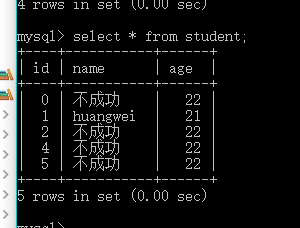
插入成功
Hibernate 再接触 Hello world 模拟Hibernate的更多相关文章
- Hibernate 再接触 关系映射 一对一单向外键关联
对象之间的关系 数据库之间的关系只有外键 注意说关系的时候一定要反面也要说通 CRUD 数据库之间设计 主键关联 单向的外键关联 中间表 一对一单向外键关联 Husband.java package ...
- Hibernate 再接触 基础配置 搭建Log4j环境 Junit日志环境等
<!-- Drop and re-create the database schema on startup --> <property name="hbm2ddl.aut ...
- Hibernate 再接触 悲观锁和乐观锁
为什么取1248 二进制 CRUD 移位效率高 在并发和效率选择一个平衡点 一般不会考虑幻读 因为我们不会再一个事务里查询两次,(只能设置为seralizable) 悲观锁和乐观锁的前提是read-u ...
- Hibernate 再接触 一级缓存 二级缓存 查询缓存
缓存 就是把本来应该放在硬盘里的东西放在内存里 将来存内存里读 一级缓存: session缓存 二级缓存: sessionFactory级别的 (适合经常访问,数据量有限,改动不大) 很多的se ...
- Hibernate 再接触 性能优化
Sessionclear 否则session缓存里越来越多 Java有内存泄露吗? 在语法中没有(垃圾自动回收) 但是在实际中会有 比如读文件没有关什么的 1+N问题 解决方法:把fetch设置为la ...
- Hibernate 再接触 CRUD
1.save 一对多双向 package com.bjsxt.hibernate; import java.util.HashSet; import java.util.Set; import jav ...
- Hibernate 再接触 核心开发接口
1.可以重载方法进行配置文件的指定 sessionFactory = new AnnotationConfiguration().configure("hibernate.xml" ...
- Hibernate 再接触 ID生成策略
Xml 方法 在student.hbm.xml中 <generator class="uuid"></generator> 取值如下 1.identity: ...
- Hibernate 再接触 HQL
Category.java package com.bjsxt.hibernate; import javax.persistence.Entity; import javax.persistence ...
随机推荐
- C++使用Mysql的详细步骤及各个常用方法的代码演示:select,insert,update,delete
这几天一直在学习C++下使用Mysql的方法及其中各种的问题,也看了很多Mysql的API函数,当然自己看的还是很基础的.其实对于每种数据库的操作,基本的方法都是非常类似的,大多都是connect,s ...
- python数字
#=====>part1:数字类型#掌握:int,float#了解:Long(在python2中才有),complex# num=10# num=int(10)# print(type(num) ...
- vs2015 引用lib库和dll
1.首先右键项目->属性 2.在项目中添加lib文件夹,把lib库放在文件夹下面,然后在图中的库目录引用当前路径的lib文件夹 3.在项目的路径下添加include中添加头文件,然后在常规中添加 ...
- Linux下开启mysql数据库的远程访问权限
摘要:今天在Linux服务器上安装了msyql数据库,在本地访问的时候可以访问,但是我想通过远程的方式访问的时候就不能访问了,查询资料后发现,Linux下MySQL默认安装完成后只有本地访问的权限 ...
- python学习之----Lambda表达式
Lambda 表达式本质上就是一个函数,可以作为其他函数的变量使用:也就是说,一个函 数不是定义成f(x, y),而是定义成f(g(x), y),或f(g(x), h(x)) 的形式. Beautif ...
- SVG 学习<五> SVG动画
目录 SVG 学习<一>基础图形及线段 SVG 学习<二>进阶 SVG世界,视野,视窗 stroke属性 svg分组 SVG 学习<三>渐变 SVG 学习<四 ...
- gentoo AR9285 BCM57780 安装驱动
首先使用启动光盘启动, 然后 mount /dev/sda4 /mnt/gentoo 挂载硬盘 lspci -v 1>/mnt/gentoo/root/lspci_v.txt 输出信息到文件. ...
- iOS基础知识之类别
本类从三个方面介绍iOS中的类别,分别是 什么是类别:类别的语法:类别的作用.具体内容如下: 一.类别: 类的补丁:当不能获取现有类的源码,但需要对现有类的功能进行补充时,这种情况下使用类别. 类别 ...
- 输出1到n以内的素数
package cn.lhj.learn; /** * 输出1~n以内的素数 * * @author lhj * */ public class TestSuShu { public static v ...
- unzip
中文乱码问题: unzip -O CP936 filename