
USBDM RS08/HCS08/HCS12/Coldfire V1,2,3,4/DSC/Kinetis Debugger and Programmer -- BDM Construction and Firmware
Construction.
- Build the hardware using the information provided in the PCB download.
- The following are provided:
- PDFs including the circuit diagrams with parts lists and example PCB layouts.
- PCB layouts in Altium designer format (a trial version of the software may be down loaded from http://altium.com/evaluate/).
- PCB layouts exported from Altium designer as Gerber files and NC drill files.
Initial programming of USBDM bootloader into BDM Flash.
- If you purchased a commercial version of the BDM with Version 4.0 or later software then the correct USBDM bootloader should have already been installed and you may go to Update of BDM firmware and changing serial number to update the BDM firmware. If the software is Ver 3 then you are advised to update all the flash including the bootloader.
- Please complete the following before the next step:
- Install the USBDM software Software Installation
- Install the USBDM drivers USB Driver Installation
- Note - Two bootloaders are used in programming the JS16 BDM
- The JS16 has an inbuilt USB bootloader. This is used with the provided JS16 First Stage Bootloader to initially program the JS16.
- The USBDM has its own bootloader. This is necessary for the JMxx versions and for consistency is also used with the JS16 versions. This bootloader has to be programmed into the BDM once (using the built-in bootloader from above!)
- If the BDM is completely unprogrammed you can simply plug it in, otherwise tie the BLMS pin low before doing so.
- The same driver is used by the JS16 Bootloader as used by the USBDM software so should install automatically.
- If you are having problems detecting the device or are not prompted for the driver you can confirm that the BDM is in Freescale bootloader mode by checking the device PID/VID in the device manager. It should be VID=15A2 & PID=0038 and the device should appears as JS16 Bootloader in the device manager when the driver is correctly installed.
- If you have previously used the Freescale JS16 GUI Bootloader then it may be necessary to uninstall the device first using the Device Manager.
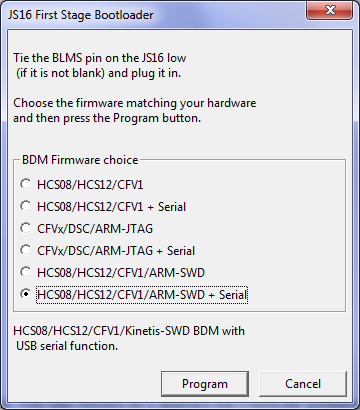
- Start the JS16 Bootloader.
- Select the appropriate firmware to load to the device.
- Press Program to program the device. There is no progress dialogue but after a short wait a confirmation should appear.
- You should then use the USBDM Firmware updater to install the current firmware version as described below.
Update of BDM firmware and changing serial number
This is the usual process for updating the BDM between different levels of the Version 4 firmware.
- Please complete the following before the next step (if not already done):
- Install the USBDM software Software Installation
- Install the USBDM drivers USB Driver Installation
- The provided USBDM Firmware Updater (FirmwareChanger.exe - not the JS16 First stage one!) may be used to change the BDM firmware. Its use is pretty obvious.
These required flash images are installed with the USBDM software and the correct one will be automatically loaded if the Auto update BDM firmware checkbox is selected.
It also allows the serial number of the BDM to be changed as part of the programming process. This is desirable as the serial number is used to identify a particular BDM if several are plugged in at the same time.Notes:
- The bootloader re-boots the BDM into USBDM in-circuit-programming (USBDM-ICP) mode to change the main firmware. The device will be re-enumerate and appears as a new device. You may be prompted to allow driver installation.
- The Bootloader will not allow the programming of a Flash image that doesn't match the existing BDM type i.e. whatever was originally programmed into the BDM. This is to prevent accidental upgrade with an incompatible Flash image.
- The Bootloader requires the BDM to have already been programmed at least once so that the Bootloader firmware is present in the BDM.
- If the BDM contains an old version of the Bootloader firmware (USBDM < V4.0) then it is necessary to take special steps to install the USB drivers to support both old and new VID/PIDs. Please see the driver installation instructions.

USBDM RS08/HCS08/HCS12/Coldfire V1,2,3,4/DSC/Kinetis Debugger and Programmer -- BDM Construction and Firmware的更多相关文章
- USBDM RS08/HCS08/HCS12/Coldfire V1,2,3,4/DSC/Kinetis Debugger and Programmer -- MC9S08JS16
Introduction The attached files provide a port of a combined TBDML/OSBDM code to a MC9S08JS16 proces ...
- USBDM RS08/HCS08/HCS12/Coldfire V1,2,3,4/DSC/Kinetis Debugger and Programmer -- Software Install
Installation of USBDM for Windows Under Windows, installation is done with a standard Windows MSI fi ...
- USBDM RS08/HCS08/HCS12/Coldfire V1,2,3,4/DSC/Kinetis Debugger and Programmer -- MC9S08JM16/32/60
Introduction The attached files provide a port of a combined TBDML/OSBDM/TBLCF code to a MC9S08JM16/ ...
- USBDM RS08/HCS08/HCS12/Coldfire V1,2,3,4/DSC/Kinetis Debugger and Programmer -- Driver Install
Installation of USBDM USB drivers for Windows There are four installers provided: USBDM_Drivers_x_x_ ...
- USBDM Debugger interface for Freescale RS08,HCS08,HCS12,Coldfire and ARM-Kinetis Devices.
Introduction USBDM is a debugger hardware interface for a range of Freescale microcontrollers. It is ...
- USBDM Coldfire V2,3,4/DSC/Kinetis Debugger and Programmer -- MC9S08JS16
Introduction The attached files provide a port of a combined TBLCF/DSC code to a MC9S08JS16 processo ...
- USBDM Kinetis Debugger and Programmer
Introduction The FRM-xxxx boards from Freescale includes a minimal SWD based debugging interface for ...
- Freescale OSBDM JM60仿真器
OSBDM-JM60 - 9S08JM60 Based OSBDM — It includes interfaces and firmware applied to all the targets s ...
- Freescale OSBDM JM60仿真器 BGND Interface
The BGND interface provides the standard 6 pin connection for the single wire BGND signal type devel ...
随机推荐
- Django之初始庐山真面目
Django可以说是基于Python语言的一款非常成熟的框架,其功能之强大,应用之广泛,开发之便捷,可以说每一个细节都值得一赞 最重要的是,Django其实是我们学习Python过程中非常重要的部分之 ...
- Unity 网格 绘制
网格绘制主要用是对Mesh进行操作,通过对vertex和triangles进行操作生成对应的面片: 这里首先得用到一个类:Triangulator(根据vertex生成triangles数组) usi ...
- ORACLE数据库数据文件转移方法(不同于move方法)
1) 手动拷贝要转移的数据数据文件'd:\OracleData\GWTABLE42.DBF'到新的位置'E:\OracleData\GWTABLE42.DBF'. 2) 把数据文件所属的表空间Offl ...
- 部分Web服务器信息对比
本文参考wikipedia的Web服务器比较页面的数据,选取了其中自己感兴趣的Web服务器的信息进行了对比,包括,Apache HTTP Server.Apache Tomcat.Nginx.Catt ...
- 20175225《java程序设计》第五周学习总结
20175225 2018-2019-2 <Java程序设计>第5周学习总结 教材学习内容总结 1.接口体中包含常量的声明(没有变量)和抽象方法两部分.接口体中只有抽象方法,没有普通的方法 ...
- java.io.StreamCorruptedException: invalid stream header: EFBFBDEF 问题解决
错误方式 @Test public void testDeserializeTest() throws IOException, ClassNotFoundException { ByteArrayO ...
- javaWeb服务器配置
jdk下载地址:http://www.oracle.com/technetwork/java/javase/downloads/java-archive-downloads-javase7-52126 ...
- hdu 1232 变成生成树至少还要加几条边 (并查集模板题)
求一个图 变成生成树至少还要加几条边(成环的边要删掉,但不用统计) Sample Input4 2 //n m1 3//u v4 33 31 21 32 35 21 23 5999 00 Sample ...
- Linux性能优化之内存优化(二)
前言 不知道大家看完前面一章关于CPU优化,是否受到相应的启发呢?如果遇到任何问题,可以留言和一起探讨这方面的问题.接下来我们介绍一些关于内存方面的知识.内存管理软件包括虚拟内存系统.地址转换.交换. ...
- JSR教程2——Spring MVC数据校验与国际化
SpringMVC数据校验采用JSR-303校验. • Spring4.0拥有自己独立的数据校验框架,同时支持JSR303标准的校验框架. • Spring在进行数据绑定时,可同时调用校验框架完成数据 ...