
Python爬虫项目--爬取自如网房源信息
本次爬取自如网房源信息所用到的知识点:
1. requests get请求
2. lxml解析html
3. Xpath
4. MongoDB存储
正文
1.分析目标站点
1. url: http://hz.ziroom.com/z/nl/z3.html?p=2 的p参数控制分页
2. get请求
2.获取单页源码
 # -*- coding: utf-8 -*-

 import requests

 import time

 from requests.exceptions import RequestException

 def get_one_page(page):

     try:

         url = "http://hz.ziroom.com/z/nl/z2.html?p=" + str(page)

         headers = {

             'Referer':'http://hz.ziroom.com/',

             'Upgrade-Insecure-Requests':'',

             'User-Agent':'Mozilla/5.0(WindowsNT6.3;Win64;x64)AppleWebKit/537.36(KHTML,likeGecko)Chrome/68.0.3440.106Safari/537.36'

         }

         res = requests.get(url,headers=headers)

         if res.status_code == 200:

             print(res.text)

     except RequestException:

         return None

 def main():

     page = 1

     get_one_page(page)

 if __name__ == '__main__':

     main()

     time.sleep(1)
3.解析单页源码
1. 解析html文档, 目的: 测试XPath表达式
将获取的源码保存到当前文件夹下的"result.html"中, 然后通过XPath对其进行相应内容的提取, 当然你也可以使用某些在线工具.
 from lxml import etree

 #解析html文档

 html = etree.parse("./resul.html",etree.HTMLParser())

 results = html.xpath('//ul[@id="houseList"]/li')

 for result in results[1:]:

     title = result.xpath("./div/h3/a/text()")[0][5:] if len(result.xpath("./div/h3/a/text()")[0]) >5 else ""

     location = result.xpath("./div/h4/a/text()")[0].replace("[","").replace("]",'')

     area = " ".join(result.xpath("./div/div/p[1]/span/text()")).replace(" ","",1) #使用join方法将列表中的内容以" "字符连接

     nearby = result.xpath("./div/div/p[2]/span/text()")[0]

     print(title)

     print(location)

     print(area)

     print(nearby)
2. 解析源代码
 from lxml import etree

 def parse_one_page(sourcehtml):

     '''解析单页源码'''

     contentTree = etree.HTML(sourcehtml)   #解析源代码

     results = contentTree.xpath('//ul[@id="houseList"]/li') #利用XPath提取相应内容

     for result in results[1:]:

         title = result.xpath("./div/h3/a/text()")[0][5:] if len(result.xpath("./div/h3/a/text()")[0]) > 5 else ""

         location = result.xpath("./div/h4/a/text()")[0].replace("[", "").replace("]", '')

         area = " ".join(result.xpath("./div/div/p[1]/span/text()")).replace(" ", "", 1)  # 使用join方法将列表中的内容以" "字符连接

         nearby = result.xpath("./div/div/p[2]/span/text()")[0]

         yield {

         "title": title,

         "location": location,

         "area": area,

         "nearby": nearby

         }

 def main():

     page = 1

     html = get_one_page(page)

     print(type(html))

     parse_one_page(html)

     for item in parse_one_page(html):

       print(item)

 if __name__ == '__main__':

     main()

     time.sleep(1)
4.获取多个页面
 def parse_one_page(sourcehtml):

     '''解析单页源码'''

     contentTree = etree.HTML(sourcehtml)   #解析源代码

     results = contentTree.xpath('//ul[@id="houseList"]/li') #利用XPath提取相应内容

     for result in results[1:]:

         title = result.xpath("./div/h3/a/text()")[0][5:] if len(result.xpath("./div/h3/a/text()")[0]) > 5 else ""

         location = result.xpath("./div/h4/a/text()")[0].replace("[", "").replace("]", '')

         area = " ".join(result.xpath("./div/div/p[1]/span/text()")).replace(" ", "", 1)  # 使用join方法将列表中的内容以" "字符连接

         #nearby = result.xpath("./div/div/p[2]/span/text()")[0].strip()这里需要加判断, 改写为下句

         nearby = result.xpath("./div/div/p[2]/span/text()")[0].strip() if len(result.xpath("./div/div/p[2]/span/text()"))>0 else ""

         yield {

         "title": title,

         "location": location,

         "area": area,

         "nearby": nearby

         }

         print(nearby)

     #yield {"pages":pages}

 def get_pages():

     """得到总页数"""

     page = 1

     html = get_one_page(page)

     contentTree = etree.HTML(html)

     pages = int(contentTree.xpath('//div[@class="pages"]/span[2]/text()')[0].strip("共页"))

     return pages

 def main():

     pages = get_pages()

     print(pages)

     for page in range(1,pages+1):

         html = get_one_page(page)

         for item in parse_one_page(html):

             print(item)

 if __name__ == '__main__':

     main()

     time.sleep(1)
5. 存储到MongoDB中
需确保MongoDB已启动服务, 否则必然会存储失败
 def save_to_mongodb(result):

     """存储到MongoDB中"""

     # 创建数据库连接对象, 即连接到本地

     client = pymongo.MongoClient(host="localhost")

     # 指定数据库,这里指定ziroom

     db = client.iroomz

     # 指定表的名称, 这里指定roominfo

     db_table = db.roominfo

     try:

         #存储到数据库

         if db_table.insert(result):

             print("---存储到数据库成功---",result)

     except Exception:

         print("---存储到数据库失败---",result)
6.完整代码
 # -*- coding: utf-8 -*-

 import requests

 import time

 import pymongo

 from lxml import etree

 from requests.exceptions import RequestException

 def get_one_page(page):

     '''获取单页源码'''

     try:

         url = "http://hz.ziroom.com/z/nl/z2.html?p=" + str(page)

         headers = {

             'Referer':'http://hz.ziroom.com/',

             'Upgrade-Insecure-Requests':'',

             'User-Agent':'Mozilla/5.0(WindowsNT6.3;Win64;x64)AppleWebKit/537.36(KHTML,likeGecko)Chrome/68.0.3440.106Safari/537.36'

         }

         res = requests.get(url,headers=headers)

         if res.status_code == 200:

             return res.text

         return None

     except RequestException:

         return None

 def parse_one_page(sourcehtml):

     '''解析单页源码'''

     contentTree = etree.HTML(sourcehtml)   #解析源代码

     results = contentTree.xpath('//ul[@id="houseList"]/li') #利用XPath提取相应内容

     for result in results[1:]:

         title = result.xpath("./div/h3/a/text()")[0][5:] if len(result.xpath("./div/h3/a/text()")[0]) > 5 else ""

         location = result.xpath("./div/h4/a/text()")[0].replace("[", "").replace("]", '')

         area = " ".join(result.xpath("./div/div/p[1]/span/text()")).replace(" ", "", 1)  # 使用join方法将列表中的内容以" "字符连接

         #nearby = result.xpath("./div/div/p[2]/span/text()")[0].strip()这里需要加判断, 改写为下句

         nearby = result.xpath("./div/div/p[2]/span/text()")[0].strip() if len(result.xpath("./div/div/p[2]/span/text()"))>0 else ""

         data = {

         "title": title,

         "location": location,

         "area": area,

         "nearby": nearby

         }

         save_to_mongodb(data)

     #yield {"pages":pages}

 def get_pages():

     """得到总页数"""

     page = 1

     html = get_one_page(page)

     contentTree = etree.HTML(html)

     pages = int(contentTree.xpath('//div[@class="pages"]/span[2]/text()')[0].strip("共页"))

     return pages

 def save_to_mongodb(result):

     """存储到MongoDB中"""

     # 创建数据库连接对象, 即连接到本地

     client = pymongo.MongoClient(host="localhost")

     # 指定数据库,这里指定ziroom

     db = client.iroomz

     # 指定表的名称, 这里指定roominfo

     db_table = db.roominfo

     try:

         #存储到数据库

         if db_table.insert(result):

             print("---存储到数据库成功---",result)

     except Exception:

         print("---存储到数据库失败---",result)

 def main():

     pages = get_pages()

     print(pages)

     for page in range(1,pages+1):

         html = get_one_page(page)

         parse_one_page(html)

 if __name__ == '__main__':

     main()

     time.sleep(1)
点击查看
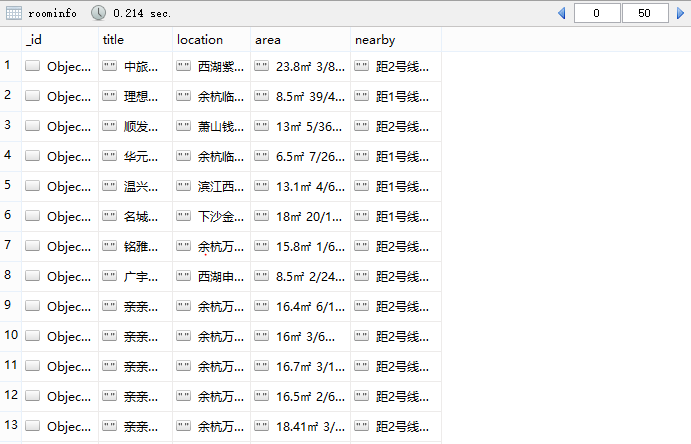
7.最终结果
总结
1. 在第三步中XPath使用注意事项
title = result.xpath("./div/h3/a/text()")

此处的点'.'不能忘记, 它表示当前节点, 如果不加'.', '/'就表示从根节点开始选取
2. 在第四步获取多个页面时出现索引超出范围错误
nearby = result.xpath("./div/div/p[2]/span/text()")[0].strip()

IndexError: list index out of range
造成这种错误原因有两种:
1) [index] index超出list范围
2) [index] index索引内容为空
因为这里的nearby的index是0, 排除第一种情况, 那么这里就是空行了, 加句if判断就可以解决
nearby = result.xpath("./div/div/p[2]/span/text()")[0].strip()

#改写以后:

nearby = result.xpath("./div/div/p[2]/span/text()")[0].strip() if len(result.xpath("./div/div/p[2]/span/text()"))>0 else ""
以上主要是对爬虫过程学习的总结, 若有不对的地方, 还请指正, 谢谢!
Python爬虫项目--爬取自如网房源信息的更多相关文章
- Python爬虫项目--爬取某宝男装信息
本次爬取用到的知识点有: 1. selenium 2. pymysql 3 pyquery 正文 1. 分析目标网站 1. 打开某宝首页, 输入"男装"后点击"搜索&q ...
- Python爬虫之爬取慕课网课程评分
BS是什么? BeautifulSoup是一个基于标签的文本解析工具.可以根据标签提取想要的内容,很适合处理html和xml这类语言文本.如果你希望了解更多关于BS的介绍和用法,请看Beautiful ...
- python爬虫项目-爬取雪球网金融数据(关注、持续更新)
(一)python金融数据爬虫项目 爬取目标:雪球网(起始url:https://xueqiu.com/hq#exchange=CN&firstName=1&secondName=1_ ...
- [Python爬虫] Selenium爬取新浪微博客户端用户信息、热点话题及评论 (上)
转载自:http://blog.csdn.net/eastmount/article/details/51231852 一. 文章介绍 源码下载地址:http://download.csdn.net/ ...
- python 爬虫之爬取大街网(思路)
由于需要,本人需要对大街网招聘信息进行分析,故写了个爬虫进行爬取.这里我将记录一下,本人爬取大街网的思路. 附:爬取得数据仅供自己分析所用,并未用作其它用途. 附:本篇适合有一定 爬虫基础 crawl ...
- Python爬虫项目--爬取链家热门城市新房
本次实战是利用爬虫爬取链家的新房(声明: 内容仅用于学习交流, 请勿用作商业用途) 环境 win8, python 3.7, pycharm 正文 1. 目标网站分析 通过分析, 找出相关url, 确 ...
- 简单python爬虫案例(爬取慕课网全部实战课程信息)
技术选型 下载器是Requests 解析使用的是正则表达式 效果图: 准备好各个包 # -*- coding: utf-8 -*- import requests #第三方下载器 import re ...
- Python爬虫项目--爬取猫眼电影Top100榜
本次抓取猫眼电影Top100榜所用到的知识点: 1. python requests库 2. 正则表达式 3. csv模块 4. 多进程 正文 目标站点分析 通过对目标站点的分析, 来确定网页结构, ...
- 网络爬虫之定向爬虫:爬取当当网2015年图书销售排行榜信息(Crawler)
做了个爬虫,爬取当当网--2015年图书销售排行榜 TOP500 爬取的基本思想是:通过浏览网页,列出你所想要获取的信息,然后通过浏览网页的源码和检查(这里用的是chrome)来获相关信息的节点,最后 ...
随机推荐
- BerOS File Suggestion(stl-map应用)
Polycarp is working on a new operating system called BerOS. He asks you to help with implementation ...
- 删除oracle数据库用户
手工删除ORACLE数据库用户时常会出现会话进程仍在使用导致删除失败的情况.需要查询会话并将会话删除才能成功将数据库用户删除,比较不方便. 适用场景 自动删除oracle数据库用户 基本知识 orac ...
- 通过给事件处理程序传递this参数,获取事件源对象的引用。单机提交按钮时在信息框中显示用户输入的字符。
<script> function mymethod(str) { alert("您输入的是:"+str); } </script><form act ...
- python __dict__
dict 以key-value 的形式存储着本对类/模块的: 模块的__dict__ 属性: 存储了模块的 name (这个也是模块的一个单独的键,即:在Bx.py 中引入Ax.py 那么,在Bx中, ...
- ArcGIS自定义工具箱-判断字段值是否相等
ArcGIS自定义工具箱-判断字段值是否相等 联系方式:谢老师,135-4855-4328,xiexiaokui#qq.com 目的:判断两个字段值是否相等 使用方法: 结果: 联系方式:谢老师,13 ...
- Android Debug Bridge命令介绍[转]
Android Debug Bridge命令介绍 Android Debug Bridge的一些基本命令.这个工具直译过来就是Android调试桥的意思.它提供了强大的特性,例如复制文件到设备或从设备 ...
- hasattr() getattr() setattr() 函数使用方法
1. hasattr(object, name) 判断object对象中是否存在name属性,当然对于python的对象而言,属性包含变量和方法:有则返回True,没有则返回False:需要注意的是n ...
- reids遇到问题
今天重启爬虫服务器在连接redis数据库时突然报错:MISCONF Redis is configured to save RDB snapshots, but it is currently not ...
- 关于git经常忘记的:远程仓库关联。
我们有时习惯建立好工程后再传到git上,这是时候就忘记咋弄啦, 其实,只要配置远程仓库就行: git remote add +url...具体看网上哦,这里提醒下 Git clone远程分支 Git ...
- 微信小程序---picker
picker 从底部弹起的滚动选择器,现支持五种选择器,通过mode来区分,分别是普通选择器,多列选择器,时间选择器,日期选择器,省市区选择器,默认是普通选择器. wxml: 普通选择器(mode = ...