
05_ssm基础(四)之Spring与持久层的整合
30.31.spring对jdbc的支持jdbcTemplate
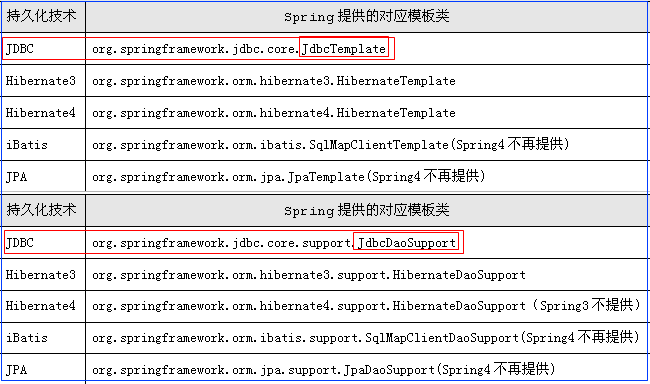
使用Spring的JDBC准备:
1):拷贝jar:
mysql-connector-java-5.1.11.jar:MySQL驱动包
spring-jdbc-4.1.2.RELEASE.jar:支持JDBC
spring-tx-4.1.2.RELEASE.jar: 支持事务
2): 操作Product对象的DAO实现:
3):参考文档:参考Spring4.x文档的362页.
代码:如下
spring配置文件代码
 <?xml version="1.0" encoding="UTF-8"?>

 <beans xmlns="http://www.springframework.org/schema/beans"

        xmlns:xsi="http://www.w3.org/2001/XMLSchema-instance"

        xmlns:context="http://www.springframework.org/schema/context"

        xsi:schemaLocation="http://www.springframework.org/schema/beans

         http://www.springframework.org/schema/beans/spring-beans.xsd

          http://www.springframework.org/schema/context

           http://www.springframework.org/schema/context/spring-context.xsd">

     <!--  读取配置文件-->

     <context:property-placeholder location="classpath:db.properties"/>

     <!--配置dataSources-->

     <bean id="dataSource" class="org.apache.commons.dbcp.BasicDataSource">

         <property name="driverClassName" value="${mysql.driverClass}"/>

         <property name="url" value="${mysql.JdbcUrl}"/>

         <property name="username" value="${mysql.User}"/>

         <property name="password" value="${mysql.Password}"/>

     </bean>

     <bean id="product2Dao" class="com.day02.ssm.spring.dao.impl.Product2Dao">

         <property name="dataSource" ref="dataSource"/>

     </bean>

 </beans>
dao是实现代码:
 package com.day02.ssm.spring.dao.impl;

 import com.day02.ssm.spring.dao.IProductDao;

 import com.day02.ssm.spring.model.Product;

 import org.apache.commons.dbcp.BasicDataSource;

 import org.springframework.beans.factory.annotation.Autowired;

 import org.springframework.jdbc.core.JdbcTemplate;

 import org.springframework.jdbc.core.RowMapper;

 import javax.sql.DataSource;

 import java.sql.Connection;

 import java.sql.PreparedStatement;

 import java.sql.ResultSet;

 import java.sql.SQLException;

 /**

  * 课程笔记:http://www.cnblogs.com/newAndHui/category/1153640.html

  * 疑问咨询wx:851298348

  */

 public class Product2Dao implements IProductDao {

     private JdbcTemplate jdbcTemplate;

     public void setDataSource(DataSource dataSource) {

         this.jdbcTemplate = new JdbcTemplate(dataSource);

     }

     @Override

     public void save(Product product)  {

         String sql = "INSERT INTO product (product_name,sale_price) VALUES (?,?)";

         this.jdbcTemplate.update(sql,product.getProductName(),product.getSalePrice());

     }

     @Override

     public void delete(int id) {

         String sql="DELETE FROM product WHERE id=?";

         this.jdbcTemplate.update(sql,id);

     }

     @Override

     public void update(Product product) {

        String sql="UPDATE product SET sale_price=? WHERE id=?";

         this.jdbcTemplate.update(sql,product.getSalePrice(),product.getId());

     }

     @Override

     public Product query(int id) {

         String sql="SELECT id,product_name,sale_price FROM product WHERE id=?";

         Product product = this.jdbcTemplate.queryForObject(sql, new Object[]{id}, new RowMapper<Product>() {

                                     public Product mapRow(ResultSet rs, int rowNum) throws SQLException {

                                         Product product = new Product();

                                         product.setId(rs.getInt("id"));

                                         product.setProductName(rs.getString("product_name"));

                                         product.setSalePrice(rs.getInt("sale_price"));

                                         return product;

                                     }

                                 });

         return product;

     }

 }
Product2Dao
dao测试代码
 package com.day02.ssm.spring.test;

 import com.day02.ssm.spring.dao.impl.Product2Dao;

 import com.day02.ssm.spring.model.Product;

 import org.junit.Test;

 import org.junit.runner.RunWith;

 import org.springframework.beans.factory.annotation.Autowired;

 import org.springframework.test.context.ContextConfiguration;

 import org.springframework.test.context.junit4.SpringJUnit4ClassRunner;

 /**

  * 课程笔记:http://www.cnblogs.com/newAndHui/category/1153640.html

  * 疑问咨询wx:851298348

  */

 @RunWith(SpringJUnit4ClassRunner.class)//把junit加载到spring容器中去

 @ContextConfiguration("classpath:spring-config_jdbcTemplat.xml")

 public class TestProduct2Dao {

     // private ProductDao productDao=new ProductDao();

     @Autowired

     private Product2Dao productDao;//从spring中获取dao对象

     @Test

     public void test() {

         Product product = new Product();

         product.setProductName("苹果22");

         product.setSalePrice(892);

         productDao.save(product);

     }

     @Test

     public void testDelete() {

        productDao.delete(24);

     }

     @Test

     public void testUpdate() {

         Product product = new Product();

         product.setId(23);

         product.setSalePrice(1000);

         productDao.update(product);

     }

     @Test

     public void testQuery() {

         Product query = productDao.query(23);

         System.out.println("query="+query);

     }

 }
TestProduct2Dao
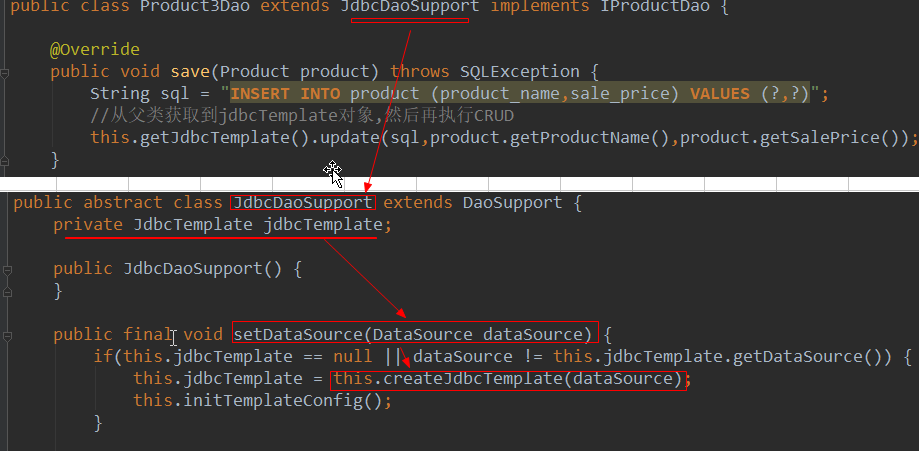
32.spring对jdbc的支持jdbcTemplate之继承方式
注意:和上面原理一样,只是写法不一样
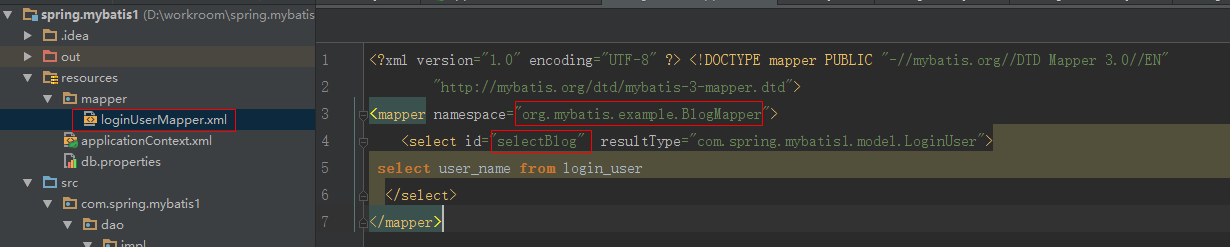
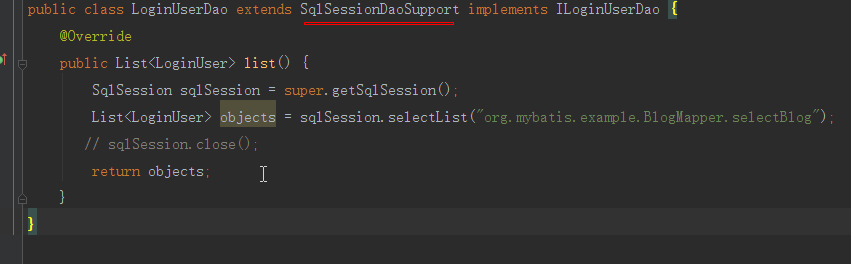
33.spring与mybatis集成方案1
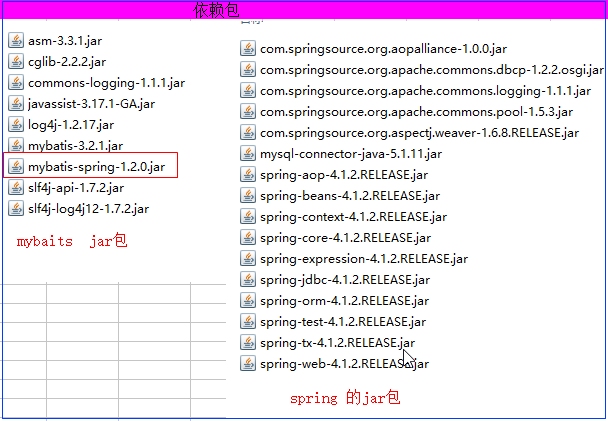
依赖包:
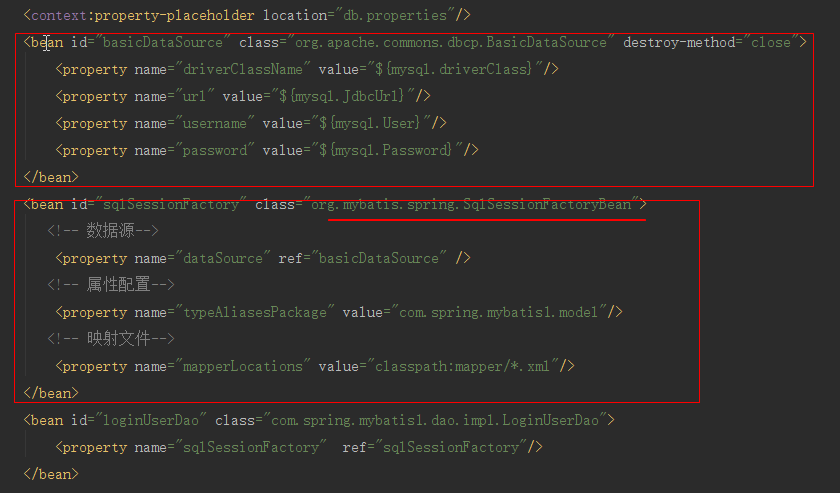
xml文件配置:
映射文件:
dao实现:
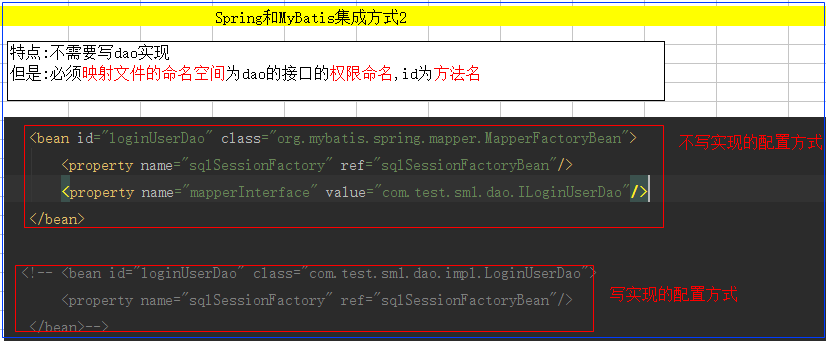
34.spring与mybatis整合方案2(不写实现类)
34.spring与mybatis整合方案3(终极生产版本)
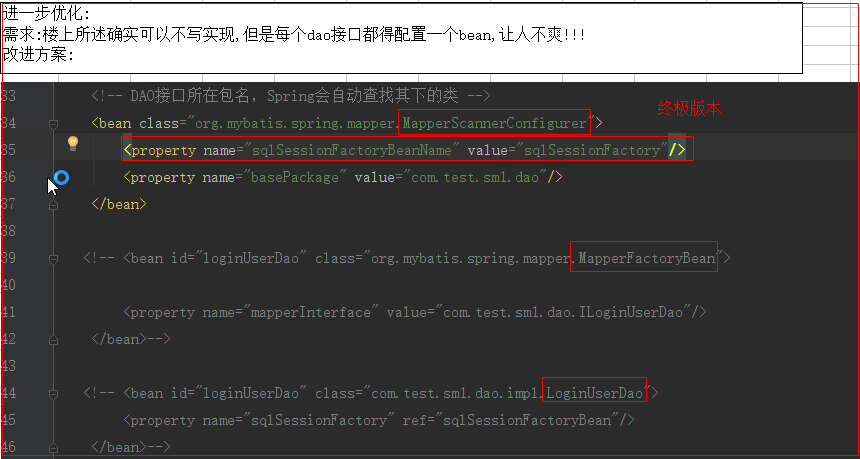
spring与mybatis整合终极版本代码:
整合的xml文件
 <?xml version="1.0" encoding="UTF-8"?>

 <beans xmlns="http://www.springframework.org/schema/beans"

        xmlns:xsi="http://www.w3.org/2001/XMLSchema-instance"

        xmlns:context="http://www.springframework.org/schema/context"

        xsi:schemaLocation="http://www.springframework.org/schema/beans

         http://www.springframework.org/schema/beans/spring-beans.xsd

          http://www.springframework.org/schema/context

           http://www.springframework.org/schema/context/spring-context.xsd">

     <!--  读取配置文件-->

     <context:property-placeholder location="classpath:db.properties"/>

     <!--配置dataSources-->

     <bean id="dataSource" class="org.apache.commons.dbcp.BasicDataSource">

         <property name="driverClassName" value="${mysql.driverClass}"/>

         <property name="url" value="${mysql.JdbcUrl}"/>

         <property name="username" value="${mysql.User}"/>

         <property name="password" value="${mysql.Password}"/>

     </bean>

 <!--整合mybatis-->

     <bean id="sqlSessionFactory" class="org.mybatis.spring.SqlSessionFactoryBean">

        <!--数据源-->

         <property name="dataSource" ref="dataSource"/>

         <!--属性文件-->

         <!--映射文件地址-->

         <property name="mapperLocations" value="classpath:mapper/*Mapper.xml"/>

     </bean>

     <bean id="mapperScannerConfigurer" class="org.mybatis.spring.mapper.MapperScannerConfigurer">

         <property name="sqlSessionFactoryBeanName" value="sqlSessionFactory"/>

         <property name="basePackage" value="com.day03.ssm.spring.mybatis.dao"/>

     </bean>

    <!-- <bean id="mapperFactoryBean" class="org.mybatis.spring.mapper.MapperFactoryBean">

         <property name="sqlSessionFactory" ref="sqlSessionFactory"/>

         <property name="mapperInterface" value="com.day03.ssm.spring.mybatis.dao.IProduct2Dao"/>

     </bean>-->

    <!-- <bean id="productDao" class="com.day03.ssm.spring.mybatis.dao.impl.ProductDao">

         <property name="sqlSessionFactory" ref="sqlSessionFactory"/>

     </bean>-->

 </beans>
mybatis映射文件
 <?xml version="1.0" encoding="UTF-8" ?>

 <!DOCTYPE mapper PUBLIC "-//mybatis.org//DTD Mapper 3.0//EN"

         "http://mybatis.org/dtd/mybatis-3-mapper.dtd">

       <!--

       namespace:该映射文件的名字,理论上可以任意取

                  没有实现类时 命名空间必须为dao接口的权限命名地址

       -->

 <mapper namespace="com.day03.ssm.spring.mybatis.dao.IProduct2Dao">

    <insert id="save" parameterType="com.day03.ssm.spring.mybatis.model.Product">

       INSERT INTO product (product_name,sale_price) VALUES (#{productName},#{salePrice})

    </insert>

 </mapper>
测试代码:
 package com.day03.ssm.spring.mybatis.testDao;

 import com.day03.ssm.spring.mybatis.dao.IProduct2Dao;

 import com.day03.ssm.spring.mybatis.model.Product;

 import org.junit.Test;

 import org.junit.runner.RunWith;

 import org.springframework.beans.factory.annotation.Autowired;

 import org.springframework.test.context.ContextConfiguration;

 import org.springframework.test.context.junit4.SpringJUnit4ClassRunner;

 /**

  * 课程笔记:http://www.cnblogs.com/newAndHui/category/1153640.html

  * 疑问咨询wx:851298348

  */

 @RunWith(SpringJUnit4ClassRunner.class)//把junit加载到spring容器中去

 @ContextConfiguration("classpath:spring-config3.xml")

 public class TestProduct3Dao {

     @Autowired

     private IProduct2Dao productDao;

     @Test

     public void testSave() {

         Product product = new Product();

         product.setProductName("小米33");

         product.setSalePrice(789);

         productDao.save(product);

     }

 }
TestProduct3Dao
05_ssm基础(四)之Spring与持久层的整合的更多相关文章
- 05_ssm基础(四)之Spring基础二
24.spring配置dbcp并完成CRUD操作 1.准备jar包 2.编辑Product模型 package com.day02.ssm.spring.model; public class Pro ...
- 对spring 对持久层的支持和数据库连接池的理解
1.spring对持久层的支持在于,得到数据库连接之后操作上的封装,将操作简化了.也就是说以后操作sql语句就用XXXTemplate(就是一个工具类)对象了. 2.数据库连接池的作用只在于得到数据库 ...
- 05_ssm基础(三)之Spring基础
11.spring入门引导 12.spring_HelloWord程序 实现步骤: 0.找到spring压缩包,并解压 1.拷贝jar包 2.添加主配置文件(官方文档约28页) 3.在测试中使用 13 ...
- springMVC系列之(四) spring+springMVC+hibernate 三大框架整合
首先我们要知道Hibernate五大对象:,本实例通过深入的使用这五大对象和spring+springMVC相互结合,体会到框架的好处,提高我们的开发效率 Hibernate有五大核心接口,分别是:S ...
- Spring(七)持久层
一.Spring对DAO的支持 DAO:Data Access Object Spring提供了DAO框架,让开发人员无须耦合特定的数据库技术,就能进行应用程序的开发. Spring封闭了操作Orac ...
- 整合使用持久层框架mybatis 使用SqlSessionTemplate模板类与使用映射接口 对比
spring中整合使用mybatis的用法总结 一:在Spring配置Mybatis 第一步:将mybatis-spring类包添加 到项目的类库中 第二步:编写spring和持久层衔接的xml文件, ...
- 浅谈Mybatis持久化框架在Spring、SSM、SpringBoot整合的演进及简化过程
前言 最近开始了SpringBoot相关知识的学习,作为为目前比较流行.用的比较广的Spring框架,是每一个Java学习者及从业者都会接触到一个知识点.作为Spring框架项目,肯定少不了与数据库持 ...
- spring学习(四)spring 持久层的封装
持久层:所谓“持久层”,也就是在系统逻辑层面上,专著于实现数据持久化的一个相对独立的领域(Domain),是把数据保存到可掉电式存储设备中.持久层是负责向(或者从)一个或者多个数据存储器中存储(或者获 ...
- 第五章 征服数据库(Spring对DB的使用)——开发持久层
本章内容: 定义Spring对数据库访问的支持 配置数据库资源 使用Spring的JDBC模板 在几乎所有的企业级应用中,都需要构建数据持久层.现在意义上的数据持久层是指把对象或者数据保存到数据库中, ...
随机推荐
- 微信小程序自定义微信客服按钮
微信小程序官方api中提到的微信客服,是一个固定的组件,图标样式固定,大小最多27px 很明显这个是不能满足我们各种奇葩需求的.下面提供一个野蛮的自定义方法. 比如做一个这样的按钮: 图标用自定义的, ...
- 自写UiAutomator 调试类
package sms_test; import java.lang.*; import java.util.ArrayList; import java.util.Collection; impor ...
- redis下操作列表list
list 列表的元素类型为string 按照插入顺序排序 在列表的头部或者尾部添加元素 命令 设置 在头部插入数据 LPUSH key value [value ...] 在尾部插入数据 RPUSH ...
- sql server ldf 日志文件清理
- FreeMarker生成Word文档
FreeMarker简介: FreeMarker是一款模板引擎:即一种基于模板和要改变的数据,并用来生成输出文本(HTML网页.电子邮件.配置文件.源代码等)的通用工具,它不是面向最终用户的,而是一个 ...
- Maven环境变量
Windows: M2_HOME=D:\ProgramFiles\apache-maven-3.5.0M2_REPO=D:\ProgramFiles\maven\repositoryPATH=%PAT ...
- linux 考试2
- 又见 tomcat启动startup.bat一闪而过
startup.bat启动的时候,一闪而过,停止, 没有提示信息,错误信息,没有任何log... 后面在 startup.bat. catalina.bat 最后 加入 pause. 也看不到结果.. ...
- java 正则 贪婪匹配 匹配sql语句中的引号内容
public class Demo { public static void main(String[] args) { String sql1 = "use test;select * f ...
- Android Netty Server
项目源码在github上,请看这里-->Android Netty Server Android netty server Start a netty server on android Dow ...