
Selenium Xpath Tutorials - Identifying xpath for element with examples to use in selenium
Let we try to understand how to identify Xpath of element with examples.
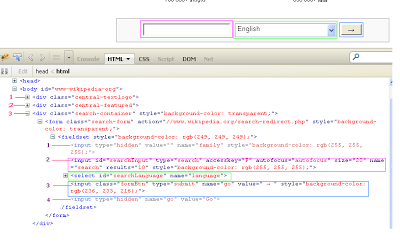
| New Test | ||
| Command | Target | Value |
| open | http://www.wikipedia.org/ | |
| type | id=searchInput | ID Example |
or
| New Test | ||
| Command | Target | Value |
| open | http://www.wikipedia.org/ | |
| type | name=search | Name Example |
Xpath in selenium Tutorial
Now if you want to identify same element (input textbox) with xpath then you can use any of the bellow given syntax in to the target column with type command in above example.
| New Test | ||
| Command | Target | Value |
| open | http://www.wikipedia.org/ | |
| type | xpath= //body/div[3]/form/fieldset /input[2] |
Xpath Example1 |
xpath=//body/div[3]/form/fieldset/*[last()-3] //// Here /*[last()-3] describes the 4th upper node(input[2]) from last node.
| New Test | ||
| Command | Target | Value |
| open | http://www.wikipedia.org/ | |
| type | xpath= //body/div[3]/form/fieldset /input[last()-2] |
Xpath Example2 |
| New Test | ||
| Command | Target | Value |
| open | http://www.wikipedia.org/ | |
| type | xpath= //body/div[3]/form/fieldset /input[@type='search'] |
Xpath Example3
|
| New Test | ||
| Command | Target | Value |
| open | http://www.wikipedia.org/ | |
| type | xpath= //body/div[3]/form/fieldset /input[@accesskey='F'] |
Xpath Example4
|
11. Using starts-with keyword
xpath=//input[starts-with(@type, "s")] //// In this example, It will find input node with attribute is 'type' and its value is starting with 's' (here it will get type = 'search').
12. Using OR (|) condition with xpath
xpath=//input[@accesskey='F'] | //input[@id='searchInput']
xpath=//input[@accesskey='F' or @id='searchInput'] //// In both these example, it will find input text box with accesskey='F' or @id='searchInput'. If any one found then it will locate it. Very useful when elements appears alternatively.
13. Using wildcard * with to finding element xpath
xpath=//*[@accesskey='F']
14. Finding nth child element of parent
xpath=//body/*[3]/form/fieldset/*[2] ////This xpath is for search text box. Here, /*[3] describes the 3rd child element of body which is div[3]. Same way *[2] describes the 2nd child element of fieldset which is input[2]
All above examples are for input text box. Now let me write Xpath for drop down.
8. xpath=//body/div[3]/form/fieldset/select[count(*)>1]
| New Test | ||
| Command | Target | Value |
| open | http://www.wikipedia.org/ | |
| select | xpath=//div[@class='search-container']/descendant::select[position()=1] | label=English
|
//a[@href='//meta.wikimedia.org/wiki/List_of_Wikipedias'] ////This xpath example will find link with given URL (//meta.wikimedia.org/wiki/List_of_Wikipedias) on the page.
2. Finding xpath of element with no child
xpath=//img[count(*)=0] ////This xpath is for wikipedia text logo which is display on top of the page. This xpath will find that image element which have not any child element. Here image node is last and it has not any child element.
xpath=//div[2]/descendant::img[count(*)=0] //// This xpath is for wikipedia logo image which is display under logo text.
Selenium Xpath Tutorials - Identifying xpath for element with examples to use in selenium的更多相关文章
- How to get the xpath by clicking an html element
How to get the xpath by clicking an html element How to get the xpath by clicking an html element
- selenium之元素定位-xpath
被测试网页的HTML代码 <html> <body> <div id="div1" style="text-align:center&quo ...
- selenium+python自动化之xpath定位
在上一篇简单的介绍了用工具查看目标元素的xpath地址,工具查看比较死板,不够灵活,有时候直接复制粘贴会定位不到.这个时候就需要自己手动的去写xpath了,这一篇详细讲解xpath的一些语法. 什么是 ...
- selenium(9)- Xpath的详细使用
什么是Xpath 官方:XPath 是一门在 XML 文档中查找信息的语言.XPath 用于在 XML 文档中通过元素和属性进行导航 [XPath 使用路径表达式来选取 XML 文档中的节点或者节点集 ...
- selenium之坑(StaleElementReferenceException: Message: Element not found in the cache...)
有时候循环点击一列链接,只能点到第一个,第二个就失败了 原因是第二个已经是新页面,当然找不到之前页面的元素.就算是后退回来的,页面也是不一样的 页面长的一样不一定是同一张页面,就像两个人长的一样不一定 ...
- selenium.common.exceptions.StaleElementReferenceException: Message: stale element reference: element is not attached to the page document
抓取网页代码后,由于是在同一个li标签下,所以使用一次性抓取,所有的a标签,然后循环做不同的操作,但是抛出找不到元素异常. def office_page(_chrome: Chrome): sn = ...
- jQuery BlockUI Plugin Demo 4(Element Blocking Examples)
Element Blocking Examples This page demonstrates how to block selected elements on the page rather t ...
- Selenium常见报错问题(1)- 先来认识下selenium常见异常类
如果你在跑selenium脚本时,需要某些异常不知道怎么解决时,可以看看这一系列的文章,看看有没有你需要的答案 https://www.cnblogs.com/poloyy/category/1749 ...
- Python+Selenium 利用ID,XPath,tag name,link text,partial link text,class name,css,name定位元素
使用firefox浏览器,查看页面元素,我们以“百度网页”为示例 一.ID定位元素 利用find_element_by_id()方法来定位网页元素对象 ①.定位百度首页,输入框的元素 ②.编写示 ...
随机推荐
- vue.js 第二课
实现响应的数据绑定和组合的视图组件. 让数据与Dom保持同步 . 在使用jq手工操作DOM时,我们的代码常常是命令式的.重复的.易错的.Vue.js拥抱数据驱动的视图概念.简单的讲,它意味着我们在普通 ...
- Djago模板拾起
在view中使用template: 首先在settings.py中配置模板文件的路径. TEMPLATE_DIRS = ( '/home/django/mysite/templates', ) 1.变 ...
- Deconvolution Using Theano
Transposed Convolution, 也叫Fractional Strided Convolution, 或者流行的(错误)称谓: 反卷积, Deconvolution. 定义请参考tuto ...
- Django进阶(一)
Url进阶 mysit/mysit/urls.py from django.conf.urls import url from django.contrib import admin urlpatte ...
- C#检验参数合法性公用方法
#region 检验参数合法性,数值类型不小于0,引用类型不能为null,否则抛出异常 /// <summary> /// 检验参数合法性,数值类型不小于0,引用类型不能为null,否则抛 ...
- POJ 3422 Kaka's Matrix Travels
Kaka's Matrix Travels Time Limit: 1000MS Memory Limit: 65536K Total Submissions: 9567 Accepted: ...
- http执行过程分析
执行过程: 1.用户在浏览器(客户端)里输入或者点击一个网址链接: 2.浏览器通过网址域名查找ip地址.DNS查找方式是通过浏览器缓存(会记录DNS记录)→系统缓存→TCP/IP参数中设置的首选DNS ...
- 机器学习——支持向量机(SVM)之核函数(kernel)
对于线性不可分的数据集,可以利用核函数(kernel)将数据转换成易于分类器理解的形式. 如下图,如果在x轴和y轴构成的坐标系中插入直线进行分类的话, 不能得到理想的结果,或许我们可以对圆中的数据进行 ...
- Nginx+Php Windows部署
http://www.cnblogs.com/huayangmeng/archive/2011/06/15/2081337.html 一定要以下面的形式启动php-cgi php-cgi.exe -b ...
- Mac Brew Install Nginx Summary
==> Downloading https://homebrew.bintray.com/bottles/nginx-1.10.1.el_capitan.bot################# ...