
Python图像识别(聚类)
 # -*- coding: utf-8 -*-

 """

 Created on Fri Sep 21 15:37:26 2018

 @author: zhen

 """

 from PIL import Image

 import numpy as np

 from sklearn.cluster import KMeans

 import matplotlib

 import matplotlib.pyplot as plt

 def restore_image(cb, cluster, shape):

     row, col, dummy = shape

     image = np.empty((row, col, dummy))

     for r in range(row):

         for c in range(col):

             image[r, c] = cb[cluster[r * col + c]]

     return image

 def show_scatter(a):

     N = 10

     density, edges = np.histogramdd(a, bins=[N, N, N], range=[(0, 1), (0, 1), (0, 1)])

     density /= density.max()

     x = y = z = np.arange(N)

     d = np.meshgrid(x, y, z)

     fig = plt.figure(1, facecolor='w')

     ax = fig.add_subplot(111, projection='3d')

     cm = matplotlib.colors.ListedColormap(list('rgbm'))

     ax.scatter(d[0], d[1], d[2], s=100 * density, cmap=cm, marker='o', depthshade=True)

     ax.set_xlabel(u'红')

     ax.set_ylabel(u'绿')

     ax.set_zlabel(u'蓝')

     plt.title(u'图像颜色三维频数分布', fontsize=20)

     plt.figure(2, facecolor='w')

     den = density[density > 0]

     den = np.sort(den)[::-1]

     t = np.arange(len(den))

     plt.plot(t, den, 'r-', t, den, 'go', lw=2)

     plt.title(u'图像颜色频数分布', fontsize=18)

     plt.grid(True)

     plt.show()

 if __name__ == '__main__':

     matplotlib.rcParams['font.sans-serif'] = [u'SimHei']

     matplotlib.rcParams['axes.unicode_minus'] = False

     # 聚类数2,6,30

     num_vq = 2

     im = Image.open('C:/Users/zhen/.spyder-py3/images/Lena.png')

     image = np.array(im).astype(np.float) / 255

     image = image[:, :, :3]

     image_v = image.reshape((-1, 3))

     kmeans = KMeans(n_clusters=num_vq, init='k-means++')

     show_scatter(image_v)

     N = image_v.shape[0]  # 图像像素总数

     # 选择样本,计算聚类中心

     idx = np.random.randint(0, N, size=int(N * 0.7))

     image_sample = image_v[idx]

     kmeans.fit(image_sample)

     result = kmeans.predict(image_v)  # 聚类结果

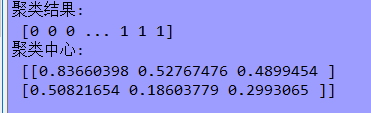
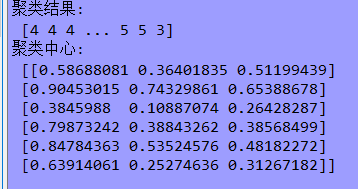
     print('聚类结果:\n', result)

     print('聚类中心:\n', kmeans.cluster_centers_)

     plt.figure(figsize=(15, 8), facecolor='w')

     plt.subplot(211)

     plt.axis('off')

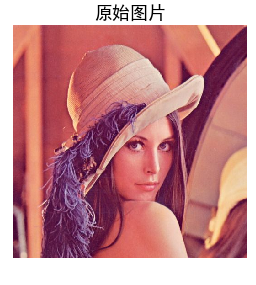
     plt.title(u'原始图片', fontsize=18)

     plt.imshow(image)

     # plt.savefig('原始图片.png')

     plt.subplot(212)

     vq_image = restore_image(kmeans.cluster_centers_, result, image.shape)

     plt.axis('off')

     plt.title(u'聚类个数:%d' % num_vq, fontsize=20)

     plt.imshow(vq_image)

     # plt.savefig('矢量化图片.png')

     plt.tight_layout(1.2)

     plt.show()
结果:

1.当k=2时:

2.当k=6时:

3.当k=30时:

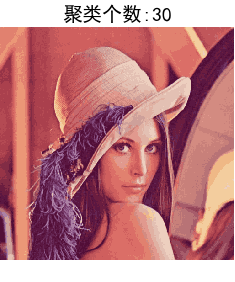
总结:当聚类个数较少时,算法运算速度快但效果较差,当聚类个数较多时,运算速度慢效果好但容易过拟合,所以恰当的k值对于聚类来说影响极其明显!!
Python图像识别(聚类)的更多相关文章
- 机器学习:Python实现聚类算法(三)之总结
考虑到学习知识的顺序及效率问题,所以后续的几种聚类方法不再详细讲解原理,也不再写python实现的源代码,只介绍下算法的基本思路,使大家对每种算法有个直观的印象,从而可以更好的理解函数中参数的意义及作 ...
- 听说图像识别很难,大神十行代码进行Python图像识别
随着深度学习算法的兴起和普及,人工智能领域取得了令人瞩目的进步,特别是在计算机视觉领域.21世纪的第二个十年迅速采用卷积神经网络,发明了最先进的算法,大量训练数据的可用性以及高性能和高性价比计算的 ...
- python 图像识别
这是一个最简单的图像识别,将图片加载后直接利用Python的一个识别引擎进行识别 将图片中的数字通过 pytesseract.image_to_string(image)识别后将结果存入到本地的txt ...
- Python机器学习--聚类
K-means聚类算法 测试: # -*- coding: utf-8 -*- """ Created on Thu Aug 31 10:59:20 2017 @auth ...
- python图像识别--验证码
1.pip3 install pyocr 2.pip3 install pillow or easy_install Pillow 3.安装tesseract-ocr:http://jaist.dl. ...
- 机器学习:Python实现聚类算法(一)之K-Means
1.简介 K-means算法是最为经典的基于划分的聚类方法,是十大经典数据挖掘算法之一.K-means算法的基本思想是:以空间中k个点为中心进行聚类,对最靠近他们的对象归类.通过迭代的方法,逐次更新各 ...
- 机器学习:Python实现聚类算法(一)之AP算法
1.算法简介 AP(Affinity Propagation)通常被翻译为近邻传播算法或者亲和力传播算法,是在2007年的Science杂志上提出的一种新的聚类算法.AP算法的基本思想是将全部数据点都 ...
- Python实现聚类算法AP
1.算法简介 AP(Affinity Propagation)通常被翻译为近邻传播算法或者亲和力传播算法,是在2007年的Science杂志上提出的一种新的聚类算法.AP算法的基本思想是将全部数据点都 ...
- 机器学习:Python实现聚类算法(二)之AP算法
1.算法简介 AP(Affinity Propagation)通常被翻译为近邻传播算法或者亲和力传播算法,是在2007年的Science杂志上提出的一种新的聚类算法.AP算法的基本思想是将全部数据点都 ...
随机推荐
- 解决IDEA中进行maven install报:系统资源不足的问题
一.背景 最近在idea中使用maven对公司的项目进行install的时候老是出现系统资源不足的问题导致install失败,在网上搜索也没找到很好的答案,自己不断摸索,最终在idea的配置里面找到了 ...
- Centos7 开启端口
CentOS7默认没有使用iptables,所以通过编辑iptables的配置文件来开启80端口是不可以的. CentOS 7 采用了 firewalld 防火墙. 如要查询是否开启80端口: [ro ...
- Java运行时,指定程序文件的编码
在命令行cmd里面运行 java -jar test.jar的时候,发现里面执行的汉字发生乱码.原来指定的是UTF-8. 解决如下: java -Dfile.encoding=UTF-8 -jar - ...
- linux中为什么cpu使用率会超过100见解
linux的cpu使用频率是根据cpu个数和核数决定的 top,然后你按一下键盘的1,这就是单个核心的负载,不然是所有核心的负载相加,自然会超过100 如上面 cpu个数是4个,那么cpu可以占到40 ...
- maven jetty debug 无法关联第三方类库解决办法
http://ifedorenko.github.com/m2e-extras/
- Golang 方法method
方法method Go中虽没有class,但依旧有method 通过显示说明receiver来实现与某个类型的结合 只能为同一个包中的类型定义方法 receiver可以是类型的值或者指针 不存在方法重 ...
- Checkpoints(第十一届河南省省赛真题)
题目描述 As a landlocked country in central and southern Africa , the political situation has been relat ...
- 网络之XML解析-GData
GDataXML是一套Google使用Objective-C开发的DOM方式XML解析类库,支持读取和修改XML文档,支持XPath方式查询, GDataXML 是 iOS 下的一款轻量级 XML 解 ...
- Redis列表操作
列表类似于双向链表结构,可从序列两端推入或者弹出元素. (列表常用命令) RPUSH : RPUSH key-name value [value1 value2,...] ------------将 ...
- c#FTP应用---FileZilla Server
一.下载Filezilla Server 官网网址:https://filezilla-project.org FileZilla Server是目前稍有的免费FTP服务器软件,比起Serv-U F ...