
使用libvirt管理KVM(一)
一. 安装和配置libvirt,源码下载http://www.qemu-project.org/download/#source.
二. 从包和源码包进行安装libvirt。
1. 在ubuntu系统上,安装包如下
xiodi@c720132:~$ sudo apt-get update
xiodi@c720132:~$ sudo apt install libvirt-bin
2. 检查libvirt守护进程是否处于运行状态。
xiodi@c720132:~$ sudo pgrep -lfa libvirtd
10131 /usr/sbin/libvirtd
3. 检查这个默认配置
xiodi@c720132:~$ cat /etc/libvirt/libvirtd.conf | grep -vi "#" | sed '/^$/d'
unix_sock_group = "libvirtd"
unix_sock_ro_perms = "0777"
unix_sock_rw_perms = "0770"
auth_unix_ro = "none"
auth_unix_rw = "none"
4. 通过编辑qemu配置文件,关闭QEMU的安全驱动。
xiodi@c720132:~$ sudo vim /etc/libvirt/qemu.conf
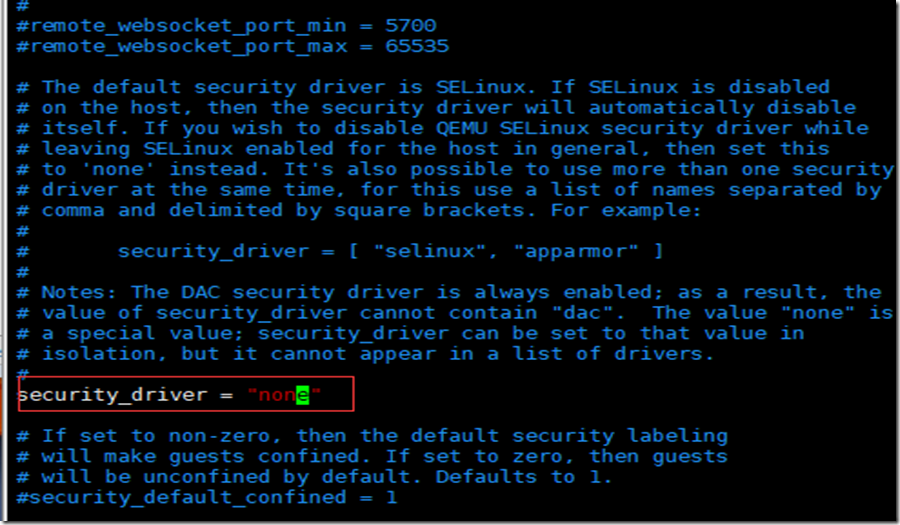
5. 重启libvirt守护进程
xiodi@c720132:~$ /etc/init.d/libvirt-bin restart
[....] Restarting libvirt-bin (via systemctl): libvirt-bin.service==== AUTHENTICATING FOR org.freedesktop.systemd1.manage-units ===
Authentication is required to restart 'libvirt-bin.service'.
Authenticating as: xiodi,,, (xiodi)
Password:
==== AUTHENTICATION COMPLETE ===
. ok
6. 在libvirt目录中检查所有配置文件 。
xiodi@c720132:~$ ls -al /etc/libvirt/
total 92
drwxr-xr-x 5 root root 4096 Jun 29 15:21 .
drwxr-xr-x 96 root root 4096 Jun 29 15:16 ..
drwxr-xr-x 2 root root 4096 May 24 03:02 hooks
-rw-r--r-- 1 root root 450 May 24 03:03 libvirt-admin.conf
-rw-r--r-- 1 root root 547 May 24 03:03 libvirt.conf
-rw-r--r-- 1 root root 15276 May 24 03:03 libvirtd.conf
-rw-r--r-- 1 root root 834 May 24 03:03 libxl.conf
-rw-r--r-- 1 root root 2169 May 24 03:03 libxl-lockd.conf
-rw-r--r-- 1 root root 1235 May 24 03:03 lxc.conf
drwxr-xr-x 2 root root 4096 Jun 29 15:16 nwfilter
drwxr-xr-x 3 root root 4096 Jun 29 15:16 qemu
-rw------- 1 root root 19536 May 24 03:03 qemu.conf
-rw-r--r-- 1 root root 2169 May 24 03:03 qemu-lockd.conf
-rw-r--r-- 1 root root 2134 May 24 03:03 virtlockd.conf
-rw-r--r-- 1 root root 1802 May 24 03:03 virtlogd.conf
-rw-r--r-- 1 root root 1217 May 24 03:03 virt-login-shell.conf
7. 介绍几个重要的配置文件
- libvirt.conf: 针对virsh命令主要是关于客户端的配置文件 。 一般默认的就满足要求了。
- libvirtd.conf :主要是针对服务器端的配置文件 ,它提供了不同的安全选项,请求限制和日志选项。
- qemu.conf: 主要是针对QEMU 设备 的主要配置文件 ,比如VNC服务器地址的配置选项等 。
- 在创建完QEMU/KVM虚拟机后,/etc/libvirtd/qemu目录将会包含虚拟机的配置定义。
- /etc/libvirt/qemu/networks/包含了网络相关的配置文件 。
三. 定义KVM实例
1. 定义本虚拟化主机上的所有虚拟机。
[root@kvm-1 ~]# virsh list --all
Id Name State
----------------------------------------------------
1 c720220 running
2 c720203 running
4 c720101 running
10 c720104 running
2. 定义下面的XML文件。
[root@kvm-1 qemu]# cat c720135.xml
<!--
WARNING: THIS IS AN AUTO-GENERATED FILE. CHANGES TO IT ARE LIKELY TO BE
OVERWRITTEN AND LOST. Changes to this xml configuration should be made using:
virsh edit c720135
or other application using the libvirt API.
--><domain type='kvm'>
<name>c720135</name>
<uuid>56468610-cb3e-457a-b493-a6845bd9a09e</uuid>
<memory unit='KiB'>4194304</memory>
<currentMemory unit='KiB'>4194304</currentMemory>
<vcpu placement='static'>8</vcpu>
<os>
<type arch='x86_64' machine='pc-i440fx-rhel7.0.0'>hvm</type>
<boot dev='hd'/>
</os>
<features>
<acpi/>
<apic/>
</features>
<cpu mode='custom' match='exact' check='partial'>
<model fallback='allow'>Westmere</model>
</cpu>
<clock offset='utc'>
<timer name='rtc' tickpolicy='catchup'/>
<timer name='pit' tickpolicy='delay'/>
<timer name='hpet' present='no'/>
</clock>
<on_poweroff>destroy</on_poweroff>
<on_reboot>restart</on_reboot>
<on_crash>destroy</on_crash>
<pm>
<suspend-to-mem enabled='no'/>
<suspend-to-disk enabled='no'/>
</pm>
<devices>
<emulator>/usr/libexec/qemu-kvm</emulator>
<disk type='file' device='disk'>
<driver name='qemu' type='qcow2'/>
<source file='/kvm/sys-disk/c720135.qcow2'/>
<target dev='vda' bus='virtio'/>
<address type='pci' domain='0x0000' bus='0x00' slot='0x07' function='0x0'/>
</disk>
<disk type='file' device='cdrom'>
<driver name='qemu' type='raw'/>
<target dev='hda' bus='ide'/>
<readonly/>
<address type='drive' controller='0' bus='0' target='0' unit='0'/>
</disk>
<controller type='usb' index='0' model='ich9-ehci1'>
<address type='pci' domain='0x0000' bus='0x00' slot='0x05' function='0x7'/>
</controller>
<controller type='usb' index='0' model='ich9-uhci1'>
<master startport='0'/>
<address type='pci' domain='0x0000' bus='0x00' slot='0x05' function='0x0' multifunction='on'/>
</controller>
<controller type='usb' index='0' model='ich9-uhci2'>
<master startport='2'/>
<address type='pci' domain='0x0000' bus='0x00' slot='0x05' function='0x1'/>
</controller>
<controller type='usb' index='0' model='ich9-uhci3'>
<master startport='4'/>
<address type='pci' domain='0x0000' bus='0x00' slot='0x05' function='0x2'/>
</controller>
<controller type='pci' index='0' model='pci-root'/>
<controller type='ide' index='0'>
<address type='pci' domain='0x0000' bus='0x00' slot='0x01' function='0x1'/>
</controller>
<controller type='virtio-serial' index='0'>
<address type='pci' domain='0x0000' bus='0x00' slot='0x06' function='0x0'/>
</controller>
<interface type='bridge'>
<mac address='52:54:00:48:7d:06'/>
<source bridge='br0'/>
<model type='virtio'/>
<address type='pci' domain='0x0000' bus='0x00' slot='0x03' function='0x0'/>
</interface>
<interface type='bridge'>
<mac address='52:54:00:67:d2:50'/>
<source bridge='br1'/>
<model type='virtio'/>
<address type='pci' domain='0x0000' bus='0x00' slot='0x04' function='0x0'/>
</interface>
<serial type='pty'>
<target port='0'/>
</serial>
<console type='pty'>
<target type='serial' port='0'/>
</console>
<channel type='unix'>
<target type='virtio' name='org.qemu.guest_agent.0'/>
<address type='virtio-serial' controller='0' bus='0' port='1'/>
</channel>
<input type='tablet' bus='usb'>
<address type='usb' bus='0' port='1'/>
</input>
<input type='mouse' bus='ps2'/>
<input type='keyboard' bus='ps2'/>
<memballoon model='virtio'>
<address type='pci' domain='0x0000' bus='0x00' slot='0x08' function='0x0'/>
</memballoon>
</devices>
</domain>
3. 定义虚拟机
[root@kvm-1 qemu]# virsh define kvm1.xml
通过写XML文件去配置虚拟机,是相当繁琐和容易出错的。一个简单 的创建虚拟机的方式是从已经存在的镜像或者安装介质创建。 是使用virt-install工具。
(1)安装virtinst包
xiodi@c720132:~$ sudo apt install virtinst
(2)使用virt-install命令定义和开启新的实例。
[root@kvm-1 tmp]# virt-install --name test --ram 1024 --disk path=/tmp/CentOS-7-x86_64-GenericCloud-1705.raw,format=raw --graphics vnc,listen=192.168.20.254 --noautoconsole --hvm --import
(3)查看定义的主机
[root@kvm-1 tmp]# virsh list --all
Id Name State
----------------------------------------------------
1 c720220 running
2 c720203 running
4 c720101 running
10 c720104 running
39 c720133 running
40 c720134 running
41 c720135 running
42 c720136 running
44 test running
(4)从下面命令可以看出自动产生的xml文件 。
[root@kvm-1 tmp]# cat /etc/libvirt/qemu/test.xml
<!--
WARNING: THIS IS AN AUTO-GENERATED FILE. CHANGES TO IT ARE LIKELY TO BE
OVERWRITTEN AND LOST. Changes to this xml configuration should be made using:
virsh edit test
or other application using the libvirt API.
--><domain type='kvm'>
<name>test</name>
<uuid>acb7bbe0-0f47-4517-be83-2cf14be50811</uuid>
<memory unit='KiB'>1048576</memory>
<currentMemory unit='KiB'>1048576</currentMemory>
<vcpu placement='static'>1</vcpu>
<os>
<type arch='x86_64' machine='pc-i440fx-rhel7.4.0'>hvm</type>
<boot dev='hd'/>
</os>
<features>
<acpi/>
<apic/>
</features>
<cpu mode='custom' match='exact' check='partial'>
<model fallback='allow'>Westmere</model>
</cpu>
<clock offset='utc'>
<timer name='rtc' tickpolicy='catchup'/>
<timer name='pit' tickpolicy='delay'/>
<timer name='hpet' present='no'/>
</clock>
<on_poweroff>destroy</on_poweroff>
<on_reboot>restart</on_reboot>
<on_crash>destroy</on_crash>
<pm>
<suspend-to-mem enabled='no'/>
<suspend-to-disk enabled='no'/>
</pm>
<devices>
<emulator>/usr/libexec/qemu-kvm</emulator>
<disk type='file' device='disk'>
<driver name='qemu' type='raw'/>
<source file='/tmp/CentOS-7-x86_64-GenericCloud-1705.raw'/>
<target dev='hda' bus='ide'/>
<address type='drive' controller='0' bus='0' target='0' unit='0'/>
</disk>
<controller type='usb' index='0' model='ich9-ehci1'>
<address type='pci' domain='0x0000' bus='0x00' slot='0x04' function='0x7'/>
</controller>
<controller type='usb' index='0' model='ich9-uhci1'>
<master startport='0'/>
<address type='pci' domain='0x0000' bus='0x00' slot='0x04' function='0x0' multifunction='on'/>
</controller>
<controller type='usb' index='0' model='ich9-uhci2'>
<master startport='2'/>
<address type='pci' domain='0x0000' bus='0x00' slot='0x04' function='0x1'/>
</controller>
<controller type='usb' index='0' model='ich9-uhci3'>
<master startport='4'/>
<address type='pci' domain='0x0000' bus='0x00' slot='0x04' function='0x2'/>
</controller>
<controller type='pci' index='0' model='pci-root'/>
<controller type='ide' index='0'>
<address type='pci' domain='0x0000' bus='0x00' slot='0x01' function='0x1'/>
</controller>
<interface type='network'>
<mac address='52:54:00:c5:25:91'/>
<source network='default'/>
<model type='rtl8139'/>
<address type='pci' domain='0x0000' bus='0x00' slot='0x03' function='0x0'/>
</interface>
<serial type='pty'>
<target port='0'/>
</serial>
<console type='pty'>
<target type='serial' port='0'/>
</console>
<input type='mouse' bus='ps2'/>
<input type='keyboard' bus='ps2'/>
<graphics type='vnc' port='-1' autoport='yes' listen='192.168.20.254'>
<listen type='address' address='192.168.20.254'/>
</graphics>
<video>
<model type='cirrus' vram='16384' heads='1' primary='yes'/>
<address type='pci' domain='0x0000' bus='0x00' slot='0x02' function='0x0'/>
</video>
<memballoon model='virtio'>
<address type='pci' domain='0x0000' bus='0x00' slot='0x05' function='0x0'/>
</memballoon>
</devices>
</domain>
四. 开始,停止,和移除KVM实例
1. 列出所有的虚拟机
[root@kvm-1 qemu]# virsh list –all
2. 启动虚拟机并进行校验
[root@kvm-1 qemu]# virsh start c720094
Domain c720094 started
列出所有虚拟机。
[root@kvm-1 qemu]# virsh list --all
Id Name State
----------------------------------------------------
1 c720220 running
2 c720203 running
4 c720101 running
10 c720104 running
39 c720133 running
40 c720134 running
41 c720135 running
42 c720136 running
43 c720094 running
- c720103 shut off
3. 检查虚拟机运行的进程
[root@kvm-1 qemu]# pgrep -lfa qemu
1822 /usr/libexec/qemu-kvm -name guest=c720101,debug-threads=on -S -object secret,id=masterKey0,format=raw,file=/var/lib/libvirt/qemu/domain-4-c720101/master-key.aes -machine pc-i440fx-rhel7.0.0,accel=kvm,usb=off,dump-guest-core=off -cpu Westmere -m 4096 -realtime mlock=off -smp 8,sockets=8,cores=1,threads=1 -
4. 停止VM和确保它的状态从运行状态转变成shut off:
[root@kvm-1 qemu]# virsh destroy c720094
Domain c720094 destroyed[root@kvm-1 qemu]# virsh list --all
Id Name State
----------------------------------------------------
1 c720220 running
2 c720203 running
4 c720101 running
10 c720104 running
39 c720133 running
40 c720134 running
41 c720135 running
42 c720136 running
- c720094 shut off
- c720103 shut off
5. 移除定义的实例
[root@kvm-1 qemu]# virsh undefine c720094
五. 检查和编辑KVM配置
转储虚拟机的配置文件 到磁盘,去检查或者备份。 使用virsh命令也可以更新配置。
1. 检查运行的虚拟机实例
[root@kvm-1 qemu]# virsh list
Id Name State
----------------------------------------------------
1 c720220 running
2 c720203 running
4 c720101 running
10 c720104 running
39 c720133 running
40 c720134 running
41 c720135 running
42 c720136 running
2. 转储实例配置文件到标准输出。
[root@kvm-1 qemu]# virsh dumpxml c720136
<domain type='kvm' id='42'>
<name>c720136</name>
<uuid>d9605a81-38b8-47ed-8984-21dea6cb0d88</uuid>
<memory unit='KiB'>4194304</memory>
<currentMemory unit='KiB'>4194304</currentMemory>
<vcpu placement='static'>8</vcpu>
<resource>
<partition>/machine</partition>
</resource>
<os>
<type arch='x86_64' machine='pc-i440fx-rhel7.0.0'>hvm</type>
<boot dev='hd'/>
</os>
<features>
<acpi/>
<apic/>
</features>
<cpu mode='custom' match='exact' check='full'>
<model fallback='forbid'>Westmere</model>
<feature policy='require' name='pclmuldq'/>
<feature policy='require' name='x2apic'/>
<feature policy='require' name='hypervisor'/>
</cpu>
<clock offset='utc'>
<timer name='rtc' tickpolicy='catchup'/>
<timer name='pit' tickpolicy='delay'/>
<timer name='hpet' present='no'/>
</clock>
<on_poweroff>destroy</on_poweroff>
<on_reboot>restart</on_reboot>
<on_crash>destroy</on_crash>
<pm>
<suspend-to-mem enabled='no'/>
<suspend-to-disk enabled='no'/>
</pm>
<devices>
<emulator>/usr/libexec/qemu-kvm</emulator>
<disk type='file' device='disk'>
<driver name='qemu' type='qcow2'/>
<source file='/kvm/sys-disk/c72136.qcow2'/>
<backingStore/>
<target dev='vda' bus='virtio'/>
<alias name='virtio-disk0'/>
<address type='pci' domain='0x0000' bus='0x00' slot='0x07' function='0x0'/>
</disk>
<disk type='file' device='cdrom'>
<driver name='qemu' type='raw'/>
<backingStore/>
<target dev='hda' bus='ide'/>
<readonly/>
<alias name='ide0-0-0'/>
<address type='drive' controller='0' bus='0' target='0' unit='0'/>
</disk>
<controller type='usb' index='0' model='ich9-ehci1'>
<alias name='usb'/>
<address type='pci' domain='0x0000' bus='0x00' slot='0x05' function='0x7'/>
</controller>
<controller type='usb' index='0' model='ich9-uhci1'>
<alias name='usb'/>
<master startport='0'/>
<address type='pci' domain='0x0000' bus='0x00' slot='0x05' function='0x0' multifunction='on'/>
</controller>
<controller type='usb' index='0' model='ich9-uhci2'>
<alias name='usb'/>
<master startport='2'/>
<address type='pci' domain='0x0000' bus='0x00' slot='0x05' function='0x1'/>
</controller>
<controller type='usb' index='0' model='ich9-uhci3'>
<alias name='usb'/>
<master startport='4'/>
<address type='pci' domain='0x0000' bus='0x00' slot='0x05' function='0x2'/>
</controller>
<controller type='pci' index='0' model='pci-root'>
<alias name='pci.0'/>
</controller>
<controller type='ide' index='0'>
<alias name='ide'/>
<address type='pci' domain='0x0000' bus='0x00' slot='0x01' function='0x1'/>
</controller>
<controller type='virtio-serial' index='0'>
<alias name='virtio-serial0'/>
<address type='pci' domain='0x0000' bus='0x00' slot='0x06' function='0x0'/>
</controller>
<interface type='bridge'>
<mac address='52:54:00:6d:a0:8b'/>
<source bridge='br0'/>
<target dev='vnet14'/>
<model type='virtio'/>
<alias name='net0'/>
<address type='pci' domain='0x0000' bus='0x00' slot='0x03' function='0x0'/>
</interface>
<interface type='bridge'>
<mac address='52:54:00:4a:9e:ea'/>
<source bridge='br1'/>
<target dev='vnet15'/>
<model type='virtio'/>
<alias name='net1'/>
<address type='pci' domain='0x0000' bus='0x00' slot='0x04' function='0x0'/>
</interface>
<serial type='pty'>
<source path='/dev/pts/5'/>
<target port='0'/>
<alias name='serial0'/>
</serial>
<console type='pty' tty='/dev/pts/5'>
<source path='/dev/pts/5'/>
<target type='serial' port='0'/>
<alias name='serial0'/>
</console>
<channel type='unix'>
<source mode='bind' path='/var/lib/libvirt/qemu/channel/target/domain-42-c720136/org.qemu.guest_agent.0'/>
<target type='virtio' name='org.qemu.guest_agent.0' state='disconnected'/>
<alias name='channel0'/>
<address type='virtio-serial' controller='0' bus='0' port='1'/>
</channel>
<input type='tablet' bus='usb'>
<alias name='input0'/>
<address type='usb' bus='0' port='1'/>
</input>
<input type='mouse' bus='ps2'>
<alias name='input1'/>
</input>
<input type='keyboard' bus='ps2'>
<alias name='input2'/>
</input>
<memballoon model='virtio'>
<alias name='balloon0'/>
<address type='pci' domain='0x0000' bus='0x00' slot='0x08' function='0x0'/>
</memballoon>
</devices>
<seclabel type='none' model='none'/>
<seclabel type='dynamic' model='dac' relabel='yes'>
<label>+107:+107</label>
<imagelabel>+107:+107</imagelabel>
</seclabel>
</domain>
3. 保存配置文件到新的文件 。
[root@kvm-1 qemu]# virsh dumpxml c720136 > c720136.xm
[root@kvm-1 qemu]# head c720136.xml
<domain type='kvm' id='42'>
<name>c720136</name>
<uuid>d9605a81-38b8-47ed-8984-21dea6cb0d88</uuid>
<memory unit='KiB'>4194304</memory>
<currentMemory unit='KiB'>4194304</currentMemory>
<vcpu placement='static'>8</vcpu>
<resource>
<partition>/machine</partition>
</resource>
<os>
4. 在适当的地方编辑配置文件 。
[root@kvm-1 qemu]# virsh edit c720136.xml
使用libvirt管理KVM(一)的更多相关文章
- KVM 介绍(6):Nova 通过 libvirt 管理 QEMU/KVM 虚机 [Nova Libvirt QEMU/KVM Domain]
学习 KVM 的系列文章: (1)介绍和安装 (2)CPU 和 内存虚拟化 (3)I/O QEMU 全虚拟化和准虚拟化(Para-virtulizaiton) (4)I/O PCI/PCIe设备直接分 ...
- 使用 libvirt创建和管理KVM虚拟机
1. libvirt介绍 Libvirt是一个软件集合,便于使用者管理虚拟机和其他虚拟化功能,比如存储和网络接口管理等等.Libvirt概括起来包括一个API库.一个 daemon(libv ...
- KVM(六)Nova 通过 libvirt 管理 QEMU/KVM 虚机
1. Libvirt 在 OpenStack 架构中的位置 在 Nova Compute 节点上运行的 nova-compute 服务调用 Hypervisor API 去管理运行在该 Hypervi ...
- 远程管理 KVM 虚机 - 每天5分钟玩转 OpenStack(5)
上一节我们通过 virt-manager 在本地主机上创建并管理 KVM 虚机.其实 virt-manager 也可以管理其他宿主机上的虚机.只需要简单的将宿主机添加进来 填入宿主机的相关信息,确定即 ...
- KVM 介绍(8):使用 libvirt 迁移 QEMU/KVM 虚机和 Nova 虚机 [Nova Libvirt QEMU/KVM Live Migration]
学习 KVM 的系列文章: (1)介绍和安装 (2)CPU 和 内存虚拟化 (3)I/O QEMU 全虚拟化和准虚拟化(Para-virtulizaiton) (4)I/O PCI/PCIe设备直接分 ...
- web管理kvm ,安装webvirtmgr
原创博文安装配置KVM http://www.cnblogs.com/elvi/p/7718574.htmlweb管理kvm http://www.cnblogs.com/elvi/p/7718582 ...
- 干货分享: 长达250页的Libvirt Qemu KVM的ppt,不实验无真相
下载地址:Libvirt Qemu KVM 教程大全 http://files.cnblogs.com/popsuper1982/LibvirtQemuKVM.pptx 1. 概论 1.1 虚拟化的基 ...
- 管理KVM虚拟机(二)
管理KVM虚拟机 工具:libvirt 官网:http://libvirt.org/ 介绍:Libvirt 库是一种实现 Linux 虚拟化功能的 Linux® API,它支持各种虚拟机监控程序,包括 ...
- CentOS7系列--5.1CentOS7中配置和管理KVM
CentOS7配置和管理KVM 安装与配置虚拟化软件KVM ( Kernel-based Virtual Machine ) + QEMU,它要求计算机的CPU支持Intel VT or AMD-V功 ...
随机推荐
- Graham's Scan法求解凸包问题
概念 凸包(Convex Hull)是一个计算几何(图形学)中的概念.用不严谨的话来讲,给定二维平面上的点集,凸包就是将最外层的点连接起来构成的凸多边型,它能包含点集中所有点的.严谨的定义和相关概念参 ...
- 网络传输---HttpURLConnection
HttpURLConnection是java做网络传输的一种,一般用于做数据的传输如xml数据传输 1.创建及配置: 1.1创建一个url对象,并指定url的地址 URL url = new URL( ...
- 五、spring boot 1.5.4 集成 jpa+hibernate+jdbcTemplate
1.pom添加依赖 <!-- spring data jpa,会注入tomcat jdbc pool/hibernate等 --> <dependency> <group ...
- SPOJ6340 ZUMA - ZUMA
题意:n个珠子排成一排,都有各自的颜色. 你可以选择不少于w个连续同色的珠子消掉,也可以先放着.你还可以任意插入任意颜色的珠子. 求全部消掉至少要插入几个珠子. 解: 什么毒瘤东西...... 有个十 ...
- boost::unique_lock和boost::lock_guard的区别
lock_guard unique_lock boost::mutex mutex; boost::unique_lock<boost::mutex> lock(mutex); std:: ...
- js判断是否为空
http://dushanggaolou.iteye.com/blog/1293803 1.<input type="hidden" id="key" n ...
- C/C++ exception类
#include <iostream> #include <iomanip> #include <string> #include <sstream> ...
- Eclipse安装与使用
Step1:启动Eclipse,在菜单中选择“文件 --> 新建 --> Java项目”,弹出对话框: Step2:填入项目名称,点击“完成”,创建项目成功,可以看到在 E:\java\w ...
- Ubuntu下安装BeautifulSoup4
先去下载beautifulsoup的安装包https://www.crummy.com/software/BeautifulSoup/bs4/download/4.0/ 下载完之后解压 tar -xv ...
- dp的进阶 (一)
熟练掌握dp的定义方法. ①四维dp的转移,生命值转移时候需要注意的 ②集合的定义,判断二进制内部是否有环 ③很难想到的背包问题 ④博弈类型的dp ⑤排列组合类型dp ⑥01背包的变种(01背包+完全 ...