
Azure CosmosDB (12) 创建Cosmos DB并执行查询语句
《Windows Azure Platform 系列文章目录》
The SQL API supports the following aggregate functions. SUM and AVG operate on numeric values, and COUNT, MIN, and MAX work on numbers, strings, Booleans, and nulls.
在本章节,我们将使用Azure Portal,创建1个Azure Cosmos DB。
1.首先,我们登录Azure China Portal: https://portal.azure.cn
2.选择Azure Cosmos DB
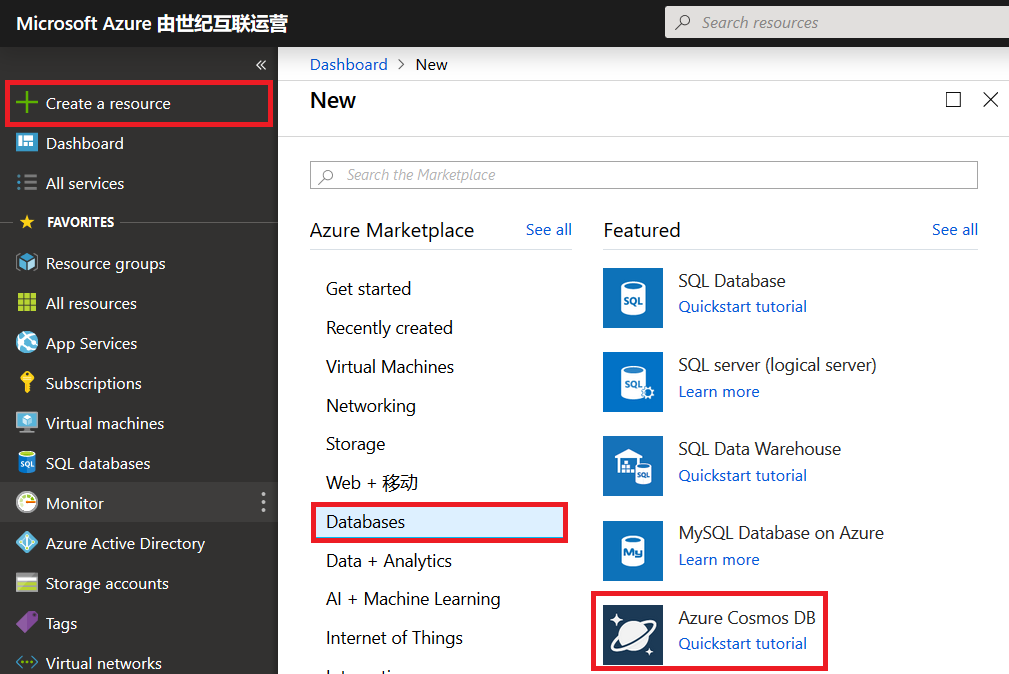
3.创建新的资源组,命名为cosmos-rg
创建新的account name:leicosmos
API设置为Core(SQL)
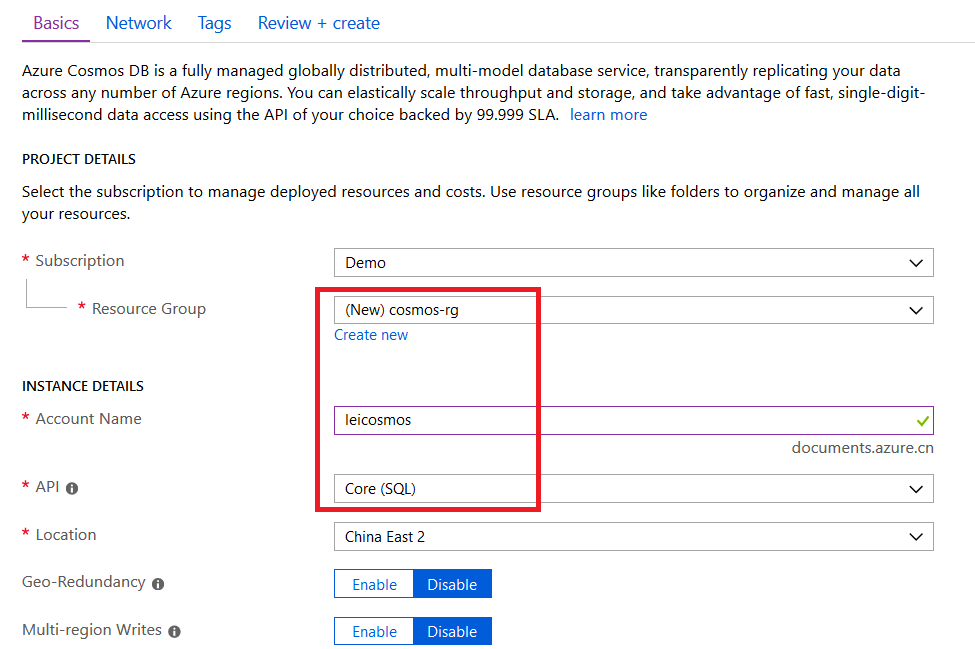
4.CosmosDB暂时不选择虚拟网络,图略。
注意:创建完毕后,cosmos DB并不会开始收费,因为我们没有分配RU
5.创建完毕后,我们选择该资源,点击Data Explorer
点击New Database,我们输入新的database id
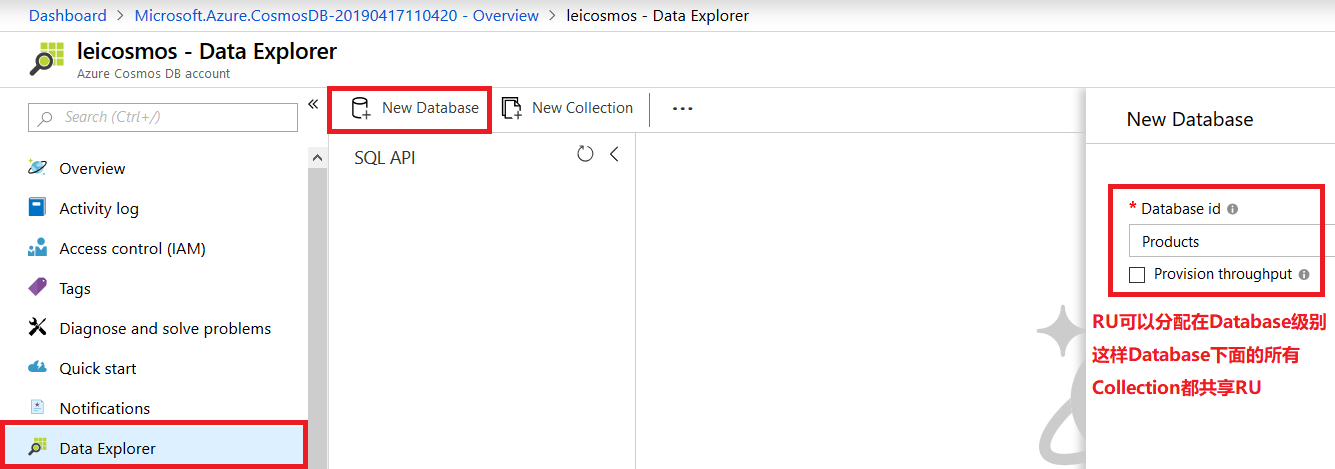
如上图所示,RU可以分配在Database级别。这样Database下面的所有Collection都共享这个Database的RU
我们这里暂时不勾选Provision throughput。
注意:创建Database完毕后,cosmos DB并不会开始收费,因为我们没有分配RU
6.在上一步操作完毕后,我们点击Products,点击右键,New Collection
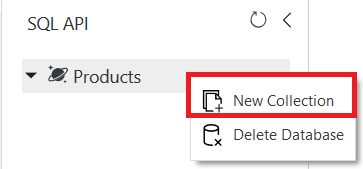
7.在右侧弹出的窗口中,输入下面的信息:

我们定义了Partition Key分区键为/country,
Throughput最小为400
定义了Unique Keys为/productionId
这个操作完毕后,cosmos DB已经开始收费,因为我们已经分配RU
8.创建完毕后,界面展示如下:
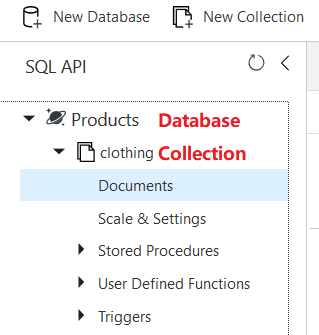
Database Level为Products
Collection Level为clothing
9.我们可以在界面上,插入新的Document。如下图:
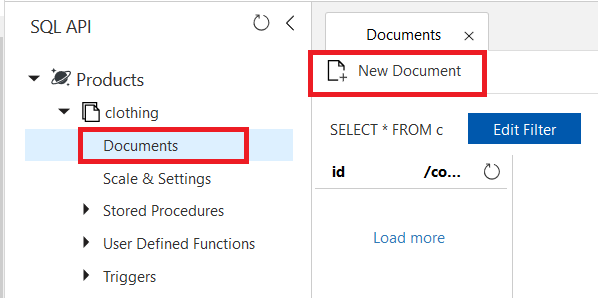
10.我们插入第一条数据
{

   "id": "",

   "productId": "",

   "country":"China",

   "category": "Women's Clothing",

   "manufacturer": "Contoso Sport",

   "description": "Quick dry crew neck t-shirt",

   "price": "14.99",

   "shipping": {

       "weight": ,

       "dimensions": {

       "width": ,

       "height": ,

       "depth":

      }

   }

}
点击Save保存。
执行成功后,截图如下:
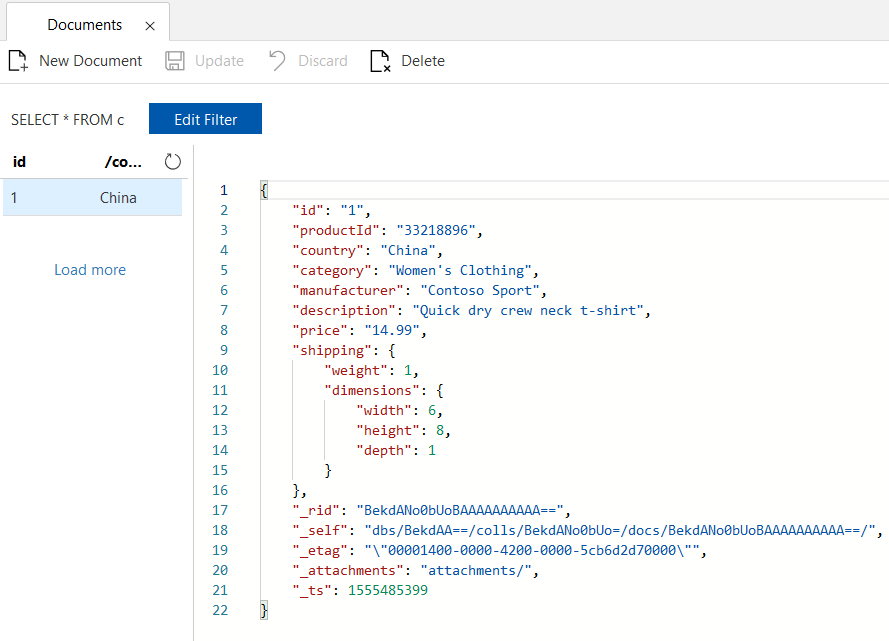
10.然后我们重复步骤9中的New Document,插入第二条数据
请注意:我们在步骤7中,创建新的Collection的时候,定义了Unique Key为productId
表示在同一个Partition Key中,productId不能重复
观察下面的数据中,"country":"China",是与步骤9中的数据,保存在同一个Partition Key里
"productId": "33218896",是与上面步骤9中的数据相同
{

   "id": "",

   "productId": "",

   "country":"China",

   "category": "Women's Outerwear",

   "manufacturer": "Contoso",

   "description": "Black wool pea-coat",

   "price": "49.99",

   "shipping": {

       "weight": ,

       "dimensions": {

       "width": ,

       "height": ,

       "depth":

      }

   }

}
执行Save操作,会出现约束错误
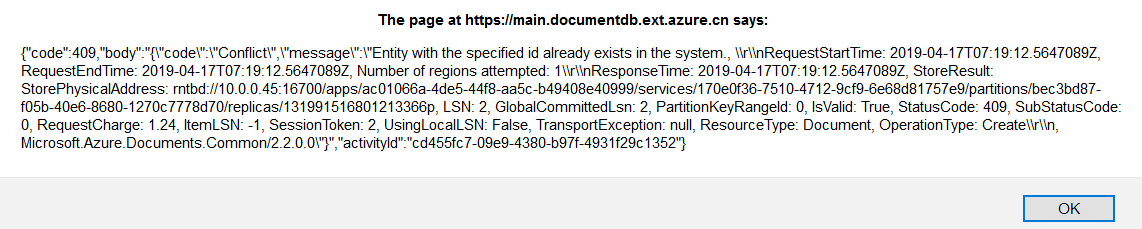
11.我们在修改productId为33218897。插入下面的值
{

   "id": "",

   "productId": "",

   "country":"China",

   "category": "Women's Outerwear",

   "manufacturer": "Contoso",

   "description": "Black wool pea-coat",

   "price": "49.99",

   "shipping": {

       "weight": ,

       "dimensions": {

       "width": ,

       "height": ,

       "depth":

      }

   }

}
执行成功
12.我们还可以插入其他值:
{

   "id": "3",

   "productId": "",

   "country":"US",

   "category": "Women's Outerwear",

   "manufacturer": "Contoso",

   "description": "Black wool pea-coat",

   "price": "29.99",

   "shipping": {

       "weight": ,

       "dimensions": {

       "width": ,

       "height": 4,

       "depth":

      }

   }

}
这样一共就插入了三个数据
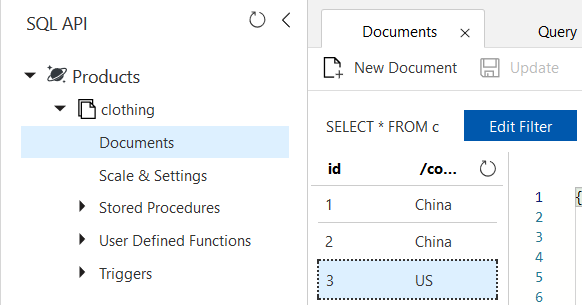
Query
13.我们执行下面的语句:
SELECT * FROM Products c where c.id=""
查询结果
[

    {

        "id": "",

        "productId": "",

        "country": "China",

        "category": "Women's Clothing",

        "manufacturer": "Contoso Sport",

        "description": "Quick dry crew neck t-shirt",

        "price": "14.99",

        "shipping": {

            "weight": ,

            "dimensions": {

                "width": ,

                "height": ,

                "depth":

            }

        },

        "_rid": "BekdAKyBIekBAAAAAAAAAA==",

        "_self": "dbs/BekdAA==/colls/BekdAKyBIek=/docs/BekdAKyBIekBAAAAAAAAAA==/",

        "_etag": "\"00001a00-0000-4200-0000-5cb6e4dd0000\"",

        "_attachments": "attachments/",

        "_ts":

    }

]
14.我们执行下面的语句
SELECT

    p.id,

    p.manufacturer,

    p.description

FROM Products p

WHERE p.id =""
执行结果:
[

    {

        "id": "",

        "manufacturer": "Contoso Sport",

        "description": "Quick dry crew neck t-shirt"

    }

]
FROM
15.我们执行下面的语句:
SELECT * FROM Products.shipping
执行结果:
[

    {

        "weight": ,

        "dimensions": {

            "width": ,

            "height": ,

            "depth":

        }

    },

    {

        "weight": ,

        "dimensions": {

            "width": ,

            "height": ,

            "depth":

        }

    },

    {

        "weight": ,

        "dimensions": {

            "width": ,

            "height": ,

            "depth":

        }

    }

]
16.我们执行下面的语句
SELECT * FROM Products.shipping.weight
执行结果
[

    ,

    ,

]
WHERE
17.我们执行下面的语句
SELECT p.description

FROM Products p

WHERE p.id = ""
执行结果
[

    {

        "description": "Quick dry crew neck t-shirt"

    }

]
Order By clause
18.我们执行下面的语句
SELECT p.price, p.description, p.productId

FROM Products p

ORDER BY p.price ASC
执行结果:
[

    {

        "price": "14.99",

        "description": "Quick dry crew neck t-shirt",

        "productId": ""

    },

    {

        "price": "29.99",

        "description": "Black wool pea-coat",

        "productId": ""

    },

    {

        "price": "49.99",

        "description": "Black wool pea-coat",

        "productId": ""

    }

]
JOIN
19.我们执行下面的语句:
SELECT p.productId

FROM Products p

JOIN p.shipping
执行结果:
[

    {

        "productId": ""

    },

    {

        "productId": ""

    },

    {

        "productId": ""

    }

]
查询MAX
20.我们执行下面的语句
SELECT value MAX(c.productId) FROM clothing c
执行结果
[

    ""

]
Azure CosmosDB (12) 创建Cosmos DB并执行查询语句的更多相关文章
- Azure Cosmos DB (三) EF Core 操作CURD
一,引言 接着上一篇使用 EF Core 操作 Azure CosmosDB 生成种子数据,今天我们完成通过 EF Core 实现CRUD一系列功能.EF Core 3.0 提供了CosmosDB 数 ...
- Azure Cosmos DB (二) SQL API 操作
一,引言 还记得国庆期间,我们学习了一下关于Azure Cosmos DB 的一些基础知识以及Azure Cosmos DB 的几种支持数据库类型.今天就开始分享一些实战操作,如何通过Azure Po ...
- 使用 Cosmos DB 创建和查询 NoSQL 表
本教程演示如何使用 Azure 门户创建 Azure Cosmos DB 帐户,然后使用 DocumentDB .NET API 创建具有分区键的文档数据库和集合.通过在创建集合时定义分区键,应用程序 ...
- Azure Cosmos DB介绍及演示
Azure Cosmos DB 是 Microsoft 提供的全球分布式多模型数据库服务.Cosmos DB是一种NoSql数据库,但是它兼容多种API.它支持SQL, MongoDB.Cassand ...
- Azure CosmosDB (10) Azure Cosmos DB体系结构
<Windows Azure Platform 系列文章目录> Azure Cosmos DB的体系结构分为以下几个部分: 1.Database Accounts Database Acc ...
- Azure Cosmos DB (五) .Net Core 控制台应用
一,引言 之前在讲Azure CosmosDB Core(SQL)核心的时候,使用了EF Core 的方式,引用了 "Microsoft.EntityFrameworkCore.Cosmos ...
- Azure Cosmos DB 使用费用参考
之前在学习Cosmos DB 中SQL API(DocumentDB) 的时候,也就是之前做的一些笔记,看到有使用费用的一些介绍,就有兴趣的去了解了下,做了一下简单的总结. 想了解更多或是购买使用的还 ...
- Azure Cosmos DB (四) 使用EF的SQL API 异地冗余
一,引言 上一篇文章中,我们介绍到使用了EF Core 与Cosmos DB SQL API 进行结合开发.同时,大家在开发过程中一定要记得EF Core 不支持Cosmos DB 的迁移.今天我们启 ...
- NCF 的Azure Cosmos DB 演示案例
简介 NCF想必看过我之前发的NCF的文章的同学们都已经很熟悉了 今天我们要来聊一聊的是NCF遇到Azure Cosmos DB后会碰撞出什么样的火花,让我们一起往下看 我们先来说说什么是Azure ...
随机推荐
- python爬虫初级--获取指定页面上的菜单名称以及链接,然后导出
''' Created on 2017年4月5日 @author: Admin ''' import requests from bs4 import BeautifulSoup as bsp # 网 ...
- redis命令String类型(四)
String 字符串类型 命令: 1> 赋值 语法:set key value 比如:set test 123 2> 取值 语法:get key 比如:get test 3> 取值并 ...
- 【linux】State : Uninterruptible, pid: 3936
运行centos7中yum命令时提示: Existing lock /var/run/yum.pid: another copy is running as pid 3936.Another app ...
- 《HTTP权威指南》读书笔记(二) :URL与资源
1.URL是什么 URL就是因特网资源的标准化名称.URL指向一条电子信息片段,告诉你它们位于何处,以及如何与之交互.通俗来说,就是浏览器寻找信息所需的资源位置. URI是一类更通用的资源标识符,UR ...
- Spring Boot相关~
Introducing Spring Boot Spring Boot makes it easy to create stand-alone, production-grade Spring-bas ...
- web页面弹出窗口代码大全
//-----------按钮提示框----------// <input type="button" name="btn2" id="btn2 ...
- UVA - 558 Wormholes (SPEA算法模板题)
先给出题面:https://vjudge.net/problem/UVA-558 题意描述:给你含n个点以及m条边的图,让你判断在这个图中是否存在负权回路. 首先,我们来介绍什么是SPEA算法 SPF ...
- 浅谈session和cookie
含义: session(会话):指用户登录网站后的一系列动作,比如浏览商品添加到购物车并购买 cookie:用户身份的一种标识 区别: 1.Cookie通过在客户端记录信息确定用户身份,Session ...
- 基于webpack的react开发环境搭建新手教程
最近学习react-webpack项目搭建,找到一篇我认为不错的博客,跟着学习了一番,写得很详细很好,本篇博客纯属记录总结,要看更详细的搭建过程及解析,请戳: 基于webpack的React项目搭建( ...
- 实现react路由动态加载的组件
import React, { Component } from 'react'; import Loading from '../../base/nc_Loading'; /* * date: 20 ...