
Element-ui表格选中回显
先瞄一下,是不是你要的效果
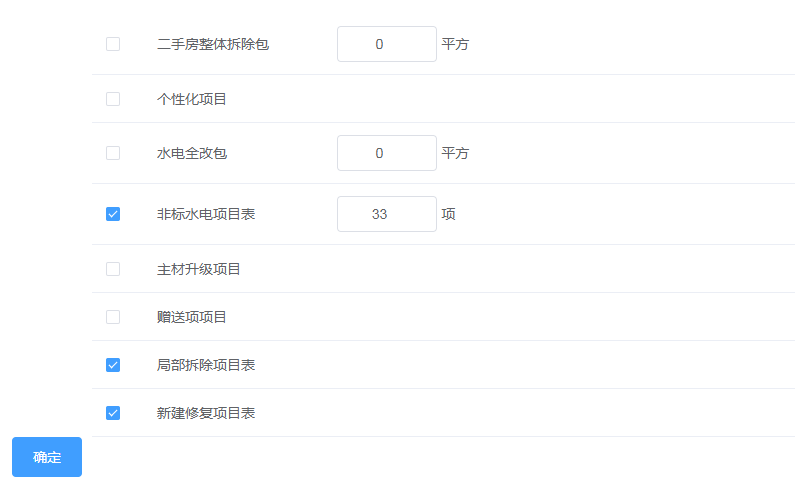
然后,废话不多说,直接上代码啦
 <template>

   <div class>

     <div class="projectData">

       <el-table :data="tableData2" ref="multipleTable" :show-header="false" :border="false" style="width: 100%" @selection-change="handleSelectionChange">

         <el-table-column type="selection" :reserve-selection="true" width="55"></el-table-column>

         <el-table-column prop="spaceName" width="180"></el-table-column>

         <el-table-column>

           <template slot-scope="scope" v-if="scope.row.id==1||scope.row.id==3||scope.row.id==4">

             <el-input

               v-model="scope.row.spacePrice"

               class="el-input_inner"

               size="medium"

               clearable

             ></el-input>

             {{scope.row.spaceUnit}}

           </template>

         </el-table-column>

       </el-table>

     </div>

     <el-button type="primary" @click="submitForm">确定</el-button>

   </div>

 </template>

 <script>

 export default {

   data() {

     return {

       tableData2: [],

       multipleSelection: [],

       listData:[],

     };

   },

   methods: {

     handleSelectionChange(val) {

       this.multipleSelection = val;

       for (var i = 0; i < this.multipleSelection.length; i++) {

           this.multipleSelection[i].containSpace = 1;

         }

     },

     // 初始化数据

      projectManage(){

           this.$axios.get("/clapi/materiel/mealSpaceRela/queryProjectManage?mealId="+this.message.id)

           .then((response) => {

               if(response.data.status.code == 200){

               this.tableData2 = response.data.result;

               this.listData = response.data.result

               for ( let i = 0 ; i < this.listData.length ; i++ ){

                   if(this.listData[i].containSpace == 1){

                     //这是默认选中上的

                     this.$refs.multipleTable.toggleRowSelection(this.tableData2[i],true);

                   }

                 }

           }

       })

       .catch(error => {

         console.log(error);

       });

     },

     // 保存

     submitForm() {

       // 数组为空的话,状态为0,输入框为0

       if(this.multipleSelection.length == 0){

             for (var i = 0; i < this.tableData2.length; i++) {

             this.tableData2[i].containSpace = 0;

             this.tableData2[i].spacePrice = 0;

            }

            this.$axios.post("/clapi/materiel/mealSpaceRela/editProjectManage",this.tableData2)

           .then((response) => {

             this.$message({

               type: "success",

               message: "保存成功!"

             });

           })

           .catch((error) =>{

             console.log(error);

           });

         }else{

           //已选数据,其他输入的值为0

           for(var n=0;n<this.multipleSelection.length;n++){

             // 如果选中的数据为空默认为0

            if(this.multipleSelection[n].spacePrice=='')this.multipleSelection[n].spacePrice=0;

           }

          this.$axios.post("/clapi/materiel/mealSpaceRela/editProjectManage",this.multipleSelection)

           .then((response) => {

            this.$message({

               type: "success",

               message: "保存成功!"

             });

           })

           .catch((error) =>{

             console.log(error);

           });

         }

     },

   },

   created() {

     this.projectManage();

   }

 };

 </script>

 <style scoped>

 .projectData >>> .el-input__inner {

   text-align: center;

 }

 .projectData >>> .el-table--enable-row-hover .el-table__body tr:hover > td {

   background: #fff!important;

 }

 .projectData tr {

   height: 60px !important;

 }

 .projectData {

   margin-left: 80px;

 }

 .favour_checkbox {

   height: 60px;

   display: block;

 }

 table,table th,table tr td {

   border:1px solid red;

 }

 .el-input_inner,

 .el-select {

   text-align: center;

   width: 100px;

 }

 </style>
若有不明白请加群号:复制 695182980 ,也可扫码,希望能帮助到大家。


Element-ui表格选中回显的更多相关文章
- element ui 表格提交时获取所有选中的checkbox的数据
<el-table ref="multipleTable" :data="appList" @selection-change="changeF ...
- ui.datepicker的回显问题
应用场景: 页面上有一些现有的输入框,需要调用日期插件,同时还要clone一份,动态添加到页面中,动态生成的输入框在调用datepicker的时候,click事件有效,但是选择的时间无法回显到对应的输 ...
- Element UI表格组件技巧:如何简洁实现跨页勾选、跨页统计功能
业务场景 在使用Element UI的Table组件时,常常面对这样的业务需求: 表格数据的每一项都要提供勾选框,当切换分页时,能够记忆所有页面勾选的数据,以实现批量提交不同页面勾选数据的功能.并且, ...
- vue element select多选回显
我们经常在使用 Element组件里面的 select多选 场景:添加账号的时候需要选择可见分公司(分公司为多选),添加成功之后可以编辑,需要回显添加时所提交的分公司 代码如下: 多选框: data( ...
- vue + element ui 表格自定义表头,提供线上demo
前言:工作中用到 vue+element ui 的前端框架,需要使用自定义表头,需要使用 re.转载请注明出处:https://www.cnblogs.com/yuxiaole/p/9710826.h ...
- 封装一个优雅的element ui表格组件
现在做后台系统用vue + elementUI 的越来越多,那element ui的 el-table 组件肯定也离不开.虽然element ui的table组件很好.但是表格和分页是分离的.每次写表 ...
- html option选中 回显 取值
1.html <select class="form-control" id="sex"> <option value="-1&qu ...
- element ui表格常用功能如:导出 新增 删除 多选 跨页多选 固定表头 多级表头 合并行列 等常见需求
<template> <div class="table-cooperte"> <el-table :data="tableData&quo ...
- vue2.0+Element UI 表格前端分页和后端分页
之前写过一篇博客,当时对element ui框架还不太了解,分页组件用 html + css 自己写的,比较麻烦,而且只提到了后端分页 (见 https://www.cnblogs.com/zdd20 ...
随机推荐
- Django框架详细介绍---Form表单
一.概述 在HTML页面中,利用form表单向后端提交数据时,需要编写input等输入标签并用form标签包裹起来,与此同时,在很多应用场景之下需要对用户输入的数据校验,例如注册登录页面中,校验用户注 ...
- html5 旋转导航练习
ul{ list-style: none; font-size: 24px; font-weight: bold; }a{ text-decoration: none;}li{ ...
- FineUI 相关
FineUI 相关(ExtAsp.Net 2008-2017),记在这把,免得找不到了. 不知道同年代的类似项目Coolite怎么样了?更名为Ext.net了,在国外活得还算滋润,在国内嘛..死贵死贵 ...
- 浏览器对象模型BOM总结
BOMwindows对象document对象location对象screen对象 Windows对象 1.窗口操作 移动指定的距离:window.moveBy(10,20); //向右移动10像素,向 ...
- decimal(19,6)什么意思
decimal(19,6)什么意思 数字长度19位,精确到小数点后6位例如0.123456 mysql中varchar(50)最多能存多少个汉字 首先要确定mysql版本4.0版本以下,varchar ...
- [转载]ISO 8601规则
1.每年有52周或者53周2.周一至周日为一个完整周.3.每周的周一是该周的第1天.周日是该周的第7天4.每年的第一周 为 每年的第一个周四所在的周.比如 2017年1月5日为当年的第一个周四,那么 ...
- window.onload
window.onload事件 window.onload = function () { JS代码块} 当页面中的DOM节点(元素)都加载完的时候执行的JS代码
- SQL*Plus命令
简介set命令 一般使用SQL PLUS导出数据时一般使用以下参数就可以了. set echo off; -- 不显示脚本中的每个sql命令(缺省为on)set feedback off; -- 禁止 ...
- Maven pom.xml文件详解
Maven pom.xml文件详解 一.简介 POM全称是Project Object Model,即项目对象模型. pom.xml是maven的项目描述文件,它类似与antx的project.xml ...
- Mac appStore下载软件报500错误的解决方法
Step1.打开"启动台": Step2:打开"其他": Step3:打开"终端": Step4:复制如下代码,主要不要作任何更改,不要有多 ...