
element-ui 解决 table 里包含表单验证的问题!
实际项目中的场景,需要在table里做表单的验证,如图效果:
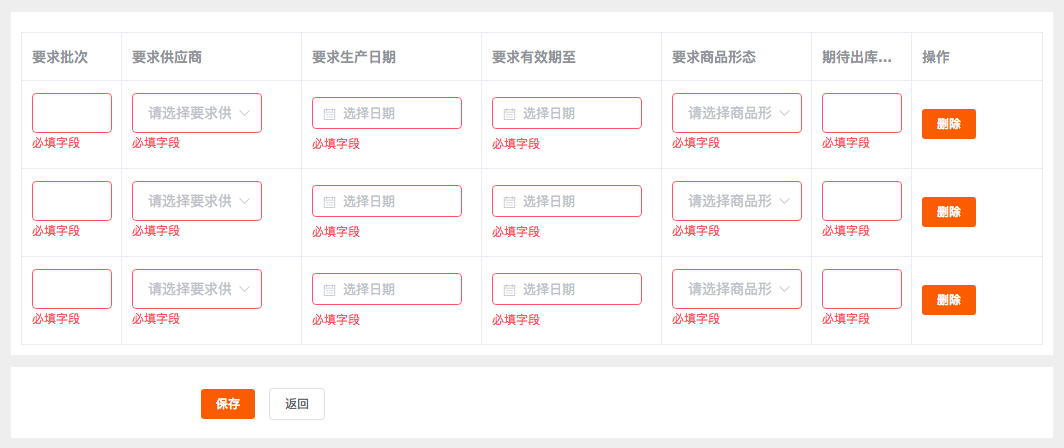
其实问题关键就在于如何给el-form-item动态绑定prop
:prop="'tableData.' + scope.$index + '.字段名'"
详见代码:
<template>

    <div v-bgb-block>

        <div style="margin-top:10px;">

            <el-form :rules="model.rules" :model="model"  ref="form">

                <!-- 表布局 -->

                <el-table

                border

                :data="model.tableData"

                style="width: 100%;"

                :default-sort = "{prop: 'date', order: 'descending'}"

                >

                <el-table-column

                    width="100px"

                    label="要求批次">

                    <template slot-scope="scope">

                            <el-form-item :prop="'tableData.' + scope.$index + '.input'" :rules='model.rules.name'>

                                <el-input style="width:80px"  v-model="scope.row.input" ></el-input>

                            </el-form-item>

                    </template>

                </el-table-column>

                <el-table-column

                    width="180px"

                    label="要求供应商">

                    <template slot-scope="scope">

                            <el-form-item :prop="'tableData.' + scope.$index + '.supplier'" :rules='model.rules.supplier'>

                                <el-select style="width:130px" v-model="scope.row.supplier" placeholder="请选择要求供应商"></el-select>

                            </el-form-item>

                    </template>

                </el-table-column>

                <el-table-column

                    width="180px"

                    label="要求生产日期">

                        <template slot-scope="scope">

                                <el-form-item :prop="'tableData.' + scope.$index + '.producedate.start'" :rules='model.rules["producedate.start"]'>

                                    <bingobox-datepicker type="date" :model="scope.row.producedate" ></bingobox-datepicker>

                                </el-form-item>

                        </template>

                    </el-table-column>

                <el-table-column

                    width="180px"

                    label="要求有效期至">

                        <template slot-scope="scope">

                                <el-form-item :prop="'tableData.' + scope.$index + '.expireddate.start'" :rules='model.rules["expireddate.start"]'>

                                    <bingobox-datepicker type="date" :model="scope.row.expireddate" ></bingobox-datepicker>

                                </el-form-item>

                        </template>

                </el-table-column>

                <el-table-column

                    width="150px"

                    label="要求商品形态">

                        <template slot-scope="scope">

                                <el-form-item :prop="'tableData.' + scope.$index + '.goodstatus'" :rules='model.rules.goodstatus'>

                                    <el-select style="width:130px" v-model="scope.row.goodstatus" placeholder="请选择商品形态"></el-select>

                                </el-form-item>

                        </template>

                </el-table-column>

                <el-table-column

                    width="100px"

                    label="期待出库数量">

                        <template slot-scope="scope">

                                <el-form-item :prop="'tableData.' + scope.$index + '.name'" :rules='model.rules.name'>

                                    <el-input style="width:80px"  v-model="scope.row.name" ></el-input>

                                </el-form-item>

                        </template>

                </el-table-column>

                <el-table-column

                    label="操作">

                    <template slot-scope="scope">

                        <el-button size="small" v-button-color>删除</el-button>

                        </template>

                </el-table-column>

            </el-table>

            </el-form>

        </div>

    </div>

</template>
<script>

export default {

    data(){

        return {

            form:{

                supplier2:"",

                type:"",

                desc:"",

                input:""

            },

            model:{

                rules: {

                    name:{ type:"string",required:true,message:"必填字段",trigger:"change"},

                    input:{ type:"string",required:true,message:"必填字段",trigger:"change"},

                    supplier:{ type:"string",required:true,message:"必填字段",trigger:"change"},

                    goodstatus:{ type:"string",required:true,message:"必填字段",trigger:"change"},

                    "producedate.start":{ type:"string",required:true,message:"必填字段",trigger:"change"},

                    "expireddate.start":{ type:"string",required:true,message:"必填字段",trigger:"change"}

                },

                tableData:[{

                    input:"",

                    name:"",

                    supplier:"",

                    goodstatus:"",

                    producedate:{

                        start:""

                    },

                    expireddate:{

                        start:""

                    }

                },{

                    input:"",

                    name:"",

                    supplier:"",

                    goodstatus:"",

                    producedate:{

                        start:""

                    },

                    expireddate:{

                        start:""

                    }

                }]

            }

        }

    },

    methods: {

        add () {

            console.log(this.form);

        },

        save () {

            this.$refs["form"].validate((valid,model)=>{

                console.log(valid);

                console.log(model);

            })

        }

    }

}

</script>
element-ui 解决 table 里包含表单验证的问题!的更多相关文章
- vue + element 实现登录注册(自定义表单验证规则)
注册页包含手机验证码登录和密码的二次验证. 效果如下: 实现代码: <template> <div> <div class="register-wrapper& ...
- element的日期选择使用value-format之后表单验证报错
在表单验证的时候报错 添加一个日期控件,但是发现在表单验证中遇到了冲突如下: Error in event handler for "el.form.change": " ...
- 表单验证提交——submit与button
之前做东西接触过表单验证提交,但是都是为了完成工作,做完就做完了,没有注过表单验证提交有几种方法,各方法都有啥区别.今天瞎折腾了一下,对他们研究了一下,如下是我个人的理解: submit: 从字面上看 ...
- 关于vue.js element ui 表单验证 this.$refs[formName].validate()的问题
方法使用前需了解: 来自”和“小编的小提示: 首先打印一下this.$refs[formName],检查是否拿到了正确的需要验证的form. 其次在拿到了正确的form后,检查该form上添加 ...
- 如何在Vue的项目里对element的表单验证进行封装
介绍需求 熟悉并优化公司项目的第五天,领导说能不能把表单验证封装一下,我打开代码一看 由于是后台管理系统,无数个需要验证的输入框,由于截图长度受限,只能展示部分,类似于这种页面还有无数个!代码重复率非 ...
- 关于Web项目里的给表单验证控件添加结束时间不得小于开始时间的验证方法,日期转换和前台显示格式之间,还有JSON取日期数据格式转换成标准日期格式的问题
项目里有些不同页面间的日期显示格式是不同的, 第一个问题: 比如我用日期控件WdatePicker.js导包后只需在input标签里加上onClick="WdatePicker()" ...
- amaze UI 如何添加原生表单验证
这段时间做的一个项目,整个系统就一个页面,然后就是各种模态框,js里拼HTML代码,而且因为表单空留距离小,最后选定了amaze ui原生的表单验证 在amaze ui官网找到 表单验证. 但是ama ...
- SNF快速开发平台MVC-各种级联绑定方式,演示样例程序(包含表单和表格控件)
做了这么多项目,经常会使用到级联.联动的情况. 如:省.市.县.区.一级分类.二级分类.三级分类.仓库.货位. 方式:有表单需要做级联的,还是表格行上需要做级联操作的. 实现:实现方法也有很多种方式. ...
- 【vue】vue使用Element组件时v-for循环里的表单项验证方法
转载至:https://www.jb51.net/article/142750.htm标题描述看起来有些复杂,有vue,Element,又有表单验证,还有v-for循环?是不是有点乱?不过我相信开发中 ...
随机推荐
- 移动端web开发常见问题
1.移动端如何定义字体font-family 三大手机系统的字体: ios 系统 默认中文字体是Heiti SC 默认英文字体是Helvetica 默认数字字体是HelveticaNeue 无微软雅黑 ...
- 自动化脚本测试,postman使用沉淀
// 服务器地址 var server = 'XXXXXXXXXXXX'; //秘钥Key var secretKey = 'XXXXXXXXXXXX'; //获取当前时间 function crea ...
- 对不可描述的软件安装sfbo插件
0 后来...突然有一天,我就需要sfbo了. 1 安装 yum search "不可描述插件"是空的,只能用源码安装. 官方信息可以链接到这里,obfs. 1.1 编译安装 gi ...
- 软件工程第二次作业-VSTS单元测试
一.选择开发工具 开发工具选择 Visual studio 2017 社区版,开发语言为C 由于之前已经安装完毕,所以不上传安装过程,主界面如下: 二.练习自动单元测试 使用的测试工具是VSTS,具体 ...
- Django之JWT理解及简单应用
Json web token (JWT), 是为了在网络应用环境间传递声明而执行的一种基于JSON的开放标准((RFC 7519).该token被设计为紧凑且安全的,特别适用于分布式站点的单点登录(S ...
- RoR - More Active Record
Active Record Scope: default_scope: 默认的检索方式 #Use unscoped to break out of the default class Hobby ...
- eclipse安装使用fat打jar包
在线安装步骤: eclipse菜单栏 help >software updates >Search for new features to install>new update si ...
- Redis的持久化之AOF方式
AOF方式:将以日志,记录每一个操作 优势:安全性相对RDB方式高很多: 劣势:效率相对RDB方式低很多: 配置: [root@localhost redis]# vi redis.conf 编辑re ...
- HFSS中查看增益
第一步:设置查看增益条件 radiation 中设置 第二步设置扫描方式 下面的save fields 一定要勾选 第三步:扫描完成就可以查看了 results 中 查看 其中 phi ...
- PHP洗牌、猴子选大王两个小算法
<一>洗牌算法 /** *洗牌算法washCard *@param $cardNum *@return array */ function washCard($cardNum) { $ca ...