
element-ui 解决 table 里包含表单验证的问题!
实际项目中的场景,需要在table里做表单的验证,如图效果:
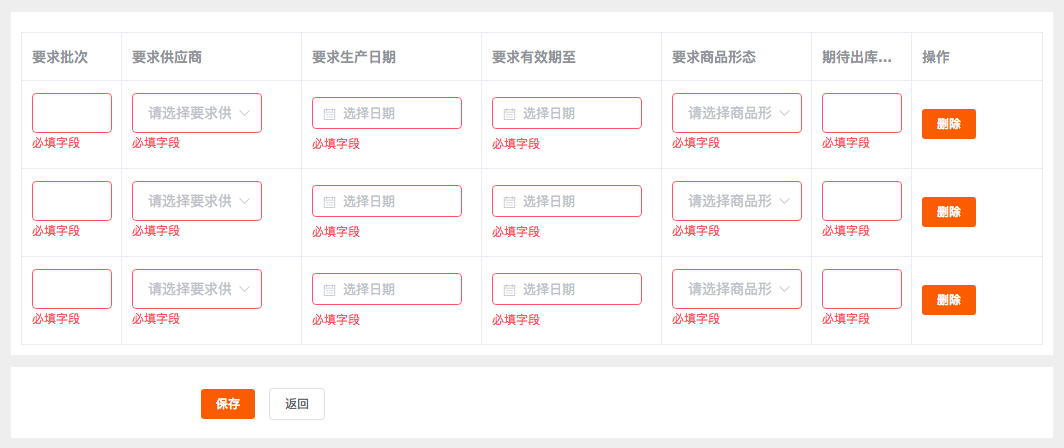
其实问题关键就在于如何给el-form-item动态绑定prop
:prop="'tableData.' + scope.$index + '.字段名'"
详见代码:
<template>

    <div v-bgb-block>

        <div style="margin-top:10px;">

            <el-form :rules="model.rules" :model="model"  ref="form">

                <!-- 表布局 -->

                <el-table

                border

                :data="model.tableData"

                style="width: 100%;"

                :default-sort = "{prop: 'date', order: 'descending'}"

                >

                <el-table-column

                    width="100px"

                    label="要求批次">

                    <template slot-scope="scope">

                            <el-form-item :prop="'tableData.' + scope.$index + '.input'" :rules='model.rules.name'>

                                <el-input style="width:80px"  v-model="scope.row.input" ></el-input>

                            </el-form-item>

                    </template>

                </el-table-column>

                <el-table-column

                    width="180px"

                    label="要求供应商">

                    <template slot-scope="scope">

                            <el-form-item :prop="'tableData.' + scope.$index + '.supplier'" :rules='model.rules.supplier'>

                                <el-select style="width:130px" v-model="scope.row.supplier" placeholder="请选择要求供应商"></el-select>

                            </el-form-item>

                    </template>

                </el-table-column>

                <el-table-column

                    width="180px"

                    label="要求生产日期">

                        <template slot-scope="scope">

                                <el-form-item :prop="'tableData.' + scope.$index + '.producedate.start'" :rules='model.rules["producedate.start"]'>

                                    <bingobox-datepicker type="date" :model="scope.row.producedate" ></bingobox-datepicker>

                                </el-form-item>

                        </template>

                    </el-table-column>

                <el-table-column

                    width="180px"

                    label="要求有效期至">

                        <template slot-scope="scope">

                                <el-form-item :prop="'tableData.' + scope.$index + '.expireddate.start'" :rules='model.rules["expireddate.start"]'>

                                    <bingobox-datepicker type="date" :model="scope.row.expireddate" ></bingobox-datepicker>

                                </el-form-item>

                        </template>

                </el-table-column>

                <el-table-column

                    width="150px"

                    label="要求商品形态">

                        <template slot-scope="scope">

                                <el-form-item :prop="'tableData.' + scope.$index + '.goodstatus'" :rules='model.rules.goodstatus'>

                                    <el-select style="width:130px" v-model="scope.row.goodstatus" placeholder="请选择商品形态"></el-select>

                                </el-form-item>

                        </template>

                </el-table-column>

                <el-table-column

                    width="100px"

                    label="期待出库数量">

                        <template slot-scope="scope">

                                <el-form-item :prop="'tableData.' + scope.$index + '.name'" :rules='model.rules.name'>

                                    <el-input style="width:80px"  v-model="scope.row.name" ></el-input>

                                </el-form-item>

                        </template>

                </el-table-column>

                <el-table-column

                    label="操作">

                    <template slot-scope="scope">

                        <el-button size="small" v-button-color>删除</el-button>

                        </template>

                </el-table-column>

            </el-table>

            </el-form>

        </div>

    </div>

</template>
<script>

export default {

    data(){

        return {

            form:{

                supplier2:"",

                type:"",

                desc:"",

                input:""

            },

            model:{

                rules: {

                    name:{ type:"string",required:true,message:"必填字段",trigger:"change"},

                    input:{ type:"string",required:true,message:"必填字段",trigger:"change"},

                    supplier:{ type:"string",required:true,message:"必填字段",trigger:"change"},

                    goodstatus:{ type:"string",required:true,message:"必填字段",trigger:"change"},

                    "producedate.start":{ type:"string",required:true,message:"必填字段",trigger:"change"},

                    "expireddate.start":{ type:"string",required:true,message:"必填字段",trigger:"change"}

                },

                tableData:[{

                    input:"",

                    name:"",

                    supplier:"",

                    goodstatus:"",

                    producedate:{

                        start:""

                    },

                    expireddate:{

                        start:""

                    }

                },{

                    input:"",

                    name:"",

                    supplier:"",

                    goodstatus:"",

                    producedate:{

                        start:""

                    },

                    expireddate:{

                        start:""

                    }

                }]

            }

        }

    },

    methods: {

        add () {

            console.log(this.form);

        },

        save () {

            this.$refs["form"].validate((valid,model)=>{

                console.log(valid);

                console.log(model);

            })

        }

    }

}

</script>
element-ui 解决 table 里包含表单验证的问题!的更多相关文章
- vue + element 实现登录注册(自定义表单验证规则)
注册页包含手机验证码登录和密码的二次验证. 效果如下: 实现代码: <template> <div> <div class="register-wrapper& ...
- element的日期选择使用value-format之后表单验证报错
在表单验证的时候报错 添加一个日期控件,但是发现在表单验证中遇到了冲突如下: Error in event handler for "el.form.change": " ...
- 表单验证提交——submit与button
之前做东西接触过表单验证提交,但是都是为了完成工作,做完就做完了,没有注过表单验证提交有几种方法,各方法都有啥区别.今天瞎折腾了一下,对他们研究了一下,如下是我个人的理解: submit: 从字面上看 ...
- 关于vue.js element ui 表单验证 this.$refs[formName].validate()的问题
方法使用前需了解: 来自”和“小编的小提示: 首先打印一下this.$refs[formName],检查是否拿到了正确的需要验证的form. 其次在拿到了正确的form后,检查该form上添加 ...
- 如何在Vue的项目里对element的表单验证进行封装
介绍需求 熟悉并优化公司项目的第五天,领导说能不能把表单验证封装一下,我打开代码一看 由于是后台管理系统,无数个需要验证的输入框,由于截图长度受限,只能展示部分,类似于这种页面还有无数个!代码重复率非 ...
- 关于Web项目里的给表单验证控件添加结束时间不得小于开始时间的验证方法,日期转换和前台显示格式之间,还有JSON取日期数据格式转换成标准日期格式的问题
项目里有些不同页面间的日期显示格式是不同的, 第一个问题: 比如我用日期控件WdatePicker.js导包后只需在input标签里加上onClick="WdatePicker()" ...
- amaze UI 如何添加原生表单验证
这段时间做的一个项目,整个系统就一个页面,然后就是各种模态框,js里拼HTML代码,而且因为表单空留距离小,最后选定了amaze ui原生的表单验证 在amaze ui官网找到 表单验证. 但是ama ...
- SNF快速开发平台MVC-各种级联绑定方式,演示样例程序(包含表单和表格控件)
做了这么多项目,经常会使用到级联.联动的情况. 如:省.市.县.区.一级分类.二级分类.三级分类.仓库.货位. 方式:有表单需要做级联的,还是表格行上需要做级联操作的. 实现:实现方法也有很多种方式. ...
- 【vue】vue使用Element组件时v-for循环里的表单项验证方法
转载至:https://www.jb51.net/article/142750.htm标题描述看起来有些复杂,有vue,Element,又有表单验证,还有v-for循环?是不是有点乱?不过我相信开发中 ...
随机推荐
- dtFindNearestPolyQuery :: process
dtFindNearestPolyQuery :: process(const dtMeshTile* tile, dtPoly** polys, dtPolyRef* refs, int count ...
- js 讲解
substring() 取文本中间 split() 分割文本 charcodeat() utf-8 tolowercase() 小写 正则是一个对象 正则 i 不区分大小写 escape(s ...
- Thymeleaf常用th标签
https://www.jianshu.com/p/f9ebd23e8da4 关键字 功能介绍 案例 th:id 替换id <input th:id="'xxx' + ${collec ...
- Linux技术栈整理一:系统体系结构
Linux操作系统必备的硬件构造: CPU 主板 显卡 硬盘 网卡 外设(键鼠-输入设备 / 显示器-输出设备) 内核管理调度: 内核体系结构: 来源于:极客专栏
- RxSwift + Moya + ObjectMapper
https://www.jianshu.com/p/173915b943af use_frameworks! target 'RXDemo' do pod 'RxSwift' pod 'RxCocoa ...
- Trivial File Transfer Protocol (TFTP)
Assignment 2The Trivial File Transfer Protocol (TFTP) is an Internet software utility fortransferrin ...
- JS 全选
第一种情况 1. 首先得有全选 checkall <input type="checkbox" class="checkAll" value=" ...
- 将pucharm与anaconda配合使用
一个用来更新各种包,另一个负责美美的打代码,把pycharm, setting project interpreter,选中anaconda中的python.exe.搞定.anaconda prom ...
- 并发编程实战1-chap1-2-斗者6星
一.线程安全性 1.线程安全关注点:对共享的和可变的状态的访问 2.JAVA同步机制:synchronized.volatile.显示锁.原子变量 3.无状态对象一定是线程安全的:不包含任何域,也不包 ...
- idea没配置Tomcat容器报错及解决方法
servlet报错,提示没有一个容器,需要一个容器来运行,说明没有tomcat容器. 看看idea的配置有没有配置tomcat? 果然没有配置tomcat容器(正常画红框的地方会出现配置的tomcat ...