
(转)通过maven,给没有pom文件的jar包生成pom文件,maven项目引入本地jar包
文章完全转载自 : https://blog.csdn.net/qq_31289187/article/details/81117478
问题一:
经常遇到公司私服或者中央仓库没有的jar包,然后通过各种渠道找到了解决问题的jar包,但是发现没有pom文件,maven项目引入之后,还有maven在本地仓库找不到对应jar包的pom文件,打包的时候会在私服下载对应jar包的pom文件而抛出异常,通过maven就可以解决这个问题。前提是你安装了maven,然后在命令行执行命令就OK了!!!
[ERROR] Failed to execute goal on project AccountEJob: Could not resolve dependencies for project AccountEJob:AccountEJob:jar:1.1.1: Failed to collect dependencies at org.apache.hive:hive-jdbc:jar:1.2.1000.2.6.1.0-129: Failed to read artifact descriptor for org.apache.hive:hive-jdbc:jar:1.2.1000.2.6.1.0-129: Could not transfer artifact org.apache.hive:hive-jdbc:pom:1.2.1000.2.6.1.0-129 from/to nexus (http://XXX.XXX.XXX.XXX:8081/nexus/content/groups/public): Connect to XXX.XXX.XXX.XXX:8081/ [/XXX.XXX.XXX.XXX:8081/] failed: Connection timed out: connect -> [Help 1]

[ERROR]

[ERROR] To see the full stack trace of the errors, re-run Maven with the -e switch.

[ERROR] Re-run Maven using the -X switch to enable full debug logging.

[ERROR]

[ERROR] For more information about the errors and possible solutions, please read the following articles:

[ERROR] [Help 1] http://cwiki.apache.org/confluence/display/MAVEN/DependencyResolutionException
命令:
mvn install:install-file -DgroupId=novaplanet.net -DartifactId=commons-lang -Dversion=2.5 -Dfile=F:/commons-lang-2.5.jar -Dpackaging=jar -DgeneratePom=true
DgroupId:是项目组织唯一的标识符,自己随便起名
DartifactId:项目的唯一的标识符,自己可以随便起
Dversion:项目版本
Dfile:jar包路径(绝对路径)
DgeneratePom:是否生成pom文件,ture:生成,false:不生成
执行成功,会在本地的maven jar包目录下以下结果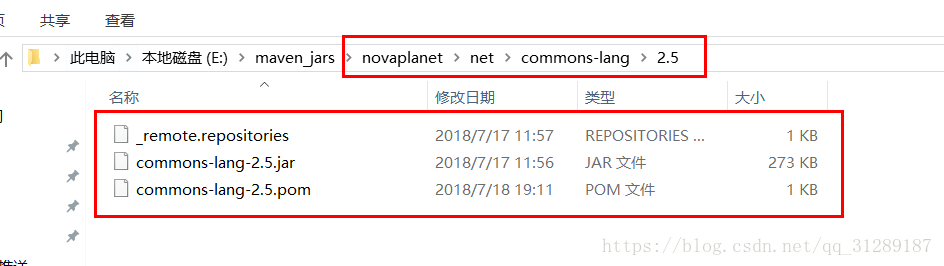
问题二:
自己本地的jar包,公司私服上没有,引入本地的jar包,现在项目的resource目录下新建lib文件夹,然后将你本地的jar包copy到里面
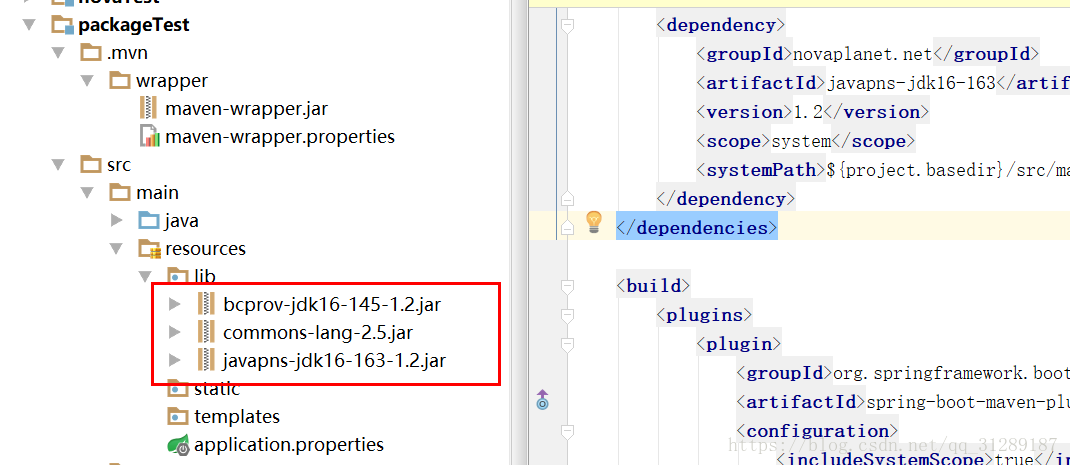
在maven的配置如下:
<dependencies>

        <dependency>

            <groupId>novaplanet.net</groupId>

            <artifactId>javapns-jdk16-163</artifactId>

            <version>1.2</version>

            <scope>system</scope>

            <systemPath>${project.basedir}/src/main/resources/lib/javapns-jdk16-163-1.2.jar</systemPath>

        </dependency>

    </dependencies>
build插入下面配置:
<build>

        <plugins>

            <plugin>

                <groupId>org.springframework.boot</groupId>

                <artifactId>spring-boot-maven-plugin</artifactId>

                <configuration>

                    <includeSystemScope>true</includeSystemScope>

                </configuration>

            </plugin>

        </plugins>

    </build>
我的实例配置:
<?xml version="1.0" encoding="UTF-8"?>

<project xmlns="http://maven.apache.org/POM/4.0.0" xmlns:xsi="http://www.w3.org/2001/XMLSchema-instance"

    xsi:schemaLocation="http://maven.apache.org/POM/4.0.0 http://maven.apache.org/xsd/maven-4.0.0.xsd">

    <modelVersion>4.0.0</modelVersion>

    <groupId>com.teset</groupId>

    <artifactId>demo</artifactId>

    <version>0.0.1-SNAPSHOT</version>

    <packaging>jar</packaging>

    <name>demo</name>

    <description>Demo project for Spring Boot</description>

    <parent>

        <groupId>org.springframework.boot</groupId>

        <artifactId>spring-boot-starter-parent</artifactId>

        <version>2.0.3.RELEASE</version>

        <relativePath/> <!-- lookup parent from repository -->

    </parent>

    <properties>

        <project.build.sourceEncoding>UTF-8</project.build.sourceEncoding>

        <project.reporting.outputEncoding>UTF-8</project.reporting.outputEncoding>

        <java.version>1.8</java.version>

    </properties>

    <dependencies>

        <dependency>

            <groupId>org.springframework.boot</groupId>

            <artifactId>spring-boot-starter-web</artifactId>

        </dependency>

        <dependency>

            <groupId>org.springframework.boot</groupId>

            <artifactId>spring-boot-starter-test</artifactId>

            <scope>test</scope>

        </dependency>

        <dependency>

            <groupId>novaplanet.net</groupId>

            <artifactId>bcprov-jdk16-145</artifactId>

            <version>1.2</version>

            <scope>system</scope>

            <systemPath>${project.basedir}/src/main/resources/lib/bcprov-jdk16-145-1.2.jar</systemPath>

        </dependency>

        <dependency>

            <groupId>novaplanet.net</groupId>

            <artifactId>commons-lang</artifactId>

            <version>2.5</version>

            <scope>system</scope>

            <systemPath>${project.basedir}/src/main/resources/lib/commons-lang-2.5.jar</systemPath>

        </dependency>

        <dependency>

            <groupId>novaplanet.net</groupId>

            <artifactId>javapns-jdk16-163</artifactId>

            <version>1.2</version>

            <scope>system</scope>

            <systemPath>${project.basedir}/src/main/resources/lib/javapns-jdk16-163-1.2.jar</systemPath>

        </dependency>

    </dependencies>

    <build>

        <plugins>

            <plugin>

                <groupId>org.springframework.boot</groupId>

                <artifactId>spring-boot-maven-plugin</artifactId>

                <configuration>

                    <includeSystemScope>true</includeSystemScope>

                </configuration>

            </plugin>

        </plugins>

    </build>

</project>
引入之后,编译项目,编译成功不一定引入成功了,接着打包,看jar包中的classes下的lib中有没有你需要引入的jar包

(转)通过maven,给没有pom文件的jar包生成pom文件,maven项目引入本地jar包的更多相关文章
- 详细解释 集成Maven Spring Mybatis项目包生成Bat文件
有时在项目必须Maven项目包生成bat文件,长官一人.本文将解释的具体使用方法maven-assembly-plugin插件实现bat文件包. 1.首先看一下项目结构 2.配置pom.xml文件,在 ...
- maven pom 引入本地jar包
maven pom 引入本地jar包 在pom.xml同级目录下新建lib文件夹,并放入本地jar包. 配置Jar包的dependency,包括groupId,artifactId,version三个 ...
- pringboot pom文件引入本地jar包和对其打jar包
maven引入本地jar包需要在pom文件中天剑如下配置: <dependency> <groupId>com.baidu</groupId> <artifa ...
- Springboot中如何引入本地jar包,并通过maven把项目成功打包成jar包部署
最近尝试引入阿里云的短信验证码,阿里云的core sdk是maven就有的,但是短信相关的jar包却不是放在maven的,所以得引入本地的下载回来的jar包.本地开发直接引入,idea是可以直接跑调用 ...
- springboot(六) Maven打包引入本地jar包
springboot Maven打包引入本地jar包 最近在做项目的时候,有一些jar包不存在maven的依赖库中,所以需要自己引入本地jar包来达到需求,那么我们该如何去将本地的jar包引入s ...
- (Unity)Unity自定义Debug日志文件,利用VS生成Dll文件并使用Dotfuscated进展混淆,避免被反编译
Unity自定义Debug日志文件,利用VS生成Dll文件并使用Dotfuscated进行混淆,避免被反编译. 1.打开VS,博主所用版本是Visual Studio 2013. 2.新建一个VC项目 ...
- 【U1结业机试题】新闻内容管理系统:解析XML文件读取Html模版生成网页文件
一.作业要求: 1.在xml文件中创建新闻节点news,包含标题.作者.日期.正文等信息 2.创建HTML模板文件 3.读取xml中所有新闻信息,并使用新闻信息替换模板文件中占位符,从而为每一条新闻生 ...
- maven引入本地jar 打jar包
没搭建私服的情况下引入本地的jar,并把本地jar打包进项目的run jar 以打包引入hadoop-common-2.7.5.jar为例 引用 复制jar包所在的路径 打开cmd命令提示符 切换路径 ...
- MAVEN打包同时引入本地jar包
方法一(pom文件指定jar包目录进行引入) 1.将需要手动引入的包放在项目目录下,如lib目录下: 修改pom文件,引入依赖并且将scope设置为system 2.同时配置maven打包插件 方法二 ...
随机推荐
- python项目推荐(转载知乎)
作者:Wayne Shi链接:https://www.zhihu.com/question/29372574/answer/88744491来源:知乎著作权归作者所有.商业转载请联系作者获得授权,非商 ...
- VS2017 + EF6连接MySql
VS2017 + EF6连接MySql 原地址:https://blog.csdn.net/mzhifa/article/details/80999105 VS2017 + EF6连接MySql ...
- python [[1,2],[3,4],[5,6]]一行代码展开该列表,得出[1,2,3,4,5,6]
#1)利用推导式运行过程:for i in a ,每个i是[1,2],[3,4],[5,6],for j in i,每个j就是1,2,3,4,5,6,合并后就是结果 a=[[1,2],[3,4],[5 ...
- 学Python的感受
这门课程已经上了两周了,虽然还没学到什么实质上的东西,只是做了几道题,但是我也感受到了Python的魅力.我感觉这门课真的很有用,比如老师所说的网络爬虫,我对这个非常感兴趣.再说说老师的教学方式,理论 ...
- vue进阶--外卖商家页
一.准备工作 1.vue特性:轻量级.简洁.高效.组件化.数据驱动 2.技术分析:使用vue- resource与后端交互(ajax通信,ie9+) 使用vue-router作为前端路由 bet ...
- IP地址数据库 | 手机号段归属地数据库 | 行政区划省市区数据库
2019年4月最新版 IP地址数据库 (全球版·国内版·国外版·掩码版·英文版) 全球旗舰版 454267行 国内精华版 244379行 演示 https://www.qqzeng.com/ip ...
- 目标检测方法——R-FCN
R-FCN论文阅读(R-FCN: Object Detection via Region-based Fully Convolutional Networks ) 目录 作者及相关链接 方法概括 方法 ...
- pandas 时间格式转换
OUTLINE 常见的时间字符串与timestamp之间的转换 日期与timestamp之间的转换 常见的时间字符串与timestamp之间的转换 这里说的字符串不是一般意义上的字符串,是指在读取日期 ...
- dos模式下切换电脑用户
启用管理员运行dos 然后输入net user adminstrator /active.yes 然后点击打开按钮 就可以切换电脑用户了
- mysql,jdbc、连接池
show processlist; select * from information_schema.processlist; Command: The type of command the thr ...