
Java Lucene入门
1、lucene版本:7.2.1
pom文件:
<?xml version="1.0" encoding="UTF-8"?>
<project xmlns="http://maven.apache.org/POM/4.0.0" xmlns:xsi="http://www.w3.org/2001/XMLSchema-instance"
    xsi:schemaLocation="http://maven.apache.org/POM/4.0.0 http://maven.apache.org/xsd/maven-4.0.0.xsd">
    <modelVersion>4.0.0</modelVersion>

    <groupId>com.example</groupId>
    <artifactId>demo-lucene</artifactId>
    <version>0.0.1-SNAPSHOT</version>
    <packaging>war</packaging>

    <name>demo-lucene</name>
    <description>Demo project for Spring Boot</description>

    <parent>
        <groupId>org.springframework.boot</groupId>
        <artifactId>spring-boot-starter-parent</artifactId>
        <version>2.1.0.RELEASE</version>
        <relativePath/> <!-- lookup parent from repository -->
    </parent>

    <properties>
        <project.build.sourceEncoding>UTF-8</project.build.sourceEncoding>
        <project.reporting.outputEncoding>UTF-8</project.reporting.outputEncoding>
        <java.version>1.8</java.version>
    </properties>

    <dependencies>
        <dependency>
            <groupId>org.springframework.boot</groupId>
            <artifactId>spring-boot-starter-web</artifactId>
        </dependency>

        <dependency>
            <groupId>org.springframework.boot</groupId>
            <artifactId>spring-boot-starter-test</artifactId>
            <scope>test</scope>
        </dependency>

        <!-- Lucene核心库 -->
        <dependency>
            <groupId>org.apache.lucene</groupId>
            <artifactId>lucene-core</artifactId>
            <version>7.2.1</version>
        </dependency>
        <!-- Lucene解析库 -->
        <dependency>
            <groupId>org.apache.lucene</groupId>
            <artifactId>lucene-queryparser</artifactId>
            <version>7.2.1</version>
        </dependency>
        <!-- Lucene附加的分析库 -->
        <dependency>
            <groupId>org.apache.lucene</groupId>
            <artifactId>lucene-analyzers-common</artifactId>
            <version>7.2.1</version>
        </dependency>
    </dependencies>

    <build>
        <plugins>
            <plugin>
                <groupId>org.springframework.boot</groupId>
                <artifactId>spring-boot-maven-plugin</artifactId>
            </plugin>
        </plugins>
    </build>

</project>
2、代码如下:
package com.example.demo;

import org.apache.lucene.analysis.Analyzer;
import org.apache.lucene.analysis.standard.StandardAnalyzer;
import org.apache.lucene.document.Document;
import org.apache.lucene.document.Field;
import org.apache.lucene.document.StringField;
import org.apache.lucene.document.TextField;
import org.apache.lucene.index.DirectoryReader;
import org.apache.lucene.index.IndexWriter;
import org.apache.lucene.index.IndexWriterConfig;
import org.apache.lucene.index.Term;
import org.apache.lucene.search.*;
import org.apache.lucene.store.Directory;
import org.apache.lucene.store.FSDirectory;

import java.io.IOException;
import java.nio.file.Paths;

/**
 * Created by 1 on 2018/11/20.
 */
public class DemoLucene {

    public static void main(String[] args) throws IOException {
        String path = "D:\\lucene\\index";

        Directory directory = FSDirectory.open(Paths.get(path));
        Analyzer analyzer = new StandardAnalyzer();
        IndexWriterConfig config = new IndexWriterConfig(analyzer);
        config.setOpenMode(IndexWriterConfig.OpenMode.CREATE);
        IndexWriter indexWriter = new IndexWriter(directory, config);

        Document document1 = new Document();
        document1.add(new StringField("name", "张三", Field.Store.YES));
        document1.add(new StringField("no", "1001", Field.Store.YES));
        document1.add(new TextField("content", "中心小学的张三是个喜欢学习的学生", Field.Store.YES));
        indexWriter.addDocument(document1);

        Document document2 = new Document();
        document2.add(new StringField("name", "李四", Field.Store.YES));
        document2.add(new StringField("no", "1002", Field.Store.YES));
        document2.add(new TextField("content", "中心小学的李四是个期末考试成绩很好的学生", Field.Store.YES));
        indexWriter.addDocument(document2);

        Document document3 = new Document();
        document3.add(new StringField("name", "王五", Field.Store.YES));
        document3.add(new StringField("no", "1003", Field.Store.YES));
        document3.add(new TextField("content", "南宁市中心小学的王五在班级里是个班长", Field.Store.YES));
        indexWriter.addDocument(document3);

        indexWriter.close();

        DirectoryReader directoryReader = DirectoryReader.open(directory);
        IndexSearcher indexSearcher = new IndexSearcher(directoryReader);
        Query query = new TermQuery(new Term("content", "班长"));
        System.out.println("查询语句 = " + query);
        TopDocs topDocs = indexSearcher.search(query, 100);
        ScoreDoc[] scoreDocs = topDocs.scoreDocs;
        if(scoreDocs.length == 0){
            System.out.println("未找到数据");
        }else{
            for (int i = 0; i < scoreDocs.length; i++) {
                Document docResult = indexSearcher.doc(scoreDocs[i].doc);
                System.out.println(String.format("======================  第%d条  ======================", i + 1));
                System.out.println("name:" + docResult.get("name"));
                System.out.println("no:" + docResult.get("no"));
                System.out.println("content:" + docResult.get("content"));
            }
        }

    }

}
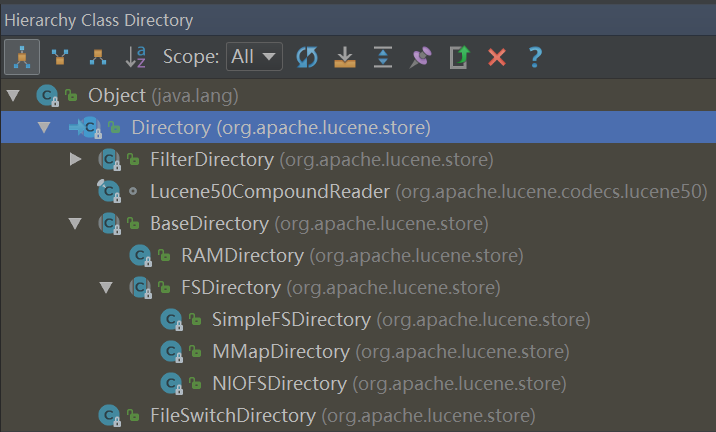
1、Directory是个抽象类,其子类的BaseDirectory也是抽象类。
BaseDirectory的子类:
RAMDirectory(普通类):把索引创建到内存
FSDirectory(抽象类):把索引创建到磁盘
本文使用FSDirectory。通过FSDirectory的静态方法open可以创建一个目录。看看open方法:
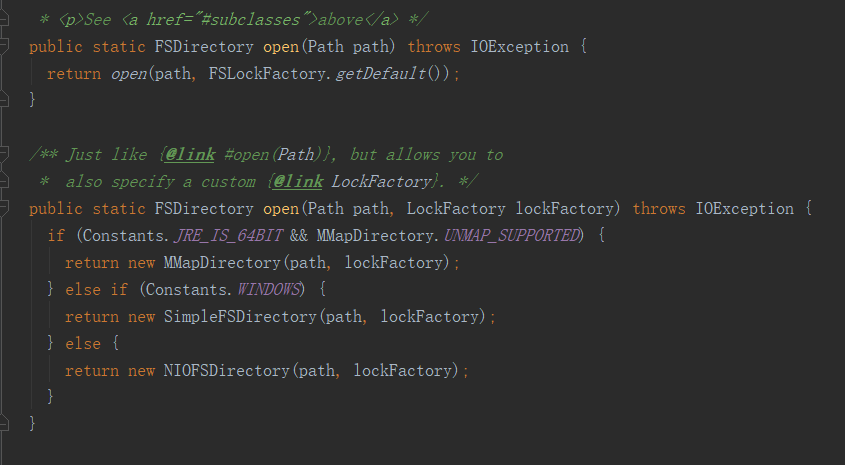
FSDirectory.open方法返回FSDirectory抽象类的其中一个子类,这里根据情况会返回一个MMapDirectory。
3、Lucene常用查询的Query抽象类
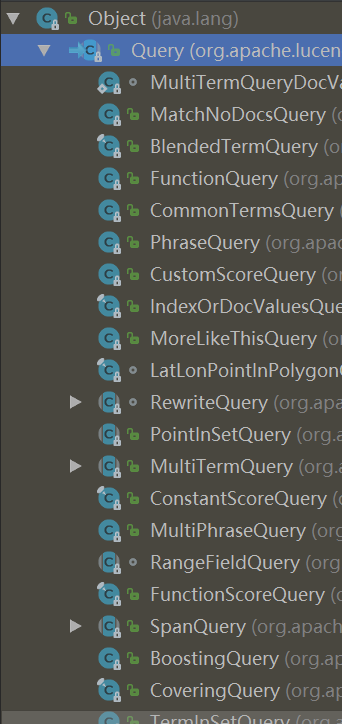
1、抽象类Query有很多子类如上图,这里只列举常用的类。
1、PhraseQuery类:用于查询英文单词,用法如下。
        PhraseQuery.Builder builder = new PhraseQuery.Builder();
        builder.add(new Term("content", "tom"));
        builder.add(new Term("content", "is"));
        builder.add(new Term("content", "student"));
        System.out.println("查询语句 = " + builder.build());
        TopDocs topDocs = indexSearcher.search(builder.build(), 100);
2、WildcardQuery类:用于通配符查询,用法如下。
        WildcardQuery wildcardQuery = new WildcardQuery(new Term("content", "中心小学*"));
        System.out.println("查询语句 = " + wildcardQuery);
        TopDocs topDocs = indexSearcher.search(wildcardQuery, 100);
3、FuzzyQuery类:用于模糊查询,用法如下:
        FuzzyQuery fuzzyQuery = new FuzzyQuery(new Term("name", "王健林"), 2, 3);
        System.out.println("查询语句 = " + fuzzyQuery);
        TopDocs topDocs = indexSearcher.search(fuzzyQuery, 100);
这里的FuzzyQuery使用了3个参数的构造函数:
  public FuzzyQuery(Term term, int maxEdits, int prefixLength) {
    this(term, maxEdits, prefixLength, defaultMaxExpansions, defaultTranspositions);
  }
maxEdits:最大编辑距离(该参数范围是0-2,默认值是2,编辑指:新增一个字符、修改一个字符、删除一个字符)
举个例子,上面的模糊查询参数是“王健林”,maxEdits=2,那么将匹配下列内容:
1、王健林首富(最大编辑距离maxEdits=2,在“王健林”后面做2次新增字符分别是“首”、“富”)
2、王力宏(最大编辑距离maxEdits=2,把“健”、“林”分别修改为“力”、“宏”)
3、王(最大编辑距离maxEdits=2,把“健”、“林”分别删除)
4、王五(最大编辑距离maxEdits=2,把“健”修改为“五”,把“林”删除)
等等,可以看出最大编辑距离maxEdits=2,那么将随机组合“增、删、改”字符2次后是否匹配。
prefixLength:前缀长度(默认值是0,当prefixLength不为0则表示前面多少个字符必须要匹配)
举个例子:
FuzzyQuery fuzzyQuery = new FuzzyQuery(new Term("name", "王健林"), 2, 2):那么必须匹配“王健”开头的内容,
FuzzyQuery fuzzyQuery = new FuzzyQuery(new Term("name", "王健林"), 2, 3):那么必须匹配“王健林”开头的内容,但是无法匹配“王健林”这条记录,如果知道的话也告诉我为什么。
4、BooleanQuery类:用于组合查询,用法如下:
        BooleanQuery.Builder builder = new BooleanQuery.Builder();
        builder.add(new TermQuery(new Term("content", "首富")), BooleanClause.Occur.MUST);
        builder.add(new TermQuery(new Term("content", "影院")), BooleanClause.Occur.MUST);
        System.out.println("查询语句 = " + builder.build());
        TopDocs topDocs = indexSearcher.search(builder.build(), 100);
Occur是个枚举有以下值:
MUST、MUST_NOT、FILTER、SHOULD
5、IntPoint、LongPoint、FloatPoint、DoublePoint类:用于数值范围查询,用法如下:
newRangeQuery:整型范围查询
newExactQuery:整型精确查询
        Query query = null;
        query = IntPoint.newRangeQuery("number", 1, 10);//范围查询
        query = IntPoint.newExactQuery("number", 5);//精确查询
        System.out.println("查询语句 = " + query);
        TopDocs topDocs = indexSearcher.search(query, 20);
6、TermQuery类:用于词条查询,用法如下:
        Query query = null;
        query = new TermQuery(new Term("name", "张三"));
        System.out.println("查询语句 = " + query);
        TopDocs topDocs = indexSearcher.search(query, 20);
4、Lucene常用的Field
TextField:Reader或String索引全文搜索 StringField:将String逐字索引作为单个标记 IntPoint:int为精确/范围查询建立索引。 LongPoint:long为精确/范围查询建立索引。 FloatPoint:float为精确/范围查询建立索引。 DoublePoint:double为精确/范围查询建立索引。 SortedDocValuesField:byte[]逐列索引,用于排序/分面 SortedSetDocValuesField:SortedSet<byte[]>逐列索引,用于排序/分面 NumericDocValuesField:long逐列索引,用于排序/分面 SortedNumericDocValuesField:SortedSet<long>逐列索引,用于排序/分面 StoredField:仅用于在摘要结果中检索的存储值 常用的Field如下: TextField:索引、分词 StringField:索引 StoredField:存储值
        Document document = new Document();
        //创建StringField,使用Field.Store.YES枚举表明要存储该值
        document.add(new StringField("name", "王健林", Field.Store.YES));
        //创建StringField,使用Field.Store.YES枚举表明要存储该值
        document.add(new StringField("no", "1006", Field.Store.YES));
        //创建IntPoint
        document.add(new IntPoint("number", 6));
        //若要存储该IntPoint的值,则添加同名的StoredField
        document.add(new StoredField("number", 6));
        //若要排序该IntPoint的值,则添加同名的SortedNumericDocValuesField
        document.add(new SortedNumericDocValuesField("number", 6L));
        //创建TextField,使用Field.Store.YES枚举表明要存储该值
        document.add(new TextField("content", "王健林是万达集团的董事长,下有万达影院、万达酒店、万达广场等产业", Field.Store.YES));
5、Lucene常用的Analyzer(分词器)
1、StandardAnalyzer分词器
当你运行文章开头的demo,查询字段为"content",查询的值为"班长",实际上应该查到document3这个对象的数据,因为已经添加了类型为TextField的字段。并且根据上面说的TextField是创建分词,创建索引。创建分词后,"班长"这个词应该可以查询的到。为什么查询不到数据?这里和分词器有关。
Document document3 = new Document(); document3.add(new StringField("name", "王五", Field.Store.YES)); document3.add(new StringField("no", "1003", Field.Store.YES)); document3.add(new TextField("content", "南宁市中心小学的王五在班级里是个班长", Field.Store.YES)); indexWriter.addDocument(document3); 文章开头的demo用的分词器是StandardAnalyzer分词器,看名字就知道是标准分词器。
Analyzer analyzer = new StandardAnalyzer();
现在把这个分词器进行上述的"南宁市中心小学的王五在班级里是个班长"这段文本进行分词,看看结果。
    public static void main(String[] args) throws IOException {
        StandardAnalyzer();
    }

    public static void StandardAnalyzer() throws IOException {
        String text = "南宁市中心小学的王五在班级里是个班长";
        Analyzer analyzer = new StandardAnalyzer();
        TokenStream tokenStream= analyzer.tokenStream("word",text);
        tokenStream.reset();
        CharTermAttribute charTermAttribute=tokenStream.addAttribute(CharTermAttribute.class);
        System.out.println("==========StandardAnalyzer分词开始==========");
        while(tokenStream.incrementToken()){
            System.out.print(String.format("[%s] ", charTermAttribute.toString()));
        }
        System.out.println("");
        System.out.println("==========StandardAnalyzer分词结束==========");
    }
结果如下:
==========StandardAnalyzer分词开始==========
[南] [宁] [市] [中] [心] [小] [学] [的] [王] [五] [在] [班] [级] [里] [是] [个] [班] [长]
==========StandardAnalyzer分词结束==========
可以看到,StandardAnalyzer这个标准分词器是一个字符一个字符来分词,所以当查询"班长"这个词的时候查不到。
2、IKAnalyzer分词器(开源,github搜索)
这是个开源的分词器(github地址:https://github.com/wks/ik-analyzer),现在来看看这个分词器的结果。
    public static void IKAnalyzer() throws IOException {
        String text = "南宁市中心小学的王五在班级里是个班长";
        Analyzer analyzer = new IKAnalyzer();
        TokenStream tokenStream= analyzer.tokenStream("word",text);
        tokenStream.reset();
        CharTermAttribute charTermAttribute=tokenStream.addAttribute(CharTermAttribute.class);
        System.out.println("==========IKAnalyzer分词开始==========");
        while(tokenStream.incrementToken()){
            System.out.print(String.format("[%s] ", charTermAttribute.toString()));
        }
        System.out.println("");
        System.out.println("==========IKAnalyzer分词结束==========");
    }
结果如下:
==========IKAnalyzer分词开始==========
[南宁市] [南宁] [市中心] [中心小学] [中心] [小学] [的] [王] [五] [在] [班级] [里] [是] [个] [班长]
==========IKAnalyzer分词结束==========
可以看到这个IKAnalyzer分词器能识别词语来分词。所以只需要对文章开头的demo代码把StandardAnalyzer换成IKAnalyzer。
        Directory directory = FSDirectory.open(Paths.get(path));
        //这里原来是StandardAnalyzer分词器,换为IKAnalyzer分词器
        Analyzer analyzer = new IKAnalyzer();
        IndexWriterConfig config = new IndexWriterConfig(analyzer);
        config.setOpenMode(IndexWriterConfig.OpenMode.CREATE);
        IndexWriter indexWriter = new IndexWriter(directory, config);
这样就能查询到文章开头的demo的数据。
Java Lucene入门的更多相关文章
- java秀发入门到优雅秃头路线导航【教学视频+博客+书籍整理】
目录 一.Java基础 二.关于JavaWeb基础 三.关于数据库 四.关于ssm框架 五.关于数据结构与算法 六.关于开发工具idea 七.关于项目管理工具Mawen.Git.SVN.Gradle. ...
- 自学 Java 怎么入门
自学 Java 怎么入门? 595赞同反对,不会显示你的姓名 给你推荐一个写得非常用心的Java基础教程:java-basic | 天码营 这个教程将Java的入门基础知识贯穿在一个实例中,逐 ...
- 《JAVA 从入门到精通》 - 正式走向JAVA项目开发的路
以前很多时候会开玩笑,说什么,三天学会PHP,七天精通Nodejs,xx天学会xx ... 一般来说,这样子说的多半都带有一点讽刺的意味,我也基本上从不相信什么快速入门.我以前在学校的时候自觉过很多门 ...
- Java NIO入门(二):缓冲区内部细节
Java NIO 入门(二)缓冲区内部细节 概述 本文将介绍 NIO 中两个重要的缓冲区组件:状态变量和访问方法 (accessor). 状态变量是前一文中提到的"内部统计机制"的 ...
- 完成《Java编程入门》初稿
Java编程入门 现在的运维工程师不但要懂得集合网络.系统管理而且要和开发人员一起调试系统,社会上也需要"复合性"的运维人员,所以需要做运维的也要懂一些开发,知道软件系统接口的调试 ...
- 三、Android NDK编程预备之Java jni入门创建C/C++共享库
转自: http://www.eoeandroid.com/thread-264971-1-1.html 应网友回复,答应在两天前要出一篇创建C/C++共享库的,但由于清明节假期,跟朋友出去游玩,丢手 ...
- 二、Android NDK编程预备之Java jni入门Hello World
转自: http://www.eoeandroid.com/forum.php?mod=viewthread&tid=264543&fromuid=588695 昨天已经简要介绍了J ...
- C功底挑战Java菜鸟入门概念干货(一)
一.认识Java 1.Java 程序比较特殊,它必须先经过编译,然后再利用解释的方式来运行. 2.Byte-codes 最大的好处是——可越平台运行,可让“一次编写,处处运行”成为可能. 3.使用 ...
- C功底挑战Java菜鸟入门概念干货(二)
(接上篇博文:C功底挑战Java菜鸟入门概念干货(一)) 一.Java面向对象程序设计-类的基本形式 1.“类”是把事物的数据与相关的功能封装在一起,形成的一种特殊结构,用以表达对真实世界的一种抽象概 ...
随机推荐
- javascript入门篇(二)
对 象 对象:一组元素的集合 声明方式:字面量方式 var O = { } 构造函数方式:var obj = new object(); 为对象添加新属性,如:o.name = 'jerry' ...
- Unlink——2016 ZCTF note2解析
简介 Unlink是经典的堆漏洞,刚看到这个漏洞不知道如何实现任意代码执行,所以找了一个CTF题,发现还有一些细节的地方没有讲的很清楚,题目在这里.自己也动手写一遍,体验一下 题目描述 首先,我们先分 ...
- ASP.net core 使用UEditor.Core 实现 ueditor 上传功能
ASP.net core 使用UEditor.Core 实现 ueditor 上传功能 首先通过nuget 引用UEditor.Core,作者github:https://github.com/bai ...
- MEF 基础简介 一
前言 小编菜鸟级别的程序员最近感慨颇多,经历了三五春秋深知程序路途遥远而我沧海一粟看不到的尽头到不了的终点何处是我停留的驿站.说了段废话下面进入正题吧! 什么是MEF? MEF:全称Managed E ...
- windows10 php7安装mongodb 扩展
系统环境:win10家庭版Phpstudy2016 php7 1. 打开phpinfo 查看 nts(非线程) 还是 ts (线程),然后查看操作位数 注: 86 等于 32 位 ,和你的windo ...
- Beanstalkd,zeromq,rabbitmq的区别
1).rabbitmq(功能强大,管理应用也完善,不过也比较重量级)2).zeromq(从rabbitmq出来的一个小而快速的队列,基本是目前最快的队列机制,自身支持多种模式,可以对各个模式进行自己组 ...
- Java设计模式——适配器模式(Adapter)
目的:把源类型适配为目标类型,以适应客户端(Client)的需求:此处我们把目标接口的调用方视为客户端 使用场景:需要对类型进行由源类型到目标类型转换的场景中 前置条件:已有客户端 //Client ...
- #WEB安全基础 : HTML/CSS | 0x10.1更多表单
来认识更多的表单吧,增加知识面 我只创建了一个index.html帮助你认识它们 以下是代码 <!DOCTYPE html> <html> <head> <m ...
- 商汤科技汤晓鸥:其实不存在AI行业,唯一存在的是“AI+“行业
https://mp.weixin.qq.com/s/bU-TFh8lBAF5L0JrWEGgUQ 9 月 17 日,2018 世界人工智能大会在上海召开,在上午主论坛大会上,商汤科技联合创始人汤晓鸥 ...
- arcgis for js学习之Draw类
arcgis for js学习之Draw类 <!DOCTYPE html> <html> <head> <meta http-equiv="Cont ...