
Java Lucene入门
1、lucene版本:7.2.1
pom文件:
<?xml version="1.0" encoding="UTF-8"?>
<project xmlns="http://maven.apache.org/POM/4.0.0" xmlns:xsi="http://www.w3.org/2001/XMLSchema-instance"
    xsi:schemaLocation="http://maven.apache.org/POM/4.0.0 http://maven.apache.org/xsd/maven-4.0.0.xsd">
    <modelVersion>4.0.0</modelVersion>

    <groupId>com.example</groupId>
    <artifactId>demo-lucene</artifactId>
    <version>0.0.1-SNAPSHOT</version>
    <packaging>war</packaging>

    <name>demo-lucene</name>
    <description>Demo project for Spring Boot</description>

    <parent>
        <groupId>org.springframework.boot</groupId>
        <artifactId>spring-boot-starter-parent</artifactId>
        <version>2.1.0.RELEASE</version>
        <relativePath/> <!-- lookup parent from repository -->
    </parent>

    <properties>
        <project.build.sourceEncoding>UTF-8</project.build.sourceEncoding>
        <project.reporting.outputEncoding>UTF-8</project.reporting.outputEncoding>
        <java.version>1.8</java.version>
    </properties>

    <dependencies>
        <dependency>
            <groupId>org.springframework.boot</groupId>
            <artifactId>spring-boot-starter-web</artifactId>
        </dependency>

        <dependency>
            <groupId>org.springframework.boot</groupId>
            <artifactId>spring-boot-starter-test</artifactId>
            <scope>test</scope>
        </dependency>

        <!-- Lucene核心库 -->
        <dependency>
            <groupId>org.apache.lucene</groupId>
            <artifactId>lucene-core</artifactId>
            <version>7.2.1</version>
        </dependency>
        <!-- Lucene解析库 -->
        <dependency>
            <groupId>org.apache.lucene</groupId>
            <artifactId>lucene-queryparser</artifactId>
            <version>7.2.1</version>
        </dependency>
        <!-- Lucene附加的分析库 -->
        <dependency>
            <groupId>org.apache.lucene</groupId>
            <artifactId>lucene-analyzers-common</artifactId>
            <version>7.2.1</version>
        </dependency>
    </dependencies>

    <build>
        <plugins>
            <plugin>
                <groupId>org.springframework.boot</groupId>
                <artifactId>spring-boot-maven-plugin</artifactId>
            </plugin>
        </plugins>
    </build>

</project>
2、代码如下:
package com.example.demo;

import org.apache.lucene.analysis.Analyzer;
import org.apache.lucene.analysis.standard.StandardAnalyzer;
import org.apache.lucene.document.Document;
import org.apache.lucene.document.Field;
import org.apache.lucene.document.StringField;
import org.apache.lucene.document.TextField;
import org.apache.lucene.index.DirectoryReader;
import org.apache.lucene.index.IndexWriter;
import org.apache.lucene.index.IndexWriterConfig;
import org.apache.lucene.index.Term;
import org.apache.lucene.search.*;
import org.apache.lucene.store.Directory;
import org.apache.lucene.store.FSDirectory;

import java.io.IOException;
import java.nio.file.Paths;

/**
 * Created by 1 on 2018/11/20.
 */
public class DemoLucene {

    public static void main(String[] args) throws IOException {
        String path = "D:\\lucene\\index";

        Directory directory = FSDirectory.open(Paths.get(path));
        Analyzer analyzer = new StandardAnalyzer();
        IndexWriterConfig config = new IndexWriterConfig(analyzer);
        config.setOpenMode(IndexWriterConfig.OpenMode.CREATE);
        IndexWriter indexWriter = new IndexWriter(directory, config);

        Document document1 = new Document();
        document1.add(new StringField("name", "张三", Field.Store.YES));
        document1.add(new StringField("no", "1001", Field.Store.YES));
        document1.add(new TextField("content", "中心小学的张三是个喜欢学习的学生", Field.Store.YES));
        indexWriter.addDocument(document1);

        Document document2 = new Document();
        document2.add(new StringField("name", "李四", Field.Store.YES));
        document2.add(new StringField("no", "1002", Field.Store.YES));
        document2.add(new TextField("content", "中心小学的李四是个期末考试成绩很好的学生", Field.Store.YES));
        indexWriter.addDocument(document2);

        Document document3 = new Document();
        document3.add(new StringField("name", "王五", Field.Store.YES));
        document3.add(new StringField("no", "1003", Field.Store.YES));
        document3.add(new TextField("content", "南宁市中心小学的王五在班级里是个班长", Field.Store.YES));
        indexWriter.addDocument(document3);

        indexWriter.close();

        DirectoryReader directoryReader = DirectoryReader.open(directory);
        IndexSearcher indexSearcher = new IndexSearcher(directoryReader);
        Query query = new TermQuery(new Term("content", "班长"));
        System.out.println("查询语句 = " + query);
        TopDocs topDocs = indexSearcher.search(query, 100);
        ScoreDoc[] scoreDocs = topDocs.scoreDocs;
        if(scoreDocs.length == 0){
            System.out.println("未找到数据");
        }else{
            for (int i = 0; i < scoreDocs.length; i++) {
                Document docResult = indexSearcher.doc(scoreDocs[i].doc);
                System.out.println(String.format("======================  第%d条  ======================", i + 1));
                System.out.println("name:" + docResult.get("name"));
                System.out.println("no:" + docResult.get("no"));
                System.out.println("content:" + docResult.get("content"));
            }
        }

    }

}
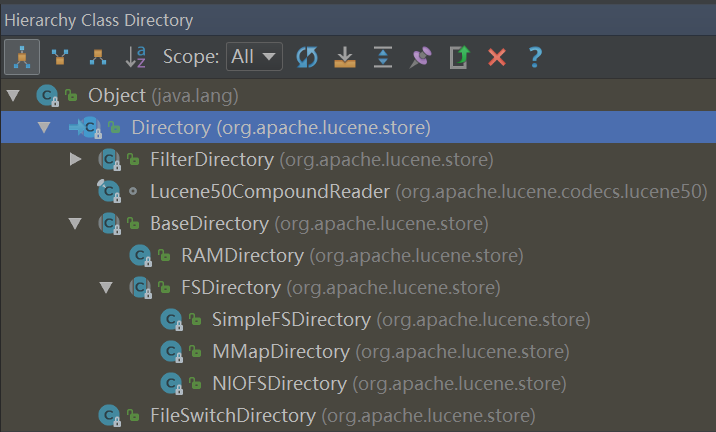
1、Directory是个抽象类,其子类的BaseDirectory也是抽象类。
BaseDirectory的子类:
RAMDirectory(普通类):把索引创建到内存
FSDirectory(抽象类):把索引创建到磁盘
本文使用FSDirectory。通过FSDirectory的静态方法open可以创建一个目录。看看open方法:
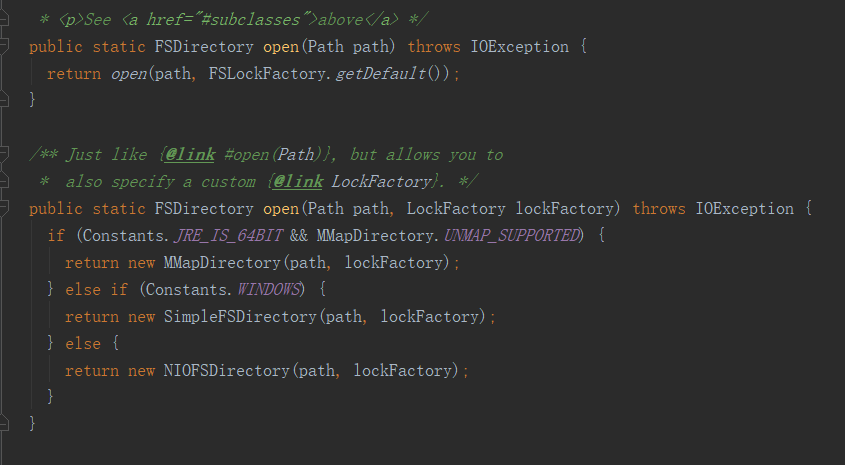
FSDirectory.open方法返回FSDirectory抽象类的其中一个子类,这里根据情况会返回一个MMapDirectory。
3、Lucene常用查询的Query抽象类
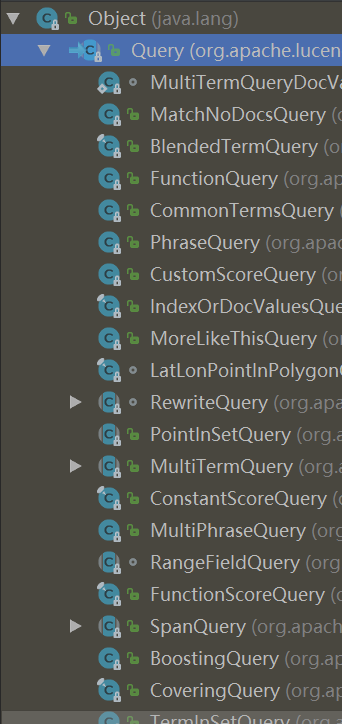
1、抽象类Query有很多子类如上图,这里只列举常用的类。
1、PhraseQuery类:用于查询英文单词,用法如下。
        PhraseQuery.Builder builder = new PhraseQuery.Builder();
        builder.add(new Term("content", "tom"));
        builder.add(new Term("content", "is"));
        builder.add(new Term("content", "student"));
        System.out.println("查询语句 = " + builder.build());
        TopDocs topDocs = indexSearcher.search(builder.build(), 100);
2、WildcardQuery类:用于通配符查询,用法如下。
        WildcardQuery wildcardQuery = new WildcardQuery(new Term("content", "中心小学*"));
        System.out.println("查询语句 = " + wildcardQuery);
        TopDocs topDocs = indexSearcher.search(wildcardQuery, 100);
3、FuzzyQuery类:用于模糊查询,用法如下:
        FuzzyQuery fuzzyQuery = new FuzzyQuery(new Term("name", "王健林"), 2, 3);
        System.out.println("查询语句 = " + fuzzyQuery);
        TopDocs topDocs = indexSearcher.search(fuzzyQuery, 100);
这里的FuzzyQuery使用了3个参数的构造函数:
  public FuzzyQuery(Term term, int maxEdits, int prefixLength) {
    this(term, maxEdits, prefixLength, defaultMaxExpansions, defaultTranspositions);
  }
maxEdits:最大编辑距离(该参数范围是0-2,默认值是2,编辑指:新增一个字符、修改一个字符、删除一个字符)
举个例子,上面的模糊查询参数是“王健林”,maxEdits=2,那么将匹配下列内容:
1、王健林首富(最大编辑距离maxEdits=2,在“王健林”后面做2次新增字符分别是“首”、“富”)
2、王力宏(最大编辑距离maxEdits=2,把“健”、“林”分别修改为“力”、“宏”)
3、王(最大编辑距离maxEdits=2,把“健”、“林”分别删除)
4、王五(最大编辑距离maxEdits=2,把“健”修改为“五”,把“林”删除)
等等,可以看出最大编辑距离maxEdits=2,那么将随机组合“增、删、改”字符2次后是否匹配。
prefixLength:前缀长度(默认值是0,当prefixLength不为0则表示前面多少个字符必须要匹配)
举个例子:
FuzzyQuery fuzzyQuery = new FuzzyQuery(new Term("name", "王健林"), 2, 2):那么必须匹配“王健”开头的内容,
FuzzyQuery fuzzyQuery = new FuzzyQuery(new Term("name", "王健林"), 2, 3):那么必须匹配“王健林”开头的内容,但是无法匹配“王健林”这条记录,如果知道的话也告诉我为什么。
4、BooleanQuery类:用于组合查询,用法如下:
        BooleanQuery.Builder builder = new BooleanQuery.Builder();
        builder.add(new TermQuery(new Term("content", "首富")), BooleanClause.Occur.MUST);
        builder.add(new TermQuery(new Term("content", "影院")), BooleanClause.Occur.MUST);
        System.out.println("查询语句 = " + builder.build());
        TopDocs topDocs = indexSearcher.search(builder.build(), 100);
Occur是个枚举有以下值:
MUST、MUST_NOT、FILTER、SHOULD
5、IntPoint、LongPoint、FloatPoint、DoublePoint类:用于数值范围查询,用法如下:
newRangeQuery:整型范围查询
newExactQuery:整型精确查询
        Query query = null;
        query = IntPoint.newRangeQuery("number", 1, 10);//范围查询
        query = IntPoint.newExactQuery("number", 5);//精确查询
        System.out.println("查询语句 = " + query);
        TopDocs topDocs = indexSearcher.search(query, 20);
6、TermQuery类:用于词条查询,用法如下:
        Query query = null;
        query = new TermQuery(new Term("name", "张三"));
        System.out.println("查询语句 = " + query);
        TopDocs topDocs = indexSearcher.search(query, 20);
4、Lucene常用的Field
TextField:Reader或String索引全文搜索 StringField:将String逐字索引作为单个标记 IntPoint:int为精确/范围查询建立索引。 LongPoint:long为精确/范围查询建立索引。 FloatPoint:float为精确/范围查询建立索引。 DoublePoint:double为精确/范围查询建立索引。 SortedDocValuesField:byte[]逐列索引,用于排序/分面 SortedSetDocValuesField:SortedSet<byte[]>逐列索引,用于排序/分面 NumericDocValuesField:long逐列索引,用于排序/分面 SortedNumericDocValuesField:SortedSet<long>逐列索引,用于排序/分面 StoredField:仅用于在摘要结果中检索的存储值 常用的Field如下: TextField:索引、分词 StringField:索引 StoredField:存储值
        Document document = new Document();
        //创建StringField,使用Field.Store.YES枚举表明要存储该值
        document.add(new StringField("name", "王健林", Field.Store.YES));
        //创建StringField,使用Field.Store.YES枚举表明要存储该值
        document.add(new StringField("no", "1006", Field.Store.YES));
        //创建IntPoint
        document.add(new IntPoint("number", 6));
        //若要存储该IntPoint的值,则添加同名的StoredField
        document.add(new StoredField("number", 6));
        //若要排序该IntPoint的值,则添加同名的SortedNumericDocValuesField
        document.add(new SortedNumericDocValuesField("number", 6L));
        //创建TextField,使用Field.Store.YES枚举表明要存储该值
        document.add(new TextField("content", "王健林是万达集团的董事长,下有万达影院、万达酒店、万达广场等产业", Field.Store.YES));
5、Lucene常用的Analyzer(分词器)
1、StandardAnalyzer分词器
当你运行文章开头的demo,查询字段为"content",查询的值为"班长",实际上应该查到document3这个对象的数据,因为已经添加了类型为TextField的字段。并且根据上面说的TextField是创建分词,创建索引。创建分词后,"班长"这个词应该可以查询的到。为什么查询不到数据?这里和分词器有关。
Document document3 = new Document(); document3.add(new StringField("name", "王五", Field.Store.YES)); document3.add(new StringField("no", "1003", Field.Store.YES)); document3.add(new TextField("content", "南宁市中心小学的王五在班级里是个班长", Field.Store.YES)); indexWriter.addDocument(document3); 文章开头的demo用的分词器是StandardAnalyzer分词器,看名字就知道是标准分词器。
Analyzer analyzer = new StandardAnalyzer();
现在把这个分词器进行上述的"南宁市中心小学的王五在班级里是个班长"这段文本进行分词,看看结果。
    public static void main(String[] args) throws IOException {
        StandardAnalyzer();
    }

    public static void StandardAnalyzer() throws IOException {
        String text = "南宁市中心小学的王五在班级里是个班长";
        Analyzer analyzer = new StandardAnalyzer();
        TokenStream tokenStream= analyzer.tokenStream("word",text);
        tokenStream.reset();
        CharTermAttribute charTermAttribute=tokenStream.addAttribute(CharTermAttribute.class);
        System.out.println("==========StandardAnalyzer分词开始==========");
        while(tokenStream.incrementToken()){
            System.out.print(String.format("[%s] ", charTermAttribute.toString()));
        }
        System.out.println("");
        System.out.println("==========StandardAnalyzer分词结束==========");
    }
结果如下:
==========StandardAnalyzer分词开始==========
[南] [宁] [市] [中] [心] [小] [学] [的] [王] [五] [在] [班] [级] [里] [是] [个] [班] [长]
==========StandardAnalyzer分词结束==========
可以看到,StandardAnalyzer这个标准分词器是一个字符一个字符来分词,所以当查询"班长"这个词的时候查不到。
2、IKAnalyzer分词器(开源,github搜索)
这是个开源的分词器(github地址:https://github.com/wks/ik-analyzer),现在来看看这个分词器的结果。
    public static void IKAnalyzer() throws IOException {
        String text = "南宁市中心小学的王五在班级里是个班长";
        Analyzer analyzer = new IKAnalyzer();
        TokenStream tokenStream= analyzer.tokenStream("word",text);
        tokenStream.reset();
        CharTermAttribute charTermAttribute=tokenStream.addAttribute(CharTermAttribute.class);
        System.out.println("==========IKAnalyzer分词开始==========");
        while(tokenStream.incrementToken()){
            System.out.print(String.format("[%s] ", charTermAttribute.toString()));
        }
        System.out.println("");
        System.out.println("==========IKAnalyzer分词结束==========");
    }
结果如下:
==========IKAnalyzer分词开始==========
[南宁市] [南宁] [市中心] [中心小学] [中心] [小学] [的] [王] [五] [在] [班级] [里] [是] [个] [班长]
==========IKAnalyzer分词结束==========
可以看到这个IKAnalyzer分词器能识别词语来分词。所以只需要对文章开头的demo代码把StandardAnalyzer换成IKAnalyzer。
        Directory directory = FSDirectory.open(Paths.get(path));
        //这里原来是StandardAnalyzer分词器,换为IKAnalyzer分词器
        Analyzer analyzer = new IKAnalyzer();
        IndexWriterConfig config = new IndexWriterConfig(analyzer);
        config.setOpenMode(IndexWriterConfig.OpenMode.CREATE);
        IndexWriter indexWriter = new IndexWriter(directory, config);
这样就能查询到文章开头的demo的数据。
Java Lucene入门的更多相关文章
- java秀发入门到优雅秃头路线导航【教学视频+博客+书籍整理】
目录 一.Java基础 二.关于JavaWeb基础 三.关于数据库 四.关于ssm框架 五.关于数据结构与算法 六.关于开发工具idea 七.关于项目管理工具Mawen.Git.SVN.Gradle. ...
- 自学 Java 怎么入门
自学 Java 怎么入门? 595赞同反对,不会显示你的姓名 给你推荐一个写得非常用心的Java基础教程:java-basic | 天码营 这个教程将Java的入门基础知识贯穿在一个实例中,逐 ...
- 《JAVA 从入门到精通》 - 正式走向JAVA项目开发的路
以前很多时候会开玩笑,说什么,三天学会PHP,七天精通Nodejs,xx天学会xx ... 一般来说,这样子说的多半都带有一点讽刺的意味,我也基本上从不相信什么快速入门.我以前在学校的时候自觉过很多门 ...
- Java NIO入门(二):缓冲区内部细节
Java NIO 入门(二)缓冲区内部细节 概述 本文将介绍 NIO 中两个重要的缓冲区组件:状态变量和访问方法 (accessor). 状态变量是前一文中提到的"内部统计机制"的 ...
- 完成《Java编程入门》初稿
Java编程入门 现在的运维工程师不但要懂得集合网络.系统管理而且要和开发人员一起调试系统,社会上也需要"复合性"的运维人员,所以需要做运维的也要懂一些开发,知道软件系统接口的调试 ...
- 三、Android NDK编程预备之Java jni入门创建C/C++共享库
转自: http://www.eoeandroid.com/thread-264971-1-1.html 应网友回复,答应在两天前要出一篇创建C/C++共享库的,但由于清明节假期,跟朋友出去游玩,丢手 ...
- 二、Android NDK编程预备之Java jni入门Hello World
转自: http://www.eoeandroid.com/forum.php?mod=viewthread&tid=264543&fromuid=588695 昨天已经简要介绍了J ...
- C功底挑战Java菜鸟入门概念干货(一)
一.认识Java 1.Java 程序比较特殊,它必须先经过编译,然后再利用解释的方式来运行. 2.Byte-codes 最大的好处是——可越平台运行,可让“一次编写,处处运行”成为可能. 3.使用 ...
- C功底挑战Java菜鸟入门概念干货(二)
(接上篇博文:C功底挑战Java菜鸟入门概念干货(一)) 一.Java面向对象程序设计-类的基本形式 1.“类”是把事物的数据与相关的功能封装在一起,形成的一种特殊结构,用以表达对真实世界的一种抽象概 ...
随机推荐
- PE知识复习之PE的两种状态
PE知识复习之PE的两种状态 一丶熟悉PE的整体结构 从下面依次网上看.可以得出PE结构 其中DOS头有DOS头结构 也就是 IMAGE_DOS_HEADER 关于结构体的各项属性.前边已经写过了.本 ...
- Spring Boot 2.x (一):HelloWorld
简介 本系列基于Spring Boot 2.1.0 的官方文档,除去了文档中一些冗余的东西,加上了一些自己的理解,意图是在于帮助更多初识Spring Boot的人来进行一次探险. 本系列建议具有Jav ...
- 第52章 撤销端点(Revocation Endpoint) - Identity Server 4 中文文档(v1.0.0)
此端点允许撤消访问令牌(仅限引用令牌)和刷新令牌.它实现了令牌撤销规范(RFC 7009). token 要撤销的令牌(必填) token_type_hint access_token或refresh ...
- redis分布式锁工具类
目录 (1)需要导入的包 (2)JedisUtil类 (3)jedisPool配置 (4)使用举例 (1)需要导入的包 <dependency> <groupId>redis. ...
- 开源IM项目-InChat登录接口设计与实现(基于Netty)
- 我的AI之路
本篇文章会列出在学习AI的路上所读的一些书籍或者其他一些相关内容,主要是用来监督自己,希望自己能够在AI学习上坚持下去. <机器学习 - 周志华> 绪论本章以西瓜为例子,简单的介绍了机器学 ...
- xxxx-xx-xx的时间的加减
<!DOCTYPE html> <html lang="zh-cn"> <head> <meta charset="UTF-8& ...
- json 按照字段分类
let arr = [ { Category:'A', Amount:, },{ Category:'B', Amount:, },{ Category:'A', Amount:, },{ Categ ...
- WEB前端开发记录PS常见操作
1.相邻2个层合并的快捷键方法:先选择上面的一个层,再按ctrl+e. 2.合并一个组内的多个层或组:在该组单击右键,选择“转换为智能对象”,然后可对其进行其它操作,比如:截取该组的为一张图片:ctr ...
- MongoDB:配置与安装
一.配置环境 1.1进行安装下载msi文件 需要注意的一点是,在安装过程中的图示界面不要勾选左下角“安装MongoDB可视化工具”.这是一个客户端管理工具,在后面会具体描述其功能.由于安装时间非常长, ...