
Bar 3D 和Pie 3D的统计图形
最近在做一个关于图形统计的界面,主要用到的是Dev控件ChartControl(功能很强大,能解决基本和复杂图形统计问题)。
ChartControl主要有Diagram、Series、Legend三个重要属性
diagram主要是用来控制图形X、Y、Z轴显示的样式和是否允许旋转以及旋转的角度和绕那个轴旋转。
series主要是用来给chartcontrol控件增加各种图形,图形的种类用viewtype来控制。
legend主要是用来说明图形的分类(可以说是图例)。
第一部分是以饼状图来分类显示各种情况所占的百分比:例如最近一段时间水果占销售总量的百分比是多少等等。
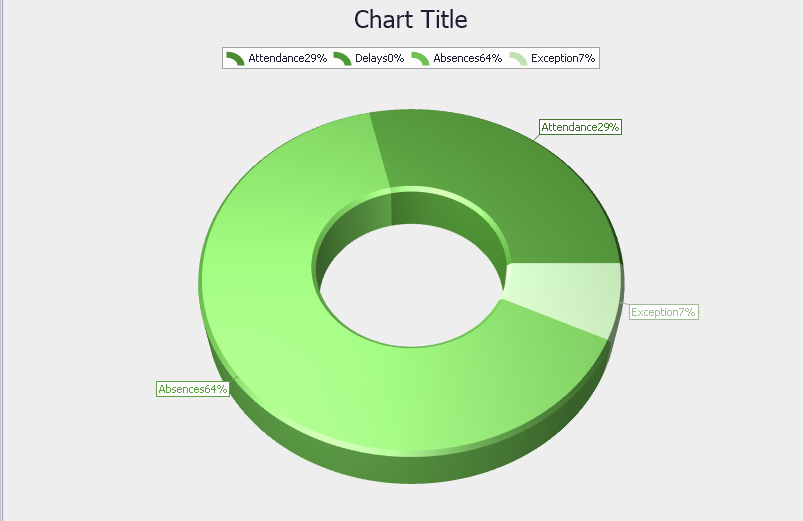
代码主要是先实例化chartcontrol,再对chartcontrol进行属性赋值最后进行绑定数据,代码如下:
 ChartControl staticsChart = new ChartControl();//create the chart control

        Series series1 = null;

        Series series2 = null;

        Series series3 = null;

        Series series4 = null;

/// <summary>

        /// config the format for doughnut3D

        /// </summary>

        private void AddDoughnut3D()

        {

            series1= new Series("Doughnut Sereis 1", ViewType.Doughnut3D);//add series1

            ChangeTheDouguntData();

            staticsChart.Series.Add(series1);

            series1.Label.TextPattern = "{A}{VP:0%}";

            ((Doughnut3DSeriesView)series1.View).HoleRadiusPercent=;

            //((Doughnut3DSeriesView)series1.View).ExplodedPoints.Add(series1.Points[0]);export diagram

            ((SimpleDiagram3D)staticsChart.Diagram).RotationType = RotationType.UseAngles;

            ((SimpleDiagram3D)staticsChart.Diagram).RotationAngleX = -;

            SetChartFormat();

        }

  private void SetChartFormat()

        {

            staticsChart.CrosshairOptions.ShowArgumentLabels = true;

            staticsChart.CrosshairOptions.ShowArgumentLine = true;

            staticsChart.CrosshairOptions.ShowCrosshairLabels = true;

            staticsChart.BackColor = Color.Transparent;

            staticsChart.PaletteBaseColorNumber = ;

            staticsChart.PaletteName = "Green";

            staticsChart.Titles.Clear();

            ChartTitle chartTitle1 = new ChartTitle();

            staticsChart.Text = "Data Graphics";

            staticsChart.Titles.Add(chartTitle1);

            staticsChart.Legend.UseCheckBoxes = false;

            staticsChart.Legend.Direction = LegendDirection.LeftToRight;

            staticsChart.Legend.AlignmentHorizontal = LegendAlignmentHorizontal.Center;

            staticsChart.Dock = DockStyle.Fill;

            this.pnlAddDiagram.Controls.Add(staticsChart);

        }

 private void ChangeTheDouguntData()

        {

            DataTable diagramData = GetAllEmployeeDaySummary();

            int attendanceNumber = ;

            int delaysNumber = ;

            int absencesNumber = ;

            int exceptionNumber = ;

            if (diagramData.Rows.Count > )

            {

                attendanceNumber = diagramData.Select("pc_code=2" + " and pc_results>0").Length;

                delaysNumber = diagramData.Select("pc_code=6" + " and pc_results>0").Length;

                absencesNumber = diagramData.Select("pc_code=8" + " and pc_results>0").Length;

                exceptionNumber = diagramData.Select("pc_code in(11,12) " + " and pc_results>0").Length;

            }

            series1.Points.AddRange(new SeriesPoint[]{

            new SeriesPoint("Attendance",attendanceNumber),

            new SeriesPoint("Delays",delaysNumber),

            new SeriesPoint("Absences",absencesNumber),

            new SeriesPoint("Exception",exceptionNumber)});

        }
第二部分是柱状图,思路和饼状图差不多,series设置的不一样。

实现代码:
  private void AddBar3DChart()

         {

             series1 = new Series("Attendance", ViewType.Bar3D);

             series2 = new Series("Delays", ViewType.Bar3D);

             series3 = new Series("Absences", ViewType.Bar3D);

             series4 = new Series("Exception", ViewType.Bar3D);

             if (cmbType.SelectedIndex == )

             {

                 ChangeEmployeeBarData();

             }

             else if (cmbType.SelectedIndex == )

             {

                 ChangeDepartmentBarData();

             }

             staticsChart.Series.AddRange(new Series[] { series1, series2, series3, series4 });

             //series1.Label.ResolveOverlappingMode = ResolveOverlappingMode.Default;

             #region set the series view's value

             Bar3DSeriesView myView1 = (Bar3DSeriesView)series1.View;

             myView1.BarDepthAuto = false;

             myView1.BarDepth = 0.2;

             myView1.BarWidth = 0.5;

             Bar3DSeriesView myView2 = (Bar3DSeriesView)series2.View;

             myView2.BarDepthAuto = false;

             myView2.BarDepth = 0.2;

             myView2.BarWidth = 0.5;

             Bar3DSeriesView myView3 = (Bar3DSeriesView)series3.View;

             myView3.BarDepthAuto = false;

             myView3.BarDepth = 0.2;

             myView3.BarWidth = 0.5;

             Bar3DSeriesView myView4 = (Bar3DSeriesView)series4.View;

             myView4.BarDepthAuto = false;

             myView4.BarDepth = 0.2;

             myView4.BarWidth = 0.5;

             #endregion

             XYDiagram3D myDiagram = (XYDiagram3D)staticsChart.Diagram;

             myDiagram.RotationType = RotationType.UseAngles;

             myDiagram.RotationOrder = RotationOrder.XYZ;

             myDiagram.RotationAngleX = ;

             myDiagram.RotationAngleY = ;

             myDiagram.RotationAngleZ = ;

             myDiagram.RuntimeScrolling = true;

             SetChartFormat();

         }

 private void ChangeDepartmentBarData()

         {

             List<Employee> empList = treeModule.CheckedEmps;

             List<Department> depList = treeModule.CheckedDepartment;

             DateTime fromDate = dteFromDate.DateTime;

             DateTime endDate = dteEndDate.DateTime;

             List<DaySummary> dsList = new DaySummaryBLL().GetEmployeesDailySummary(empList, fromDate, endDate);

             List<Paycode> paycodeList = new PaycodeBLL().GetMainFields();

             var dsPaycodeList = from ds in dsList

                                 join p in paycodeList on ds.paycode.id equals p.id

                                 where ds.pc_results >

                                 orderby ds.employee.id ascending, ds.att_date descending

                                 select new { ID = ds.employee.id, Minutes = ds.pc_results, Date = ds.att_date, Paycode = p.pc_code };

             foreach (Department dep in depList)

             {

                 int attendanceDay = ;

                 int delaysDay = ;

                 int absencesDay = ;

                 int ExceptionDay = ;

                 List<Employee> depEmpList = new EmployeeBLL().GetMainFields(string.Format("where e.department.id={0}", dep.id));

                 foreach (Employee employee in depEmpList)

                 {

                     attendanceDay += dsPaycodeList.Count(dspaycode => dspaycode.ID == employee.id && dspaycode.Paycode == );

                     delaysDay += dsPaycodeList.Count(dspaycode => dspaycode.ID == employee.id && dspaycode.Paycode == );

                     absencesDay += dsPaycodeList.Count(dspaycode => dspaycode.ID == employee.id && dspaycode.Paycode == );

                     ExceptionDay += dsPaycodeList.Count(dspaycode => dspaycode.ID == employee.id && dspaycode.Paycode == ) +

                         dsPaycodeList.Count(dspaycode => dspaycode.ID == employee.id && dspaycode.Paycode == );

                 }

                 series1.Points.Add(new SeriesPoint(dep.dept_name.ToString(), attendanceDay));

                 series2.Points.Add(new SeriesPoint(dep.dept_name.ToString(), delaysDay));

                 series3.Points.Add(new SeriesPoint(dep.dept_name.ToString(), absencesDay));

                 series4.Points.Add(new SeriesPoint(dep.dept_name.ToString(), ExceptionDay));

             }

         }
以上主要是提供一个思路怎么来解决这种图形统计类问题,以及怎么进行数据绑定,如有不对的地方请指出。
Bar 3D 和Pie 3D的统计图形的更多相关文章
- 4-Highcharts 3D图之3D普通饼图
<!DOCTYPE> <html lang='en'> <head> <title>4-Highcharts 3D图之3D普通饼图</title& ...
- 物联网3D,物业基础设施3D运维,使用webgl(three.js)与物联网设备结合案例。搭建智慧楼宇,智慧园区,3D园区、3D物业设施,3D楼宇管理系统——第八课
写在前面的废话: 很久没有更新文章了,这段时间一直忙于项目落地,虽然很忙,但是感觉没有总结,没有提炼的日子,总是让人感觉飘飘忽忽的. 所幸放下一些事,抽出一些时间,把近期的项目做一些整理与记录.也算是 ...
- Python制作统计图形
转载自:http://www.dcharm.com/?p=15 Python一般使用Matplotlib制作统计图形,用它自己的说法是‘让简单的事情简单,让复杂的事情变得可能’.(你说国外的“码农”咋 ...
- 3-Highcharts 3D图之3D柱状图分组叠堆3D图
<!DOCTYPE> <html lang='en'> <head> <title>3-Highcharts 3D图之3D柱状图分组叠堆3D图</ ...
- 2-Highcharts 3D图之3D柱状图带可调试倾斜角度
<!DOCTYPE> <html lang='en'> <head> <title>2-Highcharts 3D图之3D柱状图带可调试倾斜角度< ...
- 3D Analyst Tools(3D Analyst 工具)
3D Analyst 工具 工具里有又细分如下分类: 注:以下代码的参数需要另行配置,不能直接执行:Python2不支持中文变量! 1.3D 要素 # Process: 3D 内部 arcpy.Ins ...
- 如何用webgl(three.js)搭建一个3D库房,3D密集架,3D档案室(升级版)
很长一段时间没有写3D库房,3D密集架相关的效果文章了,刚好最近有相关项目落地,索性总结一下 与之前我写的3D库房密集架文章<如何用webgl(three.js)搭建一个3D库房,3D密集架,3 ...
- webgl(three.js)3D光伏,3D太阳能能源,3D智慧光伏、光伏发电、清洁能源三维可视化解决方案——第十六课
序: 能源是文明和发展的重要保障,人类命运不可避开的话题,无论是战争还是发展,都有它存在的身影.从石器时代到现代文明,人类的能源应用在进步,也在面临能源枯竭的危机与恐惧,而开发与应用可再生能源才是解决 ...
- 如何使用webgl(three.js)实现3D储能,3D储能站,3D智慧储能、储能柜的三维可视化解决方案——第十七课
前言 上节课我们讲了<3D光伏发电>,与之配套的就是能量存储 这节课我们主要讲讲储能,储能站,在分布式能源系统中起到调节用对电的尖峰平谷进行削峰填谷的作用.特别是小型储能站,更加灵活,因地 ...
随机推荐
- 使用Bootstrap + Vue.js实现 添加删除数据
界面首先需要引入bootstrap的css和bootstrap的js文件,还有vue.js和jQuery.js才可以看见效果. 这里提供bootstrap的在线文件给大家引用: <!-- 最新版 ...
- Docker存储驱动之AUFS简介
简介 AUFS是曾是Docker默认的首选存储驱动.它非常稳定.有很多真实场景的部署.很强的社区支持.它有以下主要优点: 极短的容器启动时间. 有效的存储利用率. 有效的内存利用率. 虽然如此,但由于 ...
- HttpClient 工具
什么是httpclient HTTP 协议可能是现在 Internet 上使用得最多.最重要的协议了,越来越多的 Java 应用程序需要直接通过 HTTP 协议来访问网络资源.虽然在 JDK 的 ja ...
- webpack 引用 jquery + bootstrap 报错解决
webpack 引用 jquery + bootstrap , error : jQuery is not defind 在webpack.dev.conf.js plugins[] 加入 new w ...
- 技术分享,学术报告presentation 常用的承接句
前言 现在即使是搞技术,做科研的,也需要在不同的场合,用ppt来做分享,做汇报,做总结. 如果国际会议,研讨会,或者在外企,国外工作,英文的presentation就更加必不可少.英语的提升需要大家从 ...
- JS邮箱验证-正则验证
<form act="">输入:<input type="text" name="qc" id="qc" ...
- java入门知识
Java特性 简单.面向对象.支持网络.解释性.健壮性.安全性.高性能.可移植(跨平台) Java特点 开源.免费.跨平台.面向对象 应用平台 JavaSE(standard edition)(c/s ...
- solr query的post方式
众所周知, solr 是通过 GET 方式来进行查询的. 那么solr 是否支持POST 方式进行查询呢? 通过一番调研,发现SOLR其实是支持POST方式进行查询的. 方式为: 使用form 方式提 ...
- ubuntu 虚拟机vm virtualbox 不能打开 win7
ubuntu某方面总有些不便,下载个虚拟机装个win7 但是第二次打开的时候就出现了安装是的场景: 原因很简单: 是因为安装了之后没有把win7的镜像文件移除,每次打开时会检测cd/dvd文件/(is ...
- @Required 注释应用于 bean 属性的 setter 方法,它表明受影响的 bean 属性在配置时必须放在 XML 配置文件中,否则容器就会抛出一个 BeanInitializationException 异常。
@Required 注释应用于 bean 属性的 setter 方法,它表明受影响的 bean 属性在配置时必须放在 XML 配置文件中,否则容器就会抛出一个 BeanInitializationEx ...