
Android中调用文件管理器并返回选中文件的路径
实际项目中经常需要调用文件管理器,选择下载路径或者上传的本地文件路径。今天就给大家做个demo示范该功能的实现过程。
一、实现效果预览
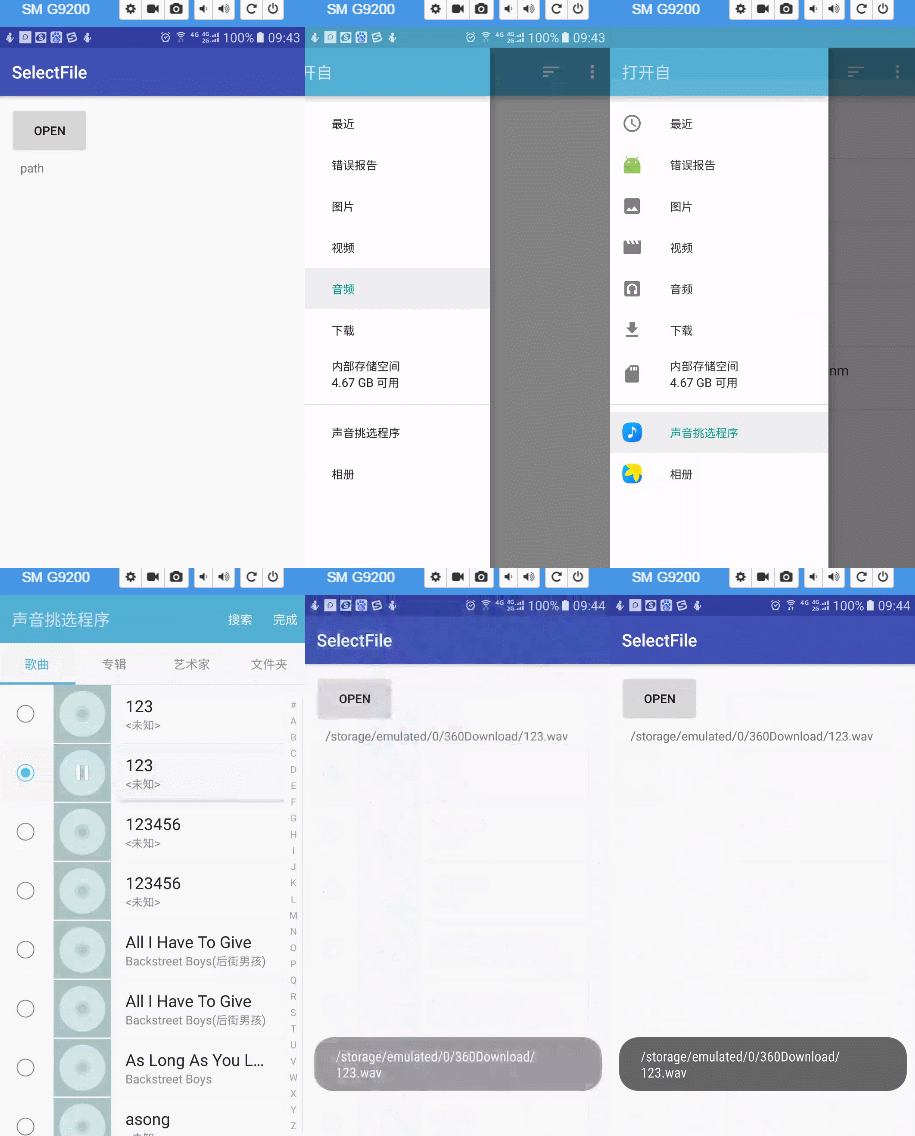
二、代码实现
 package com.panhouye.selectfile;

 import android.annotation.SuppressLint;

 import android.app.Activity;

 import android.content.ContentUris;

 import android.content.Context;

 import android.content.Intent;

 import android.database.Cursor;

 import android.net.Uri;

 import android.os.Build;

 import android.os.Bundle;

 import android.os.Environment;

 import android.provider.DocumentsContract;

 import android.provider.MediaStore;

 import android.support.v7.app.AppCompatActivity;

 import android.view.View;

 import android.widget.Button;

 import android.widget.TextView;

 import android.widget.Toast;

 public class MainActivity extends AppCompatActivity {

     TextView tv;

     @Override

     protected void onCreate(Bundle savedInstanceState) {

         super.onCreate(savedInstanceState);

         setContentView(R.layout.activity_main);

         Button btn = (Button) findViewById(R.id.btn);

         tv = (TextView) findViewById(R.id.tv);

         btn.setOnClickListener(new View.OnClickListener() {

             @Override

             public void onClick(View v) {

                 Intent intent = new Intent(Intent.ACTION_GET_CONTENT);

                 //intent.setType(“image/*”);//选择图片

                 //intent.setType(“audio/*”); //选择音频

                 //intent.setType(“video/*”); //选择视频 (mp4 3gp 是android支持的视频格式)

                 //intent.setType(“video/*;image/*”);//同时选择视频和图片

                 intent.setType("*/*");//无类型限制

                 intent.addCategory(Intent.CATEGORY_OPENABLE);

                 startActivityForResult(intent, 1);

             }

         });

     }

     String path;

     @Override

     protected void onActivityResult(int requestCode, int resultCode, Intent data) {

         if (resultCode == Activity.RESULT_OK) {

             Uri uri = data.getData();

             if ("file".equalsIgnoreCase(uri.getScheme())){//使用第三方应用打开

                 path = uri.getPath();

                 tv.setText(path);

                 Toast.makeText(this,path+"11111",Toast.LENGTH_SHORT).show();

                 return;

             }

             if (Build.VERSION.SDK_INT > Build.VERSION_CODES.KITKAT) {//4.4以后

                 path = getPath(this, uri);

                 tv.setText(path);

                 Toast.makeText(this,path,Toast.LENGTH_SHORT).show();

             } else {//4.4以下下系统调用方法

                 path = getRealPathFromURI(uri);

                 tv.setText(path);

                 Toast.makeText(MainActivity.this, path+"222222", Toast.LENGTH_SHORT).show();

             }

         }

     }

     public String getRealPathFromURI(Uri contentUri) {

         String res = null;

         String[] proj = { MediaStore.Images.Media.DATA };

         Cursor cursor = getContentResolver().query(contentUri, proj, null, null, null);

         if(null!=cursor&&cursor.moveToFirst()){;

             int column_index = cursor.getColumnIndexOrThrow(MediaStore.Images.Media.DATA);

             res = cursor.getString(column_index);

             cursor.close();

         }

         return res;

     }

     /**

      * 专为Android4.4设计的从Uri获取文件绝对路径,以前的方法已不好使

      */

     @SuppressLint("NewApi")

     public String getPath(final Context context, final Uri uri) {

         final boolean isKitKat = Build.VERSION.SDK_INT >= Build.VERSION_CODES.KITKAT;

         // DocumentProvider

         if (isKitKat && DocumentsContract.isDocumentUri(context, uri)) {

             // ExternalStorageProvider

             if (isExternalStorageDocument(uri)) {

                 final String docId = DocumentsContract.getDocumentId(uri);

                 final String[] split = docId.split(":");

                 final String type = split[0];

                 if ("primary".equalsIgnoreCase(type)) {

                     return Environment.getExternalStorageDirectory() + "/" + split[1];

                 }

             }

             // DownloadsProvider

             else if (isDownloadsDocument(uri)) {

                 final String id = DocumentsContract.getDocumentId(uri);

                 final Uri contentUri = ContentUris.withAppendedId(

                         Uri.parse("content://downloads/public_downloads"), Long.valueOf(id));

                 return getDataColumn(context, contentUri, null, null);

             }

             // MediaProvider

             else if (isMediaDocument(uri)) {

                 final String docId = DocumentsContract.getDocumentId(uri);

                 final String[] split = docId.split(":");

                 final String type = split[0];

                 Uri contentUri = null;

                 if ("image".equals(type)) {

                     contentUri = MediaStore.Images.Media.EXTERNAL_CONTENT_URI;

                 } else if ("video".equals(type)) {

                     contentUri = MediaStore.Video.Media.EXTERNAL_CONTENT_URI;

                 } else if ("audio".equals(type)) {

                     contentUri = MediaStore.Audio.Media.EXTERNAL_CONTENT_URI;

                 }

                 final String selection = "_id=?";

                 final String[] selectionArgs = new String[]{split[1]};

                 return getDataColumn(context, contentUri, selection, selectionArgs);

             }

         }

         // MediaStore (and general)

         else if ("content".equalsIgnoreCase(uri.getScheme())) {

             return getDataColumn(context, uri, null, null);

         }

         // File

         else if ("file".equalsIgnoreCase(uri.getScheme())) {

             return uri.getPath();

         }

         return null;

     }

     /**

      * Get the value of the data column for this Uri. This is useful for

      * MediaStore Uris, and other file-based ContentProviders.

      *

      * @param context       The context.

      * @param uri           The Uri to query.

      * @param selection     (Optional) Filter used in the query.

      * @param selectionArgs (Optional) Selection arguments used in the query.

      * @return The value of the _data column, which is typically a file path.

      */

     public String getDataColumn(Context context, Uri uri, String selection,

                                 String[] selectionArgs) {

         Cursor cursor = null;

         final String column = "_data";

         final String[] projection = {column};

         try {

             cursor = context.getContentResolver().query(uri, projection, selection, selectionArgs,

                     null);

             if (cursor != null && cursor.moveToFirst()) {

                 final int column_index = cursor.getColumnIndexOrThrow(column);

                 return cursor.getString(column_index);

             }

         } finally {

             if (cursor != null)

                 cursor.close();

         }

         return null;

     }

     /**

      * @param uri The Uri to check.

      * @return Whether the Uri authority is ExternalStorageProvider.

      */

     public boolean isExternalStorageDocument(Uri uri) {

         return "com.android.externalstorage.documents".equals(uri.getAuthority());

     }

     /**

      * @param uri The Uri to check.

      * @return Whether the Uri authority is DownloadsProvider.

      */

     public boolean isDownloadsDocument(Uri uri) {

         return "com.android.providers.downloads.documents".equals(uri.getAuthority());

     }

     /**

      * @param uri The Uri to check.

      * @return Whether the Uri authority is MediaProvider.

      */

     public boolean isMediaDocument(Uri uri) {

         return "com.android.providers.media.documents".equals(uri.getAuthority());

     }

 }
三、小结
Android中调用文件管理器并返回选中文件的路径的更多相关文章
- 关于android中调用系统拍照,返回图片是旋转90度
转载博客:http://blog.csdn.net/walker02/article/details/8211628 项目开发中遇到的一个问题,对于三星手机在做手机照片选择时出现图片显示不正常,研究后 ...
- [转]C#中调用资源管理器(Explorer.exe)打开指定文件夹 + 并选中指定文件 + 调用(系统默认的播放类)软件(如WMP)打开(播放歌曲等)文件
原文:http://www.crifan.com/csharp_call_explorer_to_open_destinate_folder_and_select_specific_file/ C#中 ...
- 在Android中调用WebService
某些情况下我们可能需要与Mysql或者Oracle数据库进行数据交互,有些朋友的第一反应就是直接在Android中加载驱动然后进行数据的增删改查.我个人不推荐这种做法,一是手机毕竟不是电脑,操作大量数 ...
- 【转】Android 学习笔记——利用JNI技术在Android中调用、调试C++代码
原文网址:http://cherishlc.iteye.com/blog/1756762 在Android中调用C++其实就是在Java中调用C++代码,只是在windows下编译生成DLL,在And ...
- [转][android][利用JNI技术在Android中调用、调试C++代码]
在Android中调用C++其实就是在Java中调用C++代码,只是在windows下编译生成DLL,在Android中会生成Linux系统下的.so文件(好吧,其实我基本没用过Linux). 没写过 ...
- 在Android中调用C#写的WebService(附源代码)
由于项目中要使用Android调用C#写的WebService,于是便有了这篇文章.在学习的过程中,发现在C#中直接调用WebService方便得多,直接添加一个引用,便可以直接使用将WebServi ...
- Java乔晓松-android中调用系统拍照功能并显示拍照的图片
android中调用系统拍照功能并显示拍照的图片 如果你是拍照完,利用onActivityResult获取data数据,把data数据转换成Bitmap数据,这样获取到的图片,是拍照的照片的缩略图 代 ...
- Android 中调用本地命令
Android 中调用本地命令 通常来说,在 Android 中调用本地的命令的话,一般有以下 3 种情况: 调用下也就得了,不管输出的信息,比如:echo Hello World.通常来说,这种命令 ...
- Android中调用C++函数的一个简单Demo
这里我不想多解释什么,对于什么JNI和NDK的相关内容大家自己去百度或谷歌.我对Android的学习也只是个新手.废话少说直接进入正题. 一.在Eclipse中创建一个Android Applicat ...
随机推荐
- express 4
http://www.expressjs.com.cn/4x/api.html#app中间件 路由 模板 跨域 json cookie session
- swift -- 单例
方式一: (类似OC) class SingletonDispatch{ class var shareInstance : SingletonDispatch { //结构体 struct Stat ...
- HTML里为什么不能在<p>标签中嵌套<div>标签
学习过HTML语言的人都应该知道,在HTML里,有分块级元素和内联元素:例如我们常用到的div,o,ul,dl,table,h1...h6等,这些都是块级元素:而像a,b,i,em,img,span等 ...
- 对Vue.js $watch方法的理解
博主最近对着vue.js的官方教程在自学vue.js,博主自幼愚钝,在教程中真的是好多点都不太理解,接下来要说的这个$watch方法就是其中一个不太理解的点了.咱们先来看一下对于$watch方法在vu ...
- windows python flask上传文件出现IOError: [Errno 13] Permission denied: 'E:\\git\\test\\static\\uploads'的解决方法
在浏览器中输入时,出现IOError: [Errno 13] Permission denied: 'E:\\git\\test\\static\\uploads' http://127.0.0.1: ...
- (25)IO流之转换流InputStreamReader和OutputStreamWriter
InputStreamReader:字节到字符的桥梁. OutputStreamWriter:字符到字节的桥梁. 它们有转换作用,而本身又是字符流.所以在构造的时候,需要传入字节流对象进来. 构造函数 ...
- TCP协议之三次握手与四次挥手
TCP协议是TCP/IP体系中核心一个协议,该协议比起IP协议,ICMP协议,UDP协议都更复杂,因此这篇文章主要分析TCP协议在建立连接和断开连接的时候,状态转移以及报文段的内容. 下面,先放一张T ...
- iOS开发之通知机制
1.通知中心 每一个应用程序都有一个通知中心(NSNotificationCenter)实例,专门负责协助不同对象之间的消息通信 任何一个对象都可以向通知中心发布通知(NSNotification), ...
- CSS前端开发学习总结、一
1. 属性选择器: 2. CSS伪类选择器: 3. CSS伪元素: 4. CSS优先级: 5. 行内标签: 6. 块级标签: 7. Display: 8. Line-height:行高 9. text ...
- Unity利用Sapi进行windows语音开发
软件中的语音技术主要包含两种:语音识别speech recognition和语音合成speech synthesis.一般地,开发者会因为技术实力和资金实力等各方面的问题无力完成专业的语音引擎,因此通 ...