
Android与NativeC传递数据不正确问题
操作系统:Windows8.1
显卡:Nivida GTX965M
开发工具:Android studio 2.3.3
这两天一直在调试一个BUG,具体为通过 NativeC 来处理上层Android Java传递的字节数组 byte[]。通过查阅 Oracle手册 确认JNI 与底层 C 或者 CPP 进行交互的细节。
从Java传递数组到JNI层
JNI层接收Java层传递过来的 byte[] 数组,一般有两个函数来获取它的值,一个是通过 GetByteArrayRegin,另一个就是 GetByteArrayElements,前者是进行拷贝操作,将Java端虚拟机托管的内存数组拷贝到本地系统的数组中,后者是通过指针引用的方式,将本地系统的数组指针直接指向Java端虚拟机托管的数组对象的堆地址。由于是在移动设备上开发,出于性能的考虑选择 GetByteArrayElements 来完成任务。
获取字节数组地址函数原型:
jbyte* GetByteArrayElements(jbyteArray array, jboolean* isCopy)

    { return functions->GetByteArrayElements(this, array, isCopy); }
Java调用测试代码如下:
  public native void heitaoFilter(byte[] buffer);

  private void test()

  {

    byte[] buffer = {0x01, 0x02, 0x03, 0x04};

    heitaoFilter(buffer);

    Log.d("heitaoflower", Arrays.toString(buffer));

  }
NativeC具体使用的测试代码如下:
JNIEXPORT void JNICALL

Java_io_heitao_Test_Filter(

        JNIEnv *env,

        jobject,

        jbyteArray buffer){

    int32_t buffer_size = env->GetArrayLength(buffer);

    int8_t *pBuffer = env->GetByteArrayElements(buffer, NULL);

    if (pBuffer != NULL)

    {

        for (int32_t i = ; i < buffer_size; i++)

        {

            pBuffer[i] = ;

        }

    }

}
调用的输出结果如图所示:
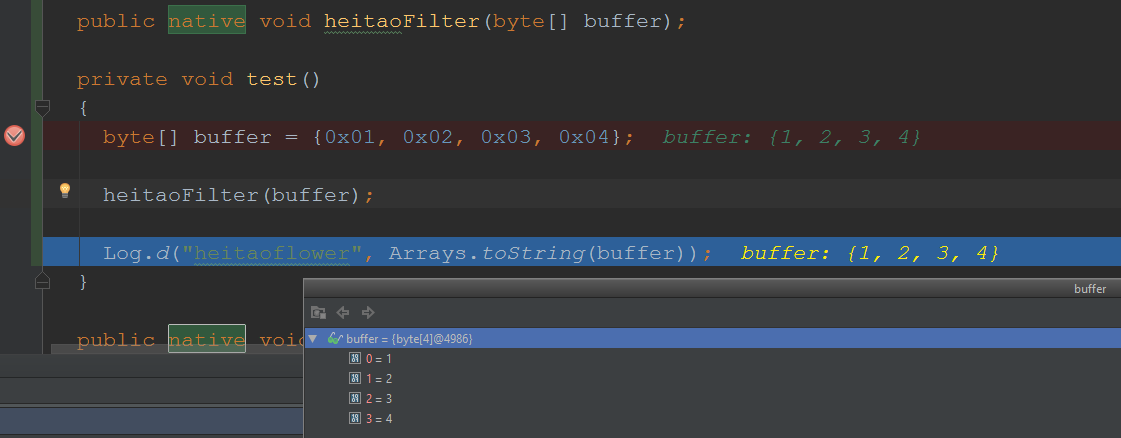
可以观测到 Output byte[] 数组依然为之前的 0x01, 0x02, 0x03, 0x04 。这是为什么呢?命名通过指针引用进行了修改,可是结果没有变化。
通过查阅资料在 Android Official Website 关于 JNI TIPS 有一段话给出了解释,大概意思是根据不同的JVM实现 GetByteArrayElements 在运行时可能返回指针,也可能返回一份本地拷贝的指针,之前的测试程序就是因为返回了拷贝的指针。
FAQ: How do I share raw data with native code?

You may find yourself in a situation where you need to access a large buffer of raw data from both managed and native code. Common examples include manipulation of bitmaps or sound samples. There are two basic approaches.


You can store the data in a byte[]. This allows very fast access from managed code. On the native side, however, you're not guaranteed to be able to access the data without having to copy it.
In some implementations, GetByteArrayElements and GetPrimitiveArrayCritical will return actual pointers to the raw data in the managed heap, but in others it will allocate a buffer on the native heap and copy the data over.

The alternative is to store the data in a direct byte buffer. These can be created with java.nio.ByteBuffer.allocateDirect, or the JNI NewDirectByteBuffer function.
Unlike regular byte buffers, the storage is not allocated on the managed heap, and can always be accessed directly from native code (get the address with GetDirectBufferAddress).
Depending on how direct byte buffer access is implemented, accessing the data from managed code can be very slow.

The choice of which to use depends on two factors:

Will most of the data accesses happen from code written in Java or in C/C++?

If the data is eventually being passed to a system API, what form must it be in? (For example, if the data is eventually passed to a function that takes a byte[], doing processing in a direct ByteBuffer might be unwise.)

If there's no clear winner, use a direct byte buffer. Support for them is built directly into JNI, and performance should improve in future releases.
解决问题
该问题解决思路仍然是性能放在第一位,避免内存的拷贝操作,根据Android JNI 官方给出的建议使用Java的 Direct ByteBuffer 配合 GetDirectBufferAddress 来解决问题。所谓 Direct ByteBuffer 简单说就是从操作系统直接分配物理内存,而不是从JVM获取托管的内存,如此就可以通过NativeC的代码修改系统的内存数据了,相关的函数及修改后代码如下:
获取 Direct Buffer 容量函数原型:
 jlong GetDirectBufferCapacity(jobject buf)

    { return functions->GetDirectBufferCapacity(this, buf); }
获取 Direct Buffer 地址函数原型:
void* GetDirectBufferAddress(jobject buf)

    { return functions->GetDirectBufferAddress(this, buf); }
修改后的Java代码如下:
public native void heitaoFilter(ByteBuffer buffer);

  private void test()

  {

    byte[] data = {0x01, 0x02, 0x03, 0x04};

    ByteBuffer buffer = ByteBuffer.allocateDirect(data.length);

    buffer.put(data);

    heitaoFilter(buffer);

    buffer.flip();

    buffer.get(data);

    Log.d("heitaoflower", Arrays.toString(data));

  }
修改后的NativeC代码如下:
JNIEXPORT void JNICALL

Java_io_heitao_Test_Filter(

        JNIEnv *env,

        jobject,

        jobject buffer){

    int32_t buffer_size = (int32_t)env->GetDirectBufferCapacity(buffer);

    int8_t *pBuffer = (int8_t *)(env->GetDirectBufferAddress(buffer));

    if (pBuffer != NULL)

    {

        for (int32_t i = ; i < buffer_size; i++)

        {

            pBuffer[i] = ;

        }

    }

}
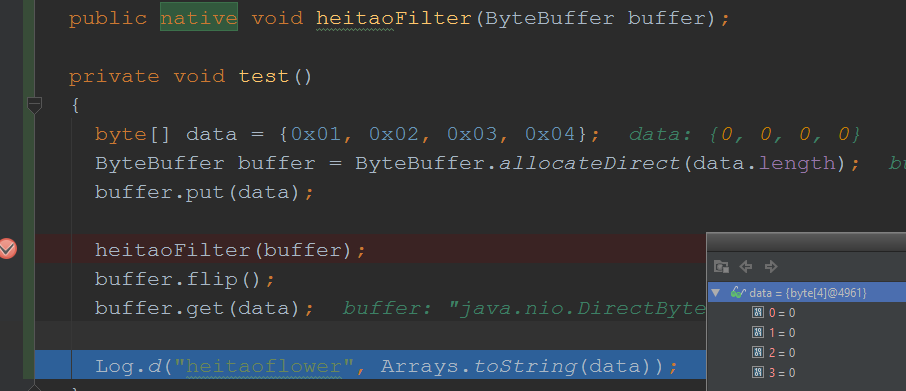
可以观测到 Output ByteBuffer内部系统分配的直接内存数据修改为 0x00, 0x00, 0x00, 0x00,成功修改。
结论
建议使用 DirectBuffer 的方式完成 Java层与NativeCode层的数据交互,虽然开发、维护的难度提升,但是避免了大量的内存分配、拷贝操作,从而带来了大幅度的性能提升。
Android与NativeC传递数据不正确问题的更多相关文章
- Android剪切板传递数据传递序列化对象数据
一.剪切板的使用介绍 1. 剪切板对象的创建 使用剪切板会用到,ClipboardManager对象,这个对像的创建不可以使用构造方法,主要是由于没有提供public的构造函数(单例模式),需要使用A ...
- Android 使用意图传递数据
使用意图传递数据之通用方式. 测试应用:当前页面点击button传递数据到一个新的页面显示在textview中. 首先在,mainActivity.xml文件中加入一个button按钮 <But ...
- Android 使用全局变量传递数据
使用全局变量传递数据,所谓的全局变量类似于jee开发中的application变量.申明后,全局调用.只有当内存被清理后,才被销毁.否则一直可以调用. 还是使用点击一个button,传递一个数据到另一 ...
- android使用全局变量传递数据
android中Application是用来保存全局变量的,在package创建的时候就存在了,到所有的activity都被destroy掉之后才会被释放掉.所以当我们需要全局变量的时候只要在appl ...
- Android 通过Application 传递数据
</pre><pre> package com.example.ApplicationTest; import android.app.Application; /** * C ...
- android中使用Intent在activity之间传递数据
android中intent传递数据的简单使用: 1.使用intent传递数据: 首先将需要传递的数据放入到intent中 Intent intent = new Intent(MainActivit ...
- Android开发—— 传递数据
一:使用静态变量传递数据 (1)静态变量传递数据,在目标Activity中声明静态变量,然后使用setText()方法将静态变量的值导出即可: (2)静态变量传递数据,在主Activity中对目标Ac ...
- Android中Service通信(一)——启动Service并传递数据
启动Service并传递数据的小实例(通过外界与服务进行通信): 1.activity_main.xml: <EditText android:layout_width="match_ ...
- android跟服务器使用json传递数据
最近在做项目,使用了json传递数据,把服务器对象转换成json字符串返回,android使用gson包解析json字符串变成对象. 1.服务器代码编写,我这边是在servlet里面 Peron pe ...
随机推荐
- iptables 汇总
iptables 一. 背景知识 1. 相关网络背景知识 (1) Linux 主机内部路由 Linux 在 内核中维护由一个路由表, 报文进入本机后, 由该路由表判断目标地址; 报文离开本机之前, 判 ...
- jq瀑布流代码
<style> #zh{ position:fixed; width:100%; height:100%; background:url(images/bgblack.png); top: ...
- 【翻译】旧技术成就新勒索软件,Petya添加蠕虫特性
原文链接:https://blogs.technet.microsoft.com/mmpc/2017/06/27/new-ransomware-old-techniques-petya-adds-wo ...
- SpringMvc+Spring3+MyBatis整合
1.MyBatis 例子 首先,单独使用MyBatis时: import java.io.IOException; import java.io.Reader; import org.apache.i ...
- 【Android Developers Training】 61. 序言:使用OpenGL ES显示图像
注:本文翻译自Google官方的Android Developers Training文档,译者技术一般,由于喜爱安卓而产生了翻译的念头,纯属个人兴趣爱好. 原文链接:http://developer ...
- 【CC2530入门教程-06】CC2530的ADC工作原理与应用
第6课 CC2530的ADC工作原理与应用 广东职业技术学院 欧浩源 一.A/D转换的基本工作原理 将时间上连续变化的模拟量转化为脉冲有无的数字量,这一过程就叫做数字化,实现数字化的关键设备是AD ...
- java网络编程之socket(2)
异步处理多客户端连接服务端 上篇讲到的是服务端接收一个客户端的请求之后就结束了,不能再接收其他客户端的请求了,实际情况上我们希望服务端能够处理来自不同用户的请求. 想到这里,或许我们可以用一个死循环, ...
- javascript之原型(prototype)
今天是第一次写博客,写点在javascript中重要的一个概念----原型(prototype): 原型,顾名思义,就是一切事物的模板. 柏拉图在<理想国>卷10中说:"床不是有 ...
- VB6之SendMessage模拟拖放事件
原文链接:http://hi.baidu.com/coo_boi/item/e1e0f5ab45bddbdd5af191df 网上找了个C++的翻一下,原文链接:http://www.cnblogs. ...
- NewsDaoImpl
package com.pb.news.dao.impl; import java.sql.CallableStatement;import java.sql.Connection;import ja ...