
Android性能优化:ViewStub
用法一:
在开发应用程序的时候,经常会遇到这样的情况,会在运行时动态根据条件来决定显示哪个View或某个布局。那么最通常的想法就是把可能用到的View都写在上面,先把它们的可见性都设为View.GONE,然后在代码中动态的更改它的可见性。这样的做法的优点是逻辑简单而且控制起来比较灵活。但是它的缺点就是耗费资源。虽然把View的初始可见View.GONE但是在Inflate布局的时候View仍然会被Inflate,也就是说仍然会创建对象,会被实例化,会被设置属性。也就是说,会耗费内存等资源。
推荐的做法是使用Android.view.ViewStub,ViewStub是一个轻量级的View,占用资源非常小的控件。在Inflate布局的时候,只有ViewStub会被初始化,然后当ViewStub被设置为可见的时候(默认是不可见的),或是调用了ViewStub.inflate()的时候,ViewStub所向的布局就才会被Inflate和实例化。
但ViewStub也不是万能的,下面总结下ViewStub能做的事儿和什么时候该用ViewStub,什么时候该用可见性的控制。
首先来说说ViewStub的一些特点:
(1) ViewStub只能Inflate一次,之后ViewStub对象会被置为空。按句话说,某个被ViewStub指定的布局被Inflate后,就不会够再通过ViewStub来控制它了。
(2) ViewStub只能用来Inflate一个布局文件,而不是某个具体的View,当然也可以把View写在某个布局文件中。
基于以上的特点,那么可以考虑使用ViewStub的情况有:
(1) 在程序的运行期间,某个布局在Inflate后,就不会有变化,除非重新启动。
因为ViewStub只能Inflate一次,之后会被置空,所以无法指望后面接着使用ViewStub来控制布局。所以当需要在运行时不止一次的显示和隐藏某个布局,那么ViewStub是做不到的。这时就只能使用View来控制了。
(2) 想要控制显示与隐藏的是一个布局文件,而非某个View。
因为设置给ViewStub的只能是某个布局文件的Id,所以无法让它来控制某个View。
所以,如果想要控制某个View(如Button或TextView)的显示与隐藏,或者想要在运行时不断的显示与隐藏某个布局或View,只能使用View来控制。
下面来看一个实例
在这个例子中,要显示二种不同的布局,一个是用TextView显示一段文字,另一个则是用ImageView显示一个图片。这二个是在onCreate()时决定是显示哪一个,这里就是应用ViewStub的最佳地点。
先来看看布局,一个是主布局,里面只定义二个ViewStub,一个用来控制TextView一个用来控制ImageView,另外就是一个是为显示文字的做的TextView布局,一个是为ImageView而做的布局:
 <?xml version="1.0" encoding="utf-8"?>

 <LinearLayout

     xmlns:android="http://schemas.android.com/apk/res/android"

     android:orientation="vertical"

     android:layout_width="fill_parent"

     android:layout_height="fill_parent"

     android:gravity="center_horizontal">

     <ViewStub

         android:id="@+id/viewstub_demo_text"

         android:layout_width="wrap_content"

         android:layout_height="wrap_content"

         android:layout_marginLeft="5dip"

         android:layout_marginRight="5dip"

         android:layout_marginTop="10dip"

         android:layout="@layout/viewstub_demo_text_layout"/>

     <ViewStub

         android:id="@+id/viewstub_demo_image"

         android:layout_width="wrap_content"

         android:layout_height="wrap_content"

         android:layout_marginLeft="5dip"

         android:layout_marginRight="5dip"

         android:layout="@layout/viewstub_demo_image_layout"/>

 </LinearLayout>
 // ...

 @Override

 public void onCreate(Bundle savedInstanceState) {

      super.onCreate(savedInstanceState);

      setContentView(R.layout.viewstub_demo_activity);

      if ((((int) (Math.random() * 100)) & 0x01) == 0) {

      ViewStub stub = (ViewStub) findViewById(R.id.viewstub_demo_text); // 获取布局

      stub.inflate(); // 实例化

      TextView text = (TextView) findViewById(R.id.viewstub_demo_textview);

      text.setText("Hello World");

      } else {

           ViewStub stub = (ViewStub) findViewById(R.id.viewstub_demo_image);

           stub.inflate();

           ImageView image = (ImageView) findViewById(R.id.viewstub_demo_imageview);

           image.setImageResource(R.drawable.img);

      }

 }

 //  ...
还有类似新内容、新功能提示,这种只会显示一次,且不会发生变化的ViewStub都是挺适合的。
用法二:
ViewStub还有类似于<include>标签的用法,只不过<ViewStub>是不可见的控件。当布局文件使用<ViewStub>标签来引用其他布局文件时并不会马上装载引用的布局文件,只会在调用了ViewStub.inFlate获ViewStub.setVisibility(View.VISIBLE)方法后,ViewStub才会装载引用的控件。而<include>会把引用的所以布局文件一次性的全部加载,造成资源的浪费。下面看个实例:
custom.xml
 <?xml version="1.0" encoding="utf-8"?>

 <LinearLayout

     xmlns:android="http://schemas.android.com/apk/res/android"

     android:orientation="vertical"

     android:layout_width="match_parent"

     android:layout_height="match_parent">

    <Button

        android:layout_width="match_parent"

        android:layout_height="warp_parent"

         android:text="我是按钮1"

         android:onclick="onClick_Button">

    <Button

        android:layout_width="match_parent"

        android:layout_height="warp_parent"

         android:text="我是按钮2"

         android:onclick="onClick_Button">

 </LinearLayout>
采用<include>引用:
 <?xml version="1.0" encoding="utf-8"?>

 <LinearLayout

     xmlns:android="http://schemas.android.com/apk/res/android"

     android:orientation="vertical"

     android:layout_width="match_parent"

     android:layout_height="match_parent">

     <Button

         android:layout_width="match_parent"

         android:layout_height="warp_parent"

         android:text="我是按钮"

         android:onclick="onClick_Button">

      <include layout="@layout/custom"/>

 </LinearLayout>
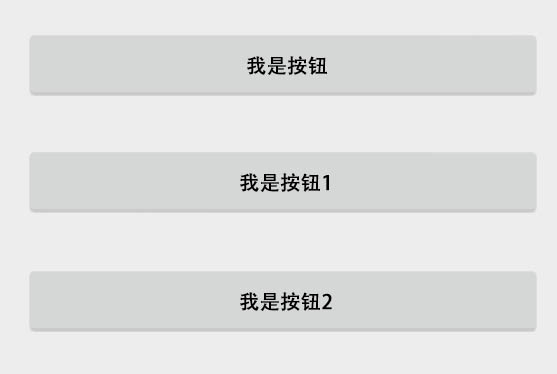
图一:采用<include>引用后显示的效果
采用<ViewStub>引用:
 <?xml version="1.0" encoding="utf-8"?>

 <LinearLayout

     xmlns:android="http://schemas.android.com/apk/res/android"

     android:orientation="vertical"

     android:layout_width="match_parent"

     android:layout_height="match_parent">

     <Button

         android:layout_width="match_parent"

         android:layout_height="warp_parent"

         android:text="我是按钮"

         android:onclick="onClick_Button">

      <ViewStub

         android:id="@+id/viewstub"

         android:inflatedId="@+id/button_layout"

         layout="@layout/custom"

         android:layout_width="match_parent"

         android:layout_height="warp_parent"/>

 </LinearLayout>

图二:采用<ViewStub>引用后显示的效果
在使用<ViewStub>标签引用布局文件后,还需要调用ViewStub.inflate或ViewStub.setVisibility(View.VISIBLE)方法才能装载所引用的空间,代码如下:
 public void onClick_Button(View v) {

     // ViewStub 控件只能获得1次,第2次再使用findViewById获得该ViewStub对象,则返回null

     View view = findViewById(R.id.viewstub);

     if(view !=  null) {

         // 或者调用ViewStub.inflate方法

         // view = ((ViewStub)  view).inflate();

         // 装载ViewStub引用的custom.xml文件的控件

         ((ViewStub) view).setVisibility(View.VISIBLE);

     } else {

          setTitle("view is null");

     }

 }
单击“我的按钮”后,会显示在custom.xml文件中定义的两个按钮,效果如图二所示。
| 注意:<ViewStub>与<include>标签一样,也可以设置引用布局文件中根节点所有与布局相关的熟悉。所不同的是<include>标签的 android:id 属性直接覆盖了所引用的布局文件中的根节点的 android:id 属性值,而<ViewStub>标签的 android:id 属性与普通控件标签的 android:id 属性一样,用于在代码中引用控件,在<ViewStub>标签中需要使用 android:inflatedId 属性覆盖所引用布局文件中根节点的 android:id 属性值。 |
Android性能优化:ViewStub的更多相关文章
- Android性能优化:布局优化 详细解析(含<include>、<ViewStub>、<merge>讲解 )
1. 影响的性能 布局性能的好坏 主要影响 :Android应用中的页面显示速度 2. 如何影响性能 布局影响Android性能的实质:页面的测量 & 绘制时间 1个页面通过递归 完成测量 & ...
- android 性能优化
本章介绍android高级开发中,对于性能方面的处理.主要包括电量,视图,内存三个性能方面的知识点. 1.视图性能 (1)Overdraw简介 Overdraw就是过度绘制,是指在一帧的时间内(16. ...
- Android性能优化系列 + Android官方培训课程中文版
Android性能优化典范 - 第6季 http://hukai.me/android-performance-patterns-season-6/ Android性能优化典范 - 第5季 htt ...
- Android性能优化之布局优化
最新最准确内容建议直接访问原文:Android性能优化之布局优化 本文为Android性能优化的第二篇——布局优化,主要介绍使用抽象布局标签(include, viewstub, merge).去除不 ...
- 【转】Android性能优化之布局优化篇
转自:http://blog.csdn.net/feiduclear_up/article/details/46670433 Android性能优化之布局优化篇 分类: andorid 开发2015 ...
- 《Android开发艺术探索》读书笔记 (13) 第13章 综合技术、第14章 JNI和NDK编程、第15章 Android性能优化
第13章 综合技术 13.1 使用CrashHandler来获取应用的Crash信息 (1)应用发生Crash在所难免,但是如何采集crash信息以供后续开发处理这类问题呢?利用Thread类的set ...
- android性能优化的一些东西
说到android性能优化,总觉得是一个很模糊的东西,因为app的性能始终适合手机本身的性能挂钩的,也许一些消耗内容的操作,在一些移动设备可以运行,但是在另外一些上面就会出现内存溢出的问题,但是不管怎 ...
- Android性能优化之启动速度优化
Android性能优化之启动速度优化 Android app 启动速度优化,首先谈谈为什么会走到优化这一步,如果一开始创建 app 项目的时候就把这个启动速度考虑进去,那么肯定就不需要重新再来优化 ...
- Android群英传笔记——第十章:Android性能优化
Android群英传笔记--第十章:Android性能优化 随着Android应用增多,功能越来越复杂,布局也越来越丰富了,而这些也成为了阻碍一个应用流畅运行,因此,对复杂的功能进行性能优化是创造高质 ...
- Android 性能优化之工具和优化点总结
Android性能优化学习 最近公司主抓性能优化工作,借此春风也学习到了许多Android性能优化方面的知识.由于组内队友的给力,优化的成果也是比较喜人.同时也学习和实践了不少知识,特此记录. 1.性 ...
随机推荐
- springboot 1.5.2 集成kafka 简单例子
添加依赖 compile("org.springframework.kafka:spring-kafka:1.1.2.RELEASE") 添加application.propert ...
- NopCommerce(3.9)作业调度插件
NopCommerce(3.9)作业调度插件视频教程录制完成,下面是插件源码下载地址和插件视频教程下载地址:插件下载地址: http://www.nopcommerce.com/p/2752/jobs ...
- Python教程(2.2)——数据类型与变量
和C/C++.Java一样,Python也有数据类型和变量两个概念. 数据类型 Python中的几个基本数据类型为整数(integer/int).浮点数(float/float).布尔值(boolea ...
- js 玩一玩
闲着没事学了学js,做了一个下页面玩玩. 下面是html代码: <!DOCTYPE html><html> <head> <meta charset=&quo ...
- JSP/Servlet Web 学习笔记 DaySix —— EL表达式
1)EL从scope中得到参数时可以自动转换类型,因此对于类型转换的限制更加宽松. 2)使用EL表达式,可以简化变量和对象的访问. 3)EL表达式必须以 ${XXXX} 来表示. 4)EL提供点(.) ...
- python之路第一篇
一.python环境的搭建 1.window下环境的搭建 (1).在 https://www.python.org/downloads/ 下载自己系统所需要的python版本 (2).安装python ...
- 简单介绍phpcms以及phpcms如何安装?
一.先大体介绍一下phpcms,及存放位置 1.将phpcms放在www目录下的phpcms,并解压 其中,readme 没什么用,重要的是install_package; 2.打开install_p ...
- Log4PHP 配置和使用
Log4PHP2.3.0使用解释 1. 什么是Log4PHP Log4php它为apche组织维护项目,是Log4xx系列日志组件之一,log4j在JAVA中可算是大名鼎鼎的日志开发包.Log4PHP ...
- PHP的魔法方法
PHP将所有以__(两个下划线)开头的类方法保留为魔术方法.所以在定义方法是,除了魔术方法,建议不要用两个下划线前缀. 魔术方法(Magic methods)有 __construct(),__des ...
- XAML: 获取元素的位置
在之前讨论 ListView 滚动相关需求的文章中(UWP: ListView 中与滚动有关的两个需求的实现)曾经提到了获取元素相对位置的方法,即某元素相对另一元素的位置.现将所有相关方法再作整理,并 ...