
.NET项目从CI到CD-Jenkins_Pipeline的应用
一、罗里吧嗦
最近迁移了服务器,顺道完善下服役了一两年的Jenkins服务,主要是把Slave搭建起来,还有等等。本文只是我对Jenkins Pipeline的一些自己的理解与应用,欢迎指出错误,欢迎交流高级应用
二、运行环境
Jenkins:
- master:阿里云Windows_2016_x64
- Slave1:京东云Windows_2008_r2_x64
- Slave2:阿里云Windows_2008_r2_x86
版本管理器:自建的git服务器,使用gogs
.NET项目:使用VS2017新建的一个web mvc项目与一个windows service项目,项目上传至git服务器
一些辅助工具:
- 7-zip:作为压缩 解压
- ossutil:阿里云oss服务工具
- nuget:还原解决方案引用包
- MSBuild:编译项目
三、开始
首先新建.NET项目,新建一个web项目与windows service项目,步骤略
其次,在自行安装Jenkins,步骤略
新建Jenkins项目,类型选择Pipeline,命名为JenkinsPipelineProject
整体流程如下
start->检出代码->还原引用包->编译->打包->上传OSS->分发slave->发布web->发布Service->end
各步骤:
检出代码:使用内置的工具进行代码的检出,如我使用的是git
还原引用包:使用nuget.exe对解决方案进行引用包还原,包源可选国内节点,国内节点下载速度框
编译:此处进行了两次编译,一次编译web,一次编译Service
打包:并行进行,对编译步骤得到的文件进行打包(使用7zip),存放于本地路径上,打包时,会删除相关配置文件,配置文件为手动更新
上传OSS:对刚打包好的更新包进行上传,因两台服务器处于阿里云内网,所以采用阿里云的OSS,更新速度快
分发Slave:根据配置的节点,进行更新web和service操作
发布web:首先从OSS下载文件下来, 停止站点(非停止IIS),使用7zip进行解压文件,更新文件,更新完毕后启动站点,如有多台服务器需要更新,则并行执行,互不干扰
发布Service:首先从OSS下载文件下来,停止对应的windows服务,卸载对应的windows服务,如若失败,则进行强制删除windows服务,之后使用7zip进行文件的解压更新,更新完毕后安装服务,并启动服务
以下为具体的Pipeline代码
注:
- 代码中所需的配置为我自己本身项目需要,如若更改,可根据自己项目进行定制
- 代码中一些敏感的配置已用xxxx代替
- 仅用于参考
//编译服务器设置start

def buildNodeSettings = [:]

buildNodeSettings.node = '阿里云Windows_2008_r2_x86'//编译服务器节点设置

buildNodeSettings.gitUrl = 'https://xxx/JenkinsPipelineProject.git'//git地址

buildNodeSettings.gitBarnches = '*/master' //分支

buildNodeSettings.slnFile = 'JenkinsPipelineProject.sln' //Nuget还原解决方案名

buildNodeSettings.buildFileForWeb ='JenkinsPipelineProjectWeb\\JenkinsPipelineProjectWeb.csproj' //msbulid编译文件名 web

buildNodeSettings.msbuildArgForWeb = '/t:Rebuild /p:Configuration=Release;PublishProfile=FolderProfile;DeployOnBuild=true' //msbulid参数 web

buildNodeSettings.publishOutputForWeb = '\\JenkinsPipelineProjectWeb\\bin\\Release\\PublishOutput' //编译后发布的路径 web

buildNodeSettings.publishFileNameForWeb = env.JOB_NAME + '/Build-Web-' +env.BUILD_NUMBER + '.7z'  //文件名

buildNodeSettings.delFilesForWeb = ["Web.config","Web.Debug.config","Web.Release.config"] as String[]  //需要删除的文件

buildNodeSettings.buildFileForService ='JenkinsPipelineProject.sln' //msbulid编译文件名 Service

buildNodeSettings.msbuildArgForService = '/t:Rebuild /p:Configuration=Release' //msbulid参数 Service

buildNodeSettings.publishOutputForService = '\\JenkinsPipelineProjectWindowsService\\bin\\Release' //编译后发布的路径 Service

buildNodeSettings.publishFileNameForService = env.JOB_NAME + '/Build-Service-' +env.BUILD_NUMBER + '.7z'  //文件名

buildNodeSettings.delFilesForService = ["*.config"] as String[]  //需要删除的文件

buildNodeSettings.updateServerPath = 'D:\\WebRoot\\update\\public_html\\'//更新服务器存放包地址

//编译服务器设置end

def webNodeSetting = [:]

webNodeSetting.node = '阿里云Windows_2008_r2_x86' //Web服务器节点

webNodeSetting.downloadPath = 'C:\\Jenkins\\download\\'//更新包下载地址

webNodeSetting.publishPath = 'D:\\WebRoot\\JenkinsPipelinePorject\\Web' //web服务器网站根目录

webNodeSetting.webApplicationName = 'JenkinsPipelinePorject'//web站点名称

def webNodeSetting2 = [:]

webNodeSetting2.node = 'master' //Web服务器节点

webNodeSetting2.downloadPath = 'C:\\JenkinsDownload\\'//更新包下载地址

webNodeSetting2.publishPath = 'D:\\WebRoot\\JenkinsPipelinePorject\\Web' //web服务器网站根目录

webNodeSetting2.webApplicationName = 'JenkinsPipelinePorject'//web站点名称

def webNodeSetting3 = [:]

webNodeSetting3.node = '京东云Windows_2008_r2_x64' //Web服务器节点

webNodeSetting3.downloadPath = 'C:\\Jenkins\\download\\'//更新包下载地址

webNodeSetting3.publishPath = 'C:\\WebRoot\\JenkinsPipelinePorject\\Web' //web服务器网站根目录

webNodeSetting3.webApplicationName = 'JenkinsPipelinePorject'//web站点名称

def serviceNodeSetting = [:]

serviceNodeSetting.node = '阿里云Windows_2008_r2_x86'

serviceNodeSetting.downloadPath = 'C:\\Jenkins\\download\\'//更新包下载地址

serviceNodeSetting.publishPath = 'D:\\WebRoot\\JenkinsPipelinePorject\\Service' //Service Windows Service存放路径

serviceNodeSetting.serviceName = 'JenkinsPipelineProject'//服务名称

serviceNodeSetting.serviceFileName = 'JenkinsPipelineProjectWindowsService.exe' //服务的文件名,相对publishPath的路径

def serviceNodeSetting2 = [:]

serviceNodeSetting2.node = 'master'

serviceNodeSetting2.downloadPath = 'C:\\Jenkins\\download\\'//更新包下载地址

serviceNodeSetting2.publishPath = 'D:\\WebRoot\\JenkinsPipelinePorject\\Service' //Service Windows Service存放路径

serviceNodeSetting2.serviceName = 'JenkinsPipelineProject'//服务名称

serviceNodeSetting2.serviceFileName = 'JenkinsPipelineProjectWindowsService.exe' //服务的文件名,相对publishPath的路径

def serviceNodeSetting3 = [:]

serviceNodeSetting3.node = '京东云Windows_2008_r2_x64'

serviceNodeSetting3.downloadPath = 'C:\\Jenkins\\download\\'//更新包下载地址

serviceNodeSetting3.publishPath = 'C:\\WebRoot\\JenkinsPipelinePorject\\Service' //Service Windows Service存放路径

serviceNodeSetting3.serviceName = 'JenkinsPipelineProject'//服务名称

serviceNodeSetting3.serviceFileName = 'JenkinsPipelineProjectWindowsService.exe' //服务的文件名,相对publishPath的路径

node(buildNodeSettings.node) {

    def msbuild=tool name: 'MSBuildTool V14.0', type: 'msbuild' //编译工具名称与地址

    buildNodeSettings.publishOutputForWeb  = env.WORKSPACE + buildNodeSettings.publishOutputForWeb

    buildNodeSettings.publishOutputForService  = env.WORKSPACE + buildNodeSettings.publishOutputForService

    stage('Check Out')

    {

        echo '检出项目'

        checkout([$class: 'GitSCM', branches: [[name: buildNodeSettings.gitBarnches]], doGenerateSubmoduleConfigurations: false, extensions: [], submoduleCfg: [], userRemoteConfigs: [[credentialsId: 'xxxxxx', url: buildNodeSettings.gitUrl]]])

    }

    stage('Nuget Restore')

    {

        echo ' 还原nuget '

        echo '${env.nuget} restore "' + env.WORKSPACE + '/' + buildNodeSettings.slnFile + '" -ConfigFile "' + env.config + '" -NoCache'

        bat env.nuget + ' restore "' + env.WORKSPACE + '/' + buildNodeSettings.slnFile + '" -ConfigFile "' + env.config + '" -NoCache'

    }

    stage('Bulid')

    {

        echo ' 编译项目'

        echo 'Bulid Web'

        bat '"' + msbuild + '" ' + buildNodeSettings.msbuildArgForWeb + ' "' + env.WORKSPACE + '/' + buildNodeSettings.buildFileForWeb + '"'

        echo 'Bulid Service'

        bat '"' + msbuild + '" ' + buildNodeSettings.msbuildArgForService + ' "' + env.WORKSPACE + '/' + buildNodeSettings.buildFileForService + '"'

    }

    stage('Pack') {

        parallel PackWeb:{

            echo '删除相关配置文件'

            buildNodeSettings.delFilesForWeb.each{

                echo '删除文件:' + it

                def filepath ='"' + buildNodeSettings.publishOutputForWeb.replace("/","\\") + '\\' + it + '"'

                bat 'if exist '+ filepath +' del ' + filepath

            }

            echo ' 发布到更新系统'

            bat 'if not exist "' + buildNodeSettings.updateServerPath + env.JOB_NAME + '" md "' + buildNodeSettings.updateServerPath + env.JOB_NAME + '"'

            bat '"' + env.zip + '"'+ ' a -r "' + buildNodeSettings.updateServerPath + buildNodeSettings.publishFileNameForWeb + '" "' + buildNodeSettings.publishOutputForWeb + '\\*"'

            echo '压缩完成'

            echo '上传oss'

            bat env.oss + ' -c ' + env.ossconfig + ' cp "' + buildNodeSettings.updateServerPath + buildNodeSettings.publishFileNameForWeb + '" "oss://xxxx/' + buildNodeSettings.publishFileNameForWeb +'"'

        },

        PackService:{

            echo '删除相关配置文件'

            buildNodeSettings.delFilesForService.each{

                echo '删除文件:' + it

                def filepath ='"' + buildNodeSettings.publishOutputForService.replace("/","\\") + '\\' + it + '"'

                bat 'if exist '+ filepath +' del ' + filepath

            }

            echo ' 发布到更新系统'

             bat 'if not exist "' + buildNodeSettings.updateServerPath + env.JOB_NAME + '" md "' + buildNodeSettings.updateServerPath + env.JOB_NAME + '"'

            bat '"' + env.zip + '"'+ ' a -r "' + buildNodeSettings.updateServerPath + buildNodeSettings.publishFileNameForService + '" "' + buildNodeSettings.publishOutputForService + '\\*"'

            echo '压缩完成'

            echo '上传oss'

            bat env.oss + ' -c ' + env.ossconfig + ' cp "' + buildNodeSettings.updateServerPath + buildNodeSettings.publishFileNameForService + '" "oss://xxxx/' + buildNodeSettings.publishFileNameForService +'"'

        }

    }

    stage('Clear')

    {

        echo '清理工作目录'

        deleteDir()

    }

}

stage('Publish Web')

{

    parallel publishWeb1:{

        node(webNodeSetting.node)

        {

            echo '发布web'

            echo '更新文件'

            echo '更新文件下载地址为:http://xxxx/' + buildNodeSettings.publishFileNameForWeb

            echo '下载文件'

            bat env.oss + ' -c ' + env.ossconfig + ' cp  "oss://xxxx/' + buildNodeSettings.publishFileNameForWeb + '" ' + webNodeSetting.downloadPath

            echo '文件下载完成'

            echo '停止站点'

            bat 'C:\\Windows\\System32\\inetsrv\\appcmd.exe stop site "' + webNodeSetting.webApplicationName + '"'

            bat '"' + env.zip + '" x "'+ webNodeSetting.downloadPath + buildNodeSettings.publishFileNameForWeb + '" -y -o"' + webNodeSetting.publishPath + '"'

            echo '启动站点'

            bat 'C:\\Windows\\System32\\inetsrv\\appcmd.exe start site "' + webNodeSetting.webApplicationName+ '"'

        }

    },

    publishWeb2:{

        node(webNodeSetting2.node)

        {

            echo '发布web'

            echo '更新文件'

            echo '更新文件下载地址为:http://xxxx/' + buildNodeSettings.publishFileNameForWeb

            echo '下载文件'

            bat env.oss + ' -c ' + env.ossconfig + ' cp  "oss://xxxx/' + buildNodeSettings.publishFileNameForWeb + '" ' + webNodeSetting2.downloadPath

            echo '文件下载完成'

            echo '停止站点'

            bat 'C:\\Windows\\System32\\inetsrv\\appcmd.exe stop site "' + webNodeSetting2.webApplicationName + '"'

            bat '"' + env.zip + '" x "'+ webNodeSetting2.downloadPath + buildNodeSettings.publishFileNameForWeb + '" -y -o"' + webNodeSetting2.publishPath + '"'

            echo '启动站点'

            bat 'C:\\Windows\\System32\\inetsrv\\appcmd.exe start site "' + webNodeSetting2.webApplicationName+ '"'

        }

    },

    publishWeb3:{

        node(webNodeSetting3.node)

        {

            withEnv(['oss=C:\\Tools\\oss\\ossutil.exe', 'ossconfig=C:\\Tools\\oss\\config']) {//需要手动设置变量

                echo '发布web'

                echo '更新文件'

                echo '更新文件下载地址为:http://xxxx/' + buildNodeSettings.publishFileNameForWeb

                echo '下载文件'

                bat env.oss + ' -c ' + env.ossconfig + ' cp  "oss://xxxx/' + buildNodeSettings.publishFileNameForWeb + '" ' + webNodeSetting3.downloadPath

                echo '文件下载完成'

                echo '停止站点'

                bat 'C:\\Windows\\System32\\inetsrv\\appcmd.exe stop site "' + webNodeSetting3.webApplicationName + '"'

                bat '"' + env.zip + '" x "'+ webNodeSetting3.downloadPath + buildNodeSettings.publishFileNameForWeb + '" -y -o"' + webNodeSetting3.publishPath + '"'

                echo '启动站点'

                bat 'C:\\Windows\\System32\\inetsrv\\appcmd.exe start site "' + webNodeSetting3.webApplicationName+ '"'

            }

        }

    }

}

stage('Publish Service')

{

    parallel publishService1:

    {

        node(serviceNodeSetting.node){

            //发布windows service

            echo '发布Service'

            echo '下载文件'

            bat env.oss + ' -c ' + env.ossconfig + ' cp  "oss://xxxx/' + buildNodeSettings.publishFileNameForService + '" ' + serviceNodeSetting.downloadPath

            echo '卸载Windows Services'

            try{

                bat 'net stop ' + serviceNodeSetting.serviceName

                bat env.InstallUtil + ' -u ' + serviceNodeSetting.serviceName

            }catch(ex)

            {

                echo '卸载失败:' + ex

                try{

                    bat 'sc delete ' + serviceNodeSetting.serviceName

                }catch(ex2)

                {

                    echo '强制删除失败:' +ex2

                }

            }

            echo '解压文件'

            bat '"' + env.zip + '" x "'+ serviceNodeSetting.downloadPath + buildNodeSettings.publishFileNameForService + '" -y -o"' + serviceNodeSetting.publishPath + '"'

            echo '服务安装'

            bat env.InstallUtil + ' ' + serviceNodeSetting.publishPath + '\\' + serviceNodeSetting.serviceFileName + ' /name='+ serviceNodeSetting.serviceName + ' /display=' + serviceNodeSetting.serviceName + ' /desc=' + serviceNodeSetting.serviceName

            echo '启动服务'

            bat 'net start ' + serviceNodeSetting.serviceName

        }

    },

    publishService2:

    {

        node(serviceNodeSetting2.node){

            //发布windows service

            echo '发布Service'

            echo '下载文件'

            bat env.oss + ' -c ' + env.ossconfig + ' cp  "oss://xxxx/' + buildNodeSettings.publishFileNameForService + '" ' + serviceNodeSetting2.downloadPath

            echo '卸载Windows Services'

            try{

                bat 'net stop ' + serviceNodeSetting2.serviceName

                bat env.InstallUtil + ' -u ' + serviceNodeSetting2.serviceName

            }catch(ex)

            {

                echo '卸载失败:' + ex

                try{

                    bat 'sc delete ' + serviceNodeSetting2.serviceName

                }catch(ex2)

                {

                    echo '强制删除失败:' +ex2

                }

            }

            echo '解压文件'

            bat '"' + env.zip + '" x "'+ serviceNodeSetting2.downloadPath + buildNodeSettings.publishFileNameForService + '" -y -o"' + serviceNodeSetting2.publishPath + '"'

            echo '服务安装'

            bat env.InstallUtil + ' ' + serviceNodeSetting2.publishPath + '\\' + serviceNodeSetting2.serviceFileName + ' /name='+ serviceNodeSetting2.serviceName + ' /display=' + serviceNodeSetting2.serviceName + ' /desc=' + serviceNodeSetting2.serviceName

            echo '启动服务'

            bat 'net start ' + serviceNodeSetting2.serviceName

        }

    },

    publishService3:

    {

        node(serviceNodeSetting3.node){

            withEnv(['oss=C:\\Tools\\oss\\ossutil.exe', 'ossconfig=C:\\Tools\\oss\\config']) {//需要手动设置变量

                //发布windows service

                echo '发布Service'

                echo '下载文件'

                bat env.oss + ' -c ' + env.ossconfig + ' cp  "oss://xxxx/' + buildNodeSettings.publishFileNameForService + '" ' + serviceNodeSetting3.downloadPath

                echo '卸载Windows Services'

                try{

                    bat 'net stop ' + serviceNodeSetting3.serviceName

                    bat env.InstallUtil + ' -u ' + serviceNodeSetting3.serviceName

                }catch(ex)

                {

                    echo '卸载失败:' + ex

                    try{

                        bat 'sc delete ' + serviceNodeSetting3.serviceName

                    }catch(ex2)

                    {

                        echo '强制删除失败:' +ex2

                    }

                }

                echo '解压文件'

                bat '"' + env.zip + '" x "'+ serviceNodeSetting3.downloadPath + buildNodeSettings.publishFileNameForService + '" -y -o"' + serviceNodeSetting3.publishPath + '"'

                echo '服务安装'

                bat env.InstallUtil + ' ' + serviceNodeSetting3.publishPath + '\\' + serviceNodeSetting3.serviceFileName + ' /name='+ serviceNodeSetting3.serviceName + ' /display=' + serviceNodeSetting3.serviceName + ' /desc=' + serviceNodeSetting3.serviceName

                echo '启动服务'

                bat 'net start ' + serviceNodeSetting3.serviceName

            }

        }

    }

}
以上代码对三台服务器上的web和service进行了更新操作,两台阿里云内网,一台京东云
代码说明:
四、看看效果
我们开始构建刚才新建的项目
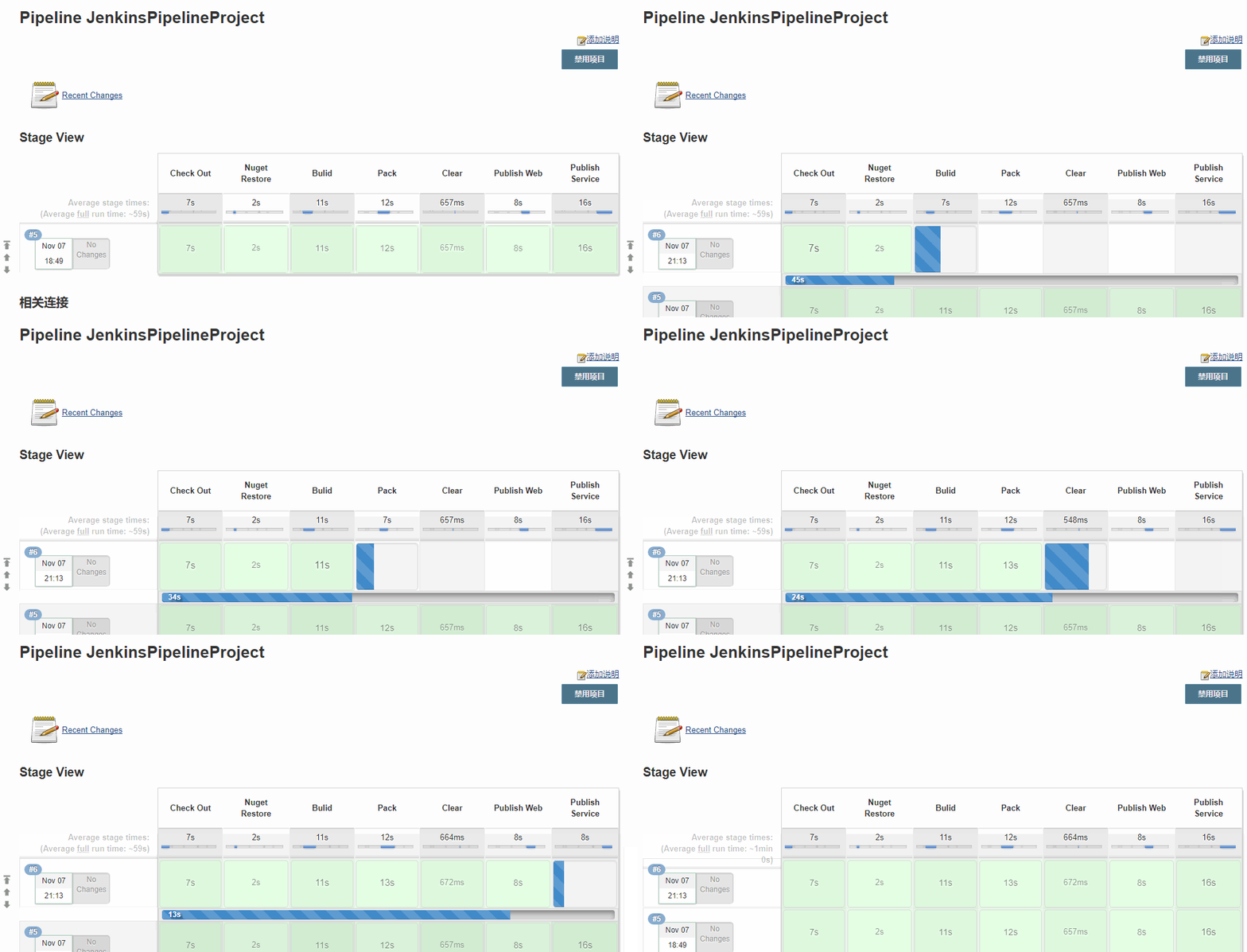
从gif可以看出,整个流程只耗费了一分钟不到,我们去看看这三台服务器


三台服务器的文件都已更新,并且服务已经启动,证明我们的pipeline代码是可行的
五、补充和改进
- 这篇文章的代码量过大,语言组织能力有待改进
- Slave节点的环境变量不能正确读取到,目前只能使用withEnv进行更改环境变量,具体情况publishService3
- 项目的耦合性太高了,目前编译、打包、发布都在同一个项目中,需要进行项目的拆分
- 没有加重试机制,一旦某一阶段失败,只能重新运行,有待改进
- 失败邮件通知,这个目前没有加入
如若有写的不好的地方,请指出
如若有更好的方案,欢迎一起交流
如若有不懂,欢迎咨询,我会告诉你我知道的
本文已同步个人博客,欢迎转载
.NET项目从CI到CD-Jenkins_Pipeline的应用的更多相关文章
- Docker最全教程之使用TeamCity来完成内部CI、CD流程(十六)
本篇教程主要讲解基于容器服务搭建TeamCity服务,并且完成内部项目的CI流程配置.教程中也分享了一个简单的CI.CD流程,仅作探讨.不过由于篇幅有限,完整的DevOps,我们后续独立探讨. 为了降 ...
- 理解 CI 和 CD 之间的区别(翻译)
博客搬迁至https://blog.wangjiegulu.com RSS订阅:https://blog.wangjiegulu.com/feed.xml 原文链接:https://blog.wang ...
- 阿里巴巴CI:CD之分层自动化实践之路
阿里巴巴CI:CD之分层自动化实践之路 2018-05-30 摘自:阿里巴巴CI:CD之分层自动化实践之路 目录 1 自动化 1.1 为什么要做自动化? 1.2 自动化的烦恼 1.3 自动化的追 ...
- CI、CD和dev-ops概念
传统的开发方式是:需求方提供文档,实现方按照文档一步步开发,中间很少变动和修改. 但是随着市场的变化,产品更新迭代的加快,也要求开放方更快的响应变化,用最短的时间开发,部署上线. 这样,持续集成(CI ...
- CI与CD之Docker上安装Jenkins
一.CI,CD,Jenkins的介绍 CI:持续集成(Continuous integration,简称 CI),在传统的软件开发环境中,有集成,但是没有持续集成这种说法,长时间的分支与主干脱离,导致 ...
- 在Jenkins的帮助下让我们的应用CI与CD
上图三位大家应该很熟悉吧,借助这三者可以让我们的服务在Linux环境下持续集成.容器中持续部署. 本篇博客的项目是core webapi, .NET 5.0 在11号已经正式发布了,你们的项目都升级了 ...
- CI和CD的意思
openstack中CI和CD的意思: 持续集成(CI)和持续交付(CD)
- Jenkins使用总结,2.0 新时代:从 CI 到 CD
Jenkins近阶段使用的总结篇,只写了个引子,却一直未动手写完,今天补上. 前几篇文章提到在内网jenkins直接构建部署升级线上环境,job都是暴露在外面,很容易被误操作,需要做简单的权限控制,以 ...
- 【转载】详解CI、CD相关概念
在软件的编译发布的过程中,经常能够看到CI.CD这样的词语.其实他们是专业的缩写短语,这里介绍下他们的概念和区别. 敏捷软件开发 敏捷软件开发,英文全称:Agile software developm ...
- Kubernetes CI/CD(2)
本章节通过在Jenkins创建一个kubernetes云环境,动态的在kubernetes集群中创建pod完成pipeline的构建流程,关于直接在宿主机上搭建Jenkins集群的可参照Kuberne ...
随机推荐
- S2_OOP第三章
第一章 多态 概念 多态是具有表现多种型生态的能力的特征,同一个实现接口,使用不同的实例而执行不同的操作 子类转换父类(向上转型) 用父类接受子类,向上转型 向上转型的规则: 讲一个父类的引用志向一个 ...
- 从DDD开始说起
前言 从13年接触DDD之后开始做应用架构已经整整四个年头. 四年里关于DDD的感触良多,慢慢有了一些心得. 关于DDD的介绍已经有很多的文章和书籍,这里我推荐三本最重要的书籍. <领域驱动设计 ...
- 将本地代码上传到github
准备工作上传本地代码到github 准备工作 在github上创建自己的Repository. 安装git,centos的git安装教程. 上传本地代码到github git init git add ...
- zoj 1081 Points Within (判断点是否在多边形内)
http://blog.csdn.net/zxy_snow/article/details/6339621先保存,搞懂了再来写
- C#常用的字符串处理方法
1.Replace(替换字符):public string Replace(char oldChar,char newChar);在对象中寻找oldChar,如果寻找到,就用newChar将oldCh ...
- Spring读书笔记——bean创建(上)
通过<Spring读书笔记--bean加载>和<Spring读书笔记--bean解析>,我们明白了两件事. Spring如何加载消化一个xml配置文件 Spring如何将xml ...
- Nginx防盗链的3种方法
一:一般的防盗链如下: location ~* \.(gif|jpg|png|swf|flv)$ { valid_referers none blocked www.jzxue.com jzxue.c ...
- Java 多线程的一些问题
1.volatile关键字的作用 一个非常重要的问题,是每个学习.应用多线程的Java程序员都必须掌握的.理解volatile关键字的作用的前提是要理解Java内存模型,volatile关键字的作用主 ...
- LINUX 配置默认程序
update-alternatives 命令用于配置默认程序,版本切换 1.display 命令,查看命令链接信息 update-alternatives --display name 2.insta ...
- 从项目中总结的js知识点
1. 数字字符串和数字进行比较可以得出正确结果,却不能正确判断是否在一个数字数组中.如以下程序: var s = '8', n = 8, arr = [1,2,8,9]; console.log(s= ...