
如何高效地向Redis插入大量的数据(转)
最近有个哥们在群里问,有一个日志,里面存的是IP地址(一行一个),如何将这些IP快速导入到Redis中。
我刚开始的建议是Shell+redis客户端。
今天,查看Redis官档,发现文档的首页部分(http://www.redis.io/documentation)有一个专门的主题是讲述“Redis Mass Insertion”的,才知道自己的建议很low。
官方给出的理由如下:
Using a normal Redis client to perform mass insertion is not a good idea for a few reasons: the naive approach of sending one command after the other is slow because you have to pay for the round trip time for every command. It is possible to use pipelining, but for mass insertion of many records you need to write new commands while you read replies at the same time to make sure you are inserting as fast as possible.
Only a small percentage of clients support non-blocking I/O, and not all the clients are able to parse the replies in an efficient way in order to maximize throughput. For all this reasons the preferred way to mass import data into Redis is to generate a text file containing the Redis protocol, in raw format, in order to call the commands needed to insert the required data.
大意是:
1> 每个redis客户端命令之间有往返时延。
2> 只要一部分客户端支持非阻塞I/O。
个人理解是,redis命令从执行到结果返回,有一定的时延,即便采用多个redis客户单并发插入,也很难提高吞吐量,因为,只有非阻塞I/O只能针对有限个连接操作。
那么如何高效的插入呢?
官方在2.6版本推出了一个新的功能-pipe mode,即将支持Redis协议的文本文件直接通过pipe导入到服务端。
说来拗口,具体实现步骤如下:
1. 新建一个文本文件,包含redis命令
SET Key0 Value0

SET Key1 Value1

...

SET KeyN ValueN
如果有了原始数据,其实构造这个文件并不难,譬如shell,python都可以
2. 将这些命令转化成Redis Protocol。
因为Redis管道功能支持的是Redis Protocol,而不是直接的Redis命令。
如何转化,可参考后面的脚本。
3. 利用管道插入
cat data.txt | redis-cli --pipe
Shell VS Redis pipe
下面通过测试来具体看看Shell批量导入和Redis pipe之间的效率。
测试思路:分别通过shell脚本和Redis pipe向数据库中插入10万相同数据,查看各自所花费的时间。
Shell
脚本如下:
#!/bin/bash

for ((i=0;i<100000;i++))

do

echo -en "helloworld" | redis-cli -x set name$i >>redis.log

done
每次插入的值都是helloworld,但键不同,name0,name1...name99999。
Redis pipe
Redis pipe会稍微麻烦一点
1> 首先构造redis命令的文本文件
在这里,我选用了python
#!/usr/bin/python

for i in range(100000):

    print 'set name'+str(i),'helloworld'
# python 1.py > redis_commands.txt
# head -2 redis_commands.txt
set name0 helloworld

set name1 helloworld
2> 将这些命令转化成Redis Protocol
在这里,我利用了github上一个shell脚本,

#!/bin/bash

while read CMD; do

  # each command begins with *{number arguments in command}\r\n

  XS=($CMD); printf "*${#XS[@]}\r\n"

  # for each argument, we append ${length}\r\n{argument}\r\n

  for X in $CMD; do printf "\$${#X}\r\n$X\r\n"; done

done < redis_commands.txt
# sh 20.sh > redis_data.txt
# head -7 redis_data.txt
*3

$3

set

$5

name0

$10

helloworld
至此,数据构造完毕。
测试结果
如下:
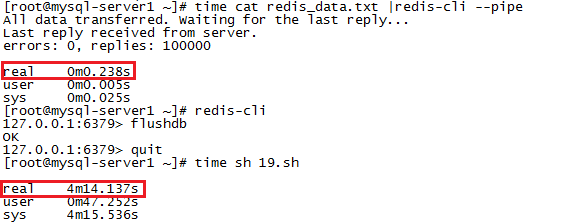
时间消耗完全不是一个量级的。
最后,来看看pipe的实现原理,
- redis-cli --pipe tries to send data as fast as possible to the server.
- At the same time it reads data when available, trying to parse it.
- Once there is no more data to read from stdin, it sends a special ECHO command with a random 20 bytes string: we are sure this is the latest command sent, and we are sure we can match the reply checking if we receive the same 20 bytes as a bulk reply.
- Once this special final command is sent, the code receiving replies starts to match replies with this 20 bytes. When the matching reply is reached it can exit with success.
即它会尽可能快的将数据发送到Redis服务端,并尽可能快的读取并解析数据文件中的内容,一旦数据文件中的内容读取完了,它会发送一个带有20个字节的字符串的echo命令,Redis服务端即根据此命令来确认数据已插入完毕。
总结:
后续有童鞋好奇,构造redis命令的时间和将命令转化为protocol的时间,这里一并贴下:
[root@mysql-server1 ~]# time python 1.py > redis_commands.txt

real    0m0.110s

user    0m0.070s

sys    0m0.040s

[root@mysql-server1 ~]# time sh 20.sh > redis_data.txt

real    0m7.112s

user    0m5.861s

sys    0m1.255s
参考文档:
1. http://www.redis.io/topics/mass-insert
2. https://gist.github.com/abtrout/432ce44fa77a9620c739
3. http://blog.chinaunix.net/uid-26284395-id-3124337.html
如何高效地向Redis插入大量的数据(转)的更多相关文章
- 如何高效地向Redis插入大量的数据
最近有个哥们在群里问,有一个日志,里面存的是IP地址(一行一个),如何将这些IP快速导入到Redis中. 我刚开始的建议是Shell+redis客户端. 今天,查看Redis官档,发现文档的首页部分( ...
- 向redis插入数据时,返回值问题
向redis插入数据时,如果redis没有要插入的key,插入成功之后返回值为1 如果redis有这个key,插入成功之后返回值是0
- Redis各种数据结构性能数据对比和性能优化实践
很对不起大家,又是一篇乱序的文章,但是满满的干货,来源于实践,相信大家会有所收获.里面穿插一些感悟和生活故事,可以忽略不看.不过听大家普遍的反馈说这是其中最喜欢看的部分,好吧,就当学习之后轻松一下. ...
- redis学习--的持久化数据备份(RDB和AOF)
接上一篇:安装window下的redis,redis可视化管理工具(Redis Desktop Manager)安装,基础使用,实例化项目 一.dump.rdb文件是怎么生成的 二.什么是redis持 ...
- 【JDBC】Mysql海量数据插入——PreparedStatement加快数据插入
转载请注明原文地址:http://www.cnblogs.com/ygj0930/p/5861959.html 使用JDBC连接数据库时,如果插入的数据量大,一条一条地插入数据会变得非常缓慢.此时,我 ...
- django基础之day08,利用bulk_create 批量插入成千上万条数据
bulk_create批量插入数据 models.py文件 class Book(models.Model): title=models.CharField(max_length=32) urls.p ...
- redis实现mysql的数据缓存
环境设定base2 172.25.78.12 nginx+phpbase3 172.25.78.13 redis端base4 172.25.78.14 mysql端# 1.在base2(nginx+p ...
- 老司机带你玩转面试(1):缓存中间件 Redis 基础知识以及数据持久化
引言 今天周末,我在家坐着掐指一算,马上又要到一年一度的金九银十招聘季了,国内今年上半年受到 YQ 冲击,金三银四泡汤了,这就直接导致很多今年毕业的同学会和明年毕业的同学一起参加今年下半年的秋招,这个 ...
- 大数据学习day34---spark14------1 redis的事务(pipeline)测试 ,2. 利用redis的pipeline实现数据统计的exactlyonce ,3 SparkStreaming中数据写入Hbase实现ExactlyOnce, 4.Spark StandAlone的执行模式,5 spark on yarn
1 redis的事务(pipeline)测试 Redis本身对数据进行操作,单条命令是原子性的,但事务不保证原子性,且没有回滚.事务中任何命令执行失败,其余的命令仍会被执行,将Redis的多个操作放到 ...
随机推荐
- Xtrabackup全量备份与恢复mysql数据库
一.Xtrabackup简单概述: Percona Xtrabackup是开源免费的MySQL数据库热备份软件,它能对InnoDB和XtraDB存储引擎的数据库非阻塞地备份(对于MyISAM的备份同 ...
- hdu - 3572 - Task
题意:有N个作业,M台机器,每个作业1天只能同1台机器运行,每台机器1天只能运行1个作业,第i个作业需要pi天完成,且只能从Si到Ei中选Pi天,问能否完成所有作业(T <= 20, N< ...
- 为什么出现Wide character in print at a14.pl line 41
[root@wx03 ~]# cat a14.pl use Net::SMTP; use LWP::UserAgent; use HTTP::Cookies; use HTTP::Headers; u ...
- Linux服务安全之TcpWrapper篇
一.TcpWrapper的定义 任何以xinetd管理的服务都可以通过TcpWrapper来设置防火墙.简单地说,就是针对源IP或域进行允许或拒绝的设置,以决定该连接是否能够成功实现连接. 通过名称我 ...
- Python,PIL压缩裁剪图片
自己写了用来压缩 DC 照片的,批量处理整目录文件,非常方便.需要安装 PIL #!/usr/bin/env python import Image import os import os.path ...
- 经典排序算法 - 基数排序Radix sort
经典排序算法 - 基数排序Radix sort 原理类似桶排序,这里总是须要10个桶,多次使用 首先以个位数的值进行装桶,即个位数为1则放入1号桶,为9则放入9号桶,临时忽视十位数 比如 待排序数组[ ...
- Selenium WebDriver java 简单实例
开发环境 JDK 下载地址: http://www.oracle.com/technetwork/java/javase/downloads/index.html Eclipse: 下载地址:http ...
- Eclipse Workspace Unavailable
开启Eclipse 提示: Workspace Unavailable: Workspace in use or cannot be created, choose a different one. ...
- .net生成Excel,并下载
生成Excel的方式有很多种,这里记录两个最简单的: 1.将数据保存为html,然后输出到客户端,保存为Excel文件: 2.通过\t\n生成字符串,然后输出到客户端,保存为Excel. 以上两者的原 ...
- TensorFlow实现与优化深度神经网络
TensorFlow实现与优化深度神经网络 转载请注明作者:梦里风林Github工程地址:https://github.com/ahangchen/GDLnotes欢迎star,有问题可以到Issue ...