
如何高效地向Redis插入大量的数据(转)
最近有个哥们在群里问,有一个日志,里面存的是IP地址(一行一个),如何将这些IP快速导入到Redis中。
我刚开始的建议是Shell+redis客户端。
今天,查看Redis官档,发现文档的首页部分(http://www.redis.io/documentation)有一个专门的主题是讲述“Redis Mass Insertion”的,才知道自己的建议很low。
官方给出的理由如下:
Using a normal Redis client to perform mass insertion is not a good idea for a few reasons: the naive approach of sending one command after the other is slow because you have to pay for the round trip time for every command. It is possible to use pipelining, but for mass insertion of many records you need to write new commands while you read replies at the same time to make sure you are inserting as fast as possible.
Only a small percentage of clients support non-blocking I/O, and not all the clients are able to parse the replies in an efficient way in order to maximize throughput. For all this reasons the preferred way to mass import data into Redis is to generate a text file containing the Redis protocol, in raw format, in order to call the commands needed to insert the required data.
大意是:
1> 每个redis客户端命令之间有往返时延。
2> 只要一部分客户端支持非阻塞I/O。
个人理解是,redis命令从执行到结果返回,有一定的时延,即便采用多个redis客户单并发插入,也很难提高吞吐量,因为,只有非阻塞I/O只能针对有限个连接操作。
那么如何高效的插入呢?
官方在2.6版本推出了一个新的功能-pipe mode,即将支持Redis协议的文本文件直接通过pipe导入到服务端。
说来拗口,具体实现步骤如下:
1. 新建一个文本文件,包含redis命令
SET Key0 Value0

SET Key1 Value1

...

SET KeyN ValueN
如果有了原始数据,其实构造这个文件并不难,譬如shell,python都可以
2. 将这些命令转化成Redis Protocol。
因为Redis管道功能支持的是Redis Protocol,而不是直接的Redis命令。
如何转化,可参考后面的脚本。
3. 利用管道插入
cat data.txt | redis-cli --pipe
Shell VS Redis pipe
下面通过测试来具体看看Shell批量导入和Redis pipe之间的效率。
测试思路:分别通过shell脚本和Redis pipe向数据库中插入10万相同数据,查看各自所花费的时间。
Shell
脚本如下:
#!/bin/bash

for ((i=0;i<100000;i++))

do

echo -en "helloworld" | redis-cli -x set name$i >>redis.log

done
每次插入的值都是helloworld,但键不同,name0,name1...name99999。
Redis pipe
Redis pipe会稍微麻烦一点
1> 首先构造redis命令的文本文件
在这里,我选用了python
#!/usr/bin/python

for i in range(100000):

    print 'set name'+str(i),'helloworld'
# python 1.py > redis_commands.txt
# head -2 redis_commands.txt
set name0 helloworld

set name1 helloworld
2> 将这些命令转化成Redis Protocol
在这里,我利用了github上一个shell脚本,

#!/bin/bash

while read CMD; do

  # each command begins with *{number arguments in command}\r\n

  XS=($CMD); printf "*${#XS[@]}\r\n"

  # for each argument, we append ${length}\r\n{argument}\r\n

  for X in $CMD; do printf "\$${#X}\r\n$X\r\n"; done

done < redis_commands.txt
# sh 20.sh > redis_data.txt
# head -7 redis_data.txt
*3

$3

set

$5

name0

$10

helloworld
至此,数据构造完毕。
测试结果
如下:
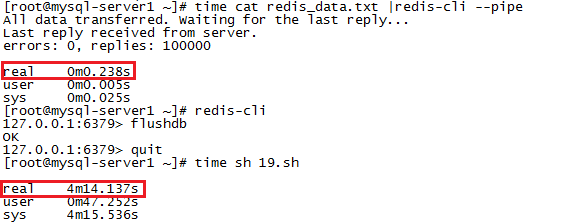
时间消耗完全不是一个量级的。
最后,来看看pipe的实现原理,
- redis-cli --pipe tries to send data as fast as possible to the server.
- At the same time it reads data when available, trying to parse it.
- Once there is no more data to read from stdin, it sends a special ECHO command with a random 20 bytes string: we are sure this is the latest command sent, and we are sure we can match the reply checking if we receive the same 20 bytes as a bulk reply.
- Once this special final command is sent, the code receiving replies starts to match replies with this 20 bytes. When the matching reply is reached it can exit with success.
即它会尽可能快的将数据发送到Redis服务端,并尽可能快的读取并解析数据文件中的内容,一旦数据文件中的内容读取完了,它会发送一个带有20个字节的字符串的echo命令,Redis服务端即根据此命令来确认数据已插入完毕。
总结:
后续有童鞋好奇,构造redis命令的时间和将命令转化为protocol的时间,这里一并贴下:
[root@mysql-server1 ~]# time python 1.py > redis_commands.txt

real    0m0.110s

user    0m0.070s

sys    0m0.040s

[root@mysql-server1 ~]# time sh 20.sh > redis_data.txt

real    0m7.112s

user    0m5.861s

sys    0m1.255s
参考文档:
1. http://www.redis.io/topics/mass-insert
2. https://gist.github.com/abtrout/432ce44fa77a9620c739
3. http://blog.chinaunix.net/uid-26284395-id-3124337.html
如何高效地向Redis插入大量的数据(转)的更多相关文章
- 如何高效地向Redis插入大量的数据
最近有个哥们在群里问,有一个日志,里面存的是IP地址(一行一个),如何将这些IP快速导入到Redis中. 我刚开始的建议是Shell+redis客户端. 今天,查看Redis官档,发现文档的首页部分( ...
- 向redis插入数据时,返回值问题
向redis插入数据时,如果redis没有要插入的key,插入成功之后返回值为1 如果redis有这个key,插入成功之后返回值是0
- Redis各种数据结构性能数据对比和性能优化实践
很对不起大家,又是一篇乱序的文章,但是满满的干货,来源于实践,相信大家会有所收获.里面穿插一些感悟和生活故事,可以忽略不看.不过听大家普遍的反馈说这是其中最喜欢看的部分,好吧,就当学习之后轻松一下. ...
- redis学习--的持久化数据备份(RDB和AOF)
接上一篇:安装window下的redis,redis可视化管理工具(Redis Desktop Manager)安装,基础使用,实例化项目 一.dump.rdb文件是怎么生成的 二.什么是redis持 ...
- 【JDBC】Mysql海量数据插入——PreparedStatement加快数据插入
转载请注明原文地址:http://www.cnblogs.com/ygj0930/p/5861959.html 使用JDBC连接数据库时,如果插入的数据量大,一条一条地插入数据会变得非常缓慢.此时,我 ...
- django基础之day08,利用bulk_create 批量插入成千上万条数据
bulk_create批量插入数据 models.py文件 class Book(models.Model): title=models.CharField(max_length=32) urls.p ...
- redis实现mysql的数据缓存
环境设定base2 172.25.78.12 nginx+phpbase3 172.25.78.13 redis端base4 172.25.78.14 mysql端# 1.在base2(nginx+p ...
- 老司机带你玩转面试(1):缓存中间件 Redis 基础知识以及数据持久化
引言 今天周末,我在家坐着掐指一算,马上又要到一年一度的金九银十招聘季了,国内今年上半年受到 YQ 冲击,金三银四泡汤了,这就直接导致很多今年毕业的同学会和明年毕业的同学一起参加今年下半年的秋招,这个 ...
- 大数据学习day34---spark14------1 redis的事务(pipeline)测试 ,2. 利用redis的pipeline实现数据统计的exactlyonce ,3 SparkStreaming中数据写入Hbase实现ExactlyOnce, 4.Spark StandAlone的执行模式,5 spark on yarn
1 redis的事务(pipeline)测试 Redis本身对数据进行操作,单条命令是原子性的,但事务不保证原子性,且没有回滚.事务中任何命令执行失败,其余的命令仍会被执行,将Redis的多个操作放到 ...
随机推荐
- http异步请求
1.加载异步请求包文件 2.java代码 package com.example.asynchttp; import org.apache.http.Header; import com.loopj. ...
- BZOJ 1264: [AHOI2006]基因匹配Match( LCS )
序列最大长度2w * 5 = 10w, O(n²)的LCS会T.. LCS 只有当a[i] == b[j]时, 才能更新答案, 我们可以记录n个数在第一个序列中出现的5个位置, 然后从左往右扫第二个序 ...
- sql: sybase 和 oracle 比较
1. sybase 和 oracle 比较 http://blog.itpub.net/14067/viewspace-1030014/ Oracle采用多线索多进程体系结构 Sybase采用单进程多 ...
- MapReduce/Hbase进阶提升(原理剖析、实战演练)
什么是MapReduce? MapReduce是一种编程模型,用于大规模数据集(大于1TB)的并行运算.概念"Map(映射)"和"Reduce(归约)",和他们 ...
- URL vs. HTML 录制模式
转自:http://blog.csdn.net/testing_is_believing/article/details/5274188 一般来说,如果是标准使用IE访问的B/S架构,应该使用HTML ...
- psl/sql本地与远程连接配置
一:下载Oracleclient 下载地址:http://www.oracle.com/technetwork/database/features/instant-client/index-09748 ...
- windows查看某个端口被谁占用
XAMPP Error: Apache shutdown unexpectedly. 解决思路 我建议首先 运行在cmd中运行 (安装目录)apache/bin/httpd.exe 无法启动apach ...
- jeecg智能开发平台参与-2013年度中国优秀开源项目评比
JEECG正在参与<2013年度中国十大优秀开源项目> 评比,如果大家觉得JEECG还不错, 请投出你宝贵的一票,给我们以支持吧!!! [目前排名第8位] https://code.csd ...
- 小言C指针
指针c语言,占据着重要的地位.终场前int.char.double其他类别似.它是一种数据类型,其特殊的原因int等基本类型的变量存储内容,针变量存放的是地址. 内存被划分成很多但愿区 ...
- Error: 17053 LogWriter: Operating system error 21(The device is not ready.)
今天在Detach数据库的时候出现错误,运行DBCC CHECKDB从SQL Server error log中看到下面的信息: Error: 17053, Severity: 16, State: ...