
移动端 微信 网易 触屏滑动回弹菜单(css版)
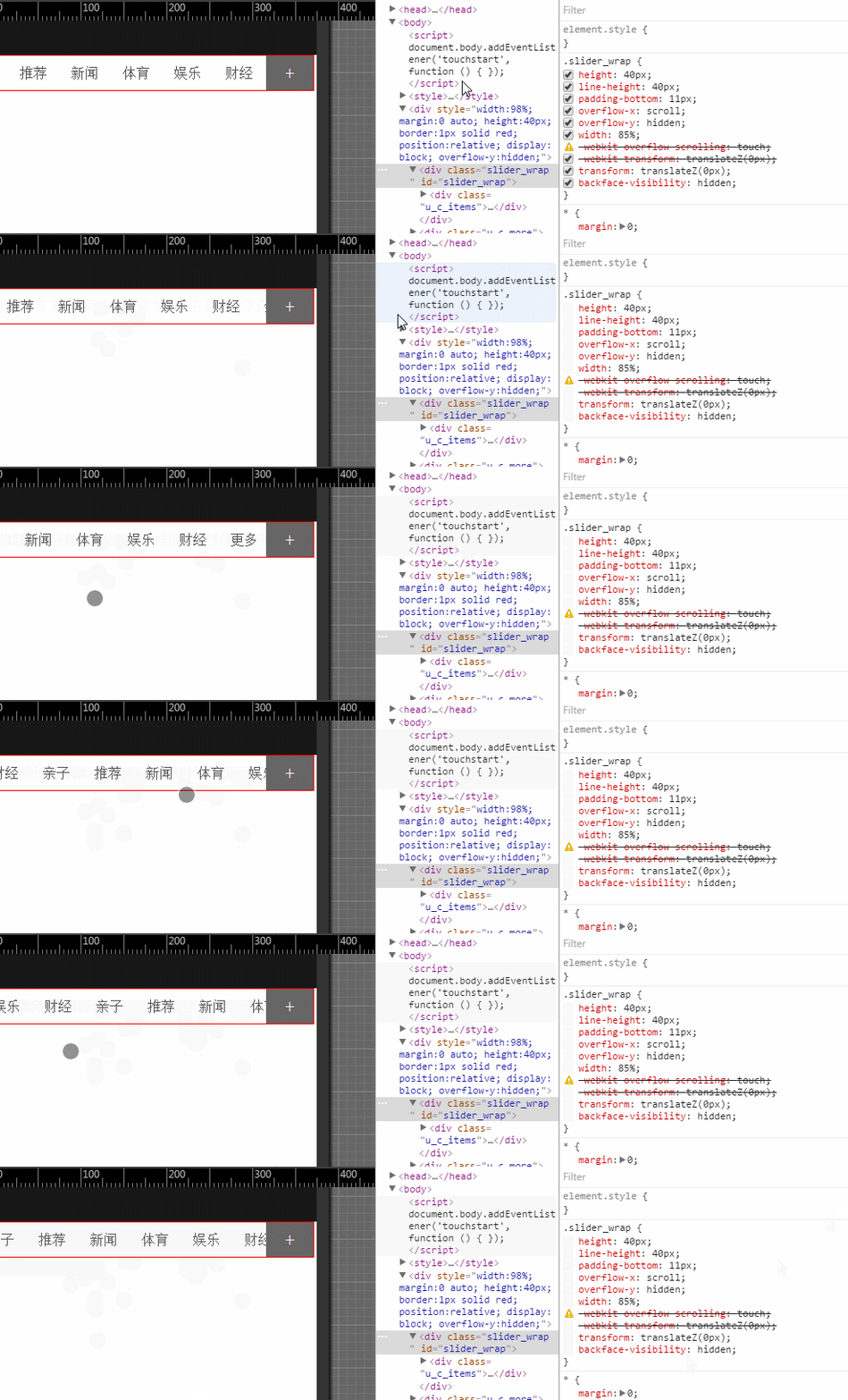
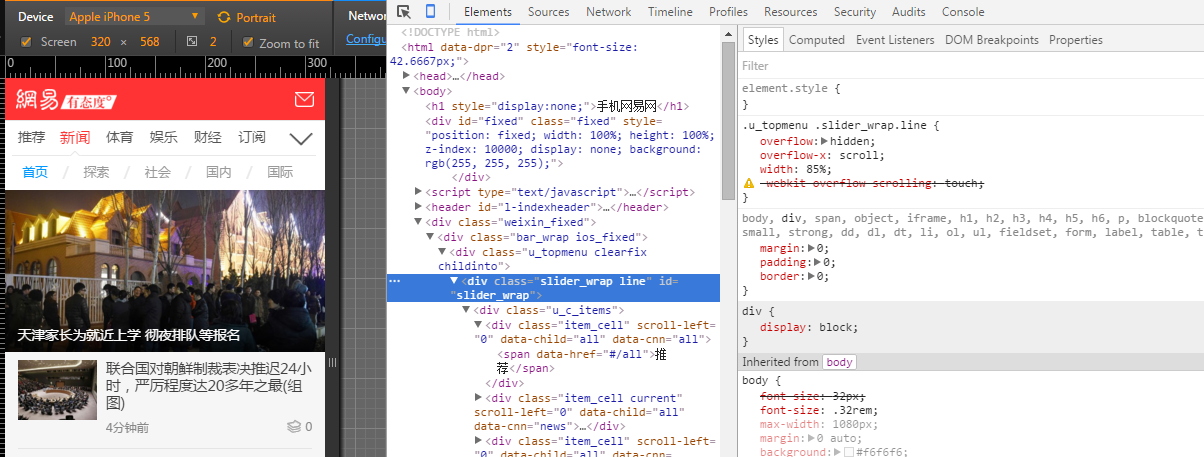
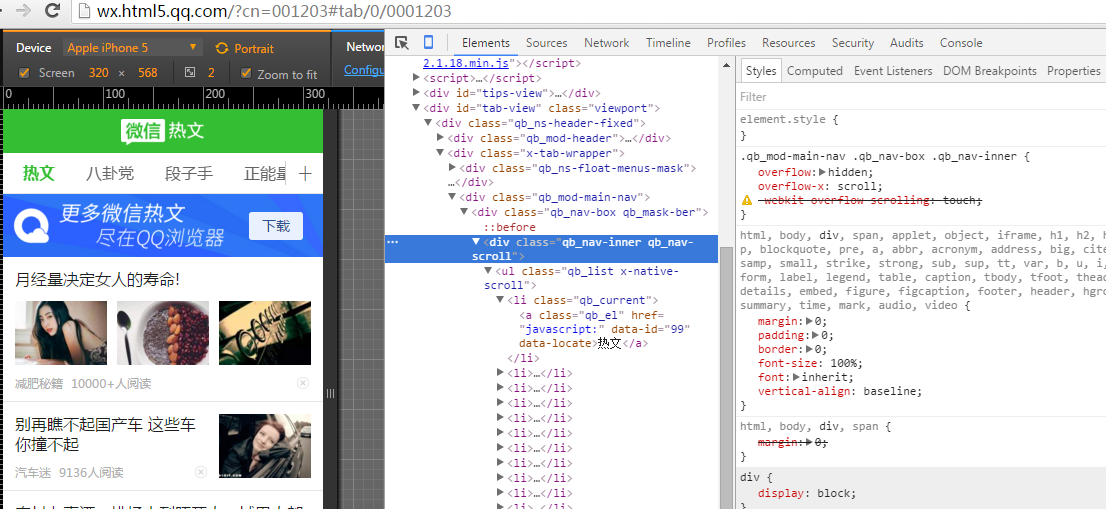
总结一下:
有点:网易新闻,微信 热文 都是 -webkit-overflow-scrolling: touch;实现,css实现,轻巧;
bug: 部分安卓浏览器(uc,自带) 只支持持续滑动,不支持回弹,
iphone垂直滑动 第一次不能完全持续滑动到底部;总体不影响使用;
偶尔低端的手机会卡,适当 GPU hack;
iphone safari浏览器会出现滚动条,::-webkit-scrollbar {display: none;width:0}无效;
.slider_wrap::-webkit-scrollbar,.slider_wrap::scrollbar{ /*iphone safari 无效*/
display:none !important;width:0px; height:0; line-height:0; -webkit-appearance: none; background:transparent;overflow:hidden;
}
解决办法
父类 overflow-y:hidden 子类 padding-bottom:11px; /*iphone safari 去掉滚动条*/
其他
如果需要js版本的持续滑动菜单 ,请点击 淘宝 xscroll.js 基于kissy框架,
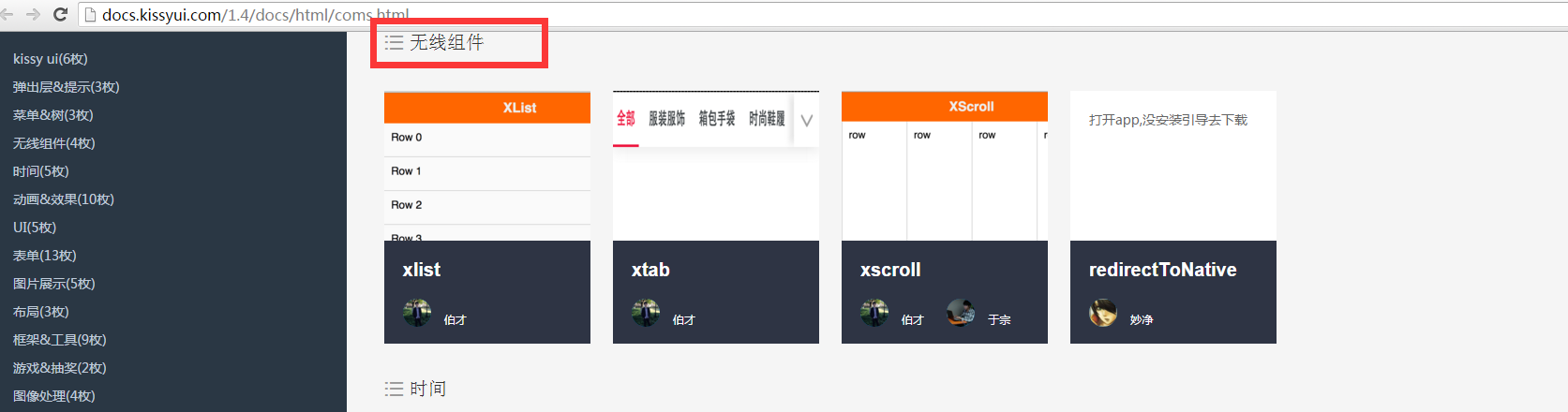
不懂kissy框架。如需独立的,里面找一下,有原生的js,不依赖库的 传送门 http://xscroll.github.io/ ,感觉功能却是完善,但这个组件的体积还是有点稍微大了;
原生独立的xscroll https://github.com/huxiaoqi567/xscroll/blob/master/build/standalone/xscroll.js

自己封装的移动端 触屏滑动条菜单(完善版) ,功能呵呵,能用,兼容没人淘宝的那么强大,也没那么多测试机器,win10触摸屏的不支持;
如果需要淘宝的 ,点击此处
附上css demo:
<!DOCTYPE html>

<html>

 <head>

  <title>surface</title>

  <meta charset="utf-8" />

<meta name="viewport"   content="initial-scale=1.0,user-scalable=no,maximum-scale=1,width=device-width"  />

 <meta http-equiv="pragma" content="no-cache">

 <meta http-equiv="cache-control" content="no-cache">

 <meta http-equiv="expires" content="0">

 <meta name="format-detection" content="telephone=no">

<meta name="format-detection" content="address=no">

<meta name="format-detection" content="email=no" >

<meta name="apple-mobile-web-app-title" content="">

<meta name="apple-mobile-web-app-capable" content="yes" />

<meta name="apple-mobile-web-app-status-bar-style" content="black-translucent" />

 </head>

 <body>

<script>  document.body.addEventListener('touchstart', function () { }); </script>

  <style>

  *{ margin:0; padding:0;}

  ul,li{ list-style:none;}

::-webkit-scrollbar-thumb, ::-webkit-scrollbar-thumb:horizontal {/*当焦点不在当前区域滑块的状态*/

background:#FF0;

}

.slider_wrap {

height:40px; line-height:40px;

padding-bottom:11px; /*iphone safari 去掉滚动条*/

overflow-x: scroll;

overflow-y:hidden;

width: 85%;

/* -webkit-overflow-scrolling: touch;  js 添加  */

-webkit-transform: translateZ(0px);transform: translateZ(0px); backface-visibility:hidden;}

#slider_wrap::-webkit-scrollbar{

display:none; width:0px; -webkit-appearance: none;

}

.u_c_items {

white-space: nowrap; height:40px;/*display: -webkit-box;*/

}

.item_cell {

display: inline-block;

height: 40px;

width: 16.6666%;

overflow: hidden;

position: relative;

}

.u_c_items span {

color: #555;

line-height: 40px;

white-space: nowrap;

display: block;

-webkit-tap-highlight-color: rgba(0,0,0,0);

text-align: center;

cursor: pointer;

}

.u_c_more {

width: 15%; background:#666; color:#fff; z-index:5; font-size:22px;

height: 40px;

line-height: 40px;

text-align: center;

position: absolute;

bottom: 0;

right: 0;

}

.qb_ns-float-menus-mask {

position: fixed;

z-index: 0;

top: 40px;

left: 0;

width: 100%;

height: 100%;

background: rgba(30,30,30,0.5);-webkit-transition: opacity .2s;

transition: opacity .2s;

opacity: 0;

pointer-events: none;

}

.qb_ns-float-menus-mask.qb_show {

opacity: 1;

pointer-events: auto;

z-index: 190;

}

  </style>

  <div style="width:98%; margin:0 auto; height:40px;border:1px solid red; position:relative; display:block; overflow-y:hidden;">

          <div class="slider_wrap " id="slider_wrap">

                <div class="u_c_items" id="j_u_c_items">

                <div class="item_cell current" scroll-left="0" data-child="all" data-cnn="all"><span data-href="#/all">推荐</span></div>

                <div class="item_cell" scroll-left="0" data-child="all" data-cnn="news"><span data-href="#/news">新闻</span></div>

                <div class="item_cell" scroll-left="0" data-child="all" data-cnn="sports"><span data-href="#/sports">体育</span></div>

                <div class="item_cell" scroll-left="45" data-child="all" data-cnn="ent"><span data-href="#/ent">娱乐</span></div>

                <div class="item_cell" scroll-left="91" data-child="all" data-cnn="money"><span data-href="#/money">财经</span></div>

                <div class="item_cell" scroll-left="777" data-child="all" data-cnn="baby"><span data-href="#/baby">亲子</span></div>

                <div class="item_cell current" scroll-left="0" data-child="all" data-cnn="all"><span data-href="#/all">推荐</span></div>

                <div class="item_cell" scroll-left="0" data-child="all" data-cnn="news"><span data-href="#/news">新闻</span></div>

                <div class="item_cell" scroll-left="0" data-child="all" data-cnn="sports"><span data-href="#/sports">体育</span></div>

                <div class="item_cell" scroll-left="45" data-child="all" data-cnn="ent"><span data-href="#/ent">娱乐</span></div>

                <div class="item_cell" scroll-left="91" data-child="all" data-cnn="money"><span data-href="#/money">财经</span></div>

               <div class="item_cell" scroll-left="777" data-child="all" data-cnn="navall"><span data-href="http://3g.163.com/touch/navigation/">更多</span></div>

              </div>

         </div>

          <div class="u_c_more">

                <span class="more_channel up ">+</span>

          </div>

    </div>

    <div class="qb_ns-float-menus-mask ">

    </div>

    <script>

	document.getElementById('slider_wrap').style.webkitOverflowScrolling = 'touch';  //js 添加  防止开始卡死

	document.getElementById("j_u_c_items").addEventListener('touchstart', function(event){});//ios7 促发

     var u_c_more=document.querySelector(".u_c_more").addEventListener("click",function(){

		 document.querySelector(".qb_ns-float-menus-mask").classList.toggle('qb_show');

	 });;

    </script>

 </body>

</html>
移动端 微信 网易 触屏滑动回弹菜单(css版)的更多相关文章
- JS案例之5——移动端触屏滑动
移动端触屏滑动的效果其实就是图片轮播,在PC的页面上很好实现,绑定click和mouseover等事件来完成.但是在移动设备上,要实现这种轮播的效果,就需要用到核心的touch事件.处理touch事件 ...
- 移动端触屏滑动,JS事件
先了解下 移动端的触屏滑动 毕竟这玩意其实和PC端还是有一定的区别的 hh 整理了下网上的资料放一放 移动端触屏滑动的效果其实就是图片轮播,在PC的页面上很好实现,绑定click和mouseover等 ...
- 自己用原生JS写的轮播图,支持移动端触屏滑动,面向对象思路。分页器圆点支持click和mouseover。
自己用原生javascript写的轮播图,面向对象思路,支持移动端手指触屏滑动.分页器圆点可以选择click点击或mouseover鼠标移入时触发.图片滚动用的setInterval,感觉setInt ...
- touch移动触屏滑动事件
移动端触屏滑动的效果其实就是图片轮播,在PC的页面上很好实现,绑定click和mouseover等事件来完成.但是在移动设备上,要实现这种轮播的效果,就需要用到核心的touch事件.处理touch事件 ...
- JS移动客户端--触屏滑动事件
移动端触屏滑动的效果其实就是图片轮播,在PC的页面上很好实现,绑定click和mouseover等事件来完成.但是在移动设备上,要实现这种轮播的效果,就需要用到核心的touch事件.处理touch事件 ...
- JS移动客户端--触屏滑动事件 banner图效果
JS移动客户端--触屏滑动事件 移动端触屏滑动的效果其实就是图片轮播,在PC的页面上很好实现,绑定click和mouseover等事件来完成.但是在移动设备上,要实现这种轮播的效果,就需要用到核心的t ...
- js实现touch移动触屏滑动事件
在开始描述touch事件之前,需要先描述一下多触式系统中特有的touch对象(android和iOS乃至nokia最新的meego系统都模拟了类 似的对象).这个对象封装一次屏幕触摸,一般来自于手指. ...
- JS移动客户端--触屏滑动事件及js手机拖拽效果
移动端触屏滑动的效果其实就是图片轮播,在PC的页面上很好实现,绑定click和mouseover等事件来完成.但是在移动设备上,要实现这种轮播的效果,就需要用到核心的touch事件.处理touch事件 ...
- 朋友圈常见单页面触屏滑动上下翻屏功能jQuery实现
翻页插件:实现原理,用margin-top来控制页面容器位置来实现上下翻页.margin这属性很好用,可以用来制作侧栏动画滑出菜单(左菜单,右内容,控制两者的margin实现):或者head下滑菜单 ...
随机推荐
- Android 一些错误
android fragment里面放viewpager 嵌套fragment 报错: 解决:在adapter的构造方法里加上 super(fragment.getChildFragmentManag ...
- Git管理工具对照(GitBash、EGit、SourceTree)
Git管理工具对照(GitBash.EGit.SourceTree) GitBash是採用命令行的方式对版本号进行管理,功能最为灵活强大,可是由于须要手动输入希望改动的文件名称,所以相对繁琐. EGi ...
- Oracle Dataguard 介绍
Oracle DataGuard介绍 一. DataGuard的基本原理 当某次事务处理对生产数据库中的数据作出更改时,Oracle数据库将在一个联机重做日志文件里记录此次更改.在DataGuard中 ...
- 辛星与您使用CSS导航条
第一步.我们创建了一个新的my.html档.在内容填入如下面.这个html文件不动,直到最后.正是这些内容: <!DOCTYPE html PUBLIC "-//W3C//DTD XH ...
- 深入理解Oracle RAC 12c 笔记
深入理解Oracle RAC 12c 跳转至: 导航. 搜索 文件夹 1 概述 2 集群件管理和故障诊断 3 执行实践 4 新特性 5 存储和ASM 6 应用设计上的问题 7 管理和调优一个复杂的RA ...
- C# WPF Datagrid的筛选
public static void SearchResult(DataGrid dg,string condition) { #region string code = string.Empty; ...
- 教你pomeloclient包libpomelo增加cocos2d-x 3.0工程(Windows、Android、IOS平台)
Windows平台 操作系统:Windows7(64-bit) VS版本号:2013 Cocos2d-x版本号:3.0 project路径:E:\cocos2d-prj\ 1.从github下载lib ...
- android client随机验证码生成函数
由于该项目使用验证码.自己找了一些资料.尽量把这个验证码做出来.代码不是很,較的简单,以下给大家看看我是怎么实现该功能的: 源代码地址下载:http://download.csdn.net/detai ...
- hdu1506(dp减少重复计算)
可以算出以第i个值为高度的矩形可以向左延伸left[i],向右延伸right[i]的长度 那么答案便是 (left[i] + right[i] + 1) * a[i] 的最大值 关键left[i] 和 ...
- Uva562(dp)
给我们n个硬币 每个硬币都有它的面值,要我我们分为两堆硬币,使得硬币的差值最小 我们可以dp计算出所有的差值,然后从小到大枚举差值,如果差值存在,就输出 dp[i][j] 表示对于前i件物品能达到差值 ...