
最简单易懂的webService客户端之soap+xml请求
代码准备:
1.网络上有提供一些免费的服务器测试地址,可以上这里找一找:https://my.oschina.net/CraneHe/blog/183471
2.我选择了一个翻译地址:http://www.webxml.com.cn/WebServices/TranslatorWebService.asmx
2.1打开之后看到该地址下有一个方法:

2.2点击进入,网站会提供该方法的客户端请求xml格式:
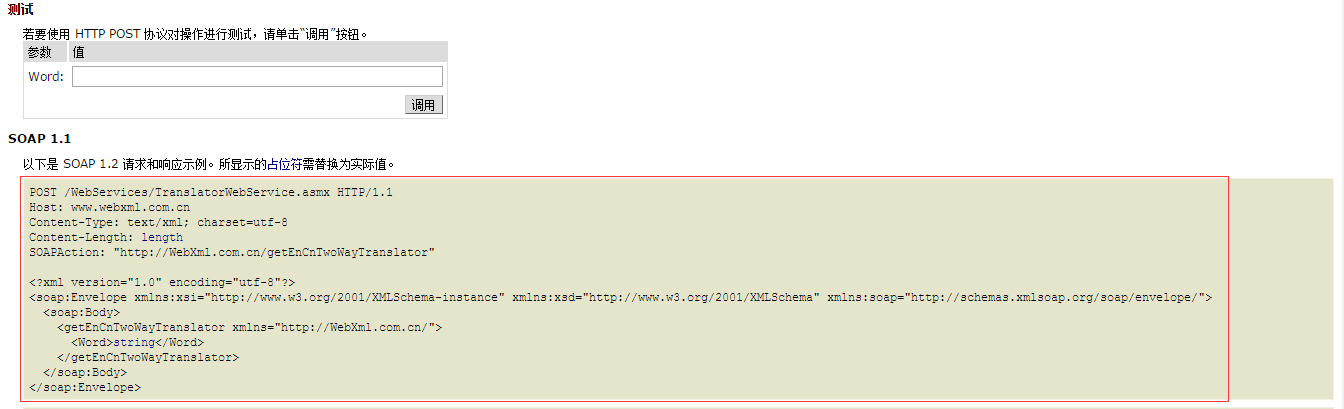
2.3,这个红框部分就是我们要的,将它写入代码,就可以完成请求了.
注意:以上还是获取soap请求xml的方法,也是比较入门的方式,有经验的筒子直接上wsdl利用解释文档也可以自己写xml...
然后是代码,我直接附上代码,大家直接复制即可运行,附注释.
Translate.class
import java.io.ByteArrayOutputStream;

import java.io.InputStream;

import java.io.OutputStream;

import java.net.HttpURLConnection;

import java.net.URL;

/**

 * Created by garfield on 2016/10/16.

 */

public class Translate {

    public static void translate(String word ) throws Exception {

        //地址

        String urlString = "http://www.webxml.com.cn/WebServices/TranslatorWebService.asmx ";

        //方法

        String soapActionString = "http://WebXml.com.cn/getEnCnTwoWayTranslator";

        URL url = new URL(urlString);

        HttpURLConnection httpConn = (HttpURLConnection) url.openConnection();

        //拼接请求体,此处也可以在外面写xml文件然后读取,但是为了方便一个文件搞定,而且参数也比较好传递我们直接String拼接(直接将网页上的复制进来即可)

        String soap = "<?xml version=\"1.0\" encoding=\"utf-8\"?>\n" +

                "<soap:Envelope xmlns:xsi=\"http://www.w3.org/2001/XMLSchema-instance\" xmlns:xsd=\"http://www.w3.org/2001/XMLSchema\" xmlns:soap=\"http://schemas.xmlsoap.org/soap/envelope/\">\n" +

                "    <soap:Body>\n" +

                "        <getEnCnTwoWayTranslator xmlns=\"http://WebXml.com.cn/\">\n" +

                "            <Word>" + word + "</Word>\n" +

                "        </getEnCnTwoWayTranslator>\n" +

                "    </soap:Body>\n" +

                "</soap:Envelope>";

        byte[] buf = soap.getBytes();

        //设置一些头参数

        httpConn.setRequestProperty("Content-Length", String.valueOf(buf.length));

        httpConn.setRequestProperty("Content-Type", "text/xml; charset=utf-8");

        httpConn.setRequestProperty("soapActionString", soapActionString);

        httpConn.setRequestMethod("POST");

        //输入参数和输出结果

        httpConn.setDoOutput(true);

        httpConn.setDoInput(true);

        OutputStream out = httpConn.getOutputStream();

        out.write(buf);

        out.close();

        //最后合格解析结果大家就各显神通了,此处打印出解析的过程,最终得到翻译答案

        byte[] datas = readInputStream(httpConn.getInputStream());

        String result = new String(datas);

        System.out.println("result:" + result);

        System.out.println(result.substring(result.indexOf("string") - 1,result.lastIndexOf("string") + 7));

        System.out.println(result.substring(result.indexOf("string") - 1,result.lastIndexOf("string") + 7).replaceAll("</{0,1}(string)?>",""));

    }

    /**

     * 从输入流中读取数据

     *

     * @param inStream

     * @return

     * @throws Exception

     */

    public static byte[] readInputStream(InputStream inStream) throws Exception {

        ByteArrayOutputStream outStream = new ByteArrayOutputStream();

        byte[] buffer = new byte[1024];

        int len = 0;

        while ((len = inStream.read(buffer)) != -1) {

            outStream.write(buffer, 0, len);

        }

        byte[] data = outStream.toByteArray();

        outStream.close();

        inStream.close();

        return data;

    }

    public static void main(String[] args) throws Exception {

        translate("sea");

    }
}
运行结果:
result:<?xml version="1.0" encoding="utf-8"?><soap:Envelope xmlns:soap="http://schemas.xmlsoap.org/soap/envelope/" xmlns:xsi="http://www.w3.org/2001/XMLSchema-instance" xmlns:xsd="http://www.w3.org/2001/XMLSchema"><soap:Body><getEnCnTwoWayTranslatorResponse xmlns="http://WebXml.com.cn/"><getEnCnTwoWayTranslatorResult><string>sea: [ si: ]</string><string>n. 海,海洋 |</string></getEnCnTwoWayTranslatorResult></getEnCnTwoWayTranslatorResponse></soap:Body></soap:Envelope>

<string>sea: [ si: ]</string><string>n. 海,海洋 |</string>

sea: [ si: ]n. 海,海洋 |
第一行是直接返回的结果,下面两行帮助理解解析,最后得到sea单词的解释,是不是简单清楚...
第二期补充:有筒子可能有问题,那我要写的soap只有wsdl地址怎么办,而且还要求有请求头验证,这个我也找了之前写的一个请求代码,同样非常简单,用到的jar包只有httpclient
<!-- https://mvnrepository.com/artifact/commons-httpclient/commons-httpclient -->

      <dependency>

          <groupId>commons-httpclient</groupId>

          <artifactId>commons-httpclient</artifactId>

          <version>3.1</version>

      </dependency>
TestService.java
import org.apache.commons.httpclient.HttpClient;

import org.apache.commons.httpclient.methods.InputStreamRequestEntity;

import org.apache.commons.httpclient.methods.PostMethod;

import org.apache.commons.httpclient.methods.RequestEntity;

import java.io.ByteArrayInputStream;

import java.io.InputStream;

import java.util.HashMap;

import java.util.Map;

/**

 * Created by garfield on 2016/10/12.

 */

public class TestWebService {

    public static void main(String[] args) throws Exception {

        Map<String, String> map = new HashMap<String, String>();

        //拼接xml请求,带有请求头

        String params = "<id>5</id>";//随手举个例子,类似...

        String soapRequestData = "<soapenv:Envelope \n" +

                "\txmlns:soapenv=\"http://schemas.xmlsoap.org/soap/envelope/\" \n" +

                "\txmlns:ser=\"http://service.resource.ws.bd.newland.com/\">\n" +

                "   <soapenv:Header>\n" +

                "\t<serviceCode>serviceCode</serviceCode>\n" +

                "\t<userName>userName</userName>\n" +

                "\t<authCode>authCode</authCode>\n" +

                "   </soapenv:Header>\n" +

                "   <soapenv:Body>\n" +

                "      <ser:function>\n" +

                params +

                "      </ser:function>\n" +

                "   </soapenv:Body>\n" +

                "</soapenv:Envelope>\n";

        try {

            String method = "请求地址";//比如http://192.177.222.222:8888/services/Service_Name/Function_Name

            PostMethod postMethod = new PostMethod(method);

            byte[] b = soapRequestData.getBytes("utf-8");

            InputStream is = new ByteArrayInputStream(b, 0, b.length);

            RequestEntity re = new InputStreamRequestEntity(is, b.length, "application/soap+xml; charset=utf-8");

            postMethod.setRequestEntity(re);

            HttpClient httpClient = new HttpClient();

            int statusCode = httpClient.executeMethod(postMethod);

            //200说明正常返回数据

            if (statusCode != 200) {

                //internet error

                System.out.println(statusCode);

            }

            soapRequestData = postMethod.getResponseBodyAsString();

            System.out.println(soapRequestData);

        } catch (Exception e) {

            e.printStackTrace();

        }

    }

}
好了,将这个简单的代码复制进去,替换一下请求头和请求地址以及参数就可以得到反馈就过了,试用一下吧.
最简单易懂的webService客户端之soap+xml请求的更多相关文章
- WebService Get/Post/Soap 方式请求
import java.io.ByteArrayOutputStream; import java.io.FileInputStream; import java.io.InputStream; im ...
- webservice客户端添加soap Header信息
根据wsdl文件的header信息,在客户端中添加相应的header 1.wsdl信息如图 <soapenv:Envelope xmlns:soapenv="http://schema ...
- C#WebService 客户端通过Http调用请求(转)
1.webservice帮助类 public class WebServiceHelper { public static string CallServiceByG ...
- webservice客户端 get delete post 请求
package com.cn.eport.util.common; import java.io.IOException; import java.util.List; import org.apac ...
- java使用POST发送soap报文请求webservice返回500错误解析
本文使用JAX-WS2.2编译webservice,并使用HttpUrlConnection的POST方式对wsdl发送soap报文进行请求返回数据, 对错误Server returned HTTP ...
- Node.js 使用 soap 模块请求 WebService 服务接口
项目开发中需要请求webservice服务,前端主要使用node.js 作为运行环境,因此可以使用soap进行请求. 使用SOAP请求webservice服务的流程如下: 1.进入项目目录,安装 so ...
- filter过滤器 默认情况下只对客户端发来的请求有过滤作用 对服务端的跳转不起作用 需要显示的在xml定义过滤的方式才行
filter过滤器 默认情况下只对客户端发来的请求有过滤作用 对服务端的跳转不起作用 需要显示的在xml定义过滤的方式才行
- WebService如何封装XML请求 以及解析接口返回的XML
原 WebService如何封装XML请求 以及解析接口返回的XML 置顶 2019年08月16日 15:00:47 童子泛舟 阅读数 28 标签: XML解析WebService第三方API 更多 ...
- 【转载】C# HttpWebRequest 发送SOAP XML
调用webservice的几种方法: 方法一:添加web引用(简单/方便 局限客户端是.net) 方法二:Post xml(本文重点讲述) 方法三:使用微软MSXML2组件(好像在window ser ...
随机推荐
- Web程序和应用程序服务器[转]
转自:http://hi.baidu.com/lclkathy/blog/item/dae3be36763a47370b55a970.html 一 常见的WEB服务器和应用服务器 在UNIX和LINU ...
- mybatis 关联关系查询 java
<mapper namespace="com.rrz.modules.awardrecord.dao.CheckAwardsDao"> <resultMap ty ...
- xlrd doc
The xlrd Module A Python module for extracting data from MS Excel ™ spreadsheet files. Version 0.7.3 ...
- Webpack入门——使用Webpack打包Angular项目的一个例子
2016.1.22,对大多数人来说,这是一个非常平常的日子,但这却是我决定在博客园写博客的日子.虽然注册博客园的博客已有4年8个月,却一直没有动手写过一篇博客,原因是觉得自己水平不行,写不出好东西,所 ...
- UPX3.03+UpolyX.5 Shell v1.0 汉化绿色版
软件名称:UPX3.03+UpolyX.5 Shell v1.0 汉化绿色版软件类别:汉化软件运行环境:Windows软件语言:简体中文授权方式:免费版软件大小:635 KB软件等级:整理时间:201 ...
- sql语句的group by与having子句
准备数据: DROP TABLE IF EXISTS `t_player`; CREATE TABLE `t_player` ( `player_id` int(11) NOT NULL AUTO_I ...
- javaScript中的一些知识
利用js动态生成table <html xmlns="http://www.w3.org/1999/xhtml"> <head> <meta http ...
- forEach用法介绍
array.forEach(callback[, thisArg]) forEach() 方法让数组的每一项都执行一次给定的函数. callback在数组每一项上执行的函数,接收三个参数: curre ...
- mysql 中 SQL_CALC_FOUND_ROWS 功能
mysql 数据库不符合sql标准的地方不少,比如TIMESTAMP列的处理,字符串比较默认大小写不敏感什么的.有时候这些问题会让你很郁闷,尤其是对从其它数据库转过来的人来说.但有些功能倒也蛮有趣. ...
- 【3】docker命令集
root@xcc-VirtualBox:/home/xcc# docker --helpUsage: docker [OPTIONS] COMMAND [arg...] docker [ ...